Custom blocks seem to be disabled
-
I cannot choose Custom anymore. Its not showing a hand anymore and I can not click anymore.
Please make that working again soon
Thanks in advance
-
I tested with chrome and with current FireFox. Its not working for both browsers
-
for me it is working.... ?
-
Sometimes there are extensions in the browser that prevent some of the .js scripts. I don't know exactly why. I wrote pretty much all .js files used in fxDreema and they generally work, but there are extensions that for some reason don't like something in the code.
The last situation - some Norton extension prevented one of my scripts saying that some frames are not allowed... but when I look into the code I don't see any frames (iframe or something related). So even I am confused

-
@fxdreema said in Custom blocks seem to be disabled:
some frames are not
Hmmm I opened the developer tools / console and there is no JS triggered when I click on custom.
There is no hand symbol like on the system buttonWould be great if you can fix it.
I do not run Norton and I disabled eset node for testing
-
Addidtionally I disabled all Addons with FF and its still not working. It was working and since a couple of days its not. It is broken since you restored the lost projects. Or maybe 1 or 2 days later.
I didn't change anything on my side, no modification to VirusScanner or Firewall no modification to my browser tools. Must be on Serverside. -
Ok I found the reason, the div #blocksContainerInit.blocksContainer is overlaying the button.
I use full hd 1920*1080 resolution on 24" monitorsThats what the Inspector shows me when I try inspect the button.
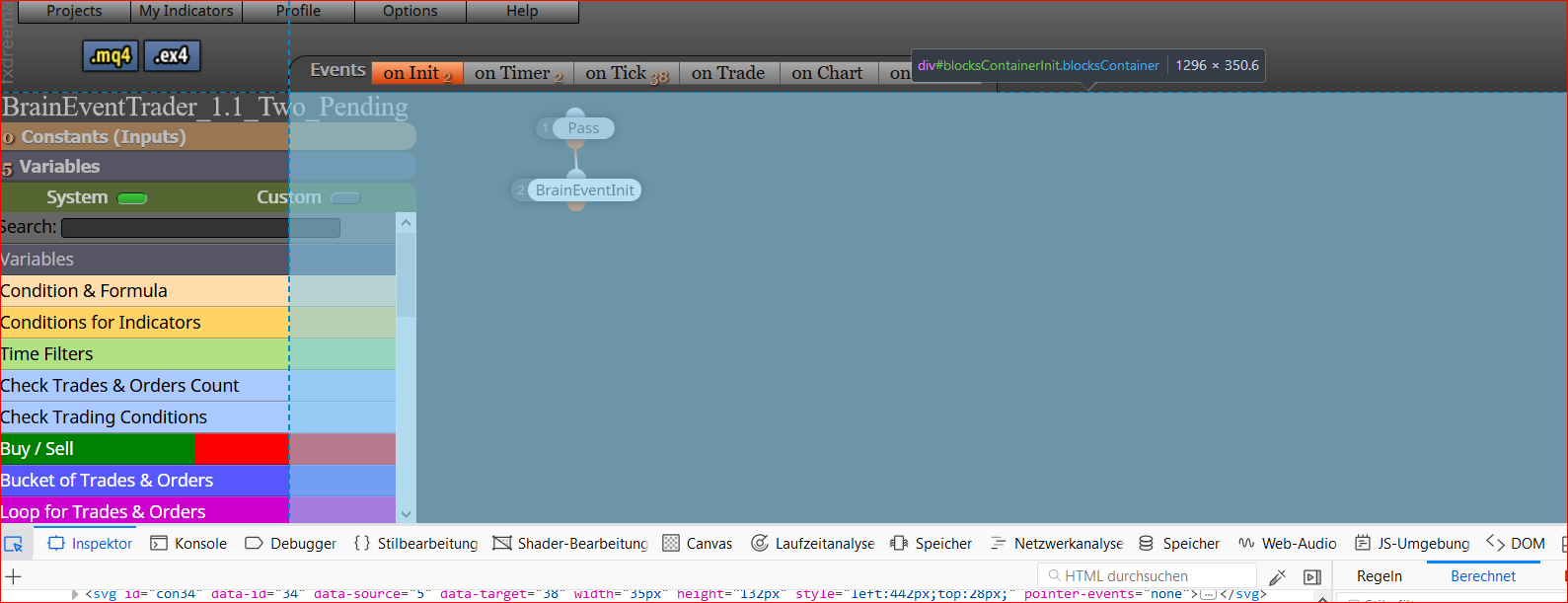
So the button is ok but the container is wrong
when i remove the section with id="content-center" for testing fom DOM then the button is free and working
-
Ok I "fixed" it: Its because the Name of my EA was longer than ... so the left menu is extended and overlayed by the center div
Shortening the name helps me out -
I never tested long names, this is intresting

