How to use an EA in different timeframes without dragging into the chart?
-
Hello,
I want to place the trade manually by looking into some facts on any of the symbol. I want to close the trades from the EA on particular timeframes like below. I would like to use it in any symbol and in any timeframes. Is this possible without dragging the EA into the chart? or is it possible to place the EA in a single symbol and use it on multi-timeframes in MT4 or for that particular Symbol?
This scenario arises while I am away from system. But I place the trade through mobile in a particular timeframe.
Eg: EURUSD, from mobile I placed a buy in 15 min timeframe. As soon as that happens only 15 min chart of EURUSD should use the EA. How to achieve this scenario?
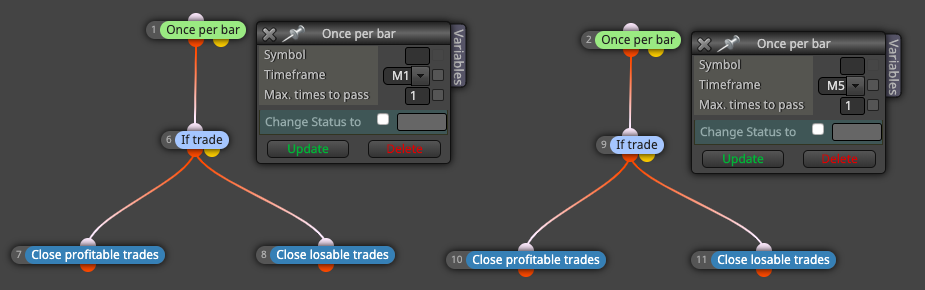
-
Use condition block to select the timeframe so it will pass only in that timeframe

-
@vish Thanks for your response. But my question is how will the EA recognize which timeframe I placed the trade from mobile. Lets say if I place a trade in EURUSD in 15 mins timeframe. As my EA is used in all the timeframes of EURUSD, it will close the trades whichever first matches.
The condition you mentioned works only on MT4 terminal window. I want the same to happen when I trade in any particular timeframe from mobile.
I want it to recognize the timeframe as well as symbol.
-
There is no way to recognize the timeframe, simply because when you place a trade (manually), the chart doesn't matter at all. You can place trades all day long even without any chart opened. If EA is creating the trade, again, there is no information saved with the trade about the chart. But if needed, the comment of the trade can be used to store such information. This also means that if you are able to set that comment in mobile, you can always do that, and then in the desktop you can recognize the data in the comment somehow.
-
@fxDreema Thanks for clarifying