Draw Edit field - unable to turn off border colour
-
When using a "Draw Edit Field" and Border Colour is set to "No Color", a border still draws in the same colour as the text.
Please can you tell me how to turn off the border ?
-
Didn't know that? Can you please upload a screenshot of it?
-
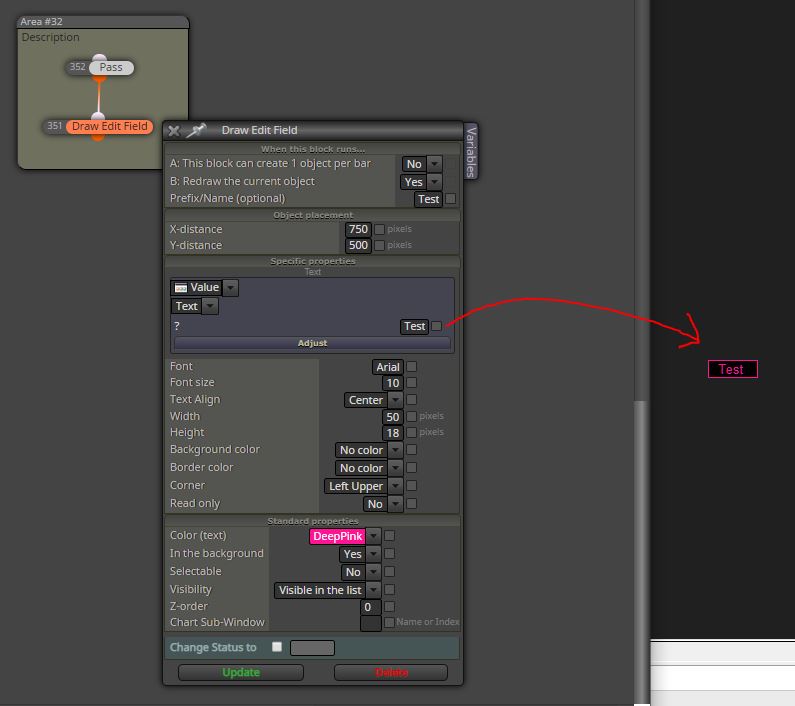
Here is a simple test to send the word "Test" to screen with "Border Color" set to "No Color".
It creates a border in the same color as the font. Is this expected behaviour ?
Obviously the simple way around it is to simply color the border the same as the background color.
Many thanks.
-
if I remember right, it is expected. The border color has to be specified for Edit field and Button object. If it is not specified, then the color of text is used for border (this is how mql code works). So as you found out, use the same color for bg and border. If you use multiple edit fields next to each other, leave a free pixel between them and the result looks as border-less.
-
Great, many thanks.


