@sktsec no I haven't, and I couldn't find such block. Can you show me?
A
Posts made by allstarengin
-
RE: How To Fix The Margin In money (Not In Lots)posted in Questions & Answers
-
RE: How To Fix The Margin In money (Not In Lots)posted in Questions & Answers
And I'm not a developer. So, do you know how to write the code for that requirement?
-
How To Fix The Margin In money (Not In Lots)posted in Questions & Answers
Hi,
I want each of my trades to have a fixed (for instance) $100 margin requirement. In other words, I'd like to set the margin in "money" (not in lots). Also, please note that, I won't use stop loss or take profit.
Does anyone know how to make that?
Regards.
-
RE: Do we really need constants?posted in Questions & Answers
@l-andorrà Bro, I'd like to consult with you privately through your website, but I noticed the contact form doesn't allow file attachments. Would it be possible for you to share your direct email address instead?
-
RE: Do we really need constants?posted in Questions & Answers
Thank you for your solid feedback bro, I'll always try my backtests with constants from now on


-
RE: Do we really need constants?posted in Questions & Answers
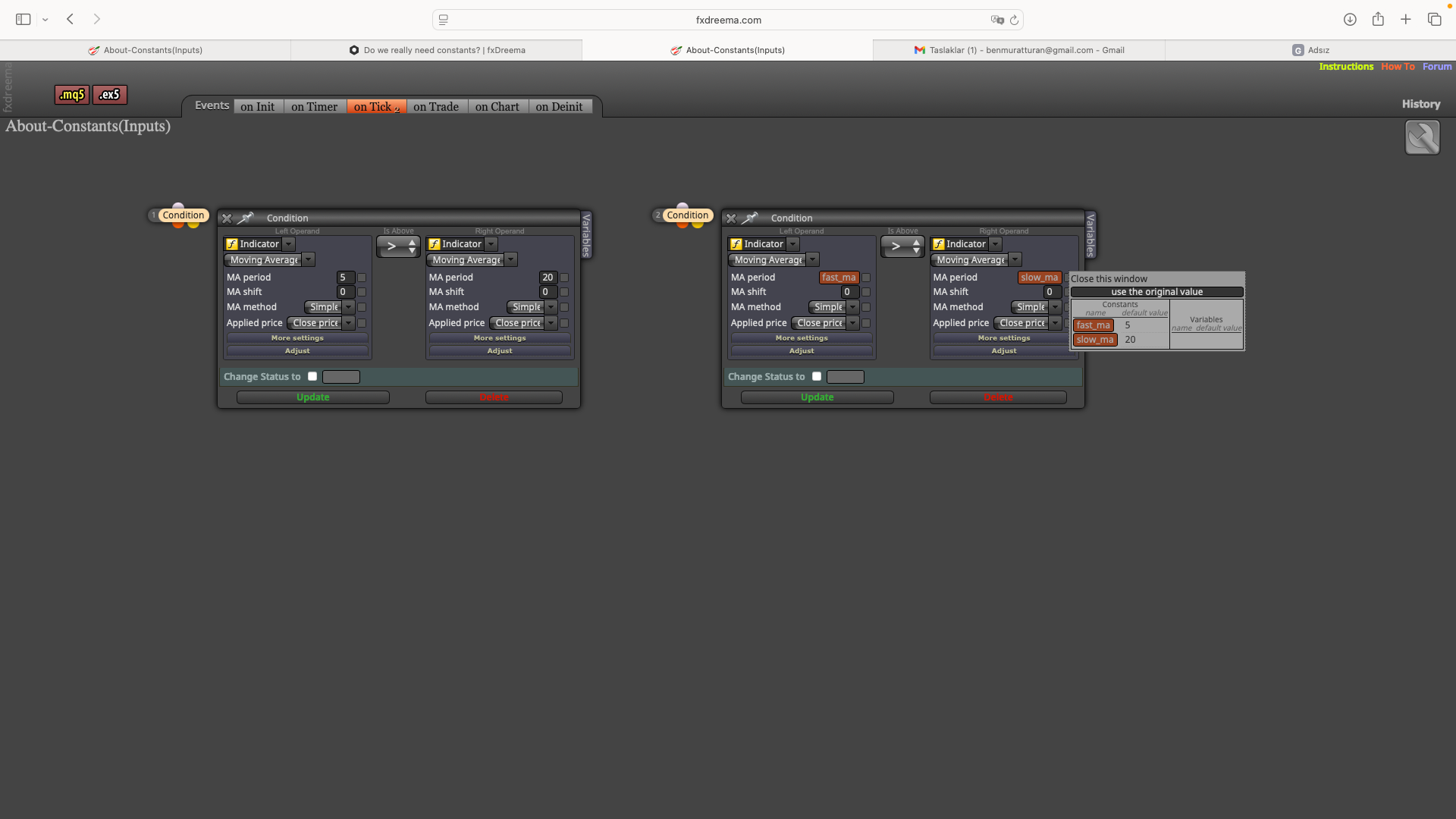
I mean what is the difference between 1. condition and the second condition bro?
https://fxdreema.com/shared/L3o8G9vkb
In the documentation below, it says "Constants - Similar to the Variables, but the idea is that they should not be modified. These are also input parameters of the robot. In the output code they are not really constants."
So, if constants make a parameter unchangeable, then why do we need it? Because we can already make parameters unchangeable when we don't click the box next to the values?
On the other hand, the last sentence of the Constant documentation explanation above says: "In the output code they are not really constants." So, if we don't add constants to the values in the conditions, does that mean that robot can change the values by mistake or by accident within the live order?
https://fxdreema.com/documentation/builder/constants-and-variables
You can also see the ss below...
-
Do we really need constants?posted in Questions & Answers
Hello,
Function of constants is making parameters cannot be modified. But you can make an unchanged parameter by “not” clicking the tick box just next to the parameter… So, my question is do we really need constants even though we don’t click on the box next to parameters?
Regards…
-
RE: Why Does Bot Miss Trades in Backtesting?posted in Questions & Answers
@l-andorrà Yes, I'm sure that all conditions are met. It occurred to me that MT5 might statistically incorporate real-world execution problems into backtests - like slippage or unfilled orders. For instance, if MT5's data shows that 1% of orders typically fail to execute in live markets, could it be factoring this into backtest simulations?
-
Why Does Bot Miss Trades in Backtesting?posted in Questions & Answers
Hello,
I've observed that sometimes trades don't execute in backtests even when all conditions in the rule set are met. For example, the strategy should theoretically enter 100 trades during the backtest period, but only 90 trades are actually generated. Does anyone know what might be causing this discrepancy?
Regards...
-
RE: About Setting TrailingStop For Different Groups Under a Unified Rule Setposted in Questions & Answers
I want to use it by %, not by pips.
-
About Setting TrailingStop For Different Groups Under a Unified Rule Setposted in Questions & Answers
Hello,
Instead of using the rule set with 1:3 stop-loss/take-profit ratio, I’d like to make 3 distinct groups with the same rule set adding trailing-stop and customizing the sl&tp ratios as below:
-
Group 1: 1:1 RR (Static SL/TP - No Trailing Stop)
-
Group 2: 1:2 RR (Trailing Stop Activated… When Group 2 achieves +1% PnL → SL adjusts to breakeven +1%)
-
Group 3: 1:3 RR (Trailing Stop Activated… So, a) At +1% PnL → SL moves to breakeven +1%. And b) At +2% PnL → Additional 1% SL adjustment (net +2% buffer))
In short, since all groups share the same entry rules, the bot will execute 3 simultaneous trades at the same time. The key mechanism is this:
-
For Group 2: When position reaches +1% profit → adjust stop loss to lock in 1% gain
-
For Group 3: • At +1% profit → tighten stop loss by 1% • At +2% profit → further adjust stop loss by another 1%
The stop loss trails price movements in 1% increments, maintaining a constant 1% buffer below current market price.
You can see the groups below:
https://fxdreema.com/shared/JVzgvVvFc
Do you know how to do it?
Regards…
-
-
RE: How to Move Stop Loss to Breakeven After Partial Order Closureposted in Questions & Answers
@l-andorrà It works, thanks so much my hero bro

-
How to Move Stop Loss to Breakeven After Partial Order Closureposted in Questions & Answers
Hello,
I need my bot to:
- Close 50% of the position when price reaches 50% of the take profit level (I did that, see my settings below)
- Move stop loss to breakeven (entry price) immediately after this partial closure
https://fxdreema.com/shared/yXbgw6eEd
Does anyone have a solution for this conditional order modification?
Regards…