@zackry have you set the pip size rules for NASDAQ in the project option?
A
Posts made by ambrogio
-
RE: Lot size calculation issue for single digit after decimalposted in Questions & Answers
-
RE: How to draw a block automatically on the chart?posted in General Discussions
@zedeai2 Hello! "Draw shape" block, but i never used it.

-
RE: DAX30 Pending Orderposted in Questions & Answers
@seb-0 So you will agree with me that it is better to set the pip size rules, this way the same project can work on each tool, right? Also I wanted to point out that the pip unit on EURUSD for example is the 4th digit and not the 5th (this is the point or pipette = pip/10)
-
RE: DAX30 Pending Orderposted in Questions & Answers
@seb-0 Please, can you show an example? I don't get it.
-
RE: DAX30 Pending Orderposted in Questions & Answers
@seb-0 In currency pairs the pip is the fourth digit after the comma, (the second digit for pairs with the Yen), in the DAX30 it is the first after the comma. If you do not set this value the EA will work well in currency pairs (Fxdreema builder is already fine for that) but will work improperly on indices, metals, commodities ecc.
Simply in the window "pip size rules" write exactly the name of the good (uppercase, lowercase, spaces etc.) followed by the right number. In this case DAX30 = 0.1 and save. (See my screenshot above)
So you can try if the EA goes well or not.
Example 50 pips on the EURUSD chart is nothing on DAX30 if you don't do this. -
RE: DAX30 Pending Orderposted in Questions & Answers
@yoloyacht @seb-0 , I don't want to disturb your conversation, have you setup the pip size rules? You have to do this if you trade with indices
-
RE: DAX30 Pending Orderposted in Questions & Answers
@yoloyacht Maybe you have to setup the pip size?

-
RE: Move Take Profit to modify as a groupposted in Questions & Answers
I'm interested in this question too......
-
RE: Hello fellow traders, i need assistance with the close of this EA without having to use a trailing stop. I would like the moving average crossing back over to close the respective trades. Any solutions?posted in Questions & Answers
@savagetrades remove the link below buy and sell blocks, and put the close trade block below your condition 62 and 63
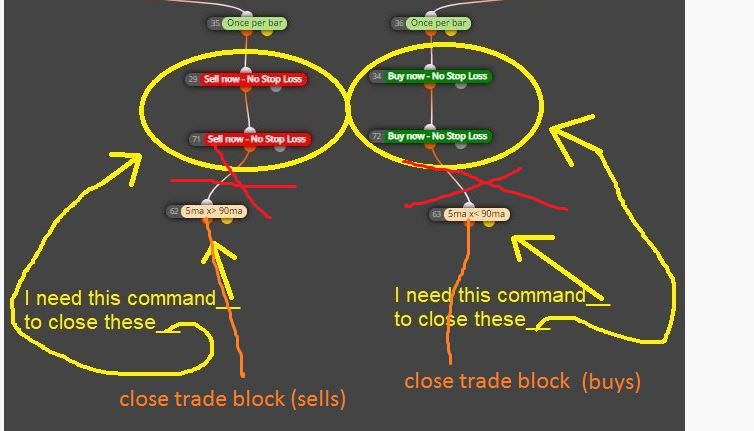
-
RE: How to code my simple systemposted in Questions & Answers
@shadowofzeus maybe you want this structure? When there is no trade buys (specify buy trade inside the block) then 6 MA > of 18 MA and together the RSI value is > 52 =======>>>> buy now.
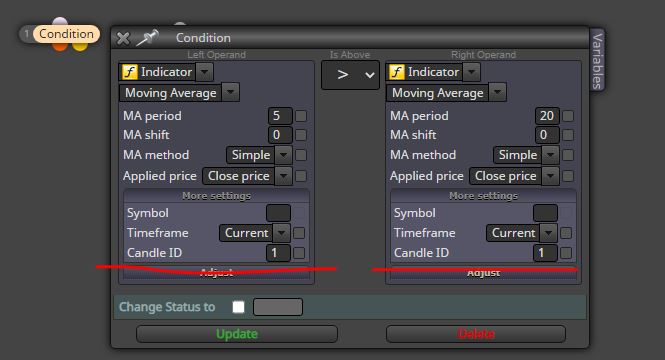
Remember to specify candle ID1 inside the condition block in the "more setting" area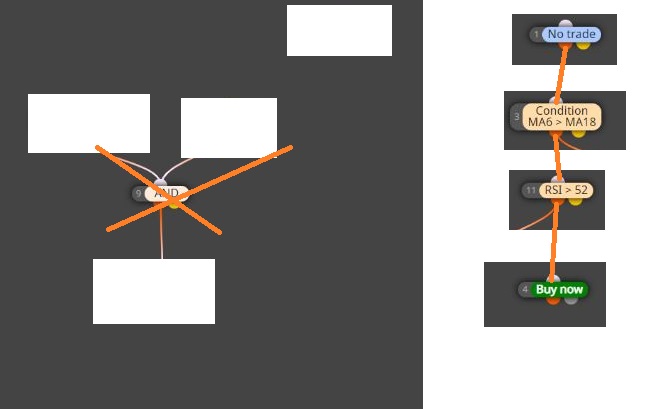
-
RE: Recovery trade does not workposted in Questions & Answers
Astute. I'll try this. Thank you @l-andorrà !!
-
RE: Recovery trade does not workposted in Questions & Answers
@l-andorrà Thank you for your intervention, yes it is so, I am forcing this thing because sometimes the EA opens the trade starting from 0.01 lot, even though there has been a losing trade, and this I can not understand, also the lot additional stops to 0.03, and do not continues with 0.05 0.07 0.09 , there is something wrong.
Meaning : first buy 0.01 hits the stop loss, after that I (according to logic) should have a buy 0.03 then stop loss, then 0.05 stop loss, 0.07 stop loss etc. but that doesn't happen
thank you for your time -
Recovery trade does not workposted in Questions & Answers
I isolated a part of 4 projects that doesn't work: lot increment doesn't work and also doesn't work "for each closed trade". Where am I going wrong?
Here's the link https://fxdreema.com/shared/B8T4xiHhc
@miro1360 @roar please can you take a look inside? Thanks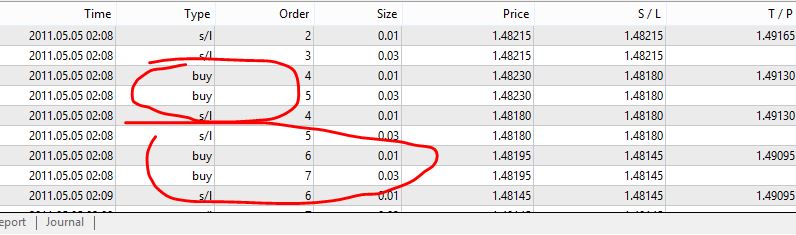
-
RE: Using my indicator but there is a problemposted in Questions & Answers
@a-salem you have just to choose the right output buffer