fxDreema

    • Register
    • Login
    • Search
    • Back to the main page
    • Categories
    • Recent
    • Tags
    • Popular
    • Search
    1. Home
    2. ambrogio
    3. Posts
    A
    • Profile
    • Following 4
    • Followers 52
    • Topics 81
    • Posts 2396
    • Best 307
    • Controversial 3
    • Groups 0

    Posts made by ambrogio

    • RE: Need Help

      @alphaomega I don't see you project, please create a share link
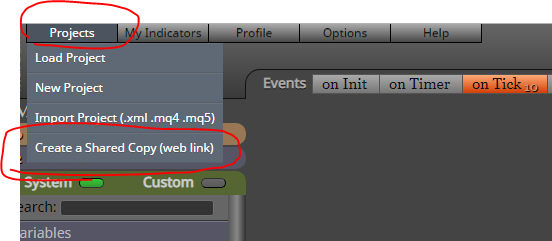
      0_1575409757202_Cattura.PNG

      posted in Questions & Answers
      A
      ambrogio
    • RE: Need Help

      @alphaomega I don't know, it's really weird
      Please con you share your project? And also the indicator

      posted in Questions & Answers
      A
      ambrogio
    • RE: My EA doesn't work with some pairs like XAUUSD.

      @vish Hi! You have to set the right decimal point as the value of a pip
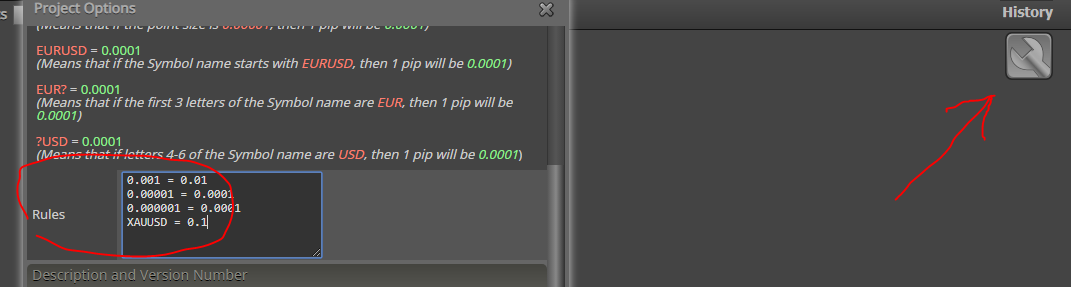
      0_1575399282771_Cattura.PNG

      posted in Questions & Answers
      A
      ambrogio
    • RE: Need Help

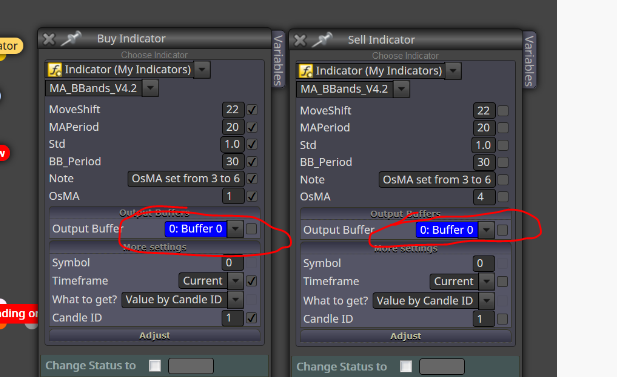
      @alphaomega you have to enter the right buffer, the one that corresponds to the Red Arrow and equally to the Yellow Arrow
      0_1575393702515_Cattura.PNG

      posted in Questions & Answers
      A
      ambrogio
    • RE: Once per bar error

      @bgvulk try to delete your project and open a new one with the same block

      posted in Bug Reports
      A
      ambrogio
    • RE: I would like my EA to wait 4 hours after a loss trade before it can trade again. Is that possible? i appreciate every idea.

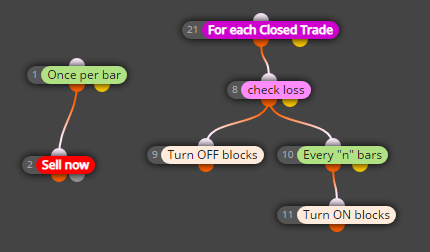
      @botondking Hi! Try this

      https://fxdreema.com/shared/ApmVAPkFb
      0_1575149660086_Cattura.PNG

      N.B.: respects the order of the blocks 9-10-11

      posted in Questions & Answers
      A
      ambrogio
    • RE: Need Help

      @alphaomega

      0_1575139873672_Cattura.PNG

      posted in Questions & Answers
      A
      ambrogio
    • RE: Need Help

      @mari5566 have you already seen from the examples?
      https://fxdreema.com/howto "buy-sell on opposite condition"

      posted in Questions & Answers
      A
      ambrogio
    • RE: Need Help

      @mari5566 moving averages are default in mt4, have you a custom indicator? If yes, you have to upload your indicator in the "my indicator" tab

      0_1575132522135_Cattura.PNG

      posted in Questions & Answers
      A
      ambrogio
    • RE: Need Help

      @mari5566 Hi!
      Please what indicator?

      posted in Questions & Answers
      A
      ambrogio
    • RE: how can one make the EA put the stop loss on the moving average?

      @trader-philipps right! in that case we can use the "adjust" field 😉

      posted in Questions & Answers
      A
      ambrogio
    • RE: how can one make the EA put the stop loss on the moving average?

      @martin-5 in this way?

      0_1575066588042_Cattura.PNG

      posted in Questions & Answers
      A
      ambrogio
    • RE: Is there a way to configure the EA to wait for 3 consecutive losses and then enter orders?

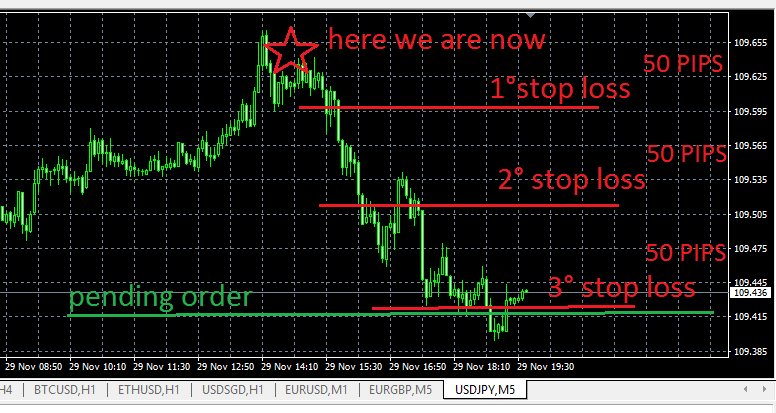
      @rafaels919 suppose your loss is 50 pips per trade
      0_1575059006942_Cattura.PNG

      this is the case of pending order

      0_1575059043616_1Cattura.PNG

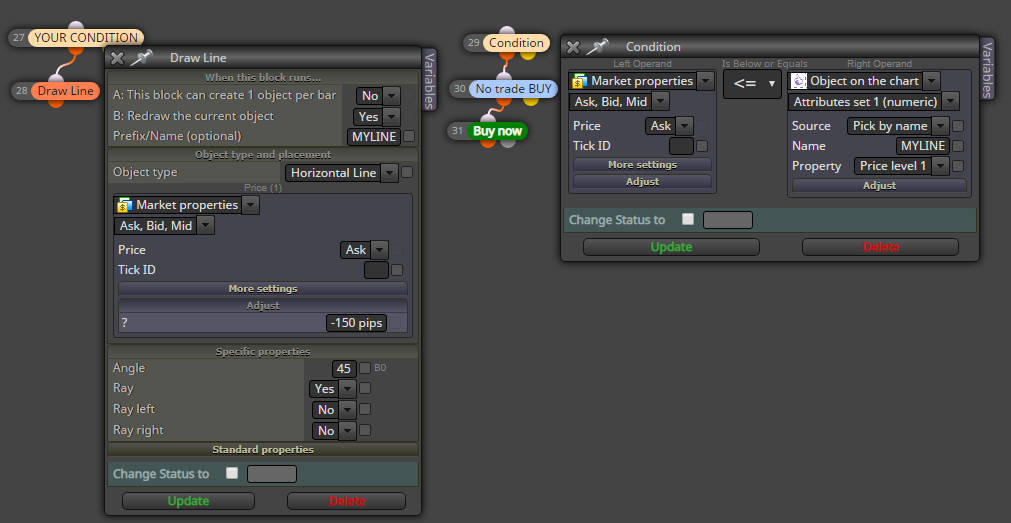
      this is the case if you want to draw a line
      0_1575059075320_2Cattura.PNG

      posted in Questions & Answers
      A
      ambrogio
    • RE: Is there a way to configure the EA to wait for 3 consecutive losses and then enter orders?

      @rafaels919 what you think about a pending order? otherwise when the price touches the third line open buy now?
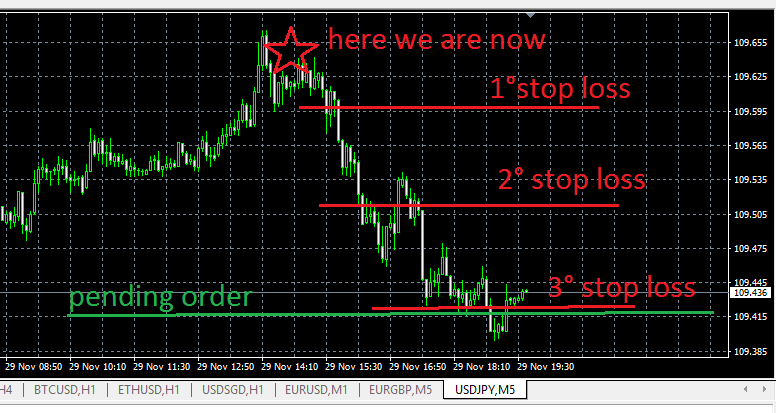
      0_1575053670693_Cattura.PNG

      posted in Questions & Answers
      A
      ambrogio
    • RE: Is there a way to configure the EA to wait for 3 consecutive losses and then enter orders?

      @rafaels919 what do you think of putting an object line on the chart (like the first order) and observing the price? if the price comes against us we lost once and so on...
      Condition TRUE == draw line 1 and so on..
      At the fourth line open your trade
      I misunderstood?

      posted in Questions & Answers
      A
      ambrogio
    • RE: Hull pullback strategy

      @shovel52 said in Hull pullback strategy:

      Ok , thanks for the input, I thought "candle ID 0 was the candle that was open, and candle ID1 was the next candle that hasn't opened yet. I am wrong? I know you were not questioning my indicator, I just wondered if you had put the EA on a chart and it had worked for you..I still don't understand how it could work " long" but not "short", (ROAR) had said it was because of this example .

      @shovel52 Yes it works for longs, because this silly condition is usually true:

      lets say, candle upper wick is 15 pips
      EURUSD is at 1.1070
      

      Condition: 15 is above or equal 1.1070 -> TRUE -> open buy
      0
      I don't understand how this can happen, and not be opposite for short trade..regards John

      https://fxdreema.com/forum/topic/7633/candle-id/2

      posted in Questions & Answers
      A
      ambrogio
    • RE: Part close a trade

      @jzfusion Hi, try this block (i've never used)

      0_1574508645142_Cattura.PNG

      posted in Questions & Answers
      A
      ambrogio
    • RE: About terms "short" and "long" positions on Forex

      @seb-0 That's right, the chart tells how many OANDA clients (in percentage) are buying (LONG) and how many are selling (SHORT) on a certain pair

      posted in General Discussions
      A
      ambrogio
    • RE: Use EA to attach and indicator to a chart

      maybe it's too broad in content, but may be useful

      https://fxdreema.com/forum/topic/7722/how-to-stop-other-all-expert-advisor-by-my-expert-advisor

      posted in Questions & Answers
      A
      ambrogio
    • RE: Use EA to attach and indicator to a chart

      @cpxiom said in Use EA to attach and indicator to a chart:

      @mole Hi, this is from an old post named apply template. https://fxdreema.com/forum/topic/3658/apply-template/9
      The solution is from fxDreema. https://fxdreema.com/shared/EooHSxoKb
      Also, as it writes here https://fxdreema.com/forum/topic/5361/how-to-apply-template, put .tpl in the name field also.

      Or you could do a custom mql block, and paste this into it. ChartApplyTemplate(currChart,"SomeTemplate.tpl");

      Hope it works 🙂

      and thanks a lot to @CPxiom

      posted in Questions & Answers
      A
      ambrogio
    • 1
    • 2
    • 89
    • 90
    • 91
    • 92
    • 93
    • 119
    • 120
    • 91 / 120