This is the best way to set a break even that I know of. It is extremely important to use the "once per trade/order" block as otherwise the stoploss would be reset every tick to break even rendering useless the trailing stop.
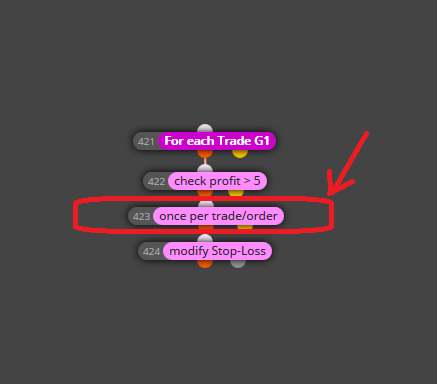

This is the best way to set a break even that I know of. It is extremely important to use the "once per trade/order" block as otherwise the stoploss would be reset every tick to break even rendering useless the trailing stop.
How about setting a break even at 12 and setting the trailing start above 12?
Hi everyone, I'm having a problem since last week with the block "play sound" in which one cannot choose a sound to be played other than "ok.wav" (you can select other but it doesn't update, it always shows ok.wav when you open it). You can change the "status" label and it updates but the sound selected doesn't. Anybody else noted that?
I see. Thanks for the response
Hi, I was wandering if there's any way to change the group of a trade after it's creation. If not, is there's any label one could attach to a trade so as to later recall that label instead of the group to work with it?
Hi, These sections define when the blocks you put there will execute. Most part of the program probably will be in "on Tick section", but it depends on your strategy.
The section "on Init" is for when you want to declare variables or any other value like booleans or flags that won't change along the program, because anything you put here will be executed only once at the start (or Initialazation) of the program. This is to save a LOT of resources so you don't need to check every tick or bar things that won't change.
The section "on Timer" is for when you want to use the timer function and execute something every "X" time (minutes, hours, etc.) instead of every "X" ticks or pips (although bars DO have relation with time).
The section "on Tick" is for when you want to execute something on every tick or every "X" ticks or pips but you can use filters to execute every certain bars or even every certain time.
The section "on Trade" is for when you want to execute something on every "trade event" like when a trade opens or closes.
The section "on Chart" is for when you want to execute something on every "chart event" like when an object is drawn on the chart or when it interacts with other object (like a trend line).
The section "on Deinit" is just for when you want to execute something just before the program closes.
If you were using an MA Cross or NLMA you could make that bar show as "Up" by lowering the sensitivity (taking more bars for the period) but for what I see you are using a condition for each bar (as ending bearish or bullish). If you want to filter signals like this from the trend you could use a moving average of some sort (I recomend using some "Non-Lag" moving average, I use Hull Moving Average and it works wonders but it can be any Non-Lag moving average) because that's what they do best (MA's in general), homogenize a trend and thus filter false signals in it. The downside to it is that you will enter a little later to the trade but it's a fair trade off if you ask me. About the "show currency" thing I would suggest adding as many filters as charts you want to work with, in the form of "if Trade" blocks adding a condition to be from the desired market in the "filter by market" input and then make a personalized message box for when it's "Up - EURUSD", another for "Up - EURGBP" and so on. As for the time, you can select it as a value in "market property / current time" and print it in the message.
@Ahlanbika Keep in mind that when you hit the button to save to ex4 it takes from 15 to 30 seconds (sometimes even longer) to respond to that order, and some times it just doesn't respond and says "no data" but it's just because the server is a bit overload at that time and if you keep trying or just wait and try a little later it will respond. With mq4 it doesn't take that long though (usually 4 to 5 seconds). I'm not saying there couldn't be another specific problem in your case but make sure it's not that what I just mentioned.
@miro1360 It woked!, thank you very much!
I've tried so far to make a boolean flag switching from to false each time a trade opens and to true each time the distance from the trade at which the break even should be set but so far it has created more problems than what it solved...
Hi, does anybody know how to check if a trade is in break even or any way to check the distance from an open trade to it's stop loss? "Check stop loss" checks the distance from the price to the stop loss but not the distance from the open trade to it's stop loss.
I get the point, if the spread was zero, then that hedging wouldn't produce any loss. I'M using Admiral Markets as broker but that does not influence my backtestings because I'm using historick tick data from Dukascopy and the Tickdata Suite program which means that I have to enter manually the right settings for the strategy tester to emulate the real spread conditions of my broker. I recomend using Historic data as it changes drastically the quality of the results. Now if you are using Tickdata Suite and you want to set the spread to zero, remember to also set the commision to zero. Are you using Metaquotes tick data or Dukascopy tick data?
But why would you want to test with spread 0? it would be unrealistic and detrimental to the testing purpose (you DO NOT want to test it with ideal conditions, on the contrary you want it as rough as possible).
I'm realizing the latter would only work as a filter, but if you need the specific number of trades open into a formula then a variable could do the work if it starts in zero and then on each trade make a "check trades count"* and refresh the value of the variable with that number.
*To obtain the "check trades count" number you could make a series of "n" blocks of "check trades count" each one equal to a natural number from 1 to "n" being that the maximum open trades number you mant to have (also limiting the maximum trades open to that number). It would bhe messy, and cumbersome, but it could work.
How about the "check trades count" block in the "check trades & orders count" section? I use it to keep the number of trades from a group of trades under X number. You can check either Long, Short or total of open positions as well. At least it has worked for me.
@ndt113 It's already fixed! the custom indicators load up correctly now, thanks to the admin:simple_smile:
@ndt113 I'm uploading an mql4 file to the web platform.   The images show the custom indicator uploaded by my brother (in his profile) as an mql4 to the web version before and after the server move. The first one, the one selecting hull-moving-average is prior to the move. The second, selecting HULLMA is the exact same indicator loaded by him in his account after the server move (yesterday). Note that he couldn't even rename the buffer as in the first case.
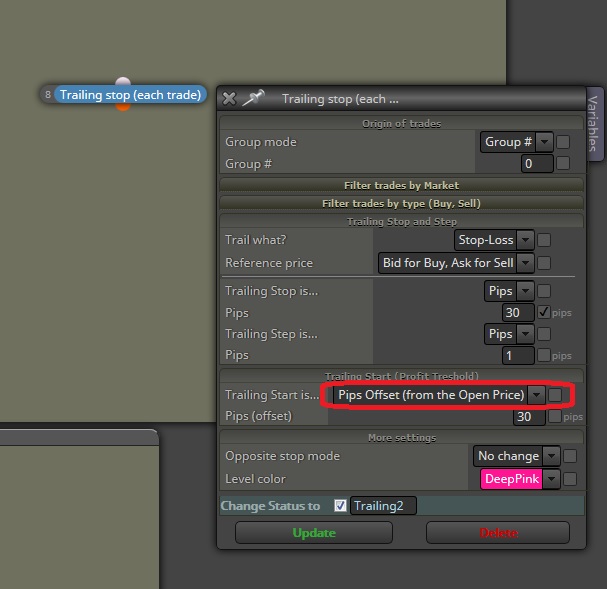 This is what you are looking for.