@fxDreema
OK, let's approach to this problem step by step.
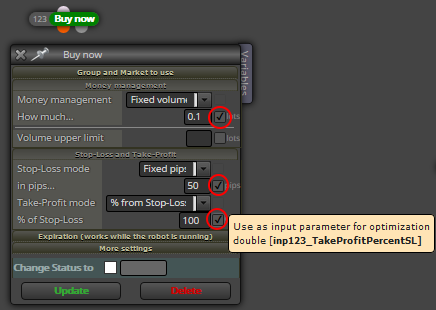
As I wrote, I extracted the ATR block as the relevant point, causing different results of the same EA compiled before and after the update. Of course, it's very simplified now. But I suppose, the error will occur here already.
Can you compile the extracted blocks one time with the current version of fxDreema and one time with the version before the last update and tell, wheather there are different results?
A
Posts made by anse33
-
RE: UPDATE time, write here if you have problems!posted in Questions & Answers
-
RE: UPDATE time, write here if you have problems!posted in Questions & Answers
@fxDreema
Would you please fix that problem?
I only have 10 days left of my full usable membership!!!
And I have lost more than 10 days already since this update problem! -
RE: UPDATE time, write here if you have problems!posted in Questions & Answers
@fxDreema
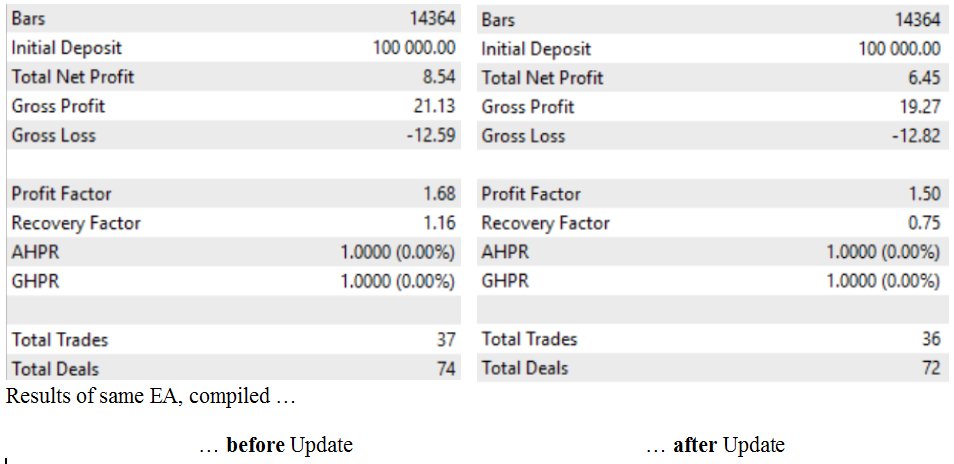
I have different results out of the same EA. (See picture below.) Not changed anything, but compiled one time before and one time after the update!Comparing these two versions of my complex EA I've found out, that the results from compiled before and after the update are equal when I deactivate the ATR block.
So there must be a problem within the extracted block "indicator moves within limits".And the different results become more relevant testing longer time distances. So I can't continue my work.
This is why I'm kindly asking you to check and fix this error as soon as possible!
-
RE: UPDATE time, write here if you have problems!posted in Questions & Answers
@fxDreema Would you please check the ATR block with the settings in the example? You might use EURUSD.
There must be a problem after the update and I can't continue my work!
https://fxdreema.com/shared/k7s6vOlzc -
RE: UPDATE time, write here if you have problems!posted in Questions & Answers
@fxDreema I can't compare the results adter the update with results from before the update. I extracted the ATR block from my project. Is this giving identical results before/after update to you?
https://fxdreema.com/shared/k7s6vOlzc -
RE: UPDATE time, write here if you have problems!posted in Questions & Answers
@fxDreema One more reporting from me. After the lastest update, EA results were a little bit worse than before. This took me a lot of hours for research. But now I should have found the source of it: There is a problem with the ATR (block "indicator moves within limits"). Could you have a look at this, please?
-
RE: UPDATE time, write here if you have problems!posted in Questions & Answers
@fxDreema Perfect, it works again. Thank you so much!

-
RE: UPDATE time, write here if you have problems!posted in Questions & Answers
@fxDreema
This is so bad!
I can't work with FxDreema at the moment!
Please look at the input field in my screenshots: After the update, there is just a mess witch is hardly or not to look through. Before the update, I could identify all fields easily by their block identification numbers/names.
This is very important. Please make it work again as soon as possible!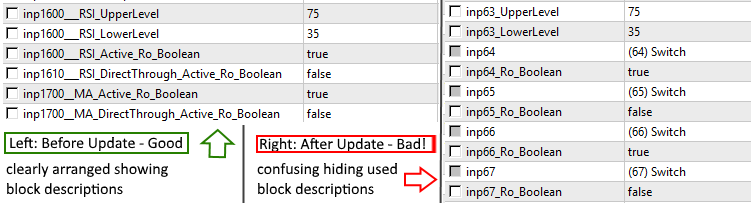
-
RE: UPDATE time, write here if you have problems!posted in Questions & Answers
@fxDreema Wrote it in "Bug Reports" already:
Input fields in Strategy Tester ("input parameter for optimization") are now with wrong "inp"-numbers, no descrpitions and some are not showed at all. I did not change anything in my EA. It worked fine two days ago. -
RE: Compiling errosrposted in Bug Reports
Compiling into MT5 also doesn't work properly.
Input fields in Strategy Tester ("input parameter for optimization") are with wrong "inp"-numbers and some are not showed at all. -
Adjust Field for Optimization?posted in Bug Reports
When I activate the "Adjust" field in any block to be able to use it for optimization in MT (4 and 5), it is not visible.
Is this a bug? Someone else with this problem? -
Modifying the Block "Modify stops of positions"? Want to leave existing TP unaffectedposted in Questions & Answers
Hey @fxDreema ,
it it possible for you to change the block "Modify stops of positions" in that way that users can choose not to modify the existing Take-Profit level?
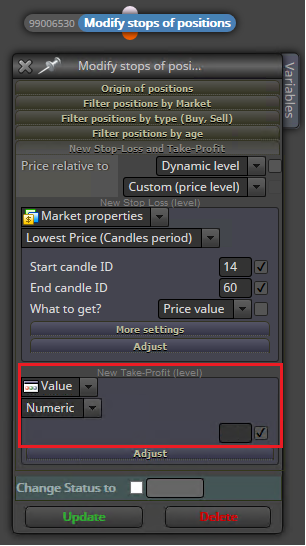
I've tried several ways (other blocks, using variables ...), but I see no way of keeping the existing TP while executing a bar by bar based trailing stopp loss.

-
RE: check trading condition block, check margin?posted in General Discussions
@miro1360 Yes, thank you! That works.
-
RE: check trading condition block, check margin?posted in General Discussions
Yes, you can choose "margin in %". But somehow it won't work properly. In fact, it doesn't work at all.
For example, if you want to prevent trading below 500% of free margin: It won't work as shown above. Because naturally no value of percentage for free margin is given when no trade is open. And setting "When no trades: Return 0 (or Return -1)" will prevent every first trade. Because margin level will never be above 500 or 50 or 0 or -1 ... So no trade will happen at all.
If you set "When no trades: Return infinite (biggest possible value)", the equation theoretically could work. But it seems to me, that there is no proper value given back to use in any condition.
This is all I have for now ...
-
RE: check trading condition block, check margin?posted in General Discussions
I also have problems using "Margin Level (in%)". Tried many times ...
There seems to be a problem with the percentage.
What I do now is to use absolute numbers:

But I think, using cash is not as good as using Free margin in %.
So, if someone has an idea? I would be happy hearing from you ... -
RE: Trailing stop as a % of the initial stop-lossposted in Questions & Answers
@rytucker2000 Try "Custom (Price Level)" instead of "Custom (Pips)".