fxDreema

    • Register
    • Login
    • Search
    • Back to the main page
    • Categories
    • Recent
    • Tags
    • Popular
    • Search
    1. Home
    2. CPxiom
    3. Best
    C
    • Profile
    • Following 3
    • Followers 6
    • Topics 3
    • Posts 145
    • Best 22
    • Controversial 1
    • Groups 0

    Best posts made by CPxiom

    • RE: HOW TO STOP OTHER/ALL EXPERT ADVISOR BY MY EXPERT ADVISOR

      @ambrogio I'm not experienced at all πŸ™‚ yet I will write here... found these.
      I posted this on your other thread as well, so this is a duplicate.
      Maybe someone more experienced can compile a working Custom mql from all these examples. Looking at all these, I guess the chart way is the way.
      .................................
      @ambrogio I did some documentation and I found all these...

      There is some code down here, and I'm thinking setting up a boolean if that's possible.
      https://docs.mql4.com/runtime/tradepermission
      But closing Auto trading feature would terminate the handler EA itself.
      So maybe trying to get the magic number of the running EAs and terminate those only would be great. Then in this Handler EA, you could even set up some conditions to check for a certain market context, and make some kind of a Manager EA.
      Also, another way to go, would be to close certain charts. Closing the chart with some EA, closes the respective EA as far as I know.
      ... Or I found this
      // Deletes the Expert Advisor form the appropriate chart
      bool EXPERT::Remove( const long Chart_ID = 0 );
      don't know if this is for mt4 or mt5.
      Also...
      It says here
      https://www.metatrader4.com/en/trading-platform/help/autotrading/experts/experts_remove
      that "the expert can be removed from the chart at profile or template change" so there could be a function to change template on some chart, also.
      Examples here
      https://www.mql5.com/en/docs/chart_operations/chartapplytemplate
      posted in Questions & Answers
      C
      CPxiom
    • RE: Useful "Buffers explorer" indicator find :)

      @trader-philipps Yes, you're right πŸ™‚
      @paragorundu wrote that "Formarly I was creating EAs to read buffer values but this is a better solution" so I thought the intention was to use the buffer values from this indicator to create an EA..

      I looked at the indicator code and it was really easy to modify. I've put here 10 buffers. If more needed, let me know. I'm not a programmer, just learning...
      Didn't test this, but it should work. Buffers explorer.mq4

      posted in Tutorials by Users
      C
      CPxiom
    • RE: Use EA to attach and indicator to a chart

      @mole Hi, this is from an old post named apply template. https://fxdreema.com/forum/topic/3658/apply-template/9
      The solution is from fxDreema. https://fxdreema.com/shared/EooHSxoKb
      Also, as it writes here https://fxdreema.com/forum/topic/5361/how-to-apply-template, put .tpl in the name field also.

      Or you could do a custom mql block, and paste this into it. ChartApplyTemplate(currChart,"SomeTemplate.tpl");

      Hope it works πŸ™‚

      posted in Questions & Answers
      C
      CPxiom
    • RE: Generate a random chart

      @roar Great thread and idea!
      AND most importantly... it follows that -there is order- in the market.
      After seeing backtests where unreliable, at least for my kind of approach (tf used, etc), I moved to forward tests. In 4 months, I ended up working only on two EAs, for the most part.
      Even if conditions change from month to month, week to week, day to day, hours in a day, news, etc, I would say that watching the charts and how the EA performs, tweaking, etc, I learned a lot without me wanting to necessarily, lol... and slowly boils down to some particulars. Will see what comes out from this.
      But, yes, an EA not working on random, means "it" gets (or the EA creator, lol πŸ™‚ ) some particulars.
      And as building approach, I have put the Money management aside, to be included when the EA is already profitable, so I know it has good strategy. The added MM would only make it even more profitable, so it's an add on (in my view).

      posted in General Discussions
      C
      CPxiom
    • Useful "Buffers explorer" indicator find :)

      Found a useful indicator for fxdreema users, called Buffers explorer.
      We can see buffers for chosen indicator, in separate subwindow.

      I find it very useful, thought to share.

      Buffers explorer.mq4

      posted in Tutorials by Users
      C
      CPxiom
    • RE: How to Have Bot Buy/Sell When it Hits Tread lines in Picture

      @laneciar Glad I was of help. I'm also quite a newbie, but learning.
      At the top of all condition blocks, you could use a - No trade - block. That way, the underlying chain of blocks, triggers only if there is no trade. Also, you could give it a Break even block, tied to the else point (orange).
      So... If no trade... then chain of blocks. Else, (meaning when trade) > BE function.

      posted in Questions & Answers
      C
      CPxiom
    • RE: Finally , Integration of News Filter :) [ MT4 Only ]

      Hello all,
      Long time no see @ambrogio, @l-andorrΓ  πŸ™‚
      I managed to put all the code from the "Copy this content On Global Scope" into a custom block, in the custom block studio, here: https://fxdreema.com/studio/MQL4, thanks to more detailed instructions and tutorial from here, where it explains what goes where, with A, B, C, D, E, in the picture: https://fxdreema.com/forum/topic/13655/tutorial-create-custom-blocks-with-fxdreema-studio/3
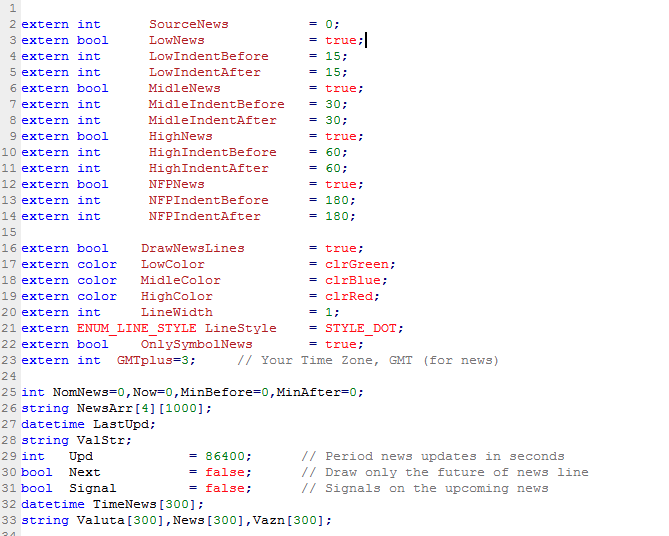
      So for this particular case, from the "Copy this content On Global Scope" block, what goes into section B, is this0_1655160807100_Screenshot 2022-06-14 at 01.52.04.png
      The enum part has to be edited out, and changed with int SourceNews, like in the picture above, as it still throws an error on compiling the ex4.

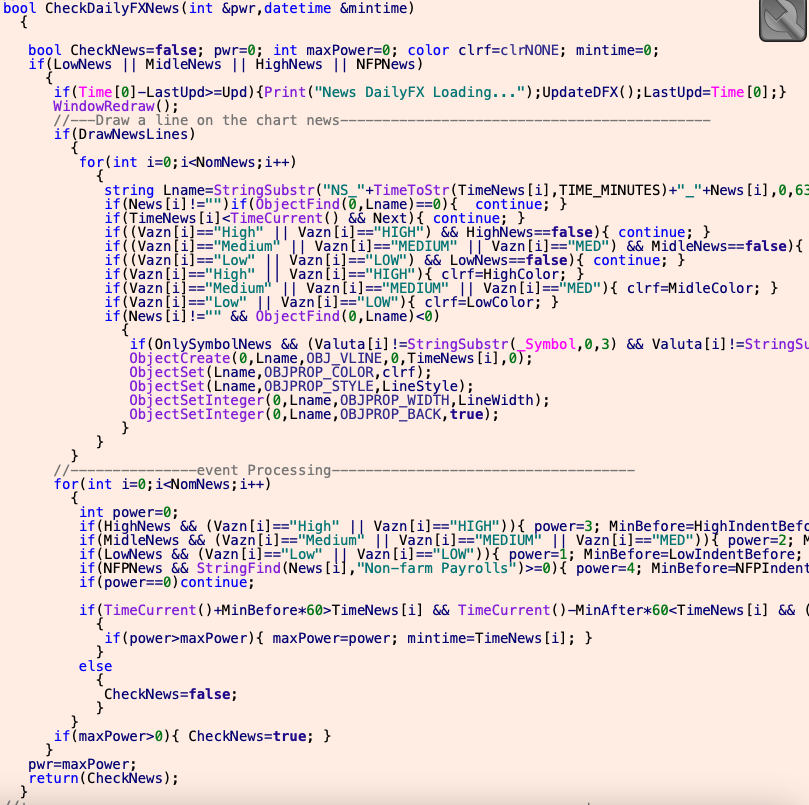
      Everything else, goes into section E, like this, 0_1655163214460_Screenshot 2022-06-14 at 02.30.24.png piece by piece: CheckDailyFXNews, CheckInvestingNews, etc... from bool, or void or what is, with the open curly brackets, till the corresponding closing curly brackets, for example CheckDailyFXNews like this:0_1655162914350_Screenshot 2022-06-14 at 02.27.43.png
      After you save the block in the studio, (Save changes - up in the left corner), you can find it in the builder in the custom blocks tab.
      Then just take it from there and connect it with a pass, and everything compiles directly from fxdreema, like here in the share from padletut: https://fxdreema.com/shared/LCnSF6OCd

      I hope this helps.

      Further, I would have some questions: So the conditions block from the shared project is designed to not allow trading in the selected news (high medium low) where is set as true? And also the 30, 60 values named as indent - define the 60 minutes 30 minutes before and after the news event - and in that time trading is not allowed? Do I understand correctly?

      posted in Tutorials by Users
      C
      CPxiom
    • RE: L'indicator AD

      @roar Very Helpful hint. Didn't thought of that. Thank you.

      posted in Questions & Answers
      C
      CPxiom
    • RE: average true range

      @roar Lol, didn't see your post. It appeared while typing I guess. πŸ™‚ Can't delete.
      But maybe two answers give assurance πŸ™‚

      posted in Questions & Answers
      C
      CPxiom
    • RE: HOW TO STOP OTHER/ALL EXPERT ADVISOR BY MY EXPERT ADVISOR

      Further digging πŸ™‚ I found this library (mt5) for the experts remove function I mentioned.
      As I see, this function also needs to specify chart ID.
      So... for mt4 and maybe mt5 as well if no libraries, the solution would be to change template (with EA, without EA? - is this possible? or other random template?), then revert to the one with EA (if possible) if market context is favorable (as seen by Manager EA). That would be great πŸ™‚
      Just some Ideas, didn't had time right now to do the tests and try these out.

      posted in Questions & Answers
      C
      CPxiom
    • RE: Heiken ashi moving average

      @satham Hello, - In condition change "is above" with "crosses above", because above can be anywhere, even at some high.... for example after you take profit.
      And I guess you should specify you want the open of - bull or bear candle.

      posted in Questions & Answers
      C
      CPxiom
    • RE: HOW TO STOP OTHER/ALL EXPERT ADVISOR BY MY EXPERT ADVISOR

      @l-andorrΓ  @ambrogio ... Yes, it seems so πŸ™‚ I checked and manually changed the template of a chart with EA, and the EA was removed. Then created a template with EA on it, and changed back and forth with same template without EA and it works πŸ™‚ It looks like the Ea is loaded and unloaded, yet it is the same template saved two times, with and without EA.
      So yes it seems that block would solve it πŸ™‚ Overlooked that block. Thanks.

      posted in Questions & Answers
      C
      CPxiom
    • RE: HOW TO STOP OTHER/ALL EXPERT ADVISOR BY MY EXPERT ADVISOR

      @ambrogio wait... On the new project I shared, the branch with EnableEA will not work... as all charts are changed to DisableEA template.
      So the fxdreema EA is discarded as well, so the EnableEA will not get executed.
      But keep the other one, and put some other condition, like a time to execute, not range, for example. I guess I'm just tired a bit.

      So this is the downside that it closes all EAs on all charts... not selectively. But further than this, it is well over my head πŸ™‚ Maybe others could help.

      Also, there is this thread regarding terminal variables as @l-andorrΓ  suggested, but don't know if it works with non fxdreema EAs. https://fxdreema.com/forum/topic/5703/terminate-other-eas

      posted in Questions & Answers
      C
      CPxiom
    • RE: HOW TO STOP OTHER/ALL EXPERT ADVISOR BY MY EXPERT ADVISOR

      @ambrogio That's so great πŸ™‚
      Yesterday I researched a bit some possibilities to change selectively... But had no success.
      I did found something that would read the string of the symbol, but honestly, don't know where to put that πŸ™‚ so the loop through the open charts would change only the specified symbol.
      Another way to go about this, would be to search for a particular indicator with this function. ChartIndicatorName... so you could distinguish some charts by other charts with some indicator, and change the template for only those.

      But as I said, this is well over my head, and maybe others could help with this.

      Because it would be great, to not close all the EAs... in case of maybe having an fxdreema EA that has good conditions and can run nonstop, let's say.

      posted in Questions & Answers
      C
      CPxiom
    • RE: Is there a way to run EA with computer off?

      @roar Oh, yes, right... I'm also forward testing, and have run into this problem. Thanks...
      Didn't know Ea's could interfere...
      So far I honed in on one EA that I'm working on... since some months now, but was thinking to diversify, as I saw that a good approach would be to have many EA's to even out the equity curve, with not so perfect EA's, but good.
      Although, it's not my style πŸ™‚ to be at the mercy of some conditions, with curve fitted EA, because in my experience if something can go wrong / differently, usually it does.
      πŸ™‚ Really I am mesmerized how the market can work. Very, very professional.

      posted in Questions & Answers
      C
      CPxiom
    • RE: Is there a way to run EA with computer off?

      @roar Yes, on uncorrelated pairs, and with different strategies, ideas. Well, working on that, long way to go. πŸ™‚
      It makes sense... still.. condition is to have long run profitable systems, which thing is not easy, but it's fun discovery process. Some things reveal other things, and so on. Sometimes it's like hitting dead ends, then right after that an explosion of possibilities... that get trimmed, and trimmed, then again. But so far, moving through several cycles like that, some gems of understanding still remained. Adding those up at the moment :), or maybe will do separate strategies, will see how it turns out.

      posted in Questions & Answers
      C
      CPxiom
    • RE: Custom trade entry for limited amount of candles

      @caesarcrypto I guess the problem is usage of ID 0. In case of a buy signal let's say with MA cross for example, on ID0, candle can rise, touch (cross) the MA, then, on the same candle, it reverses, and where it was bullish, you end up with a bearish with a wick touching the MA. And it goes down.
      In other terms, ID 0 is repainting. Id 1 is a closed candle that doesn't change, so the signal is more reliable.

      posted in Questions & Answers
      C
      CPxiom
    • RE: Can anyone help me with this error. "Compilation errors 'BuyOrSell' - constant expected 'BuyOrSell' - constant expected.

      @glen-mckinnie Try to compile directly from fxdreema, the ex4 button.

      posted in Questions & Answers
      C
      CPxiom
    • RE: HOW TO STOP OTHER/ALL EXPERT ADVISOR BY MY EXPERT ADVISOR

      A little update. This works for particular chart case.
      https://fxdreema.com/shared/oWBuqM6Hd

      posted in Questions & Answers
      C
      CPxiom
    • RE: Is there a way to configure the EA to wait for 3 consecutive losses and then enter orders?

      @trader-philipps This looks really really great, and it's a very important project. It's more than what meets the eye here...You're the inspiration.

      posted in Questions & Answers
      C
      CPxiom
    • 1
    • 2
    • 1 / 2