fxDreema

    • Register
    • Login
    • Search
    • Back to the main page
    • Categories
    • Recent
    • Tags
    • Popular
    • Search
    1. Home
    2. CPxiom
    3. Posts
    C
    • Profile
    • Following 3
    • Followers 6
    • Topics 3
    • Posts 145
    • Best 22
    • Controversial 1
    • Groups 0

    Posts made by CPxiom

    • RE: "Right Price" Target

      @Denim In EAs, always use candle ID 1, not 0, otherwise, candle ID 0 not being closed, it will repaint, or calculate wrongly. So: more settings > CandleID 1, to draw the lines, or to reference the ma 150.(candleID1), but you could use the 150 ema directly, why draw the line... just for visual representation maybe.
      The Horizontal lines can have a prefix, it could be Highest & Lowest... then you can reference those lines based on the prefix. Angle 90.
      Marker property Ask / Bid is based on tick ID, so it can be tick ID 2 is above "Highest"(prefix) line, tick ID 1 is below. Edit: But it's not necessary. U could use Ask / bid X> crosses above / below the line, or candle close, or MA1, depends on the strategy.
      To close: If trade> condition block with ema 150 cross over up for buys, down for sells > close trades.
      Also put a stop loss in place...
      Range strategies will certainly lose at one point, when the trend will happen. Usually for u it will be a trigger for sell, but the price will break out then the uptrend will happen with you in a loss.

      As for strategies... I guess it will take a period to check out indicators, styles of trading, then you will have preferences, and hone in slowly.


      posted in Questions & Answers
      C
      CPxiom
    • RE: "Right Price" Target

      @Denim You can find ADR indicator with Google, but It was a just a guess that it is ADR. From what you showed, the principle is like a strategy with an oscillator, combined with a revert to mean. These were like suggestions that might duplicate the results another way around.
      To build an EA, check the forums, tutorials. It can be done, this is a website to build EAs, it's the reason to be here. You can use objects on chart, like lines, or various indicators, if that is what you're asking.

      posted in Questions & Answers
      C
      CPxiom
    • RE: Only 1 of 2 strategies within EA opens a trade

      @Ads For further optimisation, there are those blocks check positions count... 109, 110.. that check if positions <=0 which is redundant if you have blocks 111 and 112 "no position". And then you still have to specify groups in trailing stop, and close trades as I mentioned in my first comment.

      Also, The numbering of the blocks is important, especially those at the head of the tree. First tree could start with 1, then the second tree 2 a.s.o, (as these numbers represent the order of operation), then bigger numbers, smaller numbers within those trees, then you can do Options>project options>normalise IDs. This option will take into account your specified ordering of blocks, but will trim down the number in the blocks IDs.

      posted in Questions & Answers
      C
      CPxiom
    • RE: Only 1 of 2 strategies within EA opens a trade

      @seb-0 That is what I was looking at right now... in both group 1 and group 2 area... you used block check position count == 0... then you have those conditions blocks where the value has to be lower than max trades per day, but I don't think it can get there if you have that condition above of == 0.

      Edit: Sorry. So if you you have No position block at start, then that check position count block is of no use anyway... (redundant) if it is used for ==0.
      And yes that condition block lower counts trades per day not positions so it's ok. That was my mistake with was I wrote above

      posted in Questions & Answers
      C
      CPxiom
    • RE: Only 1 of 2 strategies within EA opens a trade

      Hi, the only minor problems I can see is that at trailing stop group2 you forgot to specify group 2, and also in the global operations area, the close trades block, because you used groups, you should specify like this: 1, 2 in the group field.
      I can't see anything other than that, and all of this is related to closing positions, so I don't think this has to do with your problem, everything seems correct.

      posted in Questions & Answers
      C
      CPxiom
    • RE: "Right Price" Target

      @Denim In my opinion it seems that is based on ATR. If the line changes every hour, then the timeframe used to calculate is 1h, with an ATR of 24. This would calculate an average candle size for 24h, a range, and right price would be the middle of it... ? Maybe :). So basically (maybe) it's an ADR indicator (Average Daily Range)
      Anyway, this seems to do what an oscillator would do, and the strategy like a reverse to mean strategy.

      posted in Questions & Answers
      C
      CPxiom
    • RE: Once per bar

      Check if you have set CandleID1.

      posted in Questions & Answers
      C
      CPxiom
    • RE: Forum update

      @fxDreema Yes, the two favicons were different, and it was very handy as we keep multiple tabs opened, and it was easy to identify forum or builder. Btw the Icons are great πŸ™‚

      posted in Questions & Answers
      C
      CPxiom
    • RE: Forum update

      @fxDreema Hello, it seems favicon is missing, or it looks changed. Using Safari. Screenshot 2023-02-24 at 13.07.20.png

      posted in Questions & Answers
      C
      CPxiom
    • RE: Finally , Integration of News Filter :) [ MT4 Only ]

      @tec-nacks I will look into it in more depth later, have to re-remember πŸ™‚ but for now, maybe it has to do with a missing variable named "trade". Make a variable named "trade" and then try to compile.

      posted in Tutorials by Users
      C
      CPxiom
    • RE: Finally , Integration of News Filter :) [ MT4 Only ]

      Hello all,
      Long time no see @ambrogio, @l-andorrΓ  πŸ™‚
      I managed to put all the code from the "Copy this content On Global Scope" into a custom block, in the custom block studio, here: https://fxdreema.com/studio/MQL4, thanks to more detailed instructions and tutorial from here, where it explains what goes where, with A, B, C, D, E, in the picture: https://fxdreema.com/forum/topic/13655/tutorial-create-custom-blocks-with-fxdreema-studio/3
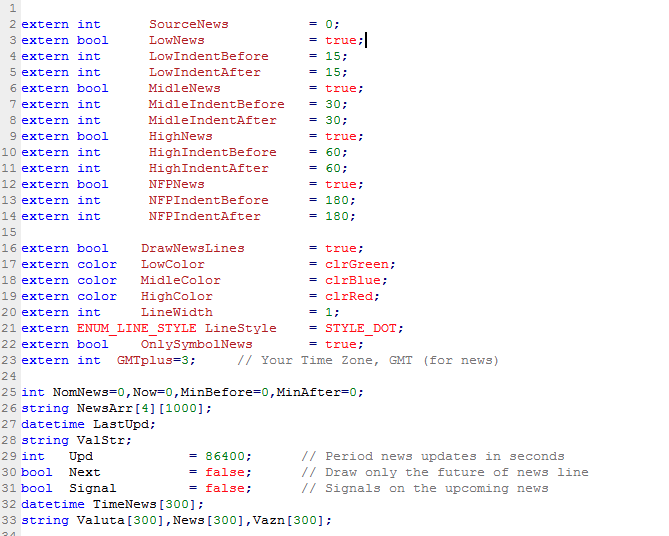
      So for this particular case, from the "Copy this content On Global Scope" block, what goes into section B, is this0_1655160807100_Screenshot 2022-06-14 at 01.52.04.png
      The enum part has to be edited out, and changed with int SourceNews, like in the picture above, as it still throws an error on compiling the ex4.

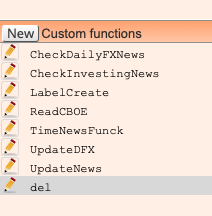
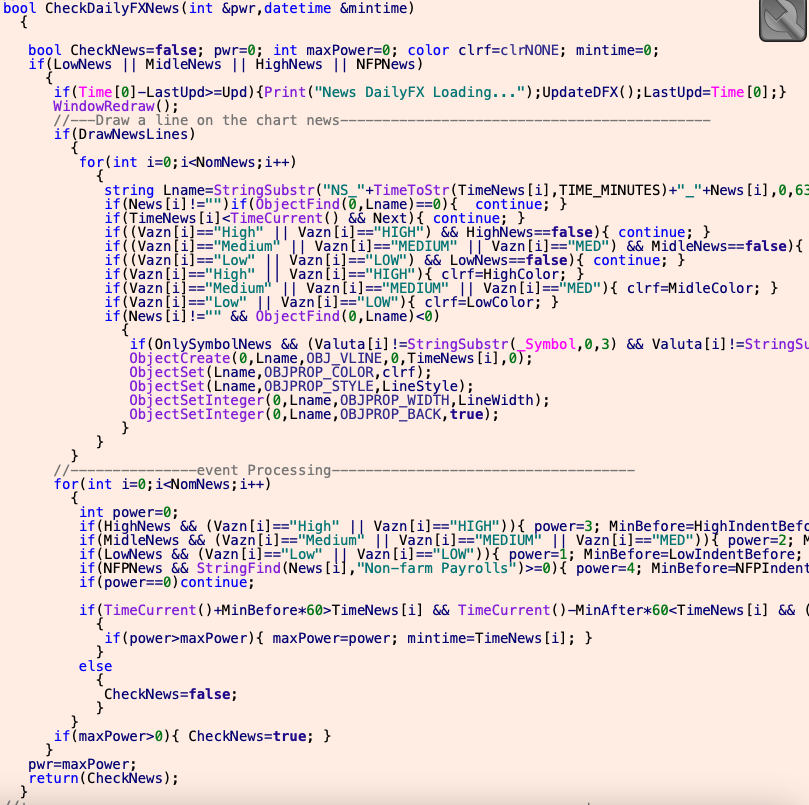
      Everything else, goes into section E, like this, 0_1655163214460_Screenshot 2022-06-14 at 02.30.24.png piece by piece: CheckDailyFXNews, CheckInvestingNews, etc... from bool, or void or what is, with the open curly brackets, till the corresponding closing curly brackets, for example CheckDailyFXNews like this:0_1655162914350_Screenshot 2022-06-14 at 02.27.43.png
      After you save the block in the studio, (Save changes - up in the left corner), you can find it in the builder in the custom blocks tab.
      Then just take it from there and connect it with a pass, and everything compiles directly from fxdreema, like here in the share from padletut: https://fxdreema.com/shared/LCnSF6OCd

      I hope this helps.

      Further, I would have some questions: So the conditions block from the shared project is designed to not allow trading in the selected news (high medium low) where is set as true? And also the 30, 60 values named as indent - define the 60 minutes 30 minutes before and after the news event - and in that time trading is not allowed? Do I understand correctly?

      posted in Tutorials by Users
      C
      CPxiom
    • RE: object on chart and resolution

      Maybe with a custom mql block. See refference: https://docs.mql4.com/constants/objectconstants/enum_basecorner

      posted in Questions & Answers
      C
      CPxiom
    • RE: Open trade when candle open

      @gsmtricks Also try with market properties choose ask or whatever, but with this block the advantage is the Tick ID, in the more options tab. You could put tick ID 2 == candle open, tick ID 1 > candle open. So you force it to take into account specific ticks. If it doesn't for some reason. Mt5 I hear has some problems. This is technique for candle ID 0.

      posted in Questions & Answers
      C
      CPxiom
    • RE: I think I have something big here

      @luisjunior1224 Try forward test! There is a difference. Then. Those drawdawns on that time scale of 8 years, look small. But getting trough them... day by day...

      posted in Questions & Answers
      C
      CPxiom
    • RE: price fraction Why

      @luisjunior1224 Please search the forum, this was covered a lot of times. πŸ™‚ In the sell set stop loss as price fraction of atr.

      posted in Questions & Answers
      C
      CPxiom
    • RE: Is there a way to configure the EA to wait for 3 consecutive losses and then enter orders?

      @trader-philipps Yes... I was referring to a "closed equity"(balance) line.
      The "GV_vEq" is the difference from close and open price in pips. Didn't had time to work on this yet. And I'm not a programmer, so it's taking longer time than normally. Understand it a bit, but I'm a beginner at mql4. But, I have a habit... doing something until it works. πŸ™‚

      posted in Questions & Answers
      C
      CPxiom
    • RE: Is there a way to configure the EA to wait for 3 consecutive losses and then enter orders?

      @trader-philipps Yes, the link is right, and the indicator has to be added manually in the tester. This can be done automatically via add template block on init, (by making a template with the indicator attached) but as this is just for testing purposes I kept the focus on what I was working on.
      The reset thing... is just a "hunch" on what could be the problem of the equity line resetting to zero, every time before some new number of pips is fed, then plotted.
      I'm not doing the reset, it's unintentional (not a block). Maybe I'm wrong, but I figured that -maybe- before new calculus the variables are reset to 0, and that data(0) is fed to the global variable... and as consequence the equity line from the indicator, is rising let's say +15 pips, then stays like that, then goes to 0, and then plots -5 pips let's say, then 0, then.... etc.
      Although... this reset to 0 before a new subtraction calculus is normal behavior for the formula for the variable. So I will try to modify the indicator today, I tend to say that it's more likely that there could be the problem.
      The covered steps are writing to global variable, and reading global variable from indicator. So problem is the plotted line. I tend to say now that it's the indicator... Will see today.

      posted in Questions & Answers
      C
      CPxiom
    • RE: FX dreema not reading custom indicator

      @tns Hello. If the indicator is in subfolder then in the name field add subbfoldername/ before the indicator name. You can find this with search on the forum, it was addressed somewhere.

      posted in Questions & Answers
      C
      CPxiom
    • RE: Is there a way to configure the EA to wait for 3 consecutive losses and then enter orders?

      @trader-philipps I went trough a lot of trial and error, tried that one too, but settled at some point with the custom mql block. It worked, it's simple, so I went further.
      That project is the same one with the trend lines which show the trades. I worked on this one, for testing purposes, so it's not important.
      For what is worked on, only the last area is important. That's the only change.

      Problem is with that reset to zero of the virtual equity line. Why is that happening?
      I tried to give a condition in the indicator also, with if global variable !=0, but didn't had an effect. Tried to filter in the EA also with same principle, but no effect. Maybe it has something to do with EMPTY_VALUE, don't know. Thinking if could use it somewhere instead of 0, or the other way around? Will research further tomorrow.

      posted in Questions & Answers
      C
      CPxiom
    • RE: Is there a way to configure the EA to wait for 3 consecutive losses and then enter orders?

      This is a work in progress, as a variant to stop the live trades. Decided to keep it on this thread, as it's a continuation.
      @trader-philipps Made a few steps further.
      Managed to write pips difference in a Global Variable. Used a custom mql block, couldn't manage to do it with the yellow block. But this works fine, and it's not complicated.
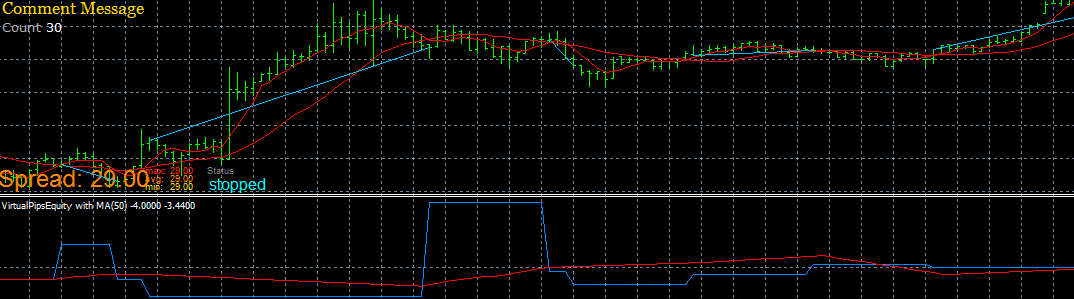
      Made an indicator that reads the Global Variable, and plots virtual pips equity.
      Also the indicator has an MA for the virtual equity line.
      Everything works great, except one problem. The virtual equity line is reset to zero, right before new value is fed.
      I figure this issue is coming from EA (the figuring out one), because in order to calculate BuyOpen and BuyClose, there probably is a reset to 0, which is fed to the Global variable.
      Don't know how to solve this.... tried with storage variable != 0 as filter condition, but it doesn't work... and maybe this is the case only for this EA (the figuring out one), so no problem for the final EA.
      If not... anyone, please help πŸ™‚
      This is the updated figuring out project: https://fxdreema.com/shared/MTRaFRHgd
      This is the indicator: 0_1575599188206_VirtualPipsEquity.mq4

      0_1575599247548_Screen Shot 2019-12-06 at 03.58.34.png

      posted in Questions & Answers
      C
      CPxiom
    • 1
    • 2
    • 3
    • 4
    • 5
    • 6
    • 7
    • 8
    • 1 / 8