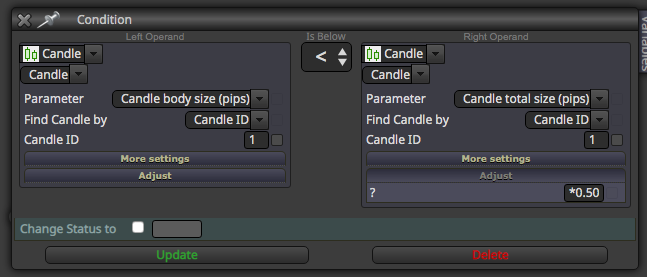
@jzfusion Try this. Extrapolated from something else, but it could work. Didn't tested.
C
Posts made by CPxiom
-
RE: Body of candle is less that 50% of Rangeposted in Questions & Answers
-
RE: How can a SL based on currency be set up?posted in Questions & Answers
@l-andorrà Great to hear that
 Problem is, it takes into account the whole equity generally... if it would be possible to check per symbol, or per EA, then that would be more flexible... although the danger would be that losses could add up on some occasion, and not know about it, only after it's too late.
 -
RE: How can a SL based on currency be set up?posted in Questions & Answers
@l-andorrà My very first post on fxdreema?
Maybe this helps...https://fxdreema.com/forum/topic/6480/stop-losable-positions-at-1-of-equityEDIT: Oh, I see you found something, (the in loop condition) on another thread. My suggestion has the flaw(depends) that it looks for the whole account, and maybe there are more than one EA.
-
RE: how do you place EMAs inside the RSI ?posted in Questions & Answers
@praise You need an indicator for that. Check out this thread https://fxdreema.com/forum/topic/6494/implementing-ma-and-rsi-indicator
-
RE: HOW TO STOP OTHER/ALL EXPERT ADVISOR BY MY EXPERT ADVISORposted in Questions & Answers
A little update. This works for particular chart case.
https://fxdreema.com/shared/oWBuqM6Hd -
RE: Use EA to attach and indicator to a chartposted in Questions & Answers
@mole Hi, this is from an old post named apply template. https://fxdreema.com/forum/topic/3658/apply-template/9
The solution is from fxDreema. https://fxdreema.com/shared/EooHSxoKb
Also, as it writes here https://fxdreema.com/forum/topic/5361/how-to-apply-template, put .tpl in the name field also.Or you could do a custom mql block, and paste this into it. ChartApplyTemplate(currChart,"SomeTemplate.tpl");
Hope it works
-
RE: Useful "Buffers explorer" indicator find :)posted in Tutorials by Users
@caesarcrypto When you load the ex4 indicator, check the colors tab.
Those are the displayed buffers.
This indicator is useful when same color is assigned to more than one buffer, and so on. It should display the buffer with gray line. If nothing is shown, it is possible that it is empty value.
Proceed to the next buffer. Instead of buffer 0, write 1, then 2, etc... -1 means it should not track buffer there.
Otherwise, everything looks ok, as how you did. -
RE: Can anyone help me with this error. "Compilation errors 'BuyOrSell' - constant expected 'BuyOrSell' - constant expected.posted in Questions & Answers
@glen-mckinnie Just add BuyOrSell in the name field, and click update. If it is interger add "int" instead of double. Uppercase lowercase is important, as far as I know.
-
RE: Can anyone help me with this error. "Compilation errors 'BuyOrSell' - constant expected 'BuyOrSell' - constant expected.posted in Questions & Answers
@glen-mckinnie Try to compile directly from fxdreema, the ex4 button.
-
RE: Custom trade entry for limited amount of candlesposted in Questions & Answers
@caesarcrypto Yes, but even if the candle does that, if it not yet 23:40 GMT it doesn't open a trade. So it will keep checking until a trade is done, once a day. And when that happens it is passed 23:40. This is just to not check just one tick...
-
RE: Custom trade entry for limited amount of candlesposted in Questions & Answers
@caesarcrypto Ok... Try to move Once a day block, right before buy/sell... So the Ea could check until conditions are true, and then... once a day, do a trade.
Because maybe it checks just once a day. Don't know for sure, but try. -
RE: Custom trade entry for limited amount of candlesposted in Questions & Answers
@caesarcrypto There still is a usage of crossover on block 29. For a upwards crossover you should put that to "Is Below" (ID1)... then the next one "is above"(ID0).
So basically change block 29 to is above, as you did with P-BL. -
RE: Custom trade entry for limited amount of candlesposted in Questions & Answers
@caesarcrypto Today I had some problems (bug?) with crossovers. I see in your project you use crossovers. Maybe that's it. If anyone else also had problems, please report.
On the forum I run into a thread that states that only one or two crossover can be used in a project??
Until now, I didn't count my crossovers in a project, and can't remember if had such problems, and maybe if I did, not having enough experience, probably I changed something else, and something else... and who knows, ended up not needing the crossovers, and managed to get some project work.
But there IS a problem with the crossovers.
As a workaround, I used CandleID2 and CandleID1 under and above MA for example, and the EA started working!Try it out and let us know, and if someone else had this problem, we should report as a bug... if it's not by design, or some limitation...
-
RE: Custom trade entry for limited amount of candlesposted in Questions & Answers
@caesarcrypto That's very smart technique.
Then... Check if GMT matches correctly the time. I personally use server time... that's the same from the market watch window. So I'm not confused. (Because here we have winter time, summer time... )
Also I read somewhere that the backtest uses other time... so maybe that's the problem. Try forward testing on demo account. -
RE: Custom trade entry for limited amount of candlesposted in Questions & Answers
@caesarcrypto I guess the problem is usage of ID 0. In case of a buy signal let's say with MA cross for example, on ID0, candle can rise, touch (cross) the MA, then, on the same candle, it reverses, and where it was bullish, you end up with a bearish with a wick touching the MA. And it goes down.
In other terms, ID 0 is repainting. Id 1 is a closed candle that doesn't change, so the signal is more reliable. -
RE: don't open new limit pending, until the close current positionposted in Questions & Answers
@amf606 From what I know, it doesn't work with negative logic... better to find something like: if - condition - then do... (no don't).
If I understand correctly, you could try the "check trades count" block and set it to lower than one, so it triggers the pending orders only if that. If there is one trade open, the next one would be two, so it won't pass that block. -
RE: Is there a way to run EA with computer off?posted in Questions & Answers
@roar Yes, on uncorrelated pairs, and with different strategies, ideas. Well, working on that, long way to go.
It makes sense... still.. condition is to have long run profitable systems, which thing is not easy, but it's fun discovery process. Some things reveal other things, and so on. Sometimes it's like hitting dead ends, then right after that an explosion of possibilities... that get trimmed, and trimmed, then again. But so far, moving through several cycles like that, some gems of understanding still remained. Adding those up at the moment :), or maybe will do separate strategies, will see how it turns out. -
RE: Is there a way to run EA with computer off?posted in Questions & Answers
@roar Oh, yes, right... I'm also forward testing, and have run into this problem. Thanks...
Didn't know Ea's could interfere...
So far I honed in on one EA that I'm working on... since some months now, but was thinking to diversify, as I saw that a good approach would be to have many EA's to even out the equity curve, with not so perfect EA's, but good.
Although, it's not my style to be at the mercy of some conditions, with curve fitted EA, because in my experience if something can go wrong / differently, usually it does.
Really I am mesmerized how the market can work. Very, very professional. -
RE: Is there a way to run EA with computer off?posted in Questions & Answers
@miro1360 and anyone... Hello, just a quick question... Why multiple instances of Mt4?
Maybe silly question but can't we open 2, 3 instances of same chart, same pair, in case we have several EA's for the pair.
I ask this as best practice. How many EAs on one Mt4, if one per chart/pair.
Thank you.