C
Posts made by CPxiom
-
RE: 10 connections Manual Trading Simulator (Training)posted in Questions & Answers
OK, so the Project is Done.

It could have more functions to it, but this is just for 10 connections only.
I have no more questions, so this thread could be moved from here.
 To a new open source projects section?
 PS: I saw a lot of good projects, trough the forum, would be great to have a place.
The tutorials by users is great, but this would be an area where branches of projects could be developed, working together on something.
-
RE: 10 connections Manual Trading Simulator (Training)posted in Questions & Answers
Wow, just saw this...
https://fxdreema.com/forum/topic/6724/free-trade-tool-created-entirely-from-tutorials-shared-in-the-forum
I will look into it.
So if there is already one, (actually can't know if it has same functionality) this project's aim will be to keep this one in 10 connections, to be downloadable. -
10 connections Manual Trading Simulator (Training)posted in Questions & Answers
Hello, this is a nice little project, really made out of fun
I thought of sharing this, as maybe it is useful to do some training.
The project is made by reading tutorials, the forum, and looking / taking from examples.
Thanks to all that share knowledge here.To use, make a template with indicators of preference, called "Tester" (seen on forum :)) and load the EA as usual. Having a lot of indicators slows down the tester in my experience... You can buy, sell, close trades, train on high speed, check the graph.
The stop loss and take profit are at 10 pips and 30 pips distance by default.
Then they can be moved!
The SL and TP lines are selected by default. Just drag to reposition.
The EA could have other buttons as well like close buy close sell, lot size, but I kept the connections at minimum.
The stop loss and take profit lines update themselves automatically to new levels, when a new trade is put on. -
RE: Looking For Accurate Trendline/Trend Zone Indicator That My EA Can Measureposted in Questions & Answers
@laneciar no pb. I wrote to you in chat.
-
RE: Looking For Accurate Trendline/Trend Zone Indicator That My EA Can Measureposted in Questions & Answers
@laneciar Hello, yes the upper or lower trend line, readjust... That's the way the indicator is built. The indicator follows what the price says. Not the other way around
But that line can be used for take profit, I would say, if you don't use something else... and if it is the case that it is an entry, then that will be a loss. It's not perfect. (Maybe combine with other confirmation) But with a good win ratio, and good R:R and good money management, maybe it can be profitable.PS: How do you read the upper line and lower line?
-
RE: Looking For Accurate Trendline/Trend Zone Indicator That My EA Can Measureposted in Questions & Answers
@ambrogio Big thanks... Personally I can't download from market on mac, only from codebase. But good for the thread.
-
RE: Looking For Accurate Trendline/Trend Zone Indicator That My EA Can Measureposted in Questions & Answers
@laneciar If it's another indicator I don't know. It should have buffers to output those values. If it has buffers, the steps to do the EA are the same.
I use SHI for manual trading.
Don't know if the lines from the two indicators coincide, because SHI uses fractals to define the trends. -
RE: Looking For Accurate Trendline/Trend Zone Indicator That My EA Can Measureposted in Questions & Answers
@laneciar I use no equation... Don't know... If there is one I would like to know also
I just look up at the corner of the chart where there is an output from the indicator. And see what value has a good slope, on that particular currency and timeframe.
I am also a newbie with this, I don't know too much.
There are some videos on you tube if you are just starting out, they give a good idea for the basics. -
RE: Looking For Accurate Trendline/Trend Zone Indicator That My EA Can Measureposted in Questions & Answers
@laneciar That value is because of some angle. If it is more steep upwards, then the value increases on the positive. If it is more steep downward then the value is negative.
So If buffer 2 is above value +2 for ex, (3, 4, depends on the currency... I saw 0.3, etc).
And if buffer 2 is below value -2.
Then buy or sell.
You make two columns of chains of conditions. One for buy, one for sell. -
RE: Looking For Accurate Trendline/Trend Zone Indicator That My EA Can Measureposted in Questions & Answers
@laneciar Yes, here some screenshots. But got some errors with the buffer 3 (middle line) I guess.
Now I figured to make two bots. One that only sells, one that only buys.
Will look into the code of the indicator more in depth, but will take some time. Maybe tomorrow.Buffer 2 is the slope. Above some value... depends on the currency. That's why I said it seems that I have to be more specific on the instrument, and so on. When backtesting, if you give visual mode, then skip till the end, but then you scroll with the mouse, it takes you trough it and you can see the angles. The size and slope is noted up in the left corner of the chart.
I have mac so I have to do it like this. Don't know with windows. The mt5 gave visualisation simply... but my broker has mt4.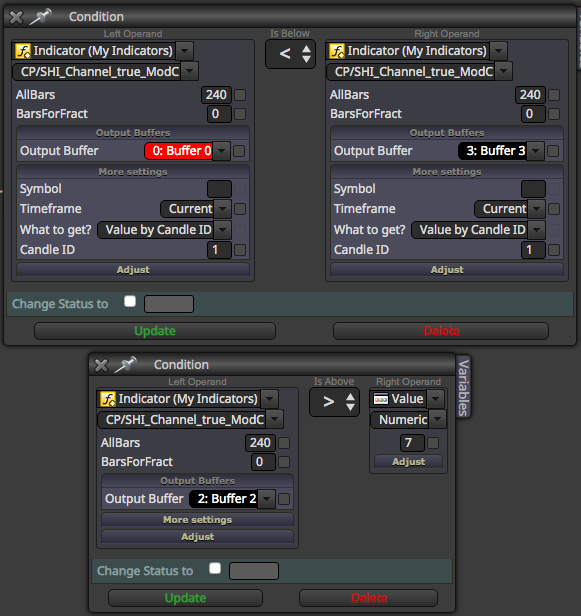
-
RE: Looking For Accurate Trendline/Trend Zone Indicator That My EA Can Measureposted in Questions & Answers
@ambrogio Hello, thanks. I did try with Market properties, but still misses some entries. I saw also that it flashes, and mostly so when I have more indicators in one EA.
I use this indicator for manual trading and it doesn't disappear just like that
in real time. Maybe because of the backtester? -
RE: Looking For Accurate Trendline/Trend Zone Indicator That My EA Can Measureposted in Questions & Answers
@laneciar I had the same problem. The Ma 5 being on candle close, rarely crossed, so I put it on candle high and candle low, it was a bit better, but still didn't take all the entries. Don't know why... that's why I like to rely more on the buffers. Try the indicator I uploaded, it has slope and middle line, ...for one strategy I use the red buffer for entry. If you look with visual, you can see it's making a red circle. Try to combine with other indicators maybe, for entry / exit, and use the SHI for trends, this depends only on your imagination and other indicators you may know of. It would be great to be able to have those lines in buffers. Maybe someone can do that. I will try to remodel something from the mt5 version, but I am not a programmer.
Still it's pretty hard to have a profitable EA. In my experience I saw I have to boil down to specific timeframes, and specific Instrument. That's what I am doing lately. See where I have best results, and then tweak for that instrument.
In the beginning I believed I could make a general EA for anything. Maybe it's possible, but spreads are different, the decimals are different, pips are different, etc. Generally I tried to work with percentage to go around these problems, but some specifics are needed as I see.
I had some profitable results, but only on the 15 min, and one instrument, etc. It is weird, because There are highly correlated instruments... like indexes. US30, US500 for example. And I get different results... So then I doubt the EA Also, if the profit goes up, then back again on minus, and then ends in profit... that's still not reliable. -
RE: Looking For Accurate Trendline/Trend Zone Indicator That My EA Can Measureposted in Questions & Answers
@ambrogio Wow, thanks, it's true I'm not too familiarized with getting signals from indicators as objects. Tried to do it few times but with no success, so I relied more on buffers, and adding buffers into the mt4.
I attach the modified version (mt4), if it helps.
Having the slope and the middle line is really good, because if buffer 0 is above middle line, then it's obviously a sell, and vice versa. More slope is strong trend, yet some EA could be developed for range, specifically. Depends on strategy.
The last two buffers don't work, if someone can get the two trend lines to work, and post here an updated version from this indicator, that would be awesome.
Until then, your solution is perfect, thanks.For the uploaded indicator:
Buf (0) is the entry
Buf (1) channel size
Buf (2) slope
Buf (3) middle line
Buf (4) should be Upper trend line, doesn't work
Buf (5) should be Lower line, doesn't work. -
RE: Looking For Accurate Trendline/Trend Zone Indicator That My EA Can Measureposted in Questions & Answers
@laneciar Try "SHI channel true" indicator. I'm working with it right at the moment. Very useful. Unfortunately it has only one buffer, but a very good one, it actually shows when to enter the trade. Used in combination with other conditions and data, to get if it is a sell or a buy, it is very good. What do you use mt4 or mt5?
For the mt5 there is a "NB" version on the mt5 codebase with more buffers.
For mt4 I have something modified, with middleline, slope and distance but couldn't get the Upperline and the lower line into buffer.Also, in a EA, from my experience, the entry does matter, but then it is also important what size of stop loss, exit strategy, trailing no trailing, scaling, etc.
So if an EA is loosing, but you have 50 percent win rate, or more... it's something else, not the entry. Tweak and tweak. -
RE: How to Have Bot Buy/Sell When it Hits Tread lines in Pictureposted in Questions & Answers
@laneciar Glad I was of help. I'm also quite a newbie, but learning.
At the top of all condition blocks, you could use a - No trade - block. That way, the underlying chain of blocks, triggers only if there is no trade. Also, you could give it a Break even block, tied to the else point (orange).
So... If no trade... then chain of blocks. Else, (meaning when trade) > BE function. -
RE: How to Have Bot Buy/Sell When it Hits Tread lines in Pictureposted in Questions & Answers
@laneciar Hello, If the indicator has buffers, you can use them to trigger the buy and sell with crossover.
Import the mt4 to my indicators. Then, In the Condition block, you can use market properties, bid for sell, crosses below my indicators - indicator - buffer (the red one). Or you can use candle close.
I would say Crosses below because if it goes up, and up, it should not trigger. If it goes up, then down, trigger.
For buy, the other way around. -
RE: Custom Indicators Basic Problem (to administrator)posted in Questions & Answers
@thomas_stock Try with market properties price crossover. Or candle close crossover, because the signal is given immediately after crossover anyway.