Hi, not support input group? Not work in fxdreema?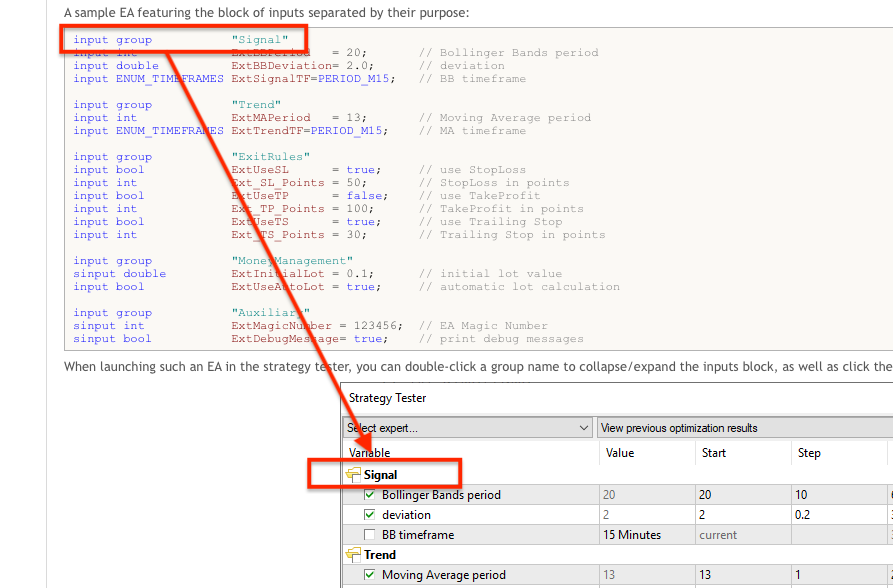
D
Posts made by duepips
-
Input Group featuring the block of inputs separated by their purposeposted in Questions & Answers
-
RE: SL for first and last positionposted in Questions & Answers
closed 1 and 4 automatically 2 and 3
average close
-
RE: SL for first and last positionposted in Questions & Answers
1 SL
2
3
4 SLsl for the first and last positions
-
SL for first and last positionposted in Questions & Answers
Hi, is it possible to set the TP to the first position and then work with SL for the first and last position?
-
RE: Draw Line for Margin Call and Stop Outposted in Questions & Answers
@bk7Thank you, I think I'll abandon the project
-
RE: Draw Line for Margin Call and Stop Outposted in Questions & Answers
View on Chart line for margin call and stop out
-
RE: Draw Line for Margin Call and Stop Outposted in Questions & Answers
yes thanks and my formula erro not calculate live Price
-
Draw Line for Margin Call and Stop Outposted in Questions & Answers
Good morning, can anyone help me assemble the blocks necessary to display the Margin Call and Stop Out lines on the graph, if possible! Thank you
-
RE: Change TP - Take Profit Average Lots for first and last positionsposted in Questions & Answers
ok thanks but it's hard to interpret fxdreema blocks, thanks anyway
-
Change TP - Take Profit Average Lots for first and last positionsposted in Questions & Answers
Hello, in these blocks I would like to add the Take Profit modification! For example, when: the Buy positions are 4, the first from 0.01 and the fourth from 0.04 the code must update the TP price for these positions by calculating the lot and the pips I add, can anyone help me? Thank you
-
RE: Running on Tradeposted in Questions & Answers
@l-andorrà said in Running on Trade:
@duepips Did you select the correct purple block on the 'on trade' tab? Can you please share the link to your project?
I have not loaded purple blocks! I think I understand that they only serve to filter events, right? Anyway, now I have changed the connection of the blocks and it seems to work well even when the market opens a pending on its own, the whole onTrade section is loaded, if a few days I find any anomalies I am attaching the code
-
Running on Tradeposted in Questions & Answers
hello, I uploaded blocks to on Trade that calculate and update the open price of the Buy and Sell positions so as not to make them work in the background on on Ticks since these must be calculated only once for each position added, in fact they work perfectly for any position added or closed with the exception of pending! When the market opens a pending to me it seems that it is not reloaded on Trade, I did a test u a demo in fact in some cases on trade needs two executions to be read completely, how can I solve? Can anyone help me? Thank you
-
Strange Closureposted in Bug Reports
today I found a closed position of a few cents in negative, it was an open buy stop and after a second closed, now the EA I created has been running for several days and is tested in all functions, I cannot find an explanation for this opening and immediately closing of this buy stop, has a similar situation happened to any of you? Thank you
-
RE: Block [Loading file Set]posted in Questions & Answers
@l-andorrà said in Block [Loading file Set]:
@duepips I'm afraid not. You will need a programmer to do it and I'm not one, sorry.

ok, thanks
-
RE: Block [Loading file Set]posted in Questions & Answers
@l-andorrà said in Block [Loading file Set]:
@duepips Yes, but ony via custom code block.
really? Fantastic!! Can you help me with an example code? Thank you
-
Block [Loading file Set]posted in Questions & Answers
hello, is it possible to create a block that loads a specified .set file under a certain condition? Thanks
