D
Posts made by duepips
-
RE: Check Market Closeposted in Questions & Answers
@jstap said in Check Market Close:
@duepips Never tried but it makes sense that if the candle time is less than the current time the markets not moving.
You can also find this by using this code:
variable1 = MarketInfo("TSLA",MODE_TRADEALLOWED);
variable1 = a int value, returns a number something like 0 for closed and 1 for open.you like this? https://fxdreema.com/shared/aaik6J4we
it must first take a turn to load the variables then it starts to run well, also to take advantage of the on Timer -
RE: Check Market Closeposted in Questions & Answers
@jstap said in Check Market Close:
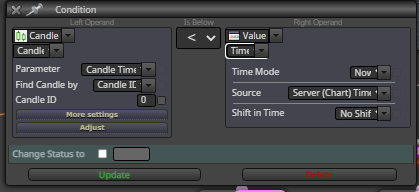
Never tried but it makes sense that if the candle time is less than the current time the markets not moving.
You can also find this by using this code:thanks, this not is simply method, I like simply elaboration...
-
Check Market Closeposted in Questions & Answers
hi. this is the method simply for verification market closed? Time Candle 0 < a Time current on tot Hours?
-
RE: Description [Comment FIX] + [Name]posted in Questions & Answers
@jstap said in Description [Comment FIX] + [Name]:
What are you asking me? that code will convert a double like input fgy-1234into a text (string) version with the same information.
to insert two variables, the first that counts the total and the second that counts the hedge, example: Lots 0.04 / 0.02
-
RE: Description [Comment FIX] + [Name]posted in Questions & Answers
@jstap said in Description [Comment FIX] + [Name]:
@duepips Use text code option like, constant A+Constant B; you can link many variables/constants, if you want to add text use speech marks like "TEXT "+constant A;
for two? example: DoubleToString(variable_1,2) "text" DoubleToString(variable_2,2)
-
RE: Draw Shape [UP ALL OBJECT]posted in General Discussions
@l-andorrà said in Draw Shape [UP ALL OBJECT]:
This is an interesting question. I'm also interested in the answer.
in mql5 the highest z-order gives priority to objects with number but only on events such as mouse clicks, I have not found a real indication about the overlapping of objects such as for example in the CSS language, too bad
-
Draw Shape [UP ALL OBJECT]posted in General Discussions
hi, I created a draw shape with z-order 1 and all the other z-order 2 objects, how come the draw shape is loaded on top of the objects despite having a lower z-order? Thanks
-
RE: No Position NOT WORKposted in Questions & Answers
@duepips said in No Position NOT WORK:
hello, I put the no position block above rsi but it opens positions in bursts, shouldn't it open only one? If there are positions why do you open others? Maybe because I set low and high prices?
Resolved! i had by mistake connected no position on otherwise ... thanks anyway
-
No Position NOT WORKposted in Questions & Answers
hello, I put the no position block above rsi but it opens positions in bursts, shouldn't it open only one? If there are positions why do you open others? Maybe because I set low and high prices?
-
RE: No position RESET EA DEFAULT VALUEposted in Questions & Answers
@jstap said in No position RESET EA DEFAULT VALUE:
@duepips No position block modify or whatever block to reset beneath.
not possible reset totally ea?
-
RE: SWAP in Loop NOT WORK all Positionposted in Questions & Answers
@jstap said in SWAP in Loop NOT WORK all Position:
@duepips I am not sure how you would do this but keep me updated.
ok
-
No position RESET EA DEFAULT VALUEposted in Questions & Answers
hi, is possible on trade no position reset ea on default value?
-
RE: Description [Comment FIX] + [Name]posted in Questions & Answers
@jstap said in Description [Comment FIX] + [Name]:
@duepips Use text code option like, constant A+Constant B; you can link many variables/constants, if you want to add text use speech marks like "TEXT "+constant A;
thanks
-
RE: SWAP in Loop NOT WORK all Positionposted in Questions & Answers
@jstap said in SWAP in Loop NOT WORK all Position:
How is this working? loop needs to be below the for each block.
I need to withdraw the swap amount to convert it into points to add to the open price
-
RE: SWAP in Loop NOT WORK all Positionposted in Questions & Answers
@jstap said in SWAP in Loop NOT WORK all Position:
@duepips Make a start see if works, put a shared link with problems you are having.
-
Description [Comment FIX] + [Name]posted in Questions & Answers
hello, it is possible to combine two constants for the comment of the buy sell modules in order to obtain the following result:
rsi-name ea
pending-name ea
grid-name eain this way you can recognize the modules that open the orders and from the settings a single field with the personalized name
thank you
-
RE: SWAP in Loop NOT WORK all Positionposted in Questions & Answers
@jstap said in SWAP in Loop NOT WORK all Position:
Not from ! block but if under the pink for each block you put the swop into a variable then in the next block use a formula block to add the variable to the variable you should get what you want, put the variable into a comment to check what's happening.
you have example for me?
-
RE: Close Position & Delete Pending [At Specific Ticket]posted in Questions & Answers
@jstap said in Close Position & Delete Pending [At Specific Ticket]:
If you use the pink for each blocks you can get the ticket number by using trade loop, from there you can add other blocks to do as you please
yes, thank! fxdreema not have one blocks specific for delete to insert ticket number position and or pending