I think it also matters whether do you want to be able to do it multiple times, or just once. And also, do you really need to do it when the new candle is created, or at some number of minutes after the trade is created.

I think it also matters whether do you want to be able to do it multiple times, or just once. And also, do you really need to do it when the new candle is created, or at some number of minutes after the trade is created.
In "Condition" you can select the timeframe for MA and it should work even if you are on different timeframe. If it doesn't check if your timeframes have data, because sometimes in MT4 the data is broken. And do this with one block first, to make sure that it works.
I would actually advice to connect Pass -> Trace, and to select bunch of MA in the Trace block, just to see if anything is correct with all values. And then experiment what will happen when you combine these values.
Try this: https://fxdreema.com/shared/WPSiKSY7b
Here I create the button with name MyButtonName in "on Init", because I only need to do it once when the EA starts. Then in "on Chart" I detect when it was clicked (block 3). Then I load that button (block 4), check whether it is pressed or not (block 5) and do some actions depending on that. I change its name (6 and 7).
Blocks 4-5-6-7 can also be used at any time in "on Init". Depends on how what you want to do. You say that you want to turn off blocks, so in my example you can replace block 8 with the turn off block. Or set the value of some variable, which will then be checked in "on Init". But also, blocks 4-5 would do pretty much the same job if they are in "on Tick".
It seems that the Chart event (OnChartEvent() MQL function) doesn't work when testing on visual mode, it only works when you run the EA live.
You can run the same EA on different charts with different Symbol names and each instance of the EA will work independently with its own trades. This is because the blocks (for example "No trade") are set by default to work only with trades from the current symbol and don't look at other trades with different symbol names. So, there is no need to change the magic number. But if you plan to run the same EA on two charts with the same symbol name, and you want each EA instance to work with its own trades, then change the magic number.
What is the problem? If there is a problem... Do you see error messages?
I know the opposite function (ExpertRemove) - to remove the robot from the chart. If there was a function to add a robot to a chart, I think it should be in the same category of functions, but I don't see such function:
https://www.mql5.com/en/docs/common/expertremove
Why "1" for two candles... you even say the word "two". I think that while I was making this block I was thinking that 1 candle rise should be the difference between MA[0] and MA[1]. Technically we compare 2 MA values here, who belong to 2 different candles, but when you draw the line between them, the line itself has width of 1 candle. This is the yellow difference in levels in the picture below:
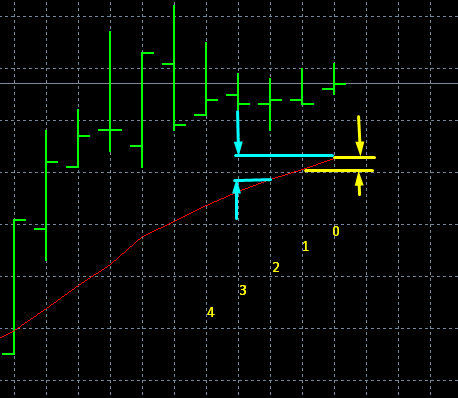
So I guess we are thinking differently - you think about how many points are connected, I think about the number of lines. Both ways are in the same time right and wrong 
In the example "Add to Volume" there is some relationship between the first trade and the following trades. Let's call the first one "mother" and the rest - "children". That "add to volume" block creates such children. And each children has few properties that are the same as the mother - SL, TP and I forgot what was the other. This allows me to detect mothers and children in the "pips away" block and only because of that this example is so easily possible. There is no functionality for Sell mother to create Buy children, so it is tricky to make it.
I made this example: https://fxdreema.com/shared/iIufGSqJ

I use two groups. The initial Sell trade is from the default group 0 (empty value for Group means 0). Blocks 7 and 8 would make trades from group 1. Also, block 9 is set to work for group 1.
Ok, so one initial Sell trade with Group number 0 is created. With block 3 we want to only load the last trade, which can be from group 0 or 1. Note that for the Group parameter I set "0,1". Now we only have one Sell from group 0, so this one is loaded. Then in block 4 I check whether or not the trade is from group 0. In other words, I want to reach block 5 only if the last trade is from group 0, not from group 1. And 10 pips above the sell a new Buy is created (blocks 5-6-8). Now this Buy has Group of 1 and for SL and TP I used those from the original Sell trade.
In block 9 I only load the last trade from group 1. I don't have "Condition" block here, but if I have at least one trade from group 1, I expect it to be the latest trade. If this can be not true, you can try this:

So, in block 10 I detect 10 pips of movement and then I "add to volume".
The initial Sell is the reason for the following Buy to be created, but they have no relationship. And that Buy is the mother of the following Buy children.
Anyway, I think it could be better if you just close the Sell, make the Buy and never go into these tricks I described above
All parameters are uint, but I tried it just like you and it works for me. Do you see any errors in the logs of MetaTrader?
There is no way to recognize the timeframe, simply because when you place a trade (manually), the chart doesn't matter at all. You can place trades all day long even without any chart opened. If EA is creating the trade, again, there is no information saved with the trade about the chart. But if needed, the comment of the trade can be used to store such information. This also means that if you are able to set that comment in mobile, you can always do that, and then in the desktop you can recognize the data in the comment somehow.
@traderjud said in How to properly set up this EMA situation?:
The candlestick would look something like a hammer with the wick going through the 8ema but price closing outside of the 8ema in the direction of the trend.
i think this is where you answer to your question. First you explain how candle 0 turns into 1 and so on, but try to look at the situation after it happened. Be in the present moment and look how candles look in the near past. Instead of wondering how to detect multiple rules one after another in the time.
So it sounds to me that you want to detect when Candle High is > MA and Candle Close is > MA. I can also see that you did that in your project... but I don't understand why for MA you use candle 1 (the previous candle) and for High/Close you are using candle 0 (the current candle). I think you want to use Candle ID = 1 for both.
You also say that you want the candle to close... take a look at this example - https://fxdreema.com/demo/mt4-once-per-bar
This screenshot is from this example: https://fxdreema.com/demo/mt4-loop-add-to-volume-on-loss
Try this: https://fxdreema.com/shared/DwGrp5Fvc
This is all I changed:

I think the calculation goes like this... here is a screenshot to help:
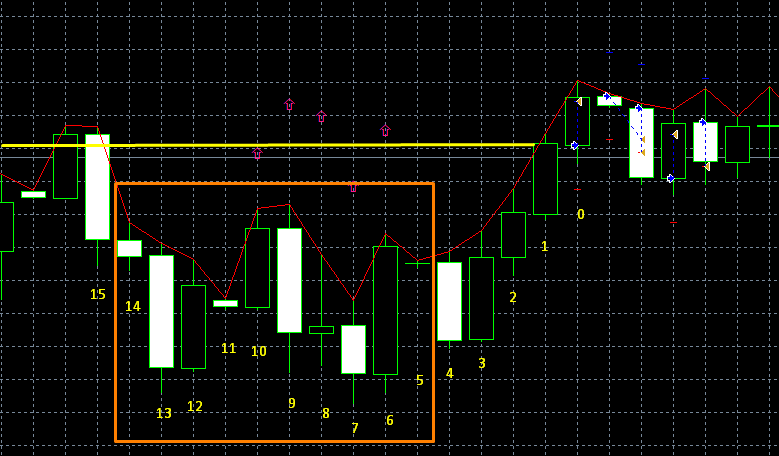
I numbered the candles from 0 to 15, candle 0 is where I got a trade and you didn't. So, at that time the upper level, which is Candle Close of candle 1 is the yellow line. We want that yellow line to be above each MA point for 10 candles, starting from candle 5. That MA actually shows High for each candle, so we are comparing High for each of these 10 candles with Close of candle 1. We are talking about candles 5 - 14. Count them, including candle 5, they are 10. My MA line is really below the yellow line for all of these candles. I notice that I have 2 extra candles - 5 and 11, they belong to Sunday days.
These are your 5-14 candles:
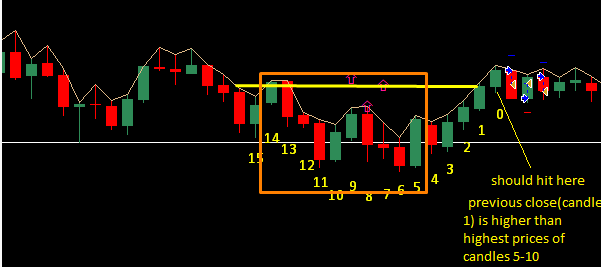
Here the High of candle 13 is higher than the yellow line.
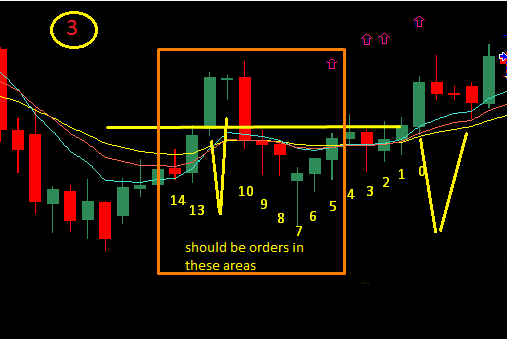
Here High is too high in candles 10, 11 and 12
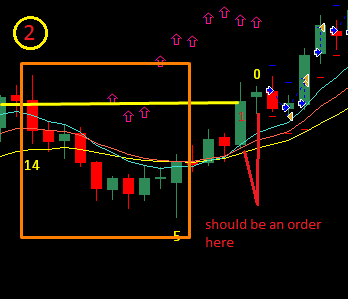
And here High is too high in candle 14.
The Tester is not exactly the same as the real life. There are different ways of testing - "Every tick" is the most accurate, but there are other models where depending on the EA, results can be very different. Also, in the Tester you start with 0 history trades, while in the live account you probably have some history. Some blocks are looking at these closed trades. Also the spread is different, in the Tester it is a fixed value. Just in case, check for any error messages.
There is no error, because the value is not checked in the block. When someone manually writes the value there, he will probably know what to write. But there is another possible scenario. Let's say that if the value is 0 or even negative, then nothing happens. This is still a way to control the block behavior via some Variable, indirect way of turning it off for a while. This makes it more flexible, because it allows you to use any value. But yes, at the same time it's probably not the best idea to do such things.
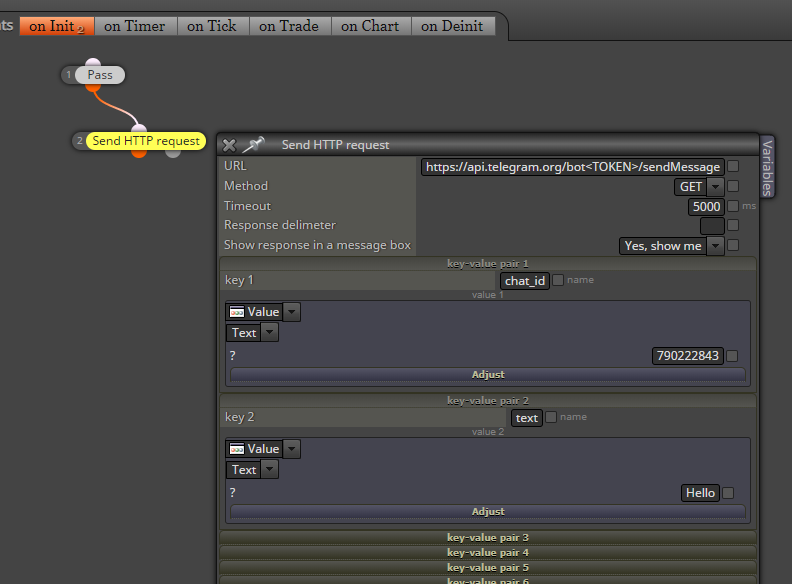
I was able to send a message to Telegram. It works from the browser as well, because it is a normal http request.
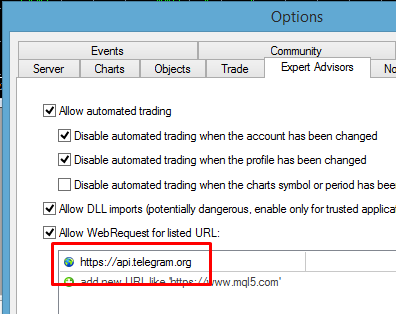
First of all, you need to go to MetaTrader settings and add https://api.telegram.org
Here is the Telegram API: https://core.telegram.org/bots/api
I used sendMessage (Ctrl+F on the page, type sendMessage and you will find the description). Here is direct link: https://core.telegram.org/bots/api#sendmessage I obviously used these parameters chat_id and text.
From where to get the chat ID? Call to getUpdates in the browser, like that:
https://api.telegram.org/bot<TOKEN>/getUpdates
... where <TOKEN> is of course your token. You should see some response, which is a JSON format response. Search for "chat" and after that you will see the id. It's some number, in my case 790222843.
Here is more info and how to do this in the browser: https://www.shellhacks.com/telegram-api-send-message-personal-notification-bot/
I don't know how to send photos, it's more complicated than that Look at the second example here: https://docs.mql4.com/common/webrequest