Store the base lot size in a constant input and copy the input into a variable. Use that variable for the lot size of the next trade. After every execution, multiply this variable by 2 and let the next execution use that variable for the upcoming lot size.
F
Posts made by fxpim
-
RE: Multiplier lot size based on trade countposted in Questions & Answers
-
RE: Compiler is timing out?posted in Bug Reports
How many times did you compile a project? I sometimes get a 429 on FXDreema because I disconnect too many blocks in a certain time interval. I contacted the admin about this; it is one of the security measures he took after the hack. Maybe this is the case for you as well.
-
RE: Position Count Not Workingposted in Bug Reports
There will be a moment where you will have 1 open position. It's the moment in between having zero or one position and the moment when the second position is opened. I guess that this block structure is triggered once per tick. If so, first run the block structure that checks whether you have two positions and then the block structure whether you have one position.
-
RE: How to wait 1 barposted in Questions & Answers
Can you provide the context in which you want this to build? It can be done in several ways but we need to have the context to do it the right way.
-
RE: Second condition not triggeringposted in Questions & Answers
just tested it and it works for me. I get one buy and one sell at a time. The only thing I don't get is why you would want to close the trades at the end time and immediately after closing those trades, open new trades again.
-
RE: Block "Order Moved" not working.posted in Bug Reports
@mariussun Do you move the order manually? If so, you should e-mail the admin because I agree that your logic is correct for this problem. However, I would move the blocks from On TImer and On Chart to the On TIck tab.
-
RE: Second condition not triggeringposted in Questions & Answers
@Moneyman012 If you want one trade at a time, no matter buy or sell, you should filter either buys or sells in the no-position block. I've already fixed it in the shared project you just shared in your last reply.
-
RE: Second condition not triggeringposted in Questions & Answers
@Moneyman012 Yes, click the shared project link you shared on this topic.

-
RE: Second condition not triggeringposted in Questions & Answers
First of all, use the hours filter instead of the time filter. It's a better block to use for this project. Secondly, put the trailing stop at the beginning of the project. Thirdly, the counter block does nothing since the mentioned ID in the counter block does not exist and you don't need the block since there is a no position block connected before the counter block. I have already changed the shared project apart from the time filter block.
-
RE: Big problem: array out of range (3297,29)posted in Bug Reports
In which timeframe are you testing the EA and which timeframe does the once-per-bar block use in which the error occurs? I've dealt with this error multiple times.
-
RE: Laggin UI with big projectposted in Questions & Answers
@l-andorrà It´s an object-based project and since I do not know how to code indicators, it creates the object in the EA which made it pretty huge in the first place. I had the choice though to use the mechanism that creates the objects in some sort of loop instead of copying it per timeframe but then I would end up with another shipload of variables and other confusing exceptions per timeframe. I've read on the forum that there was an FXDreema desktop version somewhere in the past. Do you have any knowledge if that will be a thing in the future?
-
Laggin UI with big projectposted in Questions & Answers
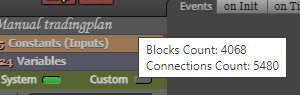
Alright, first of all, I want to compliment the admin that FXDreema is capable of handling a project with more blocks than mentioned on the product page. The only bottleneck I am experiencing right now is a lagging UI. For example, if I want to connect blocks it takes several seconds before they connect and sometimes connections even disappear when reloading the page. As you can see in the picture, I use a lot of blocks. I understand that this requires a lot of performance from the browser. So thats why I am reaching out on the forum if anyone as any suggestions for settings tweaking or even a different browser for the sake of performance.
Hope you guys can help me out!
-
RE: in mt4, Error: Array out of Range in .... (retval = Time[0];)posted in Bug Reports
Hi, I've tackled this error many times. Are you using your EA multi timeframe and are you using once per bar blocks?
-
RE: Compilation errors '-' - illegal operation use '-'posted in Bug Reports
@akallai86 I mean, have you already tried to deduct the spread as a number from sell_open_price instead of deducting it as a text?