I complained about this a while back but didn't file a report - thanks for sharing your icustom solution

I complained about this a while back but didn't file a report - thanks for sharing your icustom solution
@l-andorrà no it will only work for buys, that's a hedged trade, no?
But it might be worth asking ChatGPT as it can come up with a calculation/formula for you
you need to understand what the different types are, especially if it's a scalper
https://www.youtube.com/watch?v=qqVoHMg-Q_Y
Be wary of using chatGPT as it took me a while to get to this formula.
For example, some of the maths was completely out - I gave it 'real life' figures based on watching strategy tester (as it was working with TP based on profit, rather than price). Then it corrected itself.
But you can also just say 'now give it to me as MQL5' and it spits out code for you, so that's pretty handy
double CalculateTakeProfitPriceForBuy(double P_A, double P_D, double x_pips)
{
    double lot_size_A = 0.02;
    double lot_size_D = 0.06;
    double pip_size = 0.0001;  // Standard pip size for major pairs like EURUSD

    return (lot_size_A * P_A + lot_size_D * P_D + x_pips * pip_size * (lot_size_A + lot_size_D)) / (lot_size_A + lot_size_D);
}

// Sample usage:
void OnTick()
{
    double P_A = 1.09692;  // Opening price of trade A
    double P_D = 1.09592;  // Opening price of trade D
    double x_pips = 3.0;   // Desired profit in pips

    double TP_Price = CalculateTakeProfitPriceForBuy(P_A, P_D, x_pips);

    // Use the TP_Price as necessary, e.g., set a take profit order, draw a line on chart, etc.
    // ... your logic here ...
}
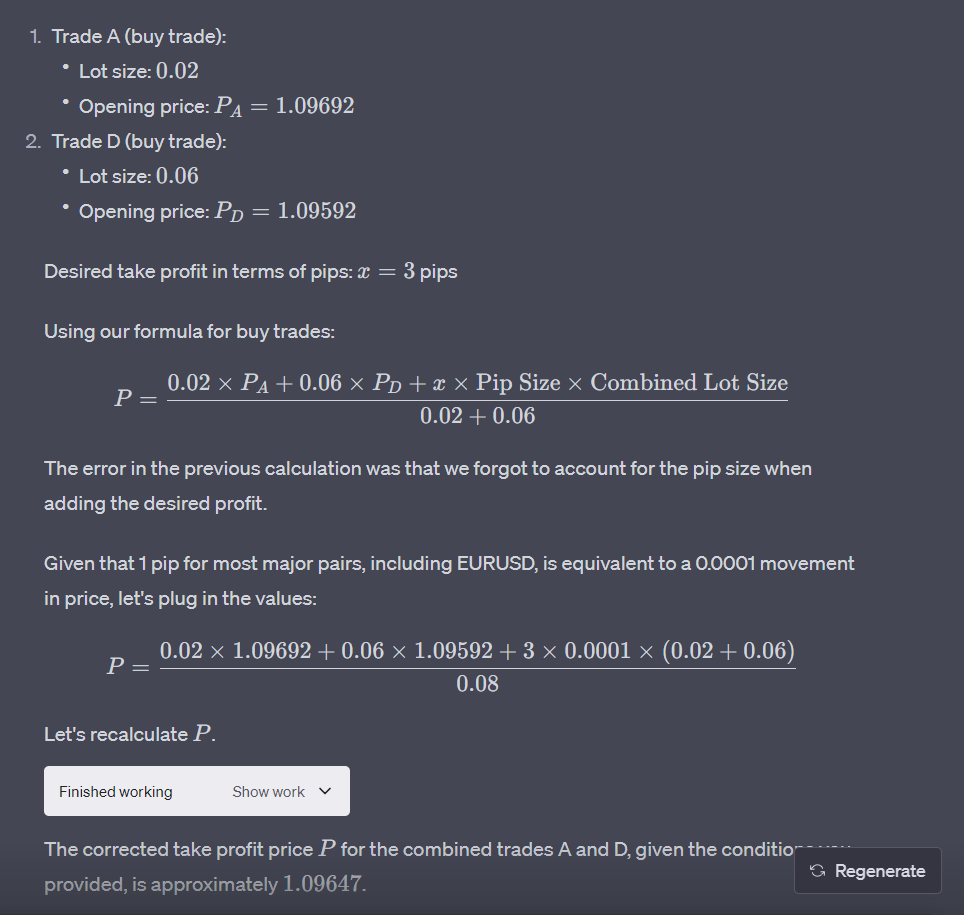
A little more on the formula (buys only)
This is bizarre.
I have 2 formulas to trace bug on why calc isn't working. One that uses custom pip size (0.0001) and one that uses original (0.00001). Identical formulas bar the 1 decimal place. But fxdreema seems to be unable to calculate the one with the extra decimal place. Just completely ignores it. And it's not the variable, I've tried hardcoding the 0.00001 as well. Very strange.
This formula seems to work weirdly I can't get the calculation to work. It simple refuses to multiply by 0.00001. Tried it an MQL5 code block and output to journal. No dice.
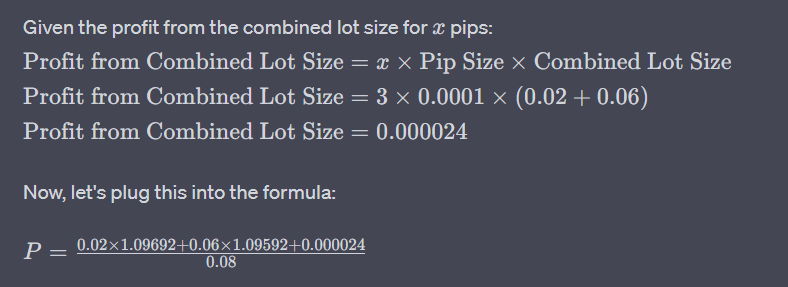
It's soooo close. The above is the solution but I have spent so long on this now for some visual flair I think I'll just leave it.
Also remember the TP in pips is of the first/last trades total lot size. The oldest trade is almost certainly in drawdown when it's closed (but the two together close in profit)
Never knew you could draw lines straight from TP!
But I don't think that'll work - it works on bucket, right? For bucket you can only filter by direction or manual/automated. By loop you could do it (count buys, then only count every (totaltrades -1)) but then you can't calc the aggregated TP of the 2 trades (remember, this could be the first/last trades of a batch of 10+)
ChatGPT's approach is to proportionally measure each trade's contribution to profit by point, and take into account the starting price of each, which is how it would've been in my head but I had no idea what formula would be.
I've nearly done it but the maths/formula is tripping me up, particularly point size as I want it to work on metals/FX/indices. I'm so close, I have the correct TP now but it's multiplied it by 10 somewhere. I'll post formula when I've cracked it.
@TipsyWisdom it is, super easy.
BUT, I would like to display the TP as a line on the chart, and I can only do this (as far as I know) by calculating the price that the TP line should be.
ChatGPT has this to say. I'm going to take a look at this closely a little later (it's for a sell):
(Deleted pic as formula was wrong)
I have my EA to take profit when TP level is at x pips profit.
However, this TP is made up of 2 trades, on the same instrument, at different prices and lot sizes from a batch of trades. One trade may even be in DD and the other will be in profit). In other words, it closes out trades in drawdown by taking the oldest and newest trades, and closing them when combined, they are in profit by x pips.
It's easy enough to tell fxdreema to TP at x pips profit (I can calculate total lot size, and profit in pips from that), but my end goal is to draw a line on the chart to show me visually when I can expect profit to be taken.
For example, I have 4 trades on the same pair. Let's call them trades A, B, C and D.
Trade A was a sell taken first with 0.5 lot size.
Trade B gets taken when DD is at 15 pips, where the EA takes a 2nd trade for 0.55 pips.
Trade C at 30 pips DD (from trade A at 0.6 lots)
Trade D at 45 pips DD from first entry, at 0.65 lots.
As price returns back into profit on trade D, I wish to know when the oldest and newest trades (trades A and D ONLY, other trades are ignored) reach a total of x pips profit, whereas they close out. So trades A and D close when profit reaches x pips with lot size (0.5 + 0.65 = 1.15 lots).
This is pretty easy to do as currency value (IF profit (A+D) > x pips profit (1.15 lots)), but I can't (I don't know) how to derive the price at which TP would occur so I can draw the line on the chart.
I've been grinding the maths through my brain and I'm sure it's simple when laid out but I've been thinking about it too much now and just tie myself up in knots. Anyone have any idea on how to calculate this? Or how I should be visualising it?
I couldn't use standard block to close trades as you would normally use loop or bucket and I needed to close down specific trades within a bucket.
I had this problem and I thought I'd write it up.
I needed to calculate how much price moves by smallest possible increment on chart, so that I can calculate what x pips of profit would be (eg how much profit is 5 pips on my current lot size?). This works across metals and forex. Should also work for indices as long as you have correct decimal values in Project Options.
The formula is:
Take smallest movement of price (a point) and divide it by current market price.
Then multiply it by current lot size
Then multiply it by a standard lot (depends on broker, usually 100,000)
You can find smallest movement of price and divide by current market price like this with formula block (bid for buys, ask for sells)
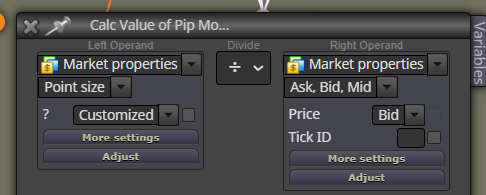
Then you can use 'adjust' field to multiply it by your open lot size, then by standard lot size (like this eg: '*Buy_Lots * Standard_Lot' or '*1.5 *100000)
So say you put result into variable 'Price_Per_Pip', you can just multiply that by '5' if you want to calculate what 5 pips of profit is.
It's OK I solved the problem without using that block.
Must've been an issue with what I was doing as with blank project that block worked fine.
OK this is weird - I can get it to fire but only after 2 trades - then it fires once for EVERY trade.
Actually - using the 'otherwise' output I can see block is firing. But when I set "How many trades?" to the exact number of trades I want (for example, 3rd trade) to execute following blocks at...nothing happens.
But the 'otherwise' output fires before and after the 3rd trade, when it's set to '3'.
Very strange.
I'd like to implement something into my grid trading bot. It takes the first and last trade of a batch, and closes out when in x pips profit.
I can get/calc the average open, average lots and therefore calculate the profit of first and last trade, but I need to do this only once when x amount of trades is open. So I decided to use the 'Once per Position' block.
However, I cannot get the Once per Position block to run.
I have tested this on a separate project, so I understand it and it works as expected on a bare project. (eg when I set it to '3' trades, when 3 trades are open, the connected blocks run once).
However, on quite a complex EA, I can't get the block to fire, no matter if I put it where I want it or at the top with no parent blocks. I am wondering whether the block ID has something to do with it? As it's the highest numbered block in the project.
Anyone have any idea what I could be doing wrong?
I mean date (of the month). For example, you apply an EA to the chart this month and want to prevent trading on the 19th. How could you specify this date in input settings?
To give context, I would like to run strategy tester over a period of months but not trade, for example, US CPI or NFP but sometimes these fall on different days. If you only have a weekly filter you have to test 1 week at a time. But if you had a date filter you could test by month or even the whole year.
I'd like to not trade on certain days.
For example - in input settings I would have a filter that is:
'Don't trade on these days' : '1, 3, 5, 11, 12'
...and it won't trade on those specific days of the month (1st, 3rd, 5th, 11th, 12th).
How could I implement this?
Yeah you put it on the top and it cycles through after checking first pair