Reading at the block info I can't see any limit for it to be positioned wherever is wanted. I tried to put it below different bloks but it doesn't work anyway. Could it be a bug?

Reading at the block info I can't see any limit for it to be positioned wherever is wanted. I tried to put it below different bloks but it doesn't work anyway. Could it be a bug?
I simply can't understand it. Why does it work fine here...
...and not in its embedded version?
Are you trying to use it on indexes charts? If so the problem may be the points value at "Project Options"
Well, my EA is moving forward! Now the pip counter has been embedded into the trade launcher. This way I will not need to add two separate EAs (launcher and pip counter). So this is it:
And here begin my new problems. My first one is that none of the information requested at the "Comment (ugly)" block is shown at the chart. I need to see it in order to check if all formulae are correct. Could someone take a look at it, please?
Miro, are you here? 
Here I am again after some testing has been done. Certainly it works better now, but no completely fine. Let me show you my results.
Test conditions:
Automatic trades instead of manual ones. I used a different EA opening trades an then, on a separate chart, the pipcounter EA. Obviously the same magic number was used on all of them.
A total of 5 charts were used simultaneously, all of them having different point rules.
No previous closed trades were available for the test. That means the number of pips for closed trades at the beginning was exactly 0.
And this was the outcome. After a few hours, three trades were closed, with the following results:

These are the numbers. The USDJPY trade was closed with a positive 5.5 pips. The first JP225 trade was closed with a negative 10 pips an the second one with a negative 26 pips. That means the overall resul for closed pips should be 5.5 - 10 - 34 = -38.5 pips.
Sadly, this is what I got:
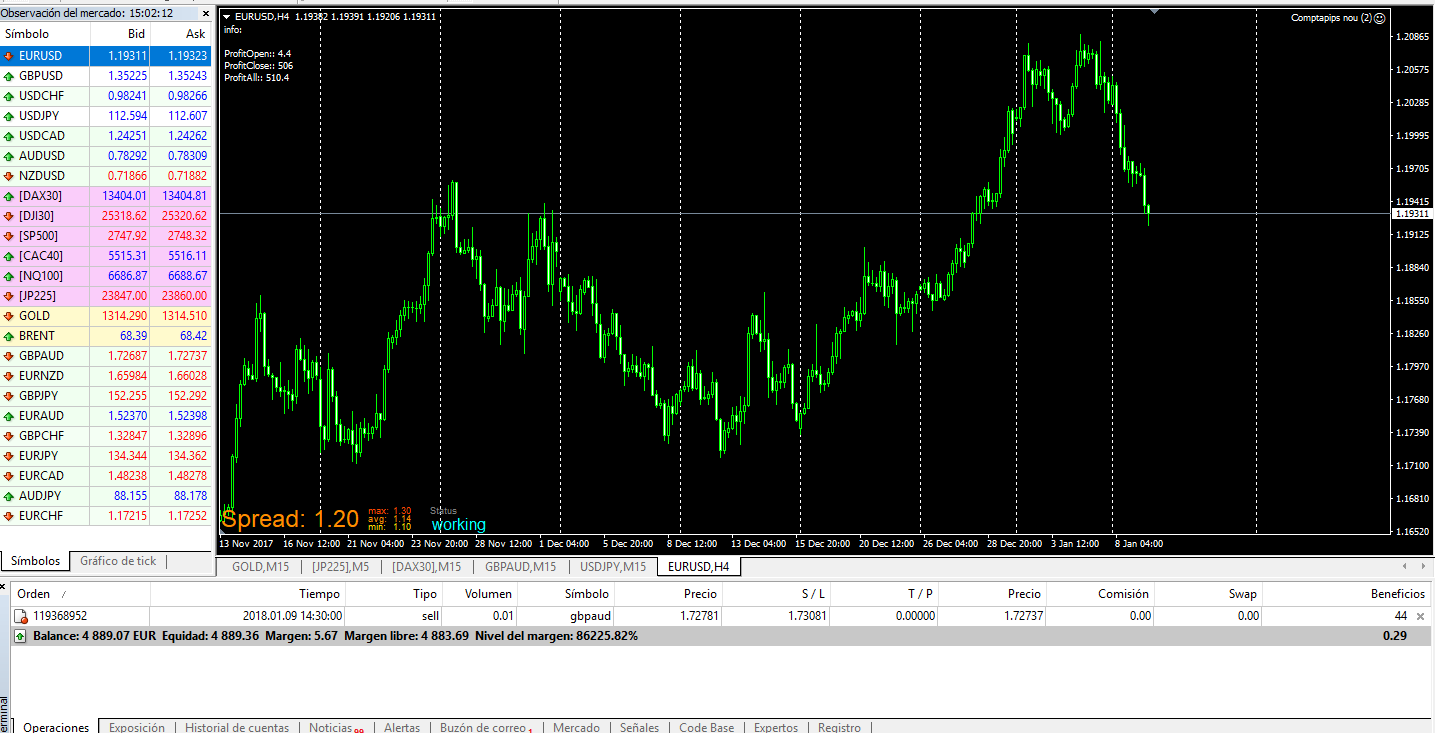
This is a screenshot including a fourth open trade correctly counted, as you can see. The problem is, once again, the count of closed pips. At first glance, the number shown (506) seemps completely random, but then I tried to figure out why it was so. This is my bes guess of how it was counted:
550 pips for the positive USDJPY trade minus 10 pips for the first JP225 and minus 34 for the second equals exactly 506.
That means that both JP225 trades were correctly counted once closed, but that was not the case with the USDJPY that was multiplied by 100. Then I took a look at the point rules for three digit charts and I confirmed that they were 0.001 = 0.01. And this is not the correct result.
Any idea why the EA is only partially counting pips correctly?
@fxdreema said in Project option's bug:
@isp00rt You can still work in dollars... in % of the account balance for example
And I guess that people prefer % instead of pips. Pips are often confusing, we can see in in this very forum topic
"For each Closed Trade" - I understand that you want to get all closed trades from all markets, but this block has no limit and it simply loads all trades ever closed, even if they are 6 months old. Is it possible that the block calculates more closed trades than you actually want?
I know working with account balance percentage is easy and common. Unfortunately, I was specifically requested to offer my results in pips in order to collaborate with a group of professional traders (wish me luck!).
I already knew how For Each Close Trade works. This is why I select a custom period of profit results shown at the MT4 platform. In my case, one week. That way I can be sure no unwanted trades are included.
As you can see in the previous examples, the point rules work perfectly for open trades, but they simply fail when counting closed trades. Each chart is considered in a different way, no matter I specified how should they be transformed at the project options.
If only the closed trades were correctñy transformed as per the point rules, this problem would vanish immediately.
Case 3. Nikkei Index, no digits. This chart was also customized as the previous one. Things are getting much worse:
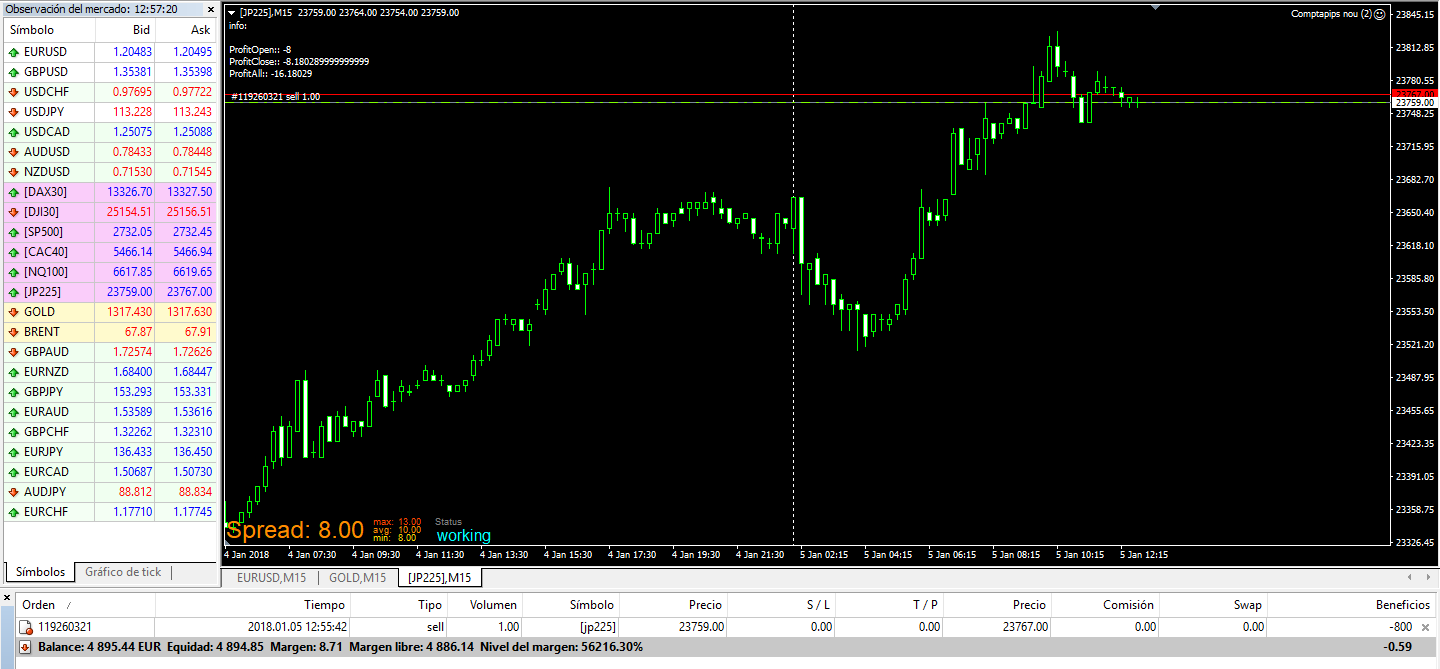
Same as before. Only one of the variables is correctly transformed, whereas the other two are again wrong.
Variables status:
a) Profitopen: Correct. -8 pips are open right now (correct transformation).
b) Profitclose: Wrong. I simply can't understand where this number comes from. Not a single clue why the EA considers that more than 8 pips have been closed so far.
c) ProfitAll: Obviously Wrong. Once more the shown number pips is a correct sum, but because of the wrong value of Profitclose, the final result is incorrect.
This is the final screenshot showing the results af all three trades:

Case 2. Gold, three digits. This chart was specifically included at the customized point rules (see message above). The first problems arise.
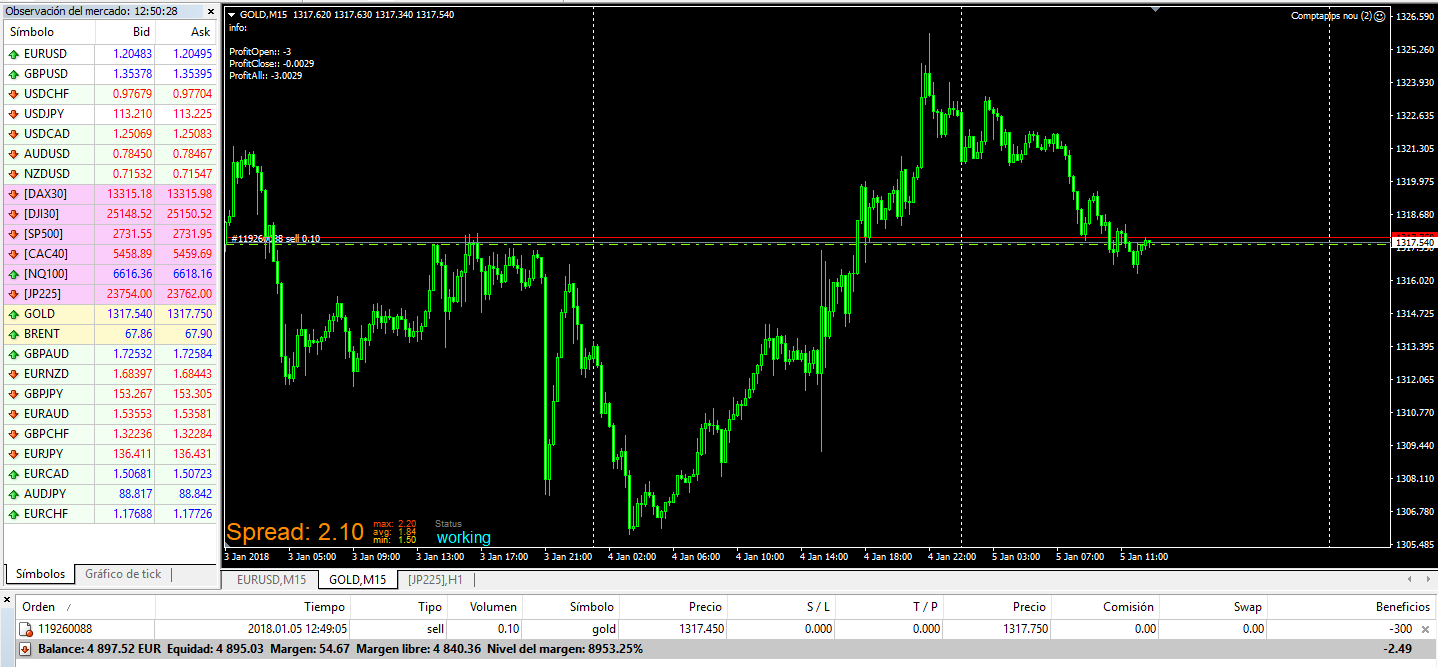
Now only one of the variables is correctly transformes, whereas the other two are clearly wrong.
Variables status:
a) Profitopen: Correct. -3 pips are open right now (correct transformation).
b) Profitclose: Wrong. The loss of 2.9 pips belonging to our previous trade are suddenly transformed into -0.0029. The correct result here should be -2.9, and not this one.
c) ProfitAll: Wrong. -3.0029 pips is a correct sum, but because of the wrong value of Profitclose, the final result is incorrect.
Tha trade is manually closed with a final loss of 1.8 pips. That means the total closed pips so far are -2.9 -1.8 = -4.7 pips.
Case 1. Forex, five digits. An EURUSD trade is open and appartently everything works perfectly.
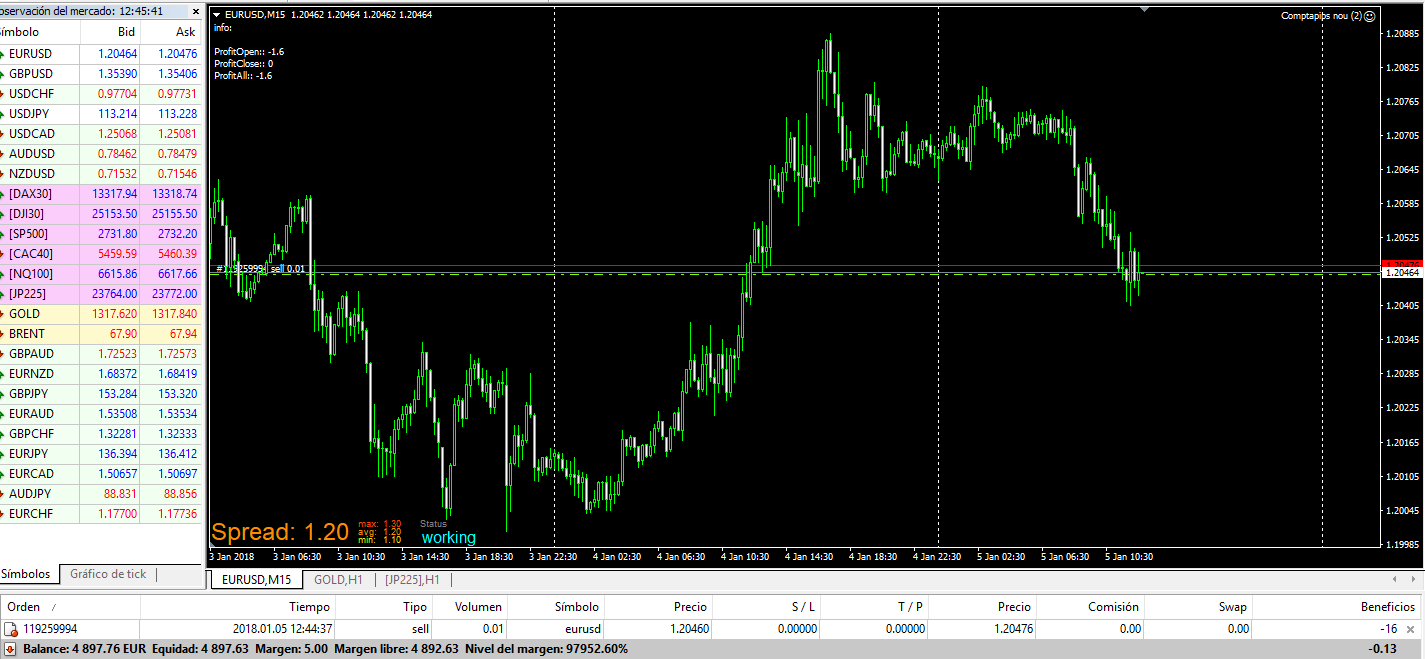
The two digits number showing the pips open right now is correctly transformed into real pips. In this example, the number 16 means 1.6 pips as is wished.
Variables status:
a) Profitopen: Correct. -1.6 pips are open right now.
b) Profitclose: Correct. 0 pips are closed so far.
c) ProfitAll: Correct. -1.6 pips are the overall result do far.
This trade is manually closed with a final result of -2.9 pips.
This is my example.
Bokerage: Admiral Markets.
Trades: Opened manually.
Conditions: The EA is running on a single chart and one only trade will be open. This way we will see how all three variables (open pips, closed pips and total pips) are calculated.
These are the point rules applicable (they have been customized).
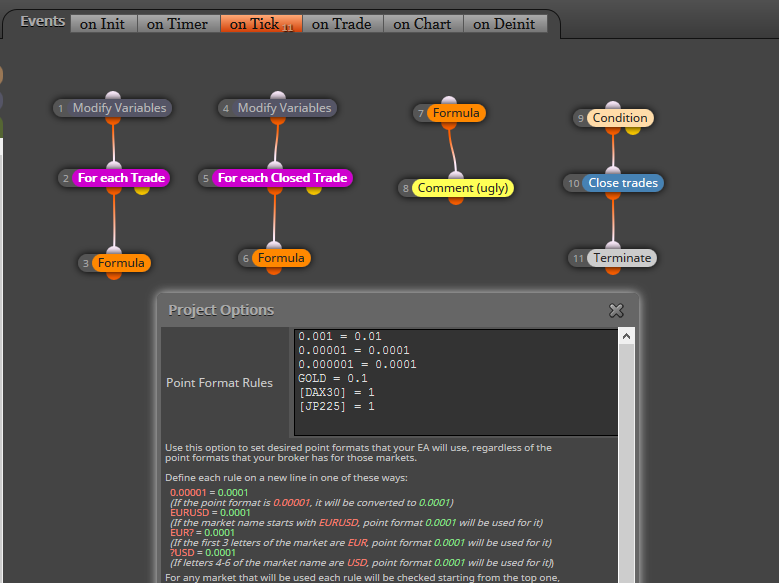
@fxdreema said in Project option's bug:
About the point rules, I found that if you write equal sides, for example 0.001 = 0.001, then this row disappears. This is probably intentional, but now I think it can be confused for someone that does not expect that. I checked different variants and it seems to work, but when one row disappears, I get confused with the row that was below it.
I don't know if this is a problem. I will show you where the problem by using a few screenshots. But firstly, let's begin with a simpler versions of the EA:
https://fxdreema.com/shared/f6DIpNNDc
This one is designed to do the basic thinhs I need.
I will upload the screenshots in the following messages.
@fxdreema said in Project option's bug:
You know, I think you want to just use that block "Check profit (period of time)". And why are you trying to work with pips, when it's easier to work with profits - the symbol doesn't matter.
I need to work with pips because that way I'll be able to manage different accounts regardless their balances and leverage. I want to introduce myself as a trader getting 200 pips per week, no matter your brokerage, leverage or deposit.
I can confirm there is a bug in the "Project Options" tab, specifically when you try to modify point format rules. I tried it with GBPJPY by using in my FXCM MT4 platform. According to the value by default, 0.001 = 0.01. Well, I tried it equals 0.1 and 1.0 but nothing changed.
For some reason I don't know the point format rules just work for some cases and not for others.
Unfortunately it cannot be backtested as designed to be used. I want to run the EA on different charts simultaneously so it cannot be backtested. It can when tested on single charts, but as I showed in my thread of the first message, then it works well. For some reason I don't understand, the combination of more than one chart makes it go crazy.
On the other hand the variable in block 3 is always initialized as 0. It is reinitialized as 0 once the target pip or the time period have been reached, whatever happens first. As you can see in this picture, it is correctly counting those pips belonging to the open trades:
http://i67.tinypic.com/2e3bw4j.png
But it works well just because there is this single chart. Problem arises when different ones are combined.
I tried it by using terminal variables, but the bug persists.
Interesting. I'll try it.
Thank you.
I am building an EA designed to close all open trades when any of the following conditions are met:
Whatever happens first must close all open trades and no new orders must be open until next week. This is what I have so far:
https://fxdreema.com/shared/37ik5l7ke
A problem rises when the indicators conditions are activated before the end of Friday's session. How can I skip all remaining time this week until next Monday? I'm not used to using time filter blocks and I'm stuck now.
Thank you in advance.
I found a bug when customizing some project options. Pip counting is wrong when combining different charts. All details can be seen at this thread:
Have taken a look at the "Project Options" of your EA? There you can choose/change the magic number. Choose a new one and try it again.
Hope it helps.