fxDreema

    • Register
    • Login
    • Search
    • Back to the main page
    • Categories
    • Recent
    • Tags
    • Popular
    • Search
    1. Home
    2. isp00rt
    3. Posts
    • Profile
    • Following 0
    • Followers 5
    • Topics 68
    • Posts 460
    • Best 9
    • Controversial 2
    • Groups 0

    Posts made by isp00rt

    • Understanding the "Indicator appear" block

      I want to use that block in my new EA but apparently I don't understand how it works. This is my code so far:

      https://fxdreema.com/shared/qAmLLKSCb

      And this is what I want it to do:

      1. I'm using the "superprofit" indicator. It shows a continuous line that changes from green to red depending on the trend. This means that when the red buffer appears the green one disappears and viceversa.

      2. There are two conditions required at a higher time frame before a trade can be opened. They are not relevant in this case.

      3. Once both conditions are met new conditions must be met at the current time frame and this is where this block is to be used. What I want is a new change of buffer colour after the higher time frame are met.

      Let me put an example. Conditions at the higher time frame indicate uptrend. What I want is that on the current time frame, when the superprofit changes from downtrend (red) to uptrend (green) that condition is then met, but not if the buffer right now is just that. So, if the higher time frame indicates uptrend but the superprofit indicator is green right now at the current time frame, I want it to become red first and then green again for the condition to be met.

      It doesn't work right now. I specify at blocks 24 and 25 which buffer I want it to appear, but apparently I'm missing something because no buffer change is detected and condition is considered as permanently met, no matter what the indicator is showing.

      Could someone please help me?

      posted in Questions & Answers
      isp00rt
      isp00rt
    • RE: Quick questions about 'Indicator rise' block

      Ok. Thank you.

      posted in Questions & Answers
      isp00rt
      isp00rt
    • Quick questions about 'Indicator rise' block

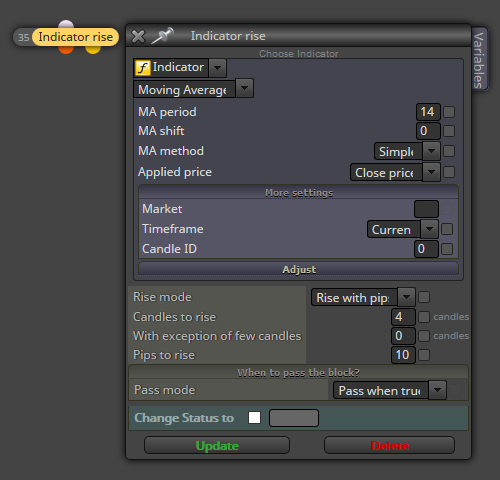
      I recently discovered the Indicator rise/fall block and I find it very interesting. Before trying it I woud like some additional info about how it works.

      0_1518596432733_01.png

      1. About the 'Rise mode' option. If I understand it correctly, when I choose 'Rise with pips' the condition for the block to pass is that the MINIMUM (not the exact) pips to be considered is the number inserted at 'Pips to rise'. Right?

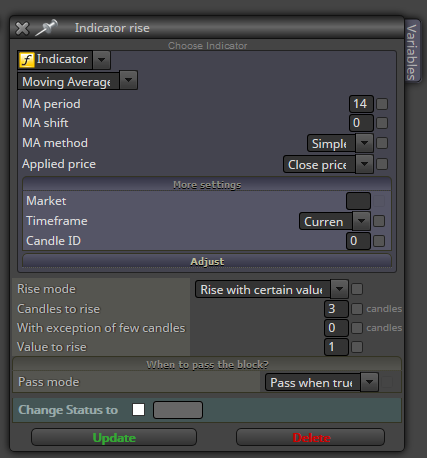
      2. Now if I choose the 'Rise with certain value' option then the MINIMUM (not the exact) value of the indicator to be considered will be the number at 'Value to rise'.

      Before the final question let me put an example. I choose that candle 0 and the previous 2 ones must be considered for the indicator to rise at least 1 unit. This is how the block should be configurated, right?

      0_1518596988988_02.png

      1. Now the final question about section 'When to pass the block?'. At the top of my EA there will be a 'Once per bar' block that will run it at the beginning or every bar. Then I guess I should choose the 'Pass mode' option 'Pass once when true'. That way I'll be sure that this block will pass if its condition is applicable at the beginning of every bar. Is that correct?

      Thank you very mych in advance.

      posted in Questions & Answers
      isp00rt
      isp00rt
    • RE: Help wanted, please!

      Now that my pipcounter EA works fine for single charts I want to implement its final step: doing it multichart. This is the group of blocks that will do it:

      https://fxdreema.com/shared/xTQsbKU4b

      And this is my final probelm found. Once solved it will be finally done!!! 😉 I don't know how the "terminal Variables" block work exactly. What I want is that all pips got from one chart (from open and closed trades) is added/substracted to the same terminal variable that is to be shared by all other charts. That way I will set a globat pip target that is to be achieved by all charts simultaneously.
      My current structure can count all pips on a single chart correctly, but I don't know why it doesn't communicate to other charts. Could someone please take a look on it to check what's is going wrong?

      Thank you very much in advance.

      posted in Questions & Answers
      isp00rt
      isp00rt
    • RE: Quick question about this trailing stop

      You're right. I followed the example and it works fine now. Thank you very much.

      posted in Questions & Answers
      isp00rt
      isp00rt
    • RE: trailing stop options is not generated correctly

      Those selected tick boxes are not intended to be included as variables at your final EA. Selecting them as they are at your screenshot means that they will be elegible to be optimized at backtesting.

      If you want to modify your trailing stop options you must create one or more variables and then insert them at the places where numbers are shown (100, 10, 40, etc.)

      posted in Questions & Answers
      isp00rt
      isp00rt
    • RE: Modify stops + Break even

      Hi again. I can confirm that the correct way to deal with the trailing stop is the one found at the help section.

      https://fxdreema.com/help/working-with/trailing-stop

      I followed it in my case and now it works fine.

      Hope it helps.

      posted in Questions & Answers
      isp00rt
      isp00rt
    • RE: Modify stops + Break even

      Hi again. Apparently I was wrong with my suggestion. I'm havig a similar problem with my trailing stop and this is not the solution. I'll be able to give you more info once I solve mine. Sorry.

      posted in Questions & Answers
      isp00rt
      isp00rt
    • RE: I Can't find this block

      Well, I saw a different name for that block. This is why I thought it was a different one. Once again, thank you very much for your help.

      posted in Questions & Answers
      isp00rt
      isp00rt
    • I Can't find this block

      I want to use some terminal variables and I need to initialize the. According to the help section here...

      https://fxdreema.com/help/working-with/terminal-variables

      ... there's a block that does exactly that, but I simply can't find it. Could someone please tell me where is it?

      posted in Questions & Answers
      isp00rt
      isp00rt
    • Quick question about this trailing stop

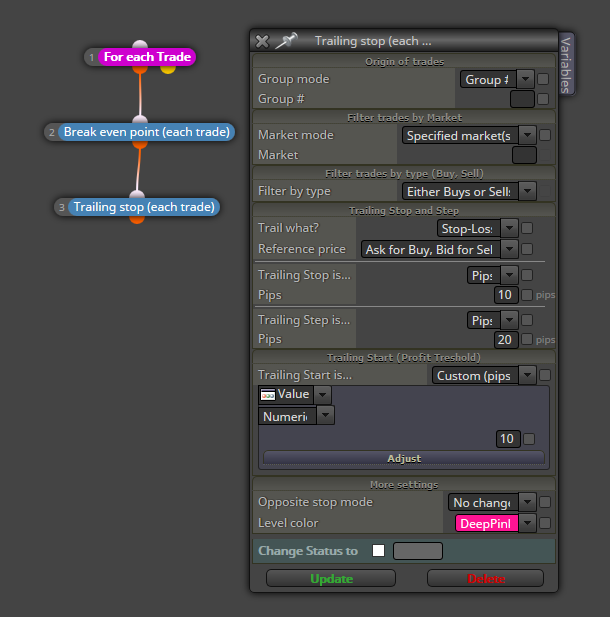
      This is part of an EA that must do the following:

      1. Move SL to break even once a fixed amount of profit pips is reached. This part is executed correctly.
      2. From that moment on every new 10 profit pips reached a trailing stop is activated so that it will move the SL 10 pips forward. Example: when 20 pips are reached move the SL from break even to 10 pips forward, when 30 pips are reached move the SL from 10 pips to 20 pips forward and so on. This is what it doesn't do.

      I guess I have a wrong configuration for that block. Could someone check it out, please?

      0_1518091704574_00.png

      posted in Questions & Answers
      isp00rt
      isp00rt
    • RE: Modify stops + Break even

      Connecting the "Break Even" block immediately below of "For each Trade" means that every tick the EA will be checking if what is specified is true, but you don't want that. You want it is checked after the opening, once the SL and TP have been updated if necessary. That means that it should be connectes immediately below of the "Modify Stop" block.

      That way the break even condition will not be active until the SL and TP have been previously checked.

      Hope it helps.

      posted in Questions & Answers
      isp00rt
      isp00rt
    • RE: Help wanted, please!

      Ok. I finally got it! This is what I had to do in order for it to work:

      1. Export the pip counter alone as a mq4 file. Then change it name.
      2. Import it to FxDreema with this new name.
      3. Copy the trade launcher blocks from another project within FxDreema.
      4. Then paste oll blocks to the new pip counter project.

      I don't know why, but now it works fine!!!! :). Obviously I deleted the wrong one forever. 😉

      posted in Questions & Answers
      isp00rt
      isp00rt
    • RE: Help wanted, please!

      It doesn't work for me :(. I erased all blocks and remade them from scratch, including all connection as you suggested. This is the "new" one:

      https://fxdreema.com/shared/Xt1wf9Ryc

      Nothing happens. Could you please tell me what MT4 build are you using? Mine is version 4.0, Build 1090. Tested at three different brokers. Could you also tell me what broker did you use to test it?

      posted in Questions & Answers
      isp00rt
      isp00rt
    • RE: How can I specify a distance between indicators?

      Ok. Thank you.

      posted in Questions & Answers
      isp00rt
      isp00rt
    • RE: How can I specify a distance between indicators?

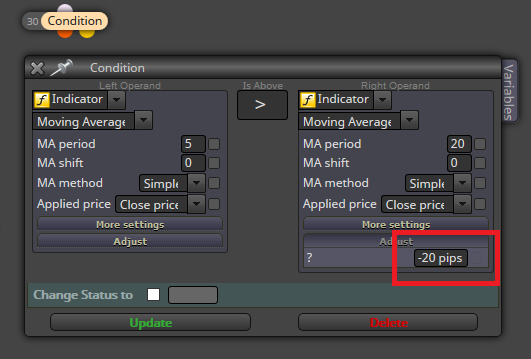
      I found this within the "Condition" block. Would it work?

      0_1517992658900_01.png

      In this example, the value of the second operand (the right MA) would be modified by susbtracting it 20 pips, if I understand it correctly. Is this how it works?

      posted in Questions & Answers
      isp00rt
      isp00rt
    • RE: Help wanted, please!

      I tried to do exactly what you did. I exported it, then I imported it again with a different name and reexported, but to no avail. Are you sure you didn't modify any block or element?

      posted in Questions & Answers
      isp00rt
      isp00rt
    • RE: How can I specify a distance between indicators?

      Great! Thank you very much 😉

      posted in Questions & Answers
      isp00rt
      isp00rt
    • How can I specify a distance between indicators?

      I want to create an EA in which the main condition is that a Moving Average must be AT LEAST 30 pips above/below another Moving Average. Which block should I use? I see that the "Condition" one can compare the value of indicators but apparently not distances.

      Any help?

      posted in Questions & Answers
      isp00rt
      isp00rt
    • RE: Help wanted, please!

      Are you sure? I tried it again at three different MT4 platforms and it doesn't work. 😞 Could you please tell me what problem did you identify in block 11?

      posted in Questions & Answers
      isp00rt
      isp00rt
    • 1
    • 2
    • 13
    • 14
    • 15
    • 16
    • 17
    • 22
    • 23
    • 15 / 23