fxDreema

    • Register
    • Login
    • Search
    • Back to the main page
    • Categories
    • Recent
    • Tags
    • Popular
    • Search
    1. Home
    2. isp00rt
    3. Posts
    • Profile
    • Following 0
    • Followers 5
    • Topics 68
    • Posts 460
    • Best 9
    • Controversial 2
    • Groups 0

    Posts made by isp00rt

    • RE: Questions about the 'Bucket of close trades' block.

      Ok. Thank you.

      posted in Questions & Answers
      isp00rt
      isp00rt
    • Questions about the 'Bucket of close trades' block.

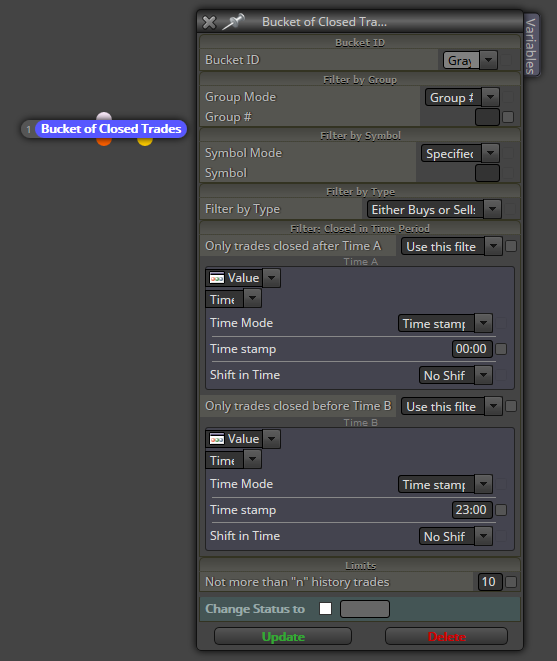
      I'm going to use the 'Bucket of close trades' block for the first time and I want to confirm I understand it correctly. This is want I want:

      1. I need to sum up all pips closed (positive and negative) today (only today).
      2. The overall result of that sum will be put into a variable that will be used for additional calculation for trades open today (only today).
      3. This bucket will be automatically emptied at the end of today so that there wil not be any closed trade tomorrow.

      Now let's take a close look to how I think this can be done:
      0_1530093234073_01.png

      And my questions are:

      1. Are filters correct? I want that all closed trades from 00:00 to 23:00 today are being considered.
      2. What does the 'Shift in time' option do?
      3. About the last parameter 'Limits', according to the additional info available it's the minimum number of closed trades to be put into the bucket. I guess I need it to be 1 because I want all closed trades today. Am I right?
      4. Will this configuration be automatically 'emptied' today at 24:00 so that not a single past closed trade will be put into the bucket tomorrow?
      posted in Questions & Answers
      isp00rt
      isp00rt
    • RE: help please

      Maybe you should share more info about what you want exactly 😉

      posted in Questions & Answers
      isp00rt
      isp00rt
    • RE: Possible bug at modifying variables

      Ok. Thanks.

      posted in Bug Reports
      isp00rt
      isp00rt
    • Possible bug at modifying variables

      I am testing these two blocks in order to show the value of a custom indicator at my chart:

      https://fxdreema.com/shared/VSISg3V3e

      Basically I want to see the value of that indicator at candle 1. Initially it runs smoothly, but after a few candles have passed it shows a weird number that has nothing to do with the indicator. The weirdest thing is that this number is exactly the numer of bars allowed at my MT4 platform! It's exactly that number.

      Could you please take a look at it?

      posted in Bug Reports
      isp00rt
      isp00rt
    • RE: Trader

      Put that result into a variable and then show it up through the block 'Comments (ugly)'.

      posted in Questions & Answers
      isp00rt
      isp00rt
    • RE: Silly question. Please don't laugh at me...

      Many interesting ideas to explore. Thank you all for them. I'll try them ;).

      posted in Questions & Answers
      isp00rt
      isp00rt
    • RE: Silly question. Please don't laugh at me...

      Interesting. Where can I find that file?

      posted in Questions & Answers
      isp00rt
      isp00rt
    • Silly question. Please don't laugh at me...

      I know it will sound weird, but I promise I need it. I would like to activate/deactivate the 'Autotrading' at the top menu of the MT4 platform. I'm designing an EA that should terminate after its target is reached but I don't want to use the block 'Terminate' because then I must run it again and I have to insert more than 20 manual variables (no kidding) :).

      It would be much easier if the EA is not terminated (so the variables are still active) but it cannot operate because the 'Autotrading' button is not on.

      Any hint? 😉

      posted in Questions & Answers
      isp00rt
      isp00rt
    • RE: COMPRA

      Then I have no idea what is happening, sorry.

      posted in Questions & Answers
      isp00rt
      isp00rt
    • RE: Condition Operator as Constant?

      I don't understand what do you want exactly. You can use your 'OrderPct' constant on the right side of the Condition block by choosing the option 'Value' at the upper display.

      posted in Questions & Answers
      isp00rt
      isp00rt
    • RE: COMPRA

      If I understand correctly you cannot apply for a year subscription for FxDreema. Right? If so probably there's a problem with your payment credit card / bank account.

      posted in Questions & Answers
      isp00rt
      isp00rt
    • RE: Quick question about this trailing stop

      Hi Cartujin,
      Firstly, thank you for your suggestion. However, I'm not sure having two different logic trees would solve it. Why separating them when both must be under a 'For each trade' Block? I'm afraid I don't understand the logic behind that. Could you please explain a bit more?

      posted in Questions & Answers
      isp00rt
      isp00rt
    • RE: News trading

      I don't think that is possible with FxDreema. How could you connect any 'news' source with your EA?

      posted in Questions & Answers
      isp00rt
      isp00rt
    • RE: Quick question about this trailing stop

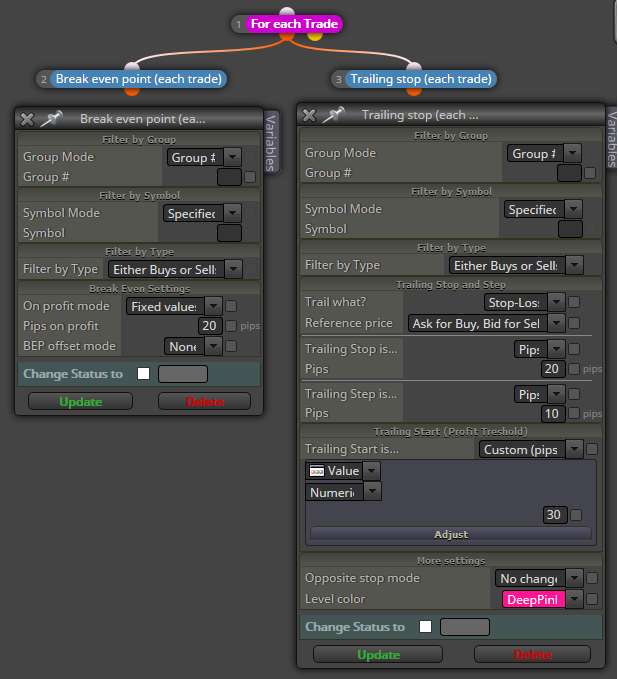
      I think that showing an image will be easier to explain my problem. This is what I want:

      1. Once the price reaches a profit of 20 pips, move SL to Break Even. Only then...
      2. Activate a trailing-stop so that every new 10 profit pips the SL also moves 10 pips forward. This means that the trailing-stop will begin to move only when a 30 pips profit has been acheived.

      This how I configured the blocks, but only point 1 works correctly.
      0_1528299355522_01.png

      Any hint why the trailing stop is not working?

      posted in Questions & Answers
      isp00rt
      isp00rt
    • RE: Quick question about this trailing stop

      I revisited this thread to check the solution suggested to my initial problem and it seems the example link by josecortesllobat is wrong: no trailing stop solution is included there. Could you please confirm it?

      posted in Questions & Answers
      isp00rt
      isp00rt
    • RE: Quick question about 'Send email' block

      I'll try. Thanks.

      posted in Questions & Answers
      isp00rt
      isp00rt
    • RE: Help, my EA does not open orders!!!!

      Pretty weird. Can you please show us your block structure?

      posted in Questions & Answers
      isp00rt
      isp00rt
    • RE: Use variables in buy now and other 'condition' nodes

      Have you created those variables at the 'Variables' tab of the builder? If so you must select them by right clicking on the SL/TP fields of the block.

      posted in Questions & Answers
      isp00rt
      isp00rt
    • RE: Quick question about 'Send email' block

      I got another unexpected problem. I don't know why but every time I try a test message to confirm emails can be send I get a message saying 'Mail: not enough space for Test Message' at the Experts tab. What is this space exactly? I confirmed all mail information (smtp server, login, etc.) works properly. I know it because it works well in another MT4 of the same broker but with a different demop account.

      posted in Questions & Answers
      isp00rt
      isp00rt
    • 1
    • 2
    • 11
    • 12
    • 13
    • 14
    • 15
    • 22
    • 23
    • 13 / 23