Sorry but what does 'in the wizard' mean?

Sorry but what does 'in the wizard' mean?
Could you please show your current block structure?
I designed a new structure and followed your suggestions. This is the new draft:
https://fxdreema.com/shared/pbesCYnipb
One problem is solved but a new one appeared. Look at this image:
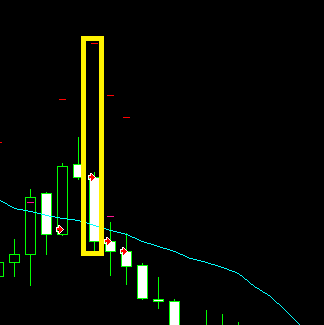
This is a series of 4 consecutive sell trades. The first one is the one whose open price and SL level are considered to condition all subsequent trades. Both levels are put into variables at blocks 26 and 27.
As you can see in the image, the second trade has incorrectly opened its SL level. That means block 34 has been ignored and block 29 has been activated instead of block 47. This situation didn't happen in my previous version. On the other hand, what was wrong in that previous version works correctly now. Apparently the problem simply swapped.
Any suggestion?
Interesting. Could you please share it here?
Just create a variable for it and assign it to each of your trades.
I tried the first way but there's a problem there. Pink blocks are designed to 'load' trade specific data, but not necessarily the one you want. This is specially annoying when opening many trades per chart.
I guess there must be a substantial difference between both blocks, but I can't see what.
I need to capture the opening price and stop loss levels from my trades. The only way I know in fxDreema is by using the (in loop) Trade/Order in loop option at the display. But recently I discovered it can also be taken by using the option (on trade) Event Data.
What's the difference between them?
It doesn't work.  I'm afraid I will have to add some custom code to fix it.
Thank you for your help.
Interesting. I'll try it. Thanks a lot.
I made a substantial modification following your suggestions and this is the new structure now:
https://fxdreema.com/shared/n5Mvu48b7
All issues have been solved except one and I would appreciate some help to fix it, please. Some Stop Loss levels are not correctly executed, but weirdly not all of them.
This is an image of what happens all the time:
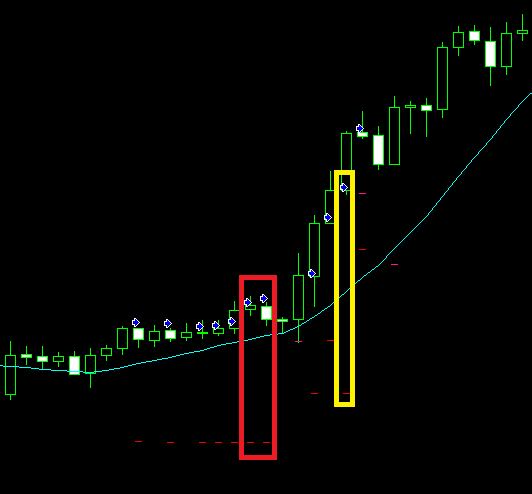
Here you can see two sequences of trades correctly executed: the first one is comprising the first 7 trades, then it touched SL and a second one of 4 additional ones was opened. So far so good.
Let's begin with the first one. Trades 1 to 5 have their SL correctly positioned. As trades 2 to 5 have an open price below the first one, block 46 is correctly executed and the SL level is the one of that trade. The problem comes when trades 6 and 7 are opened (highlighted in red at the image). As you can see there, the same SL level of the first trade is positioned when their open prices are above the original one. In this case, for a reason I don't understand block 33 does not works properly, block 28 is ignored and block 46 is wrongly applied again.
This same situation is found again on the second sequence. Trades 8, 9 and 11 are correctly executed, whereas at trade 10 (highlighted in yellow) is applied the same SL as trade 8.
Could you please tell me what I am missing?
Thank you very much in advance
I see both 'Buy now' blocks have 'How much...' and 'in pips' checkboxes selected. Deselect all of them and try again.
I recommend you try to optimize block's use. Fox emaple use just one 'Once per bar' and not two (blocks 2 and 14 on the left, blocks 15 and 27 on the right). Same with 'Close trades' (blocks 6 and 12). In this last case, both are configured to close buy AND sell, no matter what. If you don't want to do that, you shoud specify that block 5 should close buy trades only and block 11 sell trades.
Hope it helps.
And what's your exact problem? Does it close your trades partially or not?
Good points. I will check all of them. Thank you very much. 
This week an unexpected change has been made on the 'modify stops' block at its 'New Stop Loss/Take Profit mode' display when 'Custom pips' option is selected:
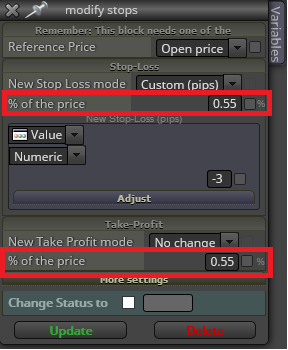
What does it mean and how does it work now?
Hi josecortesllobat,
Just curious. Why did you change that Group mode? I don't see the difference between your fisrt and second reply.
How are you defining which trade is the first one?
This is my most complex EA designed so far and it doesn't work as well as it should. This is why any help would be much appreciated. In general it works correctly but for reasons that I don't understand, weird things happen. Here it is:
https://fxdreema.com/shared/GKZsBDGArc
This is what it is intended to do:
An initiating bull/bear trend is identified by using a MA and MACD indicators.
Once identified a trade is open at every candle following that trend.
Stop loss level is programmed to do the following: a) Move to break even when some profit level has been reached, b) Move as trailing stop once above the break even price, c) Use the MA as a trailing stop from the following candle after the trade was open. All three option are active simultaneously so that whatever happens first the stop loss level is immediately moved.
Trade rules: a) The first one after the new trend is identified is opened at the custom stop loss level manually inserted at the initial EA's configuration. That stop loss level will be the one all following trades will be using. b) If the second or any subsequent trade is opened at a lower (bull trend) / higher (bear trend) price than the first one then the stop loss level used will be the existent right now as per point 3 above. c) If the second or any subsequent trade is opened at a higher (bull trend) / lower (bear trend) price than the first one then the stop loss level used will be the one manually inserted if breakeven or trailing stop have not been activated yet, otherwise the one existing right now.
All open trades are immediately closed at the end of the day.
And this is what doesn't do correctly:
Subsequent trades at a higher (bull trend) / lower (bear trend) price than the first one before the break even or trailing stop rules have been activated are opened at the wrong stop loss level of the first one. It is intended that they are applied its custom stop loss level.
When a trend has been finished and all open trades have been closed by the common stop loss, apparently that SL level is memorized somewhere an when a new trend in that same direction is identified later all new trades are opened using that same SL level no matter what.
Another weird thing is that from time to time when a trade is opened its SL level is modified during that same candle when that should never happen. All trades must have their SL level when opened and then it will be modified from the following candle onwards, never before that.
As in previous threads in this forum, thank you very much in advance.