Hey @roar thanks for your reply.
I had tried Run Blocks but that only executes blocks once - whereas activating the Button will run attached blocks whilst button is on (ie waiting for next conditions to be met)
But whilst I was redoing the example project to explain what I mean, I realised I haven't tried "Turn Blocks On"
So will give that a go once markets re-open next week.
Thanks again for your help mate 
J
Posts made by Jim67
-
RE: How to enable EA to Execute Buttonposted in Questions & Answers
-
How to enable EA to Execute Buttonposted in Questions & Answers
Hi all,
Could anyone help me with how to enable the EA to automatically execute a button without me clicking it.
I have a dashboard that has buttons that execute different functions.
Buttons work OK when I click them, but also want the EA to execute same function if certain conditions met without me having to to be in front of chart to click the button.Have tried several ways to "Change Status" to 1 but can't get anything to work.
Simple example project:
https://fxdreema.com/shared/rnXhazwyeClicking "Button" (Block 10) changes button to "Button ON" (Block 12) and executes conditions attached (eg Block 13)
Click "Button ON" (Block 15) turns button, and functions, off and returns button to "Button"How can get Block 30 to 34 to execute Block 10? ie if other conditions met, EA runs Block 10 etc
Obviously just a simple example - hope it makes sense.Appreciate any help.
Cheers,
Jim -
RE: All Blocks Resized + Lost All Connectionsposted in Bug Reports
Yes @Karlo1991 I agree, the problem still exists.
Blocks have gone blank, connections lost, constants and variables deleted again for me too.
Has happened 4-5 times in last few days - so far History has fixed it, so only lose a few blocks to restore.
Scary though, because before @fxDreema did his thing with the email logins to speed things up, once lost info, project was lost forever.
There is definitely a problem somewhere still, but I have faith that @fxDreema will find a solution soon
Until then, I suggest exporting mq5 file regularly as a back-up in case history doesn't resurrect lost info... -
RE: All Blocks Resized + Lost All Connectionsposted in Bug Reports
Well @fxDreema whatever you did has definitely sped things up - before, opening or saving block changes etc were literally taking 5-10secs per save - whereas now it's back to 1 sec or less.
So I think you nailed the problem my man, thanks again ️
️ -
RE: All Blocks Resized + Lost All Connectionsposted in Bug Reports
Many thanks @fxDreema

I had noticed it was slower than usual but thought it just my connection.
Hope this fixes it - it was driving me crazy.
You're a champion because I absolutely love using FxDreema
-
RE: All Blocks Resized + Lost All Connectionsposted in Bug Reports
And happened yet again....
Deleted project again and imported a different 200 block skeleton to start rebuild.
But it has happened again.
Changes from MT5 project to .mq4/ex4
All constants/variable gone.
All blocks blank and connections deleted.
4 times now.
Others have reported same crash problem - we all can't have the same project open twice.
Admin please help - FxDreema has become unusable in the last week yet I am doing nothing different to what I have been for 2 years ...??!! -
RE: Is Fxdreema being updated or something similar or BUG?posted in Bug Reports
I have posted same crash problem.
Was advised probably from having 2 instances of same project open BUT this is not the case.
One project, one tab. ... and like you, all constants and variables gone, tiny blank blocks and changed from MT5 created project to .mq4/ex4 without warning.
Sometimes history undoes the crash BUT it will happen again.
I am just hoping admin will look into this because others are having the same crash problem -
RE: All Blocks Resized + Lost All Connectionsposted in Bug Reports
Thanks fxdreema,
I did read that after the first time it happened.
Definitely only had one project open in one tab.
Changed browsers to Chrome.
After the first crash, I did Import Project mq5 file from last week as skeleton - changed the name and started rebuilding.
One project, one tab.
Dragged a Draw Shape block into project after over 20-25 new blocks and bang - all blocks went blank, resized to tiny, all connections deleted, all constants and variables gone. Tried History to undo - didn't work.
Maybe the Importing was the problem second time - but have done that for years to save time and never had a problem.
Think I'll just have to start again from scratch.
Let me know if you have any thoughts/theories because as you can appreciate, it's a lot of work to lose.
Thanks again for your reply.
Cheers,
Jim -
RE: All Blocks Resized + Lost All Connectionsposted in Bug Reports
Hey L'andorra,
Thanks for your reply mate - Was using Edge, have tried using Chrome but still same. All info lost.
I suppose I will rebuild from scratch and see if it happens again. 3 times so far. -
All Blocks Resized + Lost All Connectionsposted in Bug Reports
My whole EA suddenly resized all blocks. All connections deleted. Also Constants and Variables deleted.
This has happened three times now in 2 days.
Only one project open in one tab.
Today it happened when dragged "Draw Shape" into project.
Yesterday when it happened, MT5 project was changed to .mq4 and .ex4 at the top instead of MT5.
Have lost alot of work, Twice.
Could anyone tell me why is this happening and how can I fix it?
Many thanks,
Jim -
RE: Move SL to BE on TP2 once TP1 hitposted in Questions & Answers
Hey @jstap,
Many thanks for your informed reply.
Just using Position Closed and BE on Trade tab with All trades selected works fine. So simple.
Thanks again for your help, you're a champion.
Cheers mate,
Jim -
Move SL to BE on TP2 once TP1 hitposted in Questions & Answers
Hi All,
I have been trying to make a simple EA that will manage existing two positions with same SL but different targets (TP1 & TP2).So I open trades with different targets TP1 and TP2 but same entry and SL on each.
Then add EA to chart.
Once TP1 is hit, I want the remaining trade SL to be moved to BE.
See example project that does not work:
https://fxdreema.com/shared/3Q0qgbwIWhat am I doing wrong?
Any suggestions very welcomed.
Many thanks,
Jim -
RE: MT5 Modify Stops but leave Profit Unchangedposted in Questions & Answers
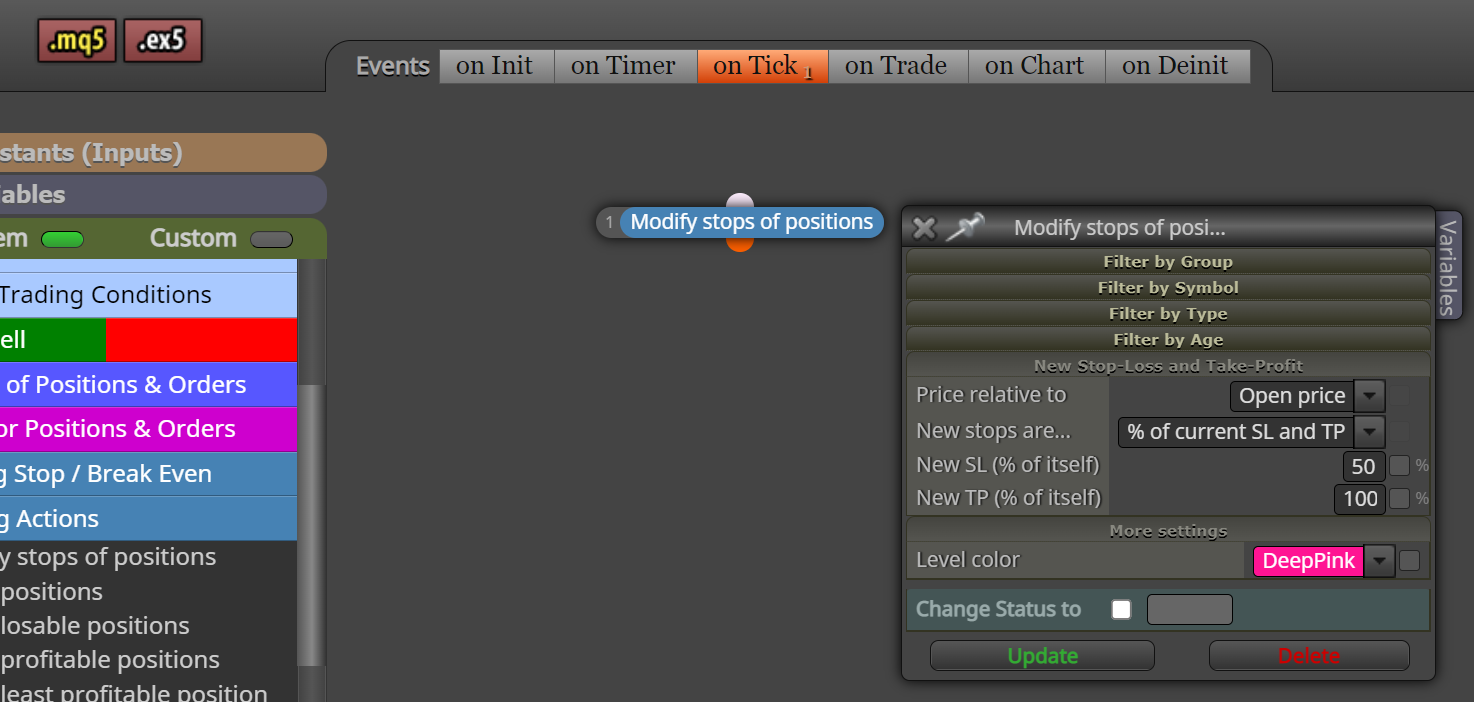
Hey @jstap Yeah that's MT4 - That's how I used to do it - but using MT5 there is no option for Profit Unchanged... I think 100% of itself will work, but wanted Custom SL Level and leave TP unchanged - looks like can have both Custom or both % of itself but not one Custom and one % of itself. Oh well ...
Thanks again Jstap -
RE: MT5 Modify Stops but leave Profit Unchangedposted in Questions & Answers
Hey @jstap That's my point - there doesn't seem to be any option for Unchanged in MT5 - there is if using MT4 EA...
I can't see it anyway .... Where is it? -
MT5 Modify Stops but leave Profit Unchangedposted in Questions & Answers
Hi All,
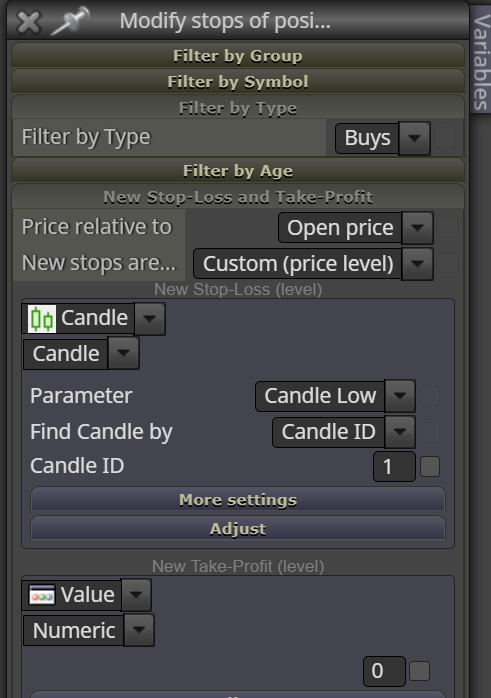
Using Modify Stops in MT5 EA, how do I leave Profit Level Unchanged?
MT4 used to have option to leave Profit Level Unchanged...
see below ...
Many thanks,
Jim -
RE: Trailing Stop not workingposted in Questions & Answers
@jstap Hey yeah of course - Thanks - so "% of opposite stop" is actually "% of TP" .... pretty daft really, because that means there's no option for TS be set as % of initial stop that you've set.
Cheers mate -
RE: Trailing Stop not workingposted in Questions & Answers
Hey @jstap Thanks for your reply - yeah got TP set as multiple of SL.
Thought the TS should work/move as set as "% of opposite stop"
Confusing why "opposite stop" though - why Opposite? shouldn't it just be "% of stop"
I dunno .... -
Trailing Stop not workingposted in Questions & Answers
Hi All,
I have an EA working fine but the Trailing Stop doesn't work.
The Break-even works but not the TS.
Any suggestions as to why?
Here is a copy of the offending blocks:
https://fxdreema.com/shared/xhAkIcPVd
Many thanks,
Jim