@PipTheRipper I have been trying to something similar. Can you please share your FxDreema blocks?
J
Posts made by jjtrader
-
RE: Max and miniumum stop loss / take profitposted in Questions & Answers
-
Comment on chart for TS or BE?posted in Questions & Answers
Is it possible to place a comment (text) on the chart by the closed trade to indicate how it was closed? For example, I would like to see which trades were closed by Trailing stop and break even.
I have tried a comment block, but it just appears in the corner and not by each trade.
I have tried the text block, but it doesn't appear.
Any ideas?
-
Close all trades and stop trading on daily profitposted in Questions & Answers
Hi, my goal is to:
- Track daily profit across all symbols.
- If the profit target is hit, close all trades and block new ones for the rest of the day.
- Automatically reset allowance to trade at the start of the next trading day.
I tried some suggestions from chat GPT but cannot get it to work.
[https://fxdreema.com/shared/x09Pkw0jb](link url)
Can anyone assist?
Thank you!
-
Save location for downloaded filesposted in Bug Reports
Hi, I'm not sure if this is a bug or something that changed in my settings. I used to be able to direct files to a certain folder when downloaded from Fxdreema. Now, they seem to go into the MQL\experts folder of one of my platforms. Since I am working with a couple, I have to go looking for the file each time. Another odd occurrence is the file automatically opens in Meta editor (?)
Again, I'm not sure if this is an FxDreema setting or browser setting... Any thoughts?
-
RE: Martingale for both buys and sells?posted in Questions & Answers
Thank you @jstap I will play around with it, but I don't fully understand your answer.
-
Martingale for both buys and sells?posted in Questions & Answers
Hello, is it possible to configure the martingale box to simply increase lot size after every loss regardless of buys or sells?
When I use the martingale configuration, it only tracks buys with buys and sells with sells. I would like it to increase the lot size of the next trade for either buys or sells after a loss.
Here is what I have so far https://fxdreema.com/shared/nrOPYPnwc
Thank you
-
Trigger buy or sell on "Indicator Appear"posted in Questions & Answers
Hi, I have an indicator that works well for me, but I can't get it to trigger a buy/sell when the color change occurs.
I use the buffers to code for either red or green as a filter, but I want to use the change in color. I can use the Indicator Appear block to draw lines when the change occurs, but when I try to use the same block to trigger trades - no trades occur.
Here are my attempts:
Draw lines on color change: https://fxdreema.com/shared/Eb0I78NY - Works fine
Trade on color change: https://fxdreema.com/shared/tUZHMs2vc - Not working, no lines or trades
Regular filter for overall trend (color) https://fxdreema.com/shared/LqU5pk4Ac - works fine
I have been strgguling with this for a long while, any help or suggestions would be appreciated!
-
RE: Trying to calculate the distance in pips between Candle Open and MAposted in Questions & Answers
The variable unit can then be set for SL=1 times, TP1=1 times, TP2= 2 times, etc. or different risk to reward strategies.
-
RE: Trying to calculate the distance in pips between Candle Open and MAposted in Questions & Answers
Hi Roar, thank you for responding. I am trying to calculate a variable to use for the SL and TP. The distance in pips for each trade (candle open and indicator buffer level) is going to be different and I want the program to calculate it automatically. It seems like it should have worked for the "modify variable" block, but it doesn't (?)
-
Trying to calculate the distance in pips between Candle Open and MAposted in Questions & Answers
Hi, I have scoured the discussion board and tried a few options but I am still nor able to make this work.
Goal calculate the distance from candle open to an indicator buffer. (e.g. ma) Then use this number in pips for the SL and TP.
Here is what I have tried so far... https://fxdreema.com/shared/dQw7u0JCc
Can anyone help me fix it? Thank you!
-
RE: Help with take profit options needed...posted in Questions & Answers
Can you share a link to an example of this? Thank you.
-
RE: My Indicator generates compliation errorsposted in Questions & Answers
@PedroG can you share your project link? I have been having an awful time trying to configure Chandelier.
-
RE: There must be a way to work with FIFO rules.posted in Questions & Answers
@rgoo Thank you RGoo! This us very helpful.
-
RE: There must be a way to work with FIFO rules.posted in Questions & Answers
@l-andorrà Thank you for your response. Can you please provide a link to an example of this? "Groups" are confusing to me.
Thanks again!
-
RE: There must be a way to work with FIFO rules.posted in Questions & Answers
@rgoo Thanks! The whole "Group" concept confuses me, so showing me the through the link helps a lot!
Which example would you suggest would work better? Number 1 (2 trades both off the spread check block) or number 2 (trade 1 and trade 2 piggyback in line off the spread check block)?
Thanks again! I really appreciate your time.
JJ
-
There must be a way to work with FIFO rules.posted in Questions & Answers
Hello,
I am trying to figure out how to get my EA to work with FIFO rules. I spent a lot of time developing an EA that works great in Demo accounts but will not run properly in Live accounts. (US broker) What I want is to take 2 trades and have the first trade close on TP and the second trade run until my exit kicks in. But in my Live account, It takes 2 trades BOTH with no TP....
Previous forum suggestions:
- Use different lot sizes
- Use the pink blocks
I have tried both these suggestions but still can't get it. I have even tried to program a partial close of one trade, but that isn't working either. Can someone please take a look and see what I'm doing wrong?
https://fxdreema.com/shared/L4JJxi15d
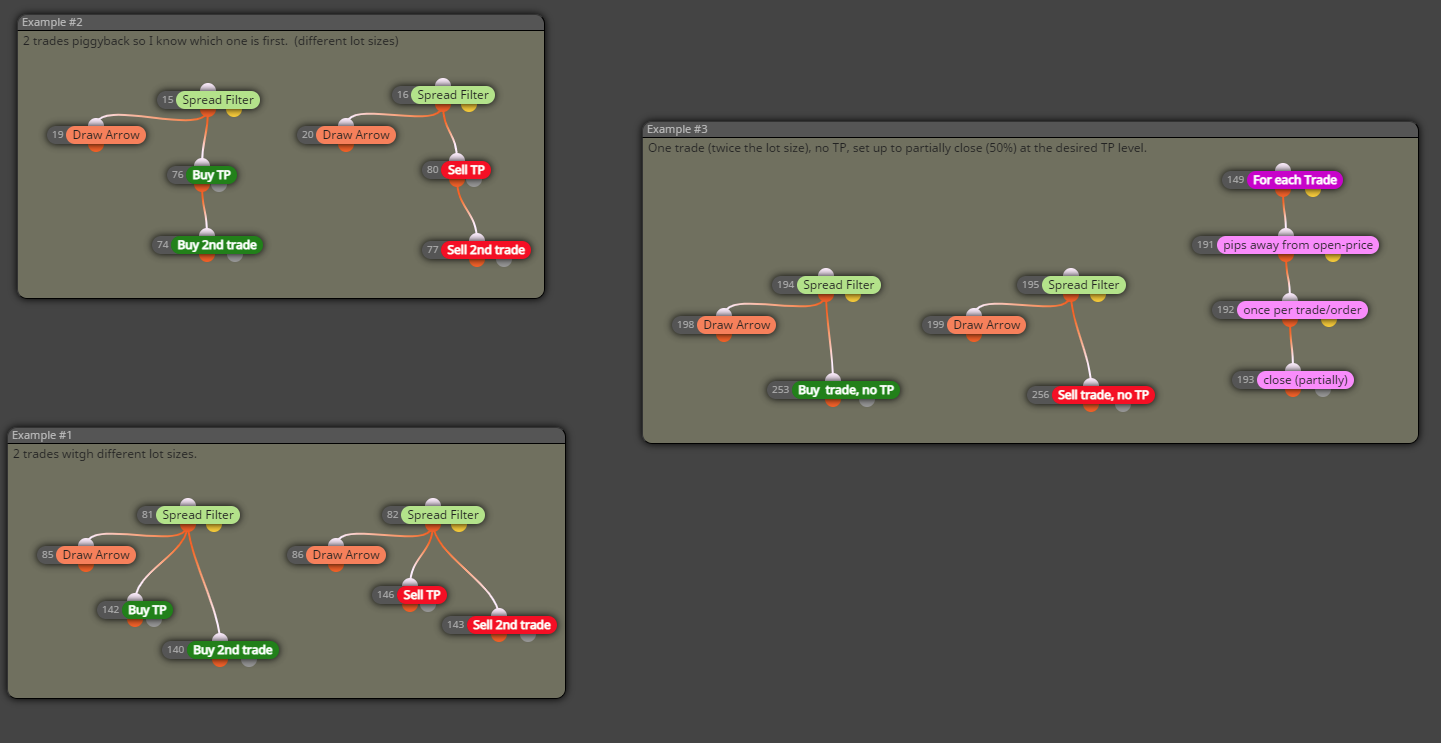
Thank you!
PS - excerpt from broker support email
"Thanks for your email. Please note that per the US regulations you are not allowed to have multiple stops or take profit levels for an FX pair even if you have placed separate multiple trades. It is due to the FIFO closure rule which requires you to close the oldest position on the FX pair before you are able to close a newer position on the same trade. If your EA can take that into account while placing multiple trades on the same FX pair then it would be possible to trade."
-
RE: Filter to wait 1 bar after a trade has closed before opening a new trade?posted in Questions & Answers
@biztet Hi! Thank you for your suggestion. I thought about that, but I don't want to delay all entries, only those triggered right after a previous close.
Thanks for the suggestion though

-
RE: Filter to wait 1 bar after a trade has closed before opening a new trade?posted in Questions & Answers
@l-andorrà Thanks! I will try this setting the time to be equal to the chart timeframe. (so it = 1 bar). I was just hoping to be able to use "# bars" rather than time since I work with Renko charts as well and they are not time based.
Thanks again, I always appreciate your help.
JJ
-
Filter to wait 1 bar after a trade has closed before opening a new trade?posted in Questions & Answers
Hello,
I have several conditions in my EA and one of them is a simple MA cross. My problem is that sometimes when the price straddles the MA, I have a lot of bad trades. Can I create a filter to wait at least 1 bar before opening a new trade after another trade has closed on the same pair?
I have searched around and see time filters (e.g. wait x minutes) but none based on current bar time. Here is a simple project - can anyone suggest an additional block or custom code as a solution?
https://fxdreema.com/shared/7svbKLf1d
Thank you so much you smart people!
#skipabar