@jstap Thank you!
J
Posts made by jjtrader
-
RE: Strength Meterposted in General Discussions
@jstap said in Strength Meter:
@pais Your indicator link doesn't work, upload the file on here directly, is buffer 2 a price level? if not you cannot compare candle close, you cannot compare text to a numeric value, 80% of what? don't think you can use % in this way.
I would also like to know more details about how to make this work.
Download page for indicator: https://www.best-metatrader-indicators.com/ultimate-pro-scalper/
If possible, please provide step b step instructions for the custom code required and the variables. Thank you!!!
-
RE: Read Information from a custom dashboard indicator?posted in Questions & Answers
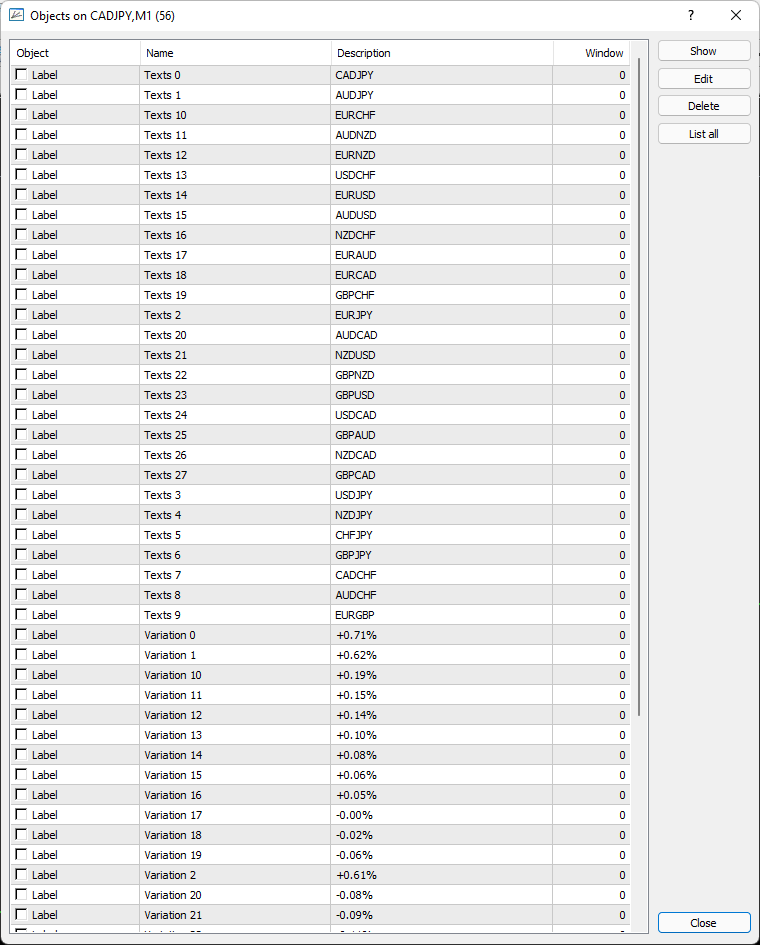
@jstap PS - here is a screenshot of the objects list on my chart.
-
RE: Read Information from a custom dashboard indicator?posted in Questions & Answers
@jstap Thank you! I have identified the objects in the table. But, the order switches around depending on the trend strength. Please see this example...
https://fxdreema.com/shared/Fhw5QQx9d
I am just trying to get it to draw a line when the conditions are met to test. - Not working

Here is a screenshot of the indicator and the indicator file is attached. My goal is to set up a filter and only trade the top pair listed for buys and the bottom air listed for sells.
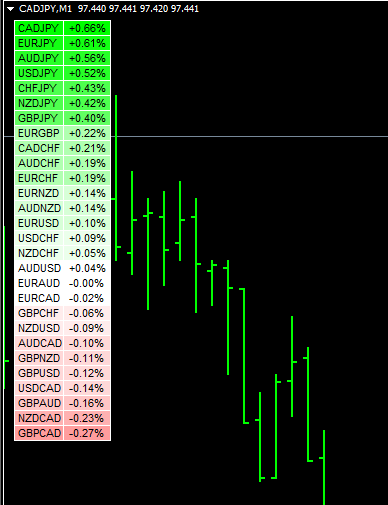
Any advise would be appreciated!
-
Read Information from a custom dashboard indicator?posted in Questions & Answers
Hi,
I am trying to determine if I upload a custom indicator that produces a dashboard on the chart, can I configure an EA to read results from the indicator to use as a condition. Not sure what to enter (no buffers).
Any advice?
Thanks!
-
RE: Delay Exit indicator close?posted in Questions & Answers
Thank you I will give that a try. This sounds like it will work well for regular candles with timeframes. It would be nice if there was a way to use a condition for total number of candles (similar to "Bulls" or "Bears" in a row) in either direction to work with Renko.
Thanks agian! You are always so helpful!
-
Delay Exit indicator close?posted in Questions & Answers
Hello,
I use an exit indicator to close trades. Because my entry may not align with the exit indicator properties, I only want the exit to be active after the trade has been running for a while (e.g. 2 candles). What I have found is if the trade opens and the exit indicator is not aligned, it immediately closes the trade.
Is there a way to do this?
https://fxdreema.com/shared/pWYS9qI3e
I am using Renko bricks rather than candles if that makes a difference.
Thanks!
-
RE: How To Use My EA's Name As Comment.posted in Questions & Answers
@lanrayy said in How To Use My EA's Name As Comment.:
@ajmd97fx said in How To Use My EA's Name As Comment.:
@lanrayy hola, puedes crear una constante que incluya el nombre que quieres poner

después lo asignas en el campo comentario de la apertura del trade

también puedes crear diferentes variables que tomen diferentes tipos de datos, por ejemplo el TF o cuantos Buy hay abiertos actualmente y lo sumas todo con la función "stringconcatenate" por ejemplo


Thank you so much @ajmd97fx I really appreciate your detail explanation.
Can anyone please explain this in English? I only need to know how to capture the EA name in the comment box
 Gracias!
 -
RE: How to Put Comments in very tradeposted in Questions & Answers
@l-andorrà This is perfect for adding comments to when trades are opened. Is it possible to include comments like this for the close of trades? E.g. "Closed by SL", "Closed by exit criteria", etc.?
I don't see a space for comment in the Close trades box.
-
RE: trade comment and comments on chart (two questions)posted in Questions & Answers
@piptheripper Can you share how you solved problem #1? I am tryin to do the same thing. Thank you!
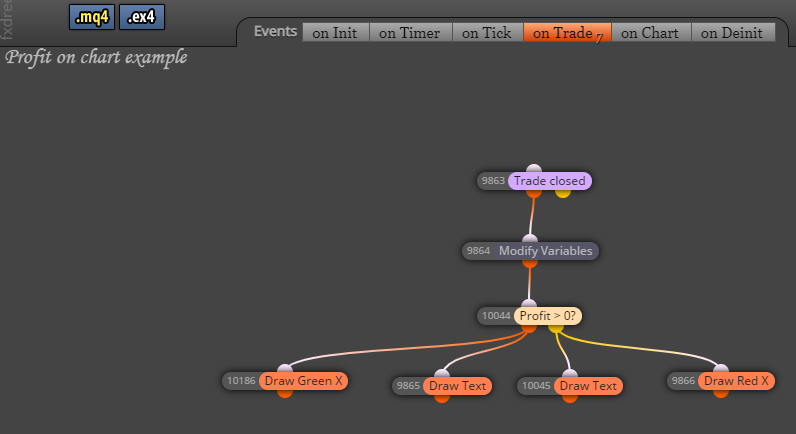
Also, here is a example of how I accomplish problem #2. I put this in the "on Trade" tab.
0_1641397454506_4324705d-a0dd-4f80-8055-dd8322f592c9-0104 BBflat KC Renko TP1 runners .mq4
-
RE: Breakeven occurs inconsistently...?posted in Questions & Answers
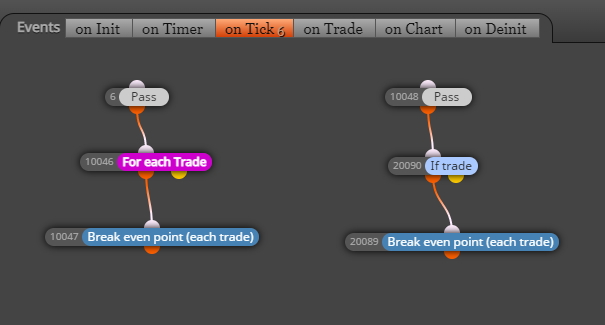
Hi @jstap thanks for your suggestion. So just to confirm, I should move the "If trade" and "Break even point" out from under the "Pass"? I will try that! Having it under the pass (like my picture above) worked sometimes but not all the time.
Fingers crossed
Thanks again! -
Breakeven occurs inconsistently...?posted in Questions & Answers
Hi there,
Move stop loss to breakeven should be a fairly straight forward concept, but I am not getting consistent results. Sometimes it works and sometimes it doesn't. No idea why.
Here are 2 different ways i have tried to configure it. Neither work consistently. Can someone please advise how to change the code?
Link to example https://fxdreema.com/shared/uCwwYVbhe
Thank you!
-
RE: Setting the SL to break even once the price goes 1X the ATR in your favorposted in Questions & Answers
@DiGru Can you share a link to what worked for you? I am trying to do the same thing. Thanks!
-
RE: How to record profit (pips) on chart for each closed trade?posted in Questions & Answers
Thank you so much @l-andorrà it worked like a charm! Now if only I could figure out how to put a shading behind the text to make it more readable on the chart
-
How to record profit (pips) on chart for each closed trade?posted in Questions & Answers
I would like display on the chart the profit or loss in pips for each closed trade.
I would like the message to appear near the candle close at the time the trade is closed and remain on the chart so I can scroll back and review for all closed trades.
I have tried a couple of methods, but none have worked in my mt4 strategy tester. https://fxdreema.com/shared/5CZrPpvve
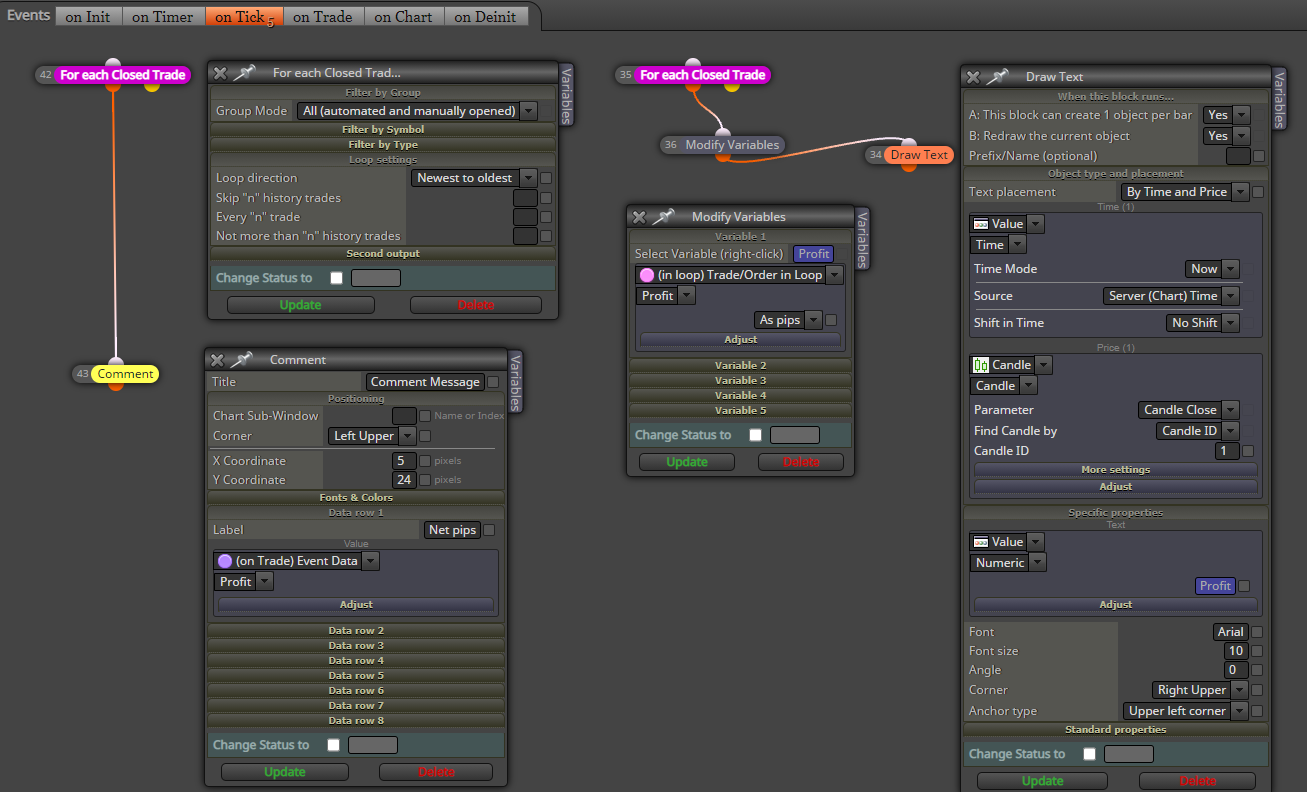
Any guidance? Am I close with either of these methods?
THANKS!
-
RE: How to Put Comments in very tradeposted in Questions & Answers
@l-andorrà Where exactly do we "activate the 'comment' tab? Thanks!
-
Set Break Even to % of Stop Lossposted in Questions & Answers
Hi, I have a break even problem.
I am taking 2 trades:
My Take profit 1 = 1 ATR (variable)
My Take profit 1 = 2 ATR (variable)
My Stop loss = 1.5 ATR (variable)I am trying to set my break even point for the second trade close to my first take profit. (1 ATR).
https://fxdreema.com/shared/5n7Zv68tb
Since the take profit is different for each trade, I am using the stop loss as a reference. I figured that 1 ATR = approx. 66% of the stop loss (2 ATR). It doesn't seem to work and I'm not sure I have it configured correctly.
Can anyone tell me what I'm doing wrong?
Thank you!
-
RE: BOSS system with NNFX TP, SL, TL and ATR Limitsposted in Tutorials by Users
@mateus_f said in BOSS system with NNFX TP, SL, TL and ATR Limits:
good morning my nobleman .. It was only difficult to test because the indicators did not come together .. and also do not have their names in each condition so we can search for them and assemble ...
This looks quite impressive! But I agree, it is almost impossible to figure out where everything goes. I know it would be a pain, but can you consider changing the title of each block to indicate the name of each indicator or command?
-
RE: Does your fxDreeema work properly for both Live and Demo accounts?posted in General Discussions
@drayzen I know it has been a long time since you had this issue. Did you come up with a solution? I am having the same problem.
-
RE: Urgent - Checking profit on the operation does not work in real account, only works in demo account.posted in Bug Reports
@fabiobioware I am having the problem. My EA works great in a demo account but doesn't open or manage trades in a real account. Did you ever find a solution?