fxDreema

    • Register
    • Login
    • Search
    • Back to the main page
    • Categories
    • Recent
    • Tags
    • Popular
    • Search
    1. Home
    2. Julianrob
    3. Posts
    • Profile
    • Following 2
    • Followers 10
    • Topics 22
    • Posts 86
    • Best 8
    • Controversial 1
    • Groups 0

    Posts made by Julianrob

    • RE: How to close trade on moving average crossover? Or moving average direction change?

      No, jstap,

      Sorry to say it but I created this test EA, very simple. I still have the same errors:

      https://fxdreema.com/shared/1GK404ATc

      MA-cross-error-closing-trades.jpg

      I would highly appreciate anyone that can solve this issue. And why in the error log, so many decimal places for the EURJPY? Also I notice when I use default project rule settings, it doesn't work properly with my broker on YEN pairs. I have to modify the rules to ?JPY = 0.01 every time.
      @fxDreema your help is much appreciated, thankyou

      posted in Questions & Answers
      Julianrob
      Julianrob
    • RE: Profitable EA after years of work. What major factors made the difference?

      Yes, I'm doing demo forward testing now and it's profitable. Need to test longer term tho

      posted in General Discussions
      Julianrob
      Julianrob
    • RE: How to close trade on moving average crossover? Or moving average direction change?

      Yeah, thanks jstap.

      I tried everything! I tried removing the pink blocks 'for each trade'. I tried using blocks 'if trade', still no success. And I tried just having the condition, Then linked the close trade command. I'm still getting the same errors in the backtester. For some reason it just doesn't like the MA crossover condition for closing the trade.

      Can you please suggest any other option to get this working?

      posted in Questions & Answers
      Julianrob
      Julianrob
    • Profitable EA after years of work. What major factors made the difference?

      Hi there

      After a long time testing and refining strategies, I have deved a strategy using FXDreema that performs well, but only on EURJPY and USDJPY.

      The strategy is a simple moving average set of conditions. The stops and profit targets are ATR based. I know if I could use more a moving average based profit target it could be even more consistently profitable so I'm working on this. The biggest improvement to happen to my EA is by using Strategy Quant EA Analyzer. In this program it can show me all sorts of amazing insights into when and how the robot is performing well. For example, trading only between certain hours each day, certain days of the week, months of the year and maybe long or short only, so I've added these conditions as input variables. It is very much possible to filter out consistently losing hours of the day, for example session time starting or ending when markets turn, and makes a HUGE difference in performance. Just look at the profitability by each hour of the day:
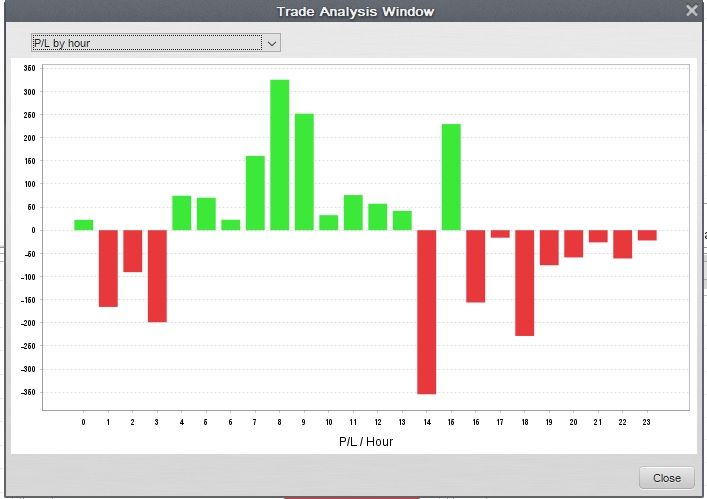
      PL-By-Hour.jpg

      Now, based on that graph, you would know exactly what hours to only trade in, right?
      I know I can get it to be even more consistent with more work. Below is my 99% accurate backtest result for the past 4 years on EURJPY, over 1,200 trades, trading 0.10 lots on each trade (Linear growth). I know it's not jaw dropping returns at the moment but it's a step in the right direction. I'm more concerned with consistency.
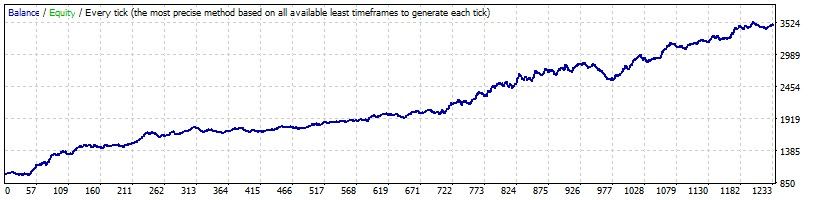
      EURJPY-2020-2023-Optimized2.jpg

      Interesting stats:
      Bars in test 451635 Ticks modelled 416983727 Modelling quality 99%
      Mismatched charts errors 0
      Initial deposit 1000.00 Spread 15
      Total net profit 2487.58 Gross profit 9771.72 Gross loss -7284.14
      Profit factor 1.34 Expected payoff 2.02
      Absolute drawdown 22.37 Maximal drawdown 321.04 (11.16%) Relative drawdown 11.16% (321.04)
      Total trades 1231 Short positions (won %) 561 (47.42%) Long positions (won %) 670 (46.12%)
      Profit trades (% of total) 575 (46.71%) Loss trades (% of total) 656 (53.29%)
      Largest profit trade 73.56 loss trade -40.11
      Average profit trade 16.99 loss trade -11.10
      Maximum consecutive wins (profit in money) 8 (98.45) consecutive losses (loss in money) 11 (-161.98)
      Maximal consecutive profit (count of wins) 182.11 (6) consecutive loss (count of losses) -161.98 (11)
      Average consecutive wins 2 consecutive losses 2

      SQ gives it a 'stability' rating of 92%, meaning it's fairly consistent.
      I am currently forward testing on demo with promising looking results. I would also be keen to see if I can filter out even more losing trades by stopping trading during high impact news event times. But I need to research their effects first. Happy to update this thread as and when more detail comes in.
      posted in General Discussions
      Julianrob
      Julianrob
    • How to close trade on moving average crossover? Or moving average direction change?

      Hi,

      I've read similar posts but I'm not able to get it working. How do I close an open trade if the moving averages crossover? Or, if a moving average changes direction?

      I've got 'for each trade' (buy), condition MA crossover, close buy trade, and the reciprocal for sell trades.

      In backtest I'm getting journal errors: Invalid price parameter for trade function (4107)

      Here is my code:
      http://fxdreema.com/shared/zNXAextC

      Any help would be appreciated, thanks!

      posted in Questions & Answers
      Julianrob
      Julianrob
    • Lot size and pip/points value issue

      Hi,

      I am using this simple strategy. I have used 'Lots' for the input setting. When I change the value for lots to 0.01 in the MT4 tester, for some reason it keeps trading with 0.10 lots. This seems to be happening with all pairs in the tester.

      I have tried everything and it's not trading micro lots. Also there is something strange going on with the backtest here on USDJPY pair. The BUY trades quote a price with 5 decimal places, the sell trades quote the pair with only 3 decimal places. It's buggered up the points/pips value settings. Is this an issue with my Strategy Quant data from Dukascopy, or is this an issue with the FXD builder? Can you please check?
      My link: http://fxdreema.com/shared/xnz79BEde
      96bbd30c-1784-4796-857c-ec48096c0973-image.png

      posted in Bug Reports
      Julianrob
      Julianrob
    • If current time/day/month is between March and October, How to do this?

      Hi there.

      I would like to compensate for the shift in trading due to daylight savings time. I would like to know, if the current time/day/month is between March and October, then trade certain conditions.

      Please, how can I do this?

      I've tried using a conditional block, 'market properties', 'time (current), server time is >= value, time, components, (source) server chart time, then the inputs for the day number and month number. Then another conditional block of the same type if current time is less than or equal to October. But it's not working.

      Here's my project: https://fxdreema.com/shared/actWMGffe
      I know it looks messy, I've got a few spare unused blocks sitting on the right. Any help would be appreciated thanks!

      posted in Questions & Answers
      Julianrob
      Julianrob
    • RE: Commands don't work on all pairs, only some?

      @jstap Thankyou so much. That looks like it fixed the issue 🙂

      posted in Questions & Answers
      Julianrob
      Julianrob
    • Commands don't work on all pairs, only some?

      Hi there,

      I have a basic robot that's designed to oversee another EA and manage all stoplosses to ensure they are maximum 150 pips.
      It works really well on most pairs on my live account, except for AUDJPY and CADJPY on my vps server. I can't figure out why it's not working on those two pairs. I have loaded it on my local computer and tested it on demo account with both CADJPY and AUDJPY and strangely it works perfectly. Can someone please tell me what the issue is and how to fix? Maybe this post should be in bug fixes category.

      Here is a link to the program:
      https://fxdreema.com/shared/8crqdXBwe

      Update an hour later: The CADJPY and AUDJPY pairs work to reduce SL to 150 pips as requested, but only on BUY trades, not SELL trades. Some sort of glitch ? How shall I fix that?

      Thanks in advance!

      posted in Questions & Answers
      Julianrob
      Julianrob
    • RE: Modify stops of trades - Modify SL only, leave TP?

      @jstap Thanks for your help.
      I just discovered the solution. I need to use "modify stops" under "Loop for trades and orders" tab. This gives the option to leave the TP unchanged

      posted in Questions & Answers
      Julianrob
      Julianrob
    • RE: Modify stops of trades - Modify SL only, leave TP?

      @jstap said in Modify stops of trades - Modify SL only, leave TP?:

      value for when you want to move

      Thanks jstap.

      But I'm creating a managing robot which will oversee other trading robots. Therefore I can't directly nominate exact TP's on those trades

      posted in Questions & Answers
      Julianrob
      Julianrob
    • Modify stops of trades - Modify SL only, leave TP?

      Hi there

      When I use "modify stops of trades" function, I want it to move SL's on any open trades to a maximum 100 pips. I have set up an EA to do this. In the "New Stop-loss" field I have "MaxstoplossPips" input set as 100 pips say. In "New Take-Profit" field I've left blank (As I already have TP's set on trades). When I leave New Takeprofit field blank (AS in do not change TP's) When I run this ea it sets max SL's to 100 pips, great. But it deletes all TP's. How can I get it to leave existing TP's where they are? Thanks in advance!

      posted in Questions & Answers modify stops of
      Julianrob
      Julianrob
    • RE: How to have specified stop moves

      @jstap Thanks so much for your help. Did this flow but unfortunately the stops are not moving at all. I'll keep trying

      posted in Questions & Answers
      Julianrob
      Julianrob
    • How to have specified stop moves

      Hello,

      I am creating a trade manager EA. In this instance, all I'd like it to do is see all manual trades I've opened. Once any trade moves 20 pips profit, set as an input, move SL to 3 pips profit (set as input).

      1. Once any trade moves 30 pips in profit, move stop loss to 12 pips profit

      2. Once any trade moves 50 pips in profit, move stop loss to 30 pips profit.

      I have these 3 stop levels programed in the inputs as 3 separate stop moves. Please, how shall I set this flow to work? I have tried various flow structures but it always moves the SL to the breakeven level of 3 pips, even when more that 50 pips profit. Please assist

      Here is my current project flow chart

      Thankyou in advance

      posted in Questions & Answers
      Julianrob
      Julianrob
    • Problems with lot size inputs

      Hello there,

      With a trading robot I have written, I set lots as a fixed volume for a pending order and set as an input and double value is 0.1, however on XAUUSD it always sets the trade at 1.0 standard lot fixed, regardless how the lots variable is set. Please can you help? Thankyou in advance. Julian

      Code here

      posted in Questions & Answers
      Julianrob
      Julianrob
    • RE: Stop trailing stop from running at 3 pips profit?

      Hi,

      I just did extensive backtesting. It appears the +Adjust pips is working. However not exact number of pips, i.e lock in 3 pips, it sometimes does 4.5 or 4.9 or something, even with 0.1 trailing step. I wonder if the backtest skipped a few pips on the news breakout and was simulating slippage. Anyhow will see how it goes moving forward

      posted in Questions & Answers
      Julianrob
      Julianrob
    • RE: Stop trailing stop from running at 3 pips profit?

      Hi there.

      I just tried removing the adjust pips and ran the long condition as -
      In loop (Trade/order in loop) Stoploss is <= (Trade/order in loop) Open price
      then run trailing stop block.

      Even on backtesting It is still not moving the SL to the open price. So it's buggy there and should be looked at by the developers. Also when :
      (trade/order in loop) profit > open price also does not work properly. We should not have to have a second flow for sell trades. By default if a trade is 3 pips in profit, it should already assume SL is 3 pips above price for a buy and below for a sell. Or at the very least, could we please have an added function in the trailing stop block to simply turn it off under certain condition or price level?

      All I want to do is be able to turn the trailing stop OFF at a predetermined level of pips profit, or even just at break even, for both buys and sells. And these pips should be able to be adjusted in input settings. Can you please let me know if it's possible? Thanks

      posted in Questions & Answers
      Julianrob
      Julianrob
    • RE: Stop trailing stop from running at 3 pips profit?

      Thankyou. I think I nearly got it working. I mean the trailing stop was set to switch off at 3 pips profit, and for GBPUSD on backtesting it would move up to 2.5 pips or 3.8 or something like that. But on gold, it would move the stop up to a random $4.40 higher in price which is nothing like 3 pips. I'll check out what you have here tomorrow as it's late here in Australia.
      Appreciated your help very much. If you have hard coding skills I would be happy to pay for a custom job to get this working reliably

      posted in Questions & Answers
      Julianrob
      Julianrob
    • 1
    • 2
    • 3
    • 4
    • 5
    • 4 / 5