@Hiten7405 Thankyou for sharing. It's a nice equity line. The max equity dd is a little high, zero history quality? Is it on every tick mode?

@Hiten7405 Thankyou for sharing. It's a nice equity line. The max equity dd is a little high, zero history quality? Is it on every tick mode?
I don't want to sound like a wet blanket but binary options just seem like a major rip off to the trader. You're paying a 10% royalty to the broker every time you trade. You get better odds at the casino. I think you would be best just developing a tidy forex trading strategy
It’s been a long while since I posted here and I’ve had a lack of time to work on this but I’m now able to provide a much wanted update. It’s unfortunate but my original strategy has unknowingly exploited a variation in spread which was not being picked up in testing. This has lead to very misleading results which is unfortunate but probably not surprising. The good news is I’ve managed to resolve this issue completely, and I’ve also overcome all the testing errors caused by data mismatching and the time zone being out of sync. This sounded like a minor issue but was major. I want to give a huge shout out to @jstap for all his help with my issues. Thankyou jstap, I really appreciate all your help mate.
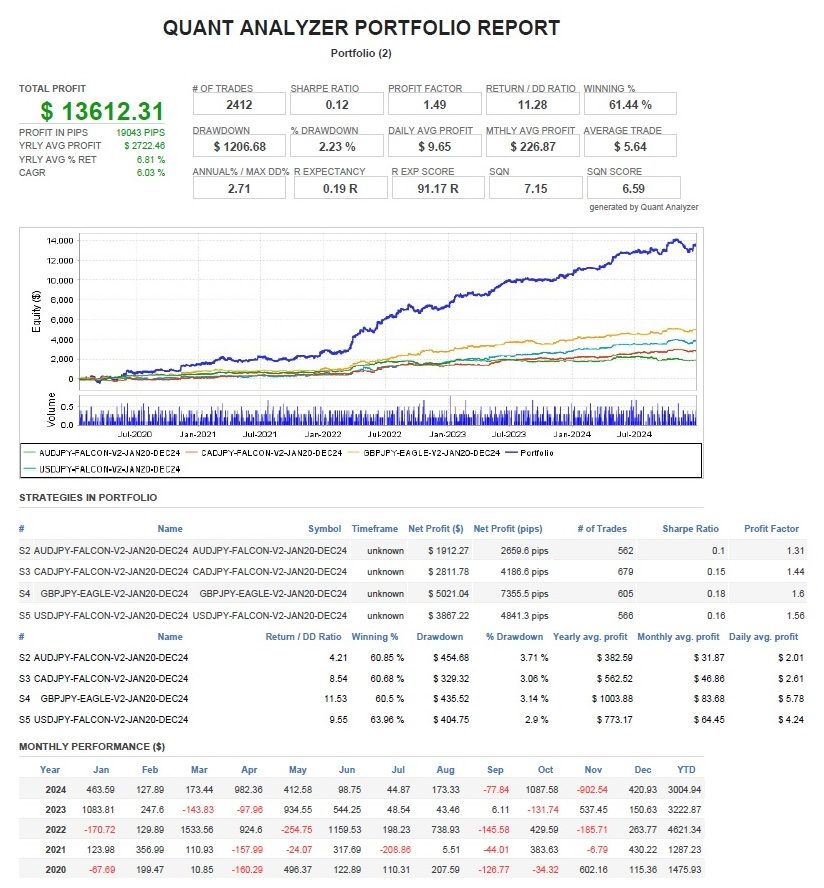
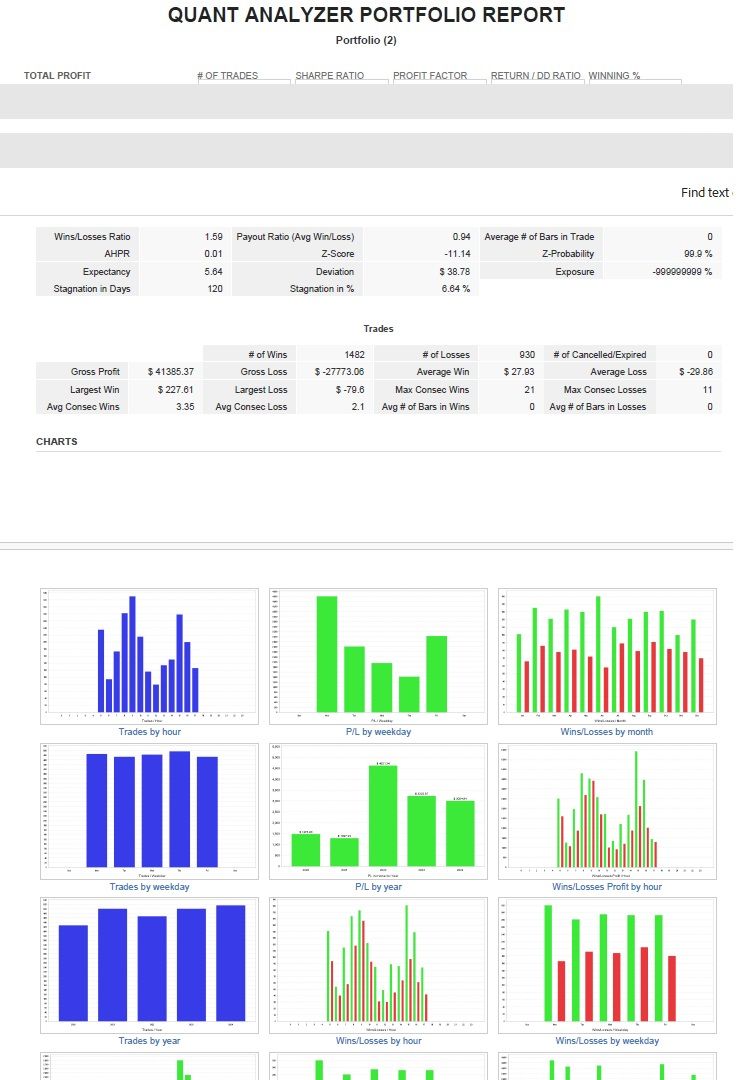
I have managed to clean up the errors and refine my strategy for realistic trading and have the latest backtest reporting for the past 5 years on GBPJPY. The modeling quality says n/a but is actually 99% accurate. I am beginning live trading this week and will post live trading results as soon as they come through. The strategy is called FALCON V2 and is based on pure price action trading, not indicators at all. It is a trend breakout strategy which trades consistently. I think there’s room for me to vastly improve it’s current performance given more time however the expert will perform similarly on AUDJPY, CADJPY and USDJPY. Here are the reports including my portfolio results of all 4 yen pairs yielding 19,043 pips in 5 years. I’ll post more updates as soon as I get them here.
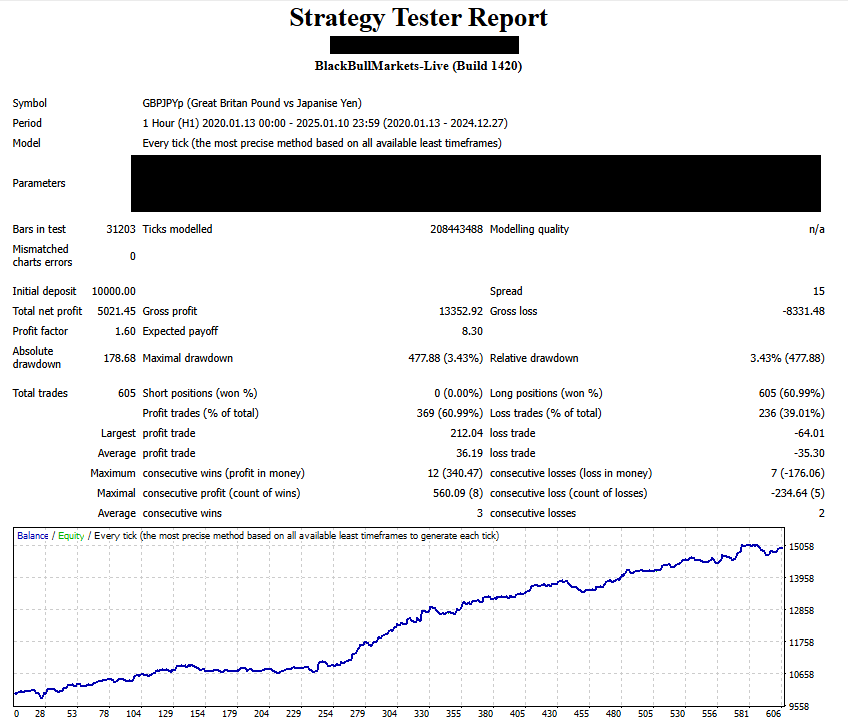
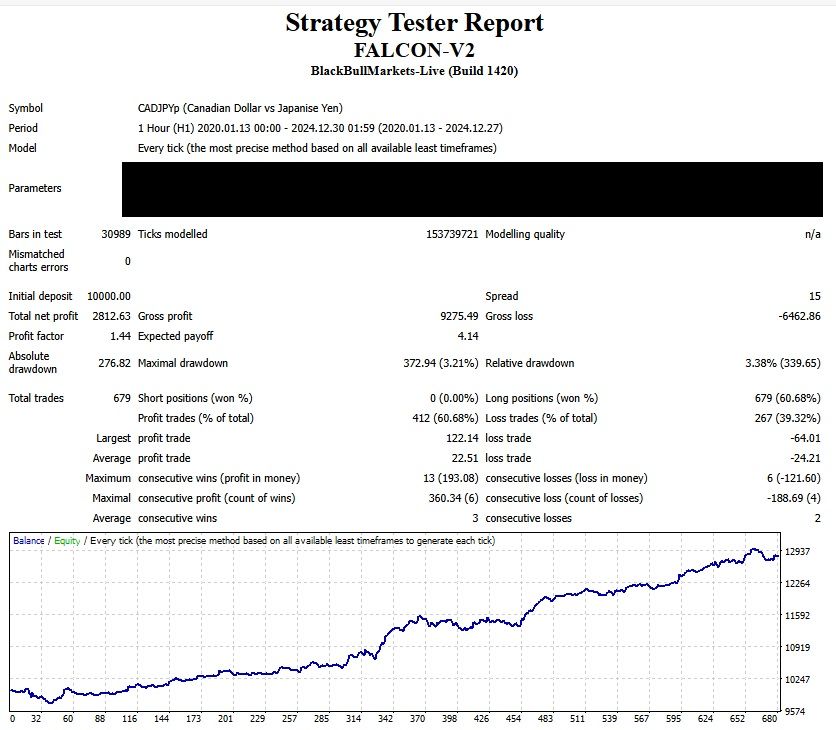
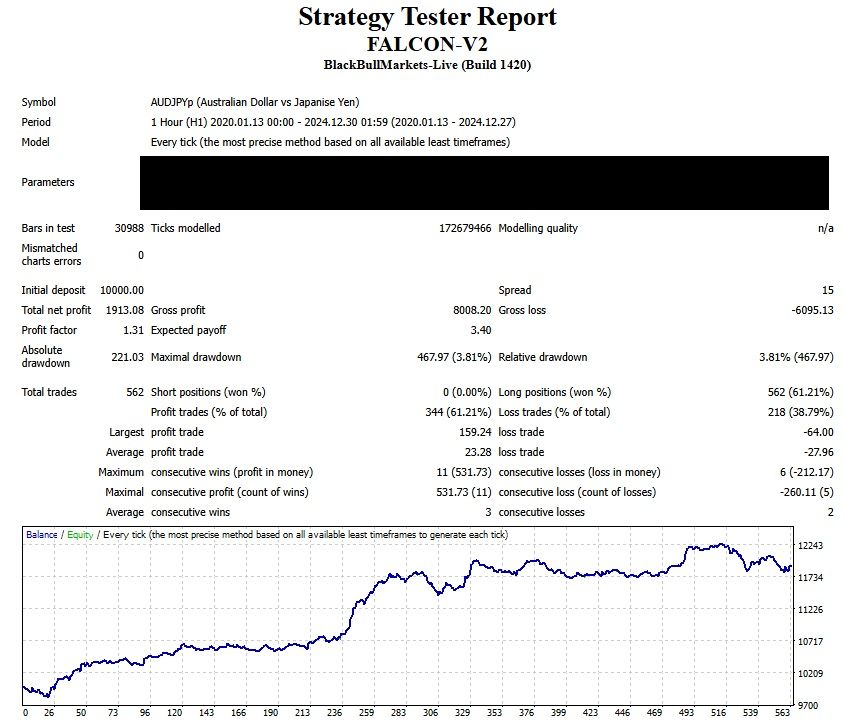
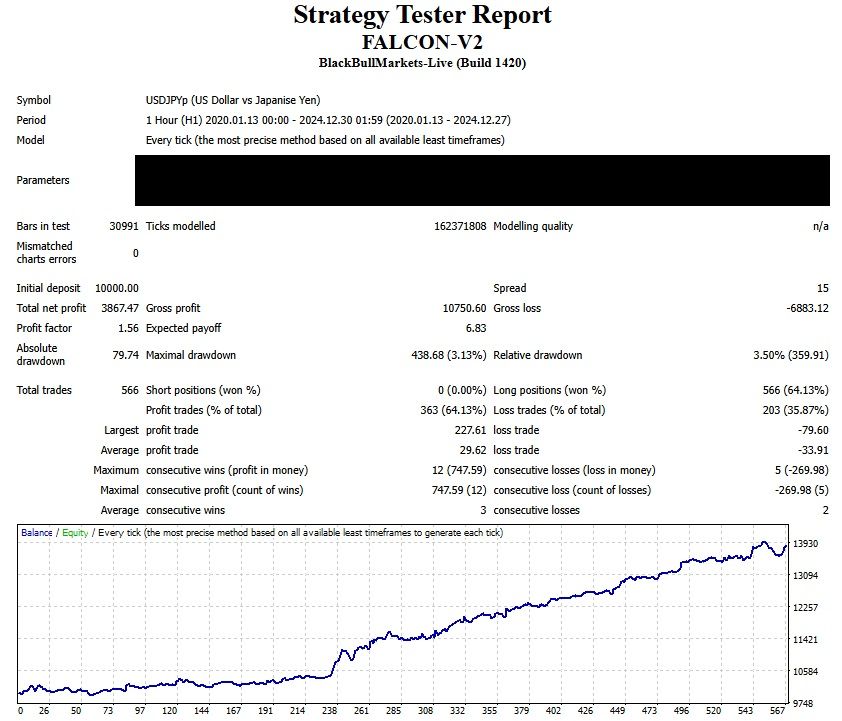
Hey, I know this post is old, but I found a simple solution which I want to share - If you want to prevent trading on the non-farm payroll day, or first Friday of the month, use these two time filters together:
Time filter, specify day start and finish, AND weekday filter, allow Friday. So if both these conditions are true, then you can link them to exclude from trading. It should only exclude Friday which falls on day 1 to 7 of the month.
I'm pretty sure this is working now
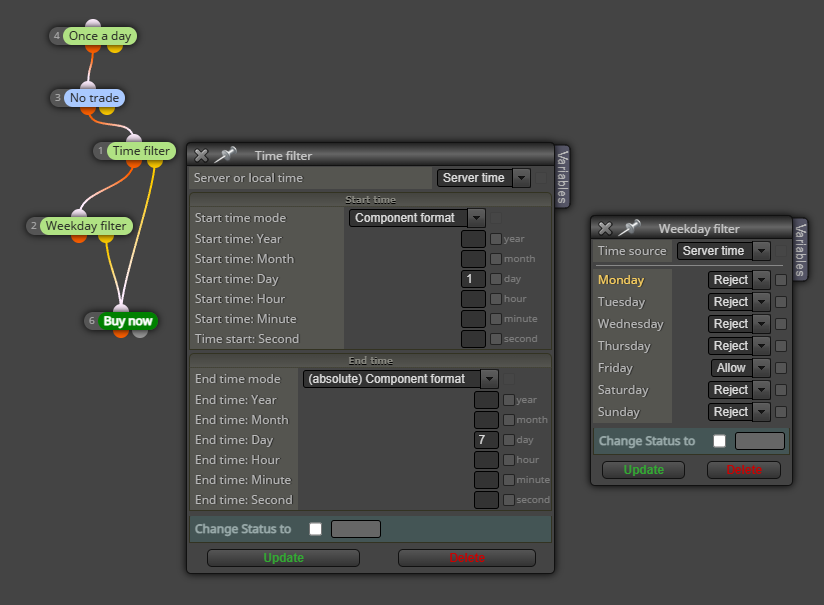
@Vahab-K Thankyou, you are genius, it works perfectly! 
@JayPhillbrooks Yes, I believe this would work well too. Filtering out certain days of the month is very helpful for enhancing performance
Thanks @sktsec
But I really don't understand the mql4 language at all. How can I do this? I've got this:
https://fxdreema.com/shared/LDYu92WIb but the EA won't load. I really don't understand custom code
Thanks I’ll take a look, maybe I can learn more from your book I just ordered. But still not clear how an example code could look to exclude days
I'm not quite following you. I got the custom code, that makes sense. But how will I write that condition to exclude that day?
How would it be written below to do buy trades each day except day 19?
https://fxdreema.com/shared/d3Pkl8x1e
I've read all the posts on this and it's not clear. I want to filter out certain days of the month like day 19 by not including them in trading. Here is what I tried but didn't succeed, I don't know why?
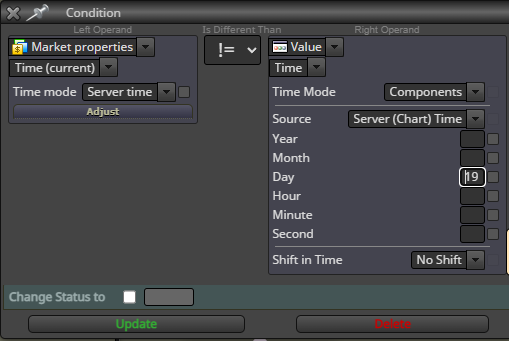
Then I saw fxdreema's post (https://fxdreema.com/shared/iB1YvWgSb) but it goes over my head. So here I want to write a condition to exclude this day 19 - Am I on the right track? It doesn't work yet
https://fxdreema.com/shared/pfDjrmQY
Any help would be much appreciated. Also if the day of month could be put into an input variable too that would be awesome
No, but thanks all is well. I think my IP range was blocked by the system, now it's unblocked
Yes, I suspect the filters have blocked my IP range. I put a support request in
Hi support,
Tried multiple computers and the builder page seems to be offline? Reside in Australia, thanks
@DragonZueloTrends
The market factors which I conceived triggers for originally have been theoretically correct but don't work in practice, therefore I revised the parameters in December last year. Yes, the robot is consistently profitable now long term and I am still making refinements to it now to make it even better. I am hoping by end of June I have some accurate and detailed reporting to share
@bayramay Sorry for my slow reply.
After looking at your project, you are best separating the trailing stop from the 'no position' block, and separate both trailing stops from each other. This current setup will have them conflicting I'm pretty sure. I'm not clear on when your different trailing stops should start and how they work.
Set up 'if postion' block, or negative output of 'no position' then insert a condition block (like profit >= X pips or something) then place the first trailing stop under that. Then insert a second condition for how you want the second trailing stop to go then insert the second trailing stop under it. Like this kind of structure:
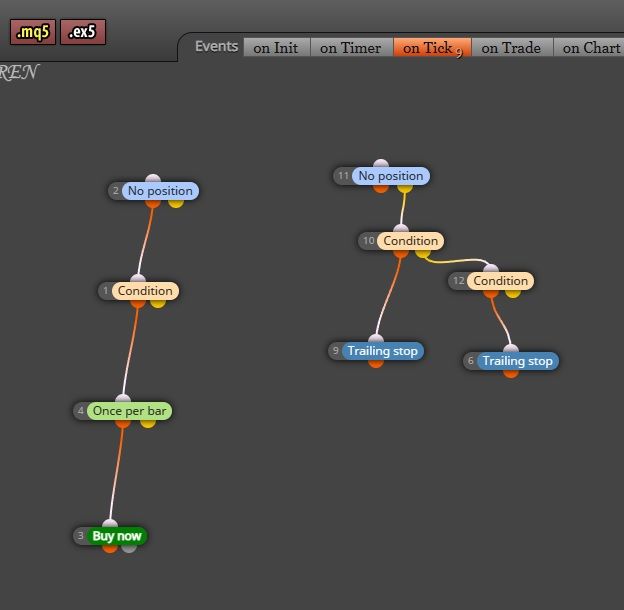
I hope it helps
So I have been stewing over this for a while and finally found a solution - How to use 2 different ATR trailing stops based on where profit is, without having them conflict.
Let's say I want to use an ATR trailing stop (x2) and have it trigger at the ATR level itself. In this case I use a variable ts_atr_mult with value of 2. I find on backtesting it triggers at the perfect time, giving the trade enough room to move into profit first. However as the trade goes further into profit, the TS is too wide to capture good profit.
Now, when profit moves let's say 85% of TP level, I want to trigger a second trailing stop that tightens from 2 x ATR to 1 x ATR. Simply having 2 trailing stops connected creates a conflict, therefore the stops jump around all over the place and it jams the testing.
How to solve this problem??
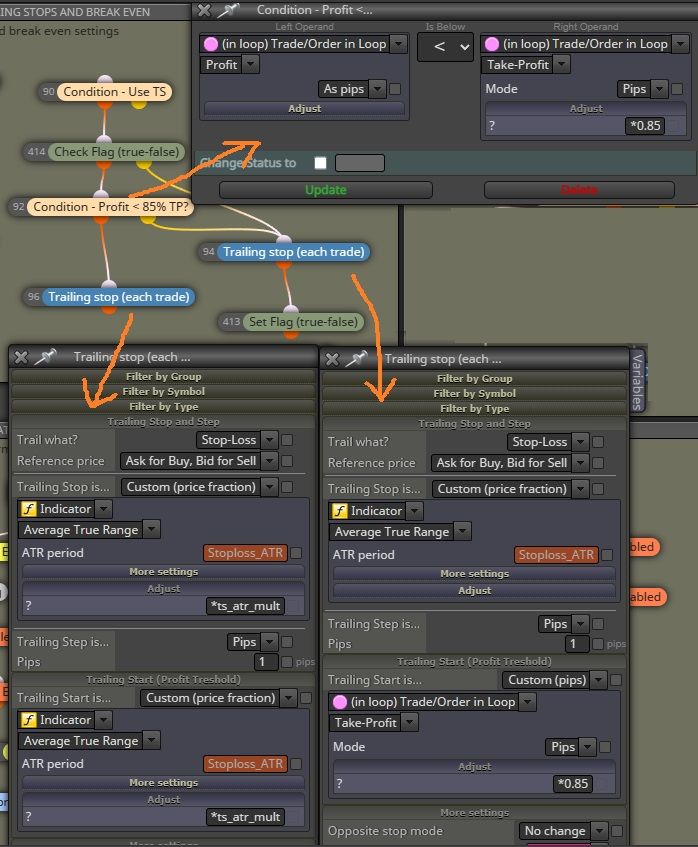
I use a condition block to check if profit is below 85% of TP, and I use 'Set Flag' true/false to fix this issue. I have the 'check flag' T/F block set to false before the condition. I have the 'set flag' to true after the negative output and below the second trailing stop. Thus, once the profit goes above 85% for the first time, the second stop is triggered and the flag is set true. Then check flag block bypasses the condition and stays on the tighter stop. Just remember to reset the flag when trades have closed. Works well to capture more profit
@bb-2 I have to start again with stats because I had lots of troubles with trades not closing so I've gone to get help from jstap. I'll keep you posted in the new year
@joeDIAMONDS Try this - On tick tab, pink menu 'loop for trades/orders', 'for each closed trade', then attach to 'Check how it was closed' block and select TP
@jstap Perfect, thanks for the advice!