fxDreema

    • Register
    • Login
    • Search
    • Back to the main page
    • Categories
    • Recent
    • Tags
    • Popular
    • Search
    1. Home
    2. kekhumbo
    K
    • Profile
    • Following 1
    • Followers 1
    • Topics 13
    • Posts 25
    • Best 1
    • Controversial 1
    • Groups 0

    kekhumbo

    @kekhumbo

    0
    Reputation
    442
    Profile views
    25
    Posts
    1
    Followers
    1
    Following
    Joined Last Online

    kekhumbo Unfollow Follow

    Best posts made by kekhumbo

    • Enum Type Error URGENT

      Hie,

      Enum Type Error.JPG

      They seem to be a problem with the enum type.

      Note that i initially found the shared link of the attached link project through the forum tab (https://fxdreema.com/shared/yeSPn6oYb). The EA Runs fine but i added the enum variable called test with the values {Here,There,Come}, The EA is able to compile and produce the executable file .ex5 or ex4 files without any errors, but when i load the EA on the chart, the first two declared enum types TYPE and BULLS_SELLS variables are able to produce the desired output on the inputs when loading it to a chart while the last enum called test is not displaying the inputs when i loaded to a chart.

      This problem is the same on MT4 and MT5.

      Below is the shared Link for my project.

      https://fxdreema.com/shared/YfTWd8r8

      Kindly fix the problem with Enum Types on the Charts Input options. Or helo me why the test option is not visible on the inputs when i load the EA to the chart while the other two Enum types are visible.

      posted in Bug Reports
      K
      kekhumbo
    • RE: fxDreema Error Bucket of Trades Pending orders Count not working

      Hi Admin, thanks for your comment, I went through your shared link, and to answer you, Please review the edited same shared link https://fxdreema.com/shared/wu6cs7ALd and take note of the Buy Report Notification, When this program is run, It is able to produce all notification fields or Data Rows as specified (Trades Count, Total Lots, Total Profits, Pending Order Lots), but the Data Row 4 'PO Count' is the problem. The system fails to print "2" as the result... Rather it prints '1' as the result and yet we have two Pending Orders. Can you please help

      posted in Bug Reports
      K
      kekhumbo

    Latest posts made by kekhumbo

    • RE: How to Show Moving Average Indicator on Chart on MT5

      So how come when am using the tester MT5, the Indictor automatically displays on the chart while on the real chart it does not?

      posted in Questions & Answers
      K
      kekhumbo
    • RE: How to Show Moving Average Indicator on Chart on MT5

      What about the is visible block? How can it be used to display the Moving Average indicator

      posted in Questions & Answers
      K
      kekhumbo
    • RE: How to Show Moving Average Indicator on Chart on MT5

      I don't want to use a template, I want the indicator to load from the code automatically

      posted in Questions & Answers
      K
      kekhumbo
    • How to Show Moving Average Indicator on Chart on MT5

      Hie,
      I am really struggling with showing a Moving average on the chart. I have a block that uses a moving average so I want that when the EA loads, It should display a moving average on the chart. How can this be done?

      posted in Questions & Answers
      K
      kekhumbo
    • RE: Enum Operators as Inputs

      Thanks @jstap . That has given me a great idea.

      But now for the operator as depicted on the picture, is it a string? I would like to replace the operator with a variable but am not sure what data type to use for the operator.

      posted in Questions & Answers
      K
      kekhumbo
    • Enum Operators as Inputs

      I have a situation. I want to be able to use the condition block with indicators but the operator should be an input field in a form of an enum. How can i achieve this? So I want a situation where a user defines the operator from the input if i choose eg Price and Moving Average. So the operators that a user should be able to specify are :

      • Is Above

      • Is Below

      • Crosses Above

      • Crosses Below

      Enum Operators.png

      posted in Questions & Answers
      K
      kekhumbo
    • RE: Enum Type Error URGENT

      Thanks for your urgent response and support, its now working based on your advice @jstap. This is resolved.

      posted in Bug Reports
      K
      kekhumbo
    • Enum Type Error URGENT

      Hie,

      Enum Type Error.JPG

      They seem to be a problem with the enum type.

      Note that i initially found the shared link of the attached link project through the forum tab (https://fxdreema.com/shared/yeSPn6oYb). The EA Runs fine but i added the enum variable called test with the values {Here,There,Come}, The EA is able to compile and produce the executable file .ex5 or ex4 files without any errors, but when i load the EA on the chart, the first two declared enum types TYPE and BULLS_SELLS variables are able to produce the desired output on the inputs when loading it to a chart while the last enum called test is not displaying the inputs when i loaded to a chart.

      This problem is the same on MT4 and MT5.

      Below is the shared Link for my project.

      https://fxdreema.com/shared/YfTWd8r8

      Kindly fix the problem with Enum Types on the Charts Input options. Or helo me why the test option is not visible on the inputs when i load the EA to the chart while the other two Enum types are visible.

      posted in Bug Reports
      K
      kekhumbo
    • RE: DataType Issue very URGENT

      Currently all Alerts are now showing integer variables correctly and not as doubles or floats. I really didnt do anything to my code so i should presume the problem was fixed with FXDreema. thanks Guys.

      posted in Bug Reports
      K
      kekhumbo
    • RE: DataType Issue very URGENT

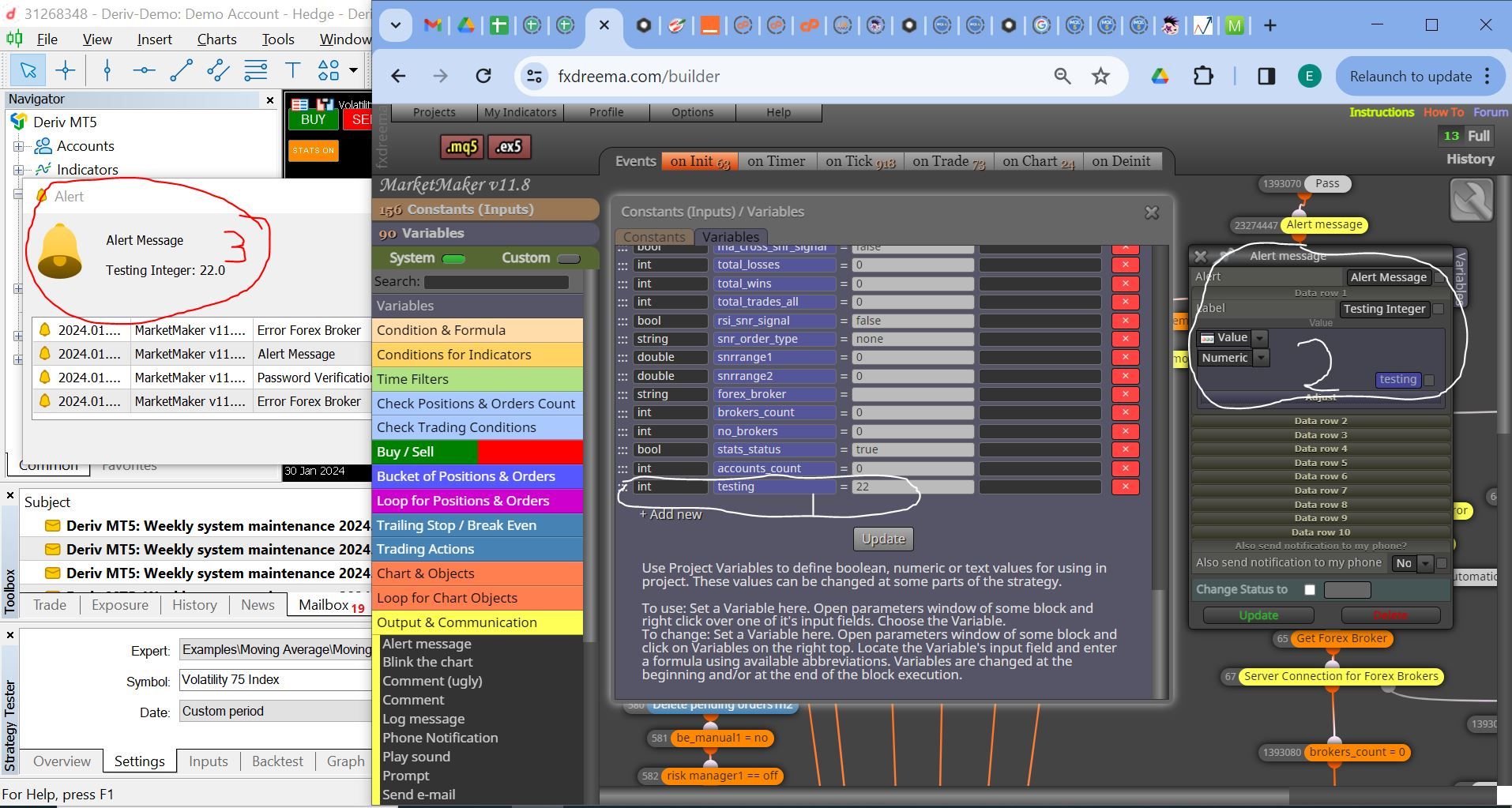
      Error Int Producing Double.JPG

      Note: I have three sections depicting the Integer Error. The 1st Section is declaring an integer variable called testing and assigning it the value 22. The second section is the alert block to display the variable testing as a number. The third section is the output alert on the MT5 Platform displaying the value of the variable as 22.0

      Take note of the initial declared integer value as 22 and the output as a double/float 22.0

      This is the same with a string variable where if i declare a string Thom, and i then use the conditional block to compare it to a Text Value Thom, The result is false yet the values are the same.

      I think we have a bug in the data types. But I look forward to your urgent response and support as usual.

      posted in Bug Reports
      K
      kekhumbo