So how come when am using the tester MT5, the Indictor automatically displays on the chart while on the real chart it does not?
K
Posts made by kekhumbo
-
RE: How to Show Moving Average Indicator on Chart on MT5posted in Questions & Answers
-
RE: How to Show Moving Average Indicator on Chart on MT5posted in Questions & Answers
What about the is visible block? How can it be used to display the Moving Average indicator
-
RE: How to Show Moving Average Indicator on Chart on MT5posted in Questions & Answers
I don't want to use a template, I want the indicator to load from the code automatically
-
How to Show Moving Average Indicator on Chart on MT5posted in Questions & Answers
Hie,
I am really struggling with showing a Moving average on the chart. I have a block that uses a moving average so I want that when the EA loads, It should display a moving average on the chart. How can this be done? -
RE: Enum Operators as Inputsposted in Questions & Answers
Thanks @jstap . That has given me a great idea.
But now for the operator as depicted on the picture, is it a string? I would like to replace the operator with a variable but am not sure what data type to use for the operator.
-
Enum Operators as Inputsposted in Questions & Answers
I have a situation. I want to be able to use the condition block with indicators but the operator should be an input field in a form of an enum. How can i achieve this? So I want a situation where a user defines the operator from the input if i choose eg Price and Moving Average. So the operators that a user should be able to specify are :
-
Is Above
-
Is Below
-
Crosses Above
-
Crosses Below

-
-
RE: Enum Type Error URGENTposted in Bug Reports
Thanks for your urgent response and support, its now working based on your advice @jstap. This is resolved.
-
Enum Type Error URGENTposted in Bug Reports
Hie,

They seem to be a problem with the enum type.
Note that i initially found the shared link of the attached link project through the forum tab (https://fxdreema.com/shared/yeSPn6oYb). The EA Runs fine but i added the enum variable called test with the values {Here,There,Come}, The EA is able to compile and produce the executable file .ex5 or ex4 files without any errors, but when i load the EA on the chart, the first two declared enum types TYPE and BULLS_SELLS variables are able to produce the desired output on the inputs when loading it to a chart while the last enum called test is not displaying the inputs when i loaded to a chart.
This problem is the same on MT4 and MT5.
Below is the shared Link for my project.
https://fxdreema.com/shared/YfTWd8r8
Kindly fix the problem with Enum Types on the Charts Input options. Or helo me why the test option is not visible on the inputs when i load the EA to the chart while the other two Enum types are visible.
-
RE: DataType Issue very URGENTposted in Bug Reports
Currently all Alerts are now showing integer variables correctly and not as doubles or floats. I really didnt do anything to my code so i should presume the problem was fixed with FXDreema. thanks Guys.
-
RE: DataType Issue very URGENTposted in Bug Reports
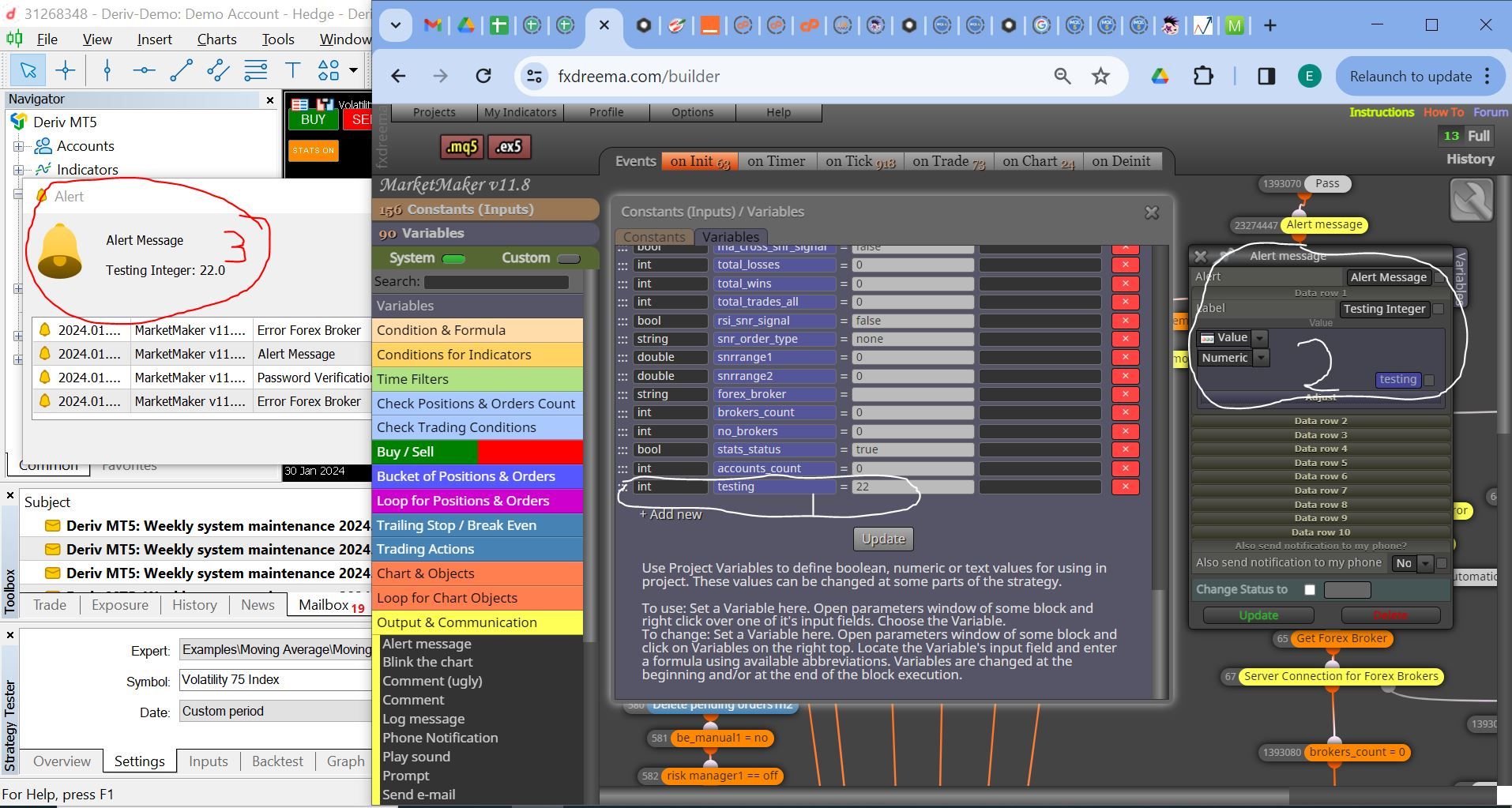
Note: I have three sections depicting the Integer Error. The 1st Section is declaring an integer variable called testing and assigning it the value 22. The second section is the alert block to display the variable testing as a number. The third section is the output alert on the MT5 Platform displaying the value of the variable as 22.0
Take note of the initial declared integer value as 22 and the output as a double/float 22.0
This is the same with a string variable where if i declare a string Thom, and i then use the conditional block to compare it to a Text Value Thom, The result is false yet the values are the same.
I think we have a bug in the data types. But I look forward to your urgent response and support as usual.
-
DataType Issue very URGENTposted in Bug Reports
When I define an Integer variable e.g. num1 = 4, after i check the value of the variable using an alert block, it displays num1 with the value 4.0 instead of just 4.
Secondly, I have defined a string name= TradeNow, when i use a HTTP Request block to connect to a google sheet which has one cell with the value = TradeNow, I ma able to get the HTTP response as TradeNow, but when i use the conditional block to compare the variable name = HTTP Response, I get a false return yet the values are the same. Why would this happen?
Do we currently have a problem with DataTypes on fxDreema?
-
PHP How to send a Response from PHP to EAposted in Questions & Answers
I have a HTTP Request separated by commas, three values are sent on the request; Login Number, Client Name, and Broker Name. My EA is able to connect to my PHP script on my web server and i get the following Http Response Notification: Http Response Received On: 2024.01.27 13:03. But I am not able to return parameters from the PHP script to the EA.
How can i send three variables from my PHP script to the EA? e.g $var1 = 1234, $var2 = "Broker"; and $var3 = "John"; How can i send these from PHP to EA and how can i access them using the HTTP Response block?
-
Testing pass stopped due to a critical error in the EAposted in Bug Reports
Hi,
I am getting the following error which I was not getting before:
2021.06.02 17:14:33.182 2021.05.03 01:17:15 Testing pass stopped due to a critical error in the EA
2021.06.02 17:14:33.182 2021.05.03 01:17:15 MarketMaker v8.6 NAS100,M1: zero divide in '13830-27735.mq4' (49055,36)Please help.
-
Order Closed block not workingposted in Bug Reports
Hi, the onTrade Block called Position Closed in MT5 - when specified with the parameters of closed by Take-profit, It doesnt work, but when specified with Closed by stop-loss it works. Review the attached blocked.
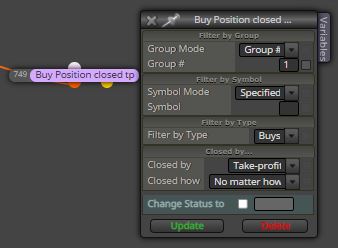 image url)
 -
BE stop loss assumed as take profit at On Trade tabposted in Bug Reports
Hi,
I have a code with break even at On Tick tab, and I have a condition to place a trade at On trade tab upon breakeven triggerd and market hits the stop loss at break even.
If the first trade (Buy Trade) triggered at On Tick tab, and breakeven is triggered, If the market hits the stop loss at breakeven, at the On Trade tab, I have placed the trade closed block and specified parameters (Buy Trade, Stop Loss) where I want it to place a pending order.
But I have noticed that when the market hits the stop loss at breakeven, the trade closed block with the parameters (Buy Trade, Stop Loss), thinks a take profit has been hit therefore nothing happens meaning my pending order is not placed.
Please look into this.
-
RE: Trading Conditions blocks Not working after break even block is activatedposted in Questions & Answers
@jsauter86 , If stop loss is removed from Buy Now or Sell Now so how will the break even be triggered?
The issue here is that when the breakeven block is triggered, and market hits the stop loss at break even, blocks like Trade Closed, No Trade etc are not working.
E.G. a Buy trade is entered
Market moves bullish and triggers the breakeven block to move the SL to break even
Market moves bearish and hits the SL at break evenWhen I use the "Trade Closed" block under the "On Trade" tab, and i specify it to open a sell trade, the sell trade is not triggered because "Trade Closed" block doesnt know if the trade was closed or not because its stop loss was modified.
Please assist.
-
RE: Trading Conditions blocks Not working after break even block is activatedposted in Questions & Answers
@l-andorrà , I have tried the sample code you have sent me but its not working.
From your sample code, If we place the first trade as buy, once the breakeven block is activated, and the market reverses and hits the stop loss at break even, the sell order you have specified at the "on trade" tab will not be triggered.
Please check.
-
RE: Trading Conditions blocks Not working after break even block is activatedposted in Questions & Answers
Hi @l-andorrà ,
I have revised the EA to include the block numbering. But its still not working.
When the first trade of the buy starts with hitting the take profit, everything works ok.
When the first trade of the buy starts with hitting the stop loss without triggering the break even block, everything works ok, meaning a sell trade is placed.But when the first trade of the Buy triggers the breakeven block and stop loss moves to breakeven, and the market reverses to hit the stop loss at break even, a sell trade is not triggered. Why? Please help.
Review the new EA through this link:
Check Type - Last Loser block not working after Break even is triggered
From the link above, when break even is hit, a sell ordered should be triggered but its not being triggered. Please assist why sell trade is not being triggered.
-
Trading Conditions blocks Not working after break even block is activatedposted in Bug Reports
Hi,
When I enter a trade e.g. Buy Trade (Take profit 50, Stop Loss 20)
I have placed breakeven block after 10pips
I then have the check trading conditions block (Check Type - Last Loser as Buy Type) to open a sell trade when its true.So initially, a buy trade is entered, when market moves 10 pips up, the breakeven block is triggered moving the stop loss to breakeven, when the market reverses and hits the stop loss at break even, the Check trade block of Last loser as Buy is not triggered to open the sell trade.
This is a technical error. Please fix this problem.
Below is the sample code:Check Type - last loser block not working after Break Even block is activated
Let me know when this is fixed.
-
Trading Conditions blocks Not working after break even block is activatedposted in Questions & Answers
Hi,
When I enter a trade e.g. Buy Trade (Take profit 50, Stop Loss 20)
I have placed breakeven block after 10pips
I then have the check trading conditions block (Check Type - Last Loser as Buy Type) to open a sell trade when its true.So initially, a buy trade is entered, when market moves 10 pips up, the breakeven block is triggered moving the stop loss to breakeven, when the market reverses and hits the stop loss at break even, the Check trade block of Last loser as Buy is not triggered to open the sell trade.
This is a technical error. Please fix this problem.
Below is the sample code:Check Type - last loser block not working after Break Even block is activated
Let me know when this is fixed.