fxDreema

    • Register
    • Login
    • Search
    • Back to the main page
    • Categories
    • Recent
    • Tags
    • Popular
    • Search
    1. Home
    2. Mantadiver
    3. Posts
    M
    • Profile
    • Following 1
    • Followers 1
    • Topics 40
    • Posts 102
    • Best 9
    • Controversial 0
    • Groups 0

    Posts made by Mantadiver

    • Block corruption ?

      I have a project that is getting quite large.

      I have had several instances of Named Blocks having numbers added after them (similar to what happens when you copy a named block, the duplicate gets a number added).

      Today I had a bug that I finally tracked down to this Modify Variables block:-

      0_1646965652698_04df550c-0ca6-4815-9983-b986b020075a-image.png

      It looks corrupted, cannot open any of the fields.

      I made a copy of the block and it has restored itself.

      A bit concerning . . Is this a known issue, any ideas what might cause it so I can avoid this in the future.

      Thank you

      posted in Bug Reports
      M
      Mantadiver
    • RE: Check Flag status

      Thanks @jstap, yes that will work well, I guess I was just trying to stop clogging up with too many variables as flags are a quick and easy alternative.

      posted in Questions & Answers
      M
      Mantadiver
    • Check Flag status

      Hello,

      Does anyone know how to "Check Flag" status from mql code rather than using the Check Flag block ?

      Many thanks

      posted in Questions & Answers
      M
      Mantadiver
    • RE: Draw Objects on Chart during Visual backtest?

      jstap, l'andorra, many thanks for your input, great to know it can be done and now I have found a mistake in my flow that was preventing it. All working now; appreciate you taking the time to respond.

      posted in Questions & Answers
      M
      Mantadiver
    • Draw Objects on Chart during Visual backtest?

      Does anyone know whether it is possible for an EA to draw chart objects to appear during a Visual Backtest ?

      How can I do it ?

      Any help appreciated, thank you.

      posted in Questions & Answers
      M
      Mantadiver
    • RE: How to specify a Group Range

      @fxDreema

      Having been an annual subscriber for around 5 years, it surely is a testament to what a great tool this is that I could only come up with those items . . .

      posted in Questions & Answers
      M
      Mantadiver
    • RE: How to specify a Group Range

      Thanks bk7, the problem I was having was to pass a list of numbers across to the Group# field and get it to read the list.

      I've now solved it, turns out it was rather simple . . .

      1. Created an array of random group numbers.
      2. Passed the array details into a string variable called Group_List.
      3. The game changer was adding "v::" in front of each item:

      Group_List =
      v::Group_Number[1]+","+
      v::Group_Number[2]+","+
      v::Group_Number[3]+","+ etc etc

      1. Insert variable Group_List in any Group# field and it now reads the list fine.

      Thanks everyone for your time and input.

      posted in Questions & Answers
      M
      Mantadiver
    • RE: How to specify a Group Range
      1. Created a list of random group numbers in an array.
      2. Converted the array to a concatenated string in a variable.
      3. Inserted the variable in the group field.

      Not quite working yet; the stumbling block seems to be how to get the Group # field to recognise the number extracted from the array. In the short term will look for a simpler approach.

      [...] as someone with obvious programming knowledge
      Hmm, not really. Have been hacking at MQL indicators for a few years but don't have the knowledge or confidence to risk self coding an EA where real money is at risk. fxDreema fills this gap perfectly and has vastly increased my understanding of coding.

      [...] maybe you can share what in the EA builder is bad, what must be done, or even what is good.
      If you still want my two penneth . . .

      Good.
      fxDreema is hands down the most intuitive, powerful and enjoyable piece of software to use I have ever encountered. I have tried many other EA builders and without exception they leave you frustrated, disappointed and fail to get the desired outcome.

      Bad.
      Nothing is "Bad" but there are certainly some minor improvements that would help.

      For example . . Pressing the ".ex4" and getting a list of errors without knowing which blocks they relate to is a little frustrating. It would be great to receive a list of associated block numbers to avoid having to export the MQL, load in MetaEditor, Compile and search for the problem there. This would save a lot of time.

      The main issue for me is the gnawing uncertainty of how committed, you may or may not be to the product going forward. Certain comments & the lack of forum input over the last few years raise questions for people who rely heavily on this excellent software.
      Having said that I appreciate you responded to my post and also that you indicated an upcoming price increase in a separate post. I have no issue with a price increase. The more the product undergoes continuing development the more I would be happy to pay.

      The forum is a great source for solving many issues but I appreciate you must get frustrated with answering repetitive questions from new users. One solution might be a Premium Support service where individual questions can be answered for a fee or users can pay an additional subscription for advanced support. This wouldn't put off new users with prohibitive charges but would be a huge benefit for more advanced users wanting a guaranteed way to gain premium support.

      posted in Questions & Answers
      M
      Mantadiver
    • How to specify a Group Range

      I am familiar with listing group numbers to include i.e.

      Group # 0,1,2,3,4,5,6,7,8,9,10,11,12,13,14,15,16,17,18,19,20,21,22,23,24,25,26,27,28,29,30

      But does anyone know of the syntax or a way to specify a range of group numbers ?

      For example:-

      Group# 1 - 60

      Any help would be appreciated.

      Thank you

      posted in Questions & Answers
      M
      Mantadiver
    • RE: Zero divide on restart due to LotStep being changed to zero . .

      OK, I think I have solved it.

      The problems being experienced were effects not the cause.

      The cause is all down to the code running at startup on offline charts BEFORE it has had a chance to read data from the broker.

      Therefore it was returning no trades when therre were trades and LotStep returned as zero which led to it trying to take another trade which in turn led to a zero divide error.

      The solution I have used is to add a 3 second delay & change a flag to "true" at the end of initialisation and then check that the flag is "true" when executing code in the On Tick tab.

      Maybe offline charts need to wait for an additional tick or something but this definitely allows it to report the active trades correctly, reports LotStep correctly and prevents the zero divide.

      Many thanks for your interest and help @jstap.

      posted in Bug Reports
      M
      Mantadiver
    • RE: Zero divide on restart due to LotStep being changed to zero . .

      That's weird, when I click on it, it says Numeric.

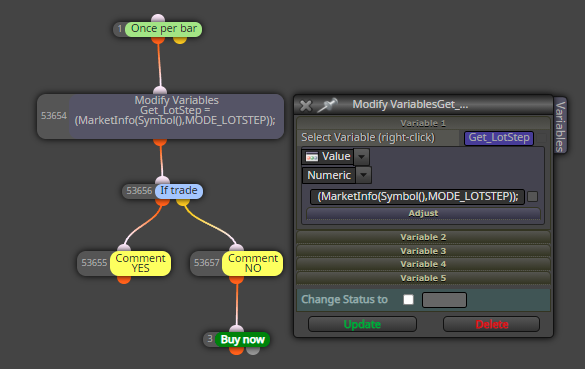
      0_1633824976709_b9d97236-d371-4b0a-a816-feef3ac6a15f-image.png

      Anyway it was only getting the data to display, the issue remains.

      Are you able to get fxdreema to recognise existing trades from offline charts ?

      posted in Bug Reports
      M
      Mantadiver
    • RE: Zero divide on restart due to LotStep being changed to zero . .
      1. It all works fine on TIME charts but not on OFFLINE charts. I am using Ovo charts but same issue exists when using the MT4 standard PeriodConverter.

      2. There are actually two issues involved:-

      a) LotStep returns zero after mt4 retart when using offline chart and there is an existing trade.

      b) EA returns a zero divide error on restart (again offline chart & existing trade) in the fxdreema system code AlignLots.

      I have discovered the reason for the zero divide. On restart I am using the "If Trade" block to detect if there is already a trade with the EA magic number. From what I can tell the "If Trade" block does not detect trades on restart on offline charts. I have tried various blocks and methods but none seem to work.

      This is a simple project as an example:-

      It prints the LotStep, Magic Nuymber and trade status to a comment.

      Simple rule: If no trade then Buy.

      If the EA is run, no trade is detetcted so it Buys. Restart MT4 and on restart the LotStep returns zero, it still says there is no trade, (even though there is) and in the Experts tab there is a zero divide error relating to LotStep in the AlignLots line [size=MathRound(size/LotStep)*LotStep;]

      Therefore my take is that the zero divide is caused by the EA trying to take another trade & being met with LotStep zero BUT it should not be trying to take another trade because the "If Trade" should have detected a trade is already present.

      The solution therefore is to find a way to get fxdreema to detect existing trades on restart when usiung offline charts . . . .

      https://fxdreema.com/shared/Ckn8OX8wb

      posted in Bug Reports
      M
      Mantadiver
    • RE: Zero divide on restart due to LotStep being changed to zero . .

      Working on it

      posted in Bug Reports
      M
      Mantadiver
    • RE: Zero divide on restart due to LotStep being changed to zero . .

      I haven't managed to change it. Whenever I reference it I get "LotStep' - undeclared identifier".

      posted in Bug Reports
      M
      Mantadiver
    • RE: Zero divide on restart due to LotStep being changed to zero . .

      @JSTAP It is MT4 code.

      The reality is I am trying to cover off a situation that is unlikely to occur . . . i.e. Server / MT4 / EA restarts when the EA has a live trade and the EA fails to start due to Zero Divide ewrror and leaves an orphaned trade.

      I have had the same issue with a prior EA build with fxDreema and I would be interested to know if anyone else gets the error when they restart an EA with a trade running.

      Maybe I have done something that has a knock on effect.

      Anyway, given that I have noticed the issue I thought it prudent to put in a fix. My logic says that as it is proven that the system variable LotStep works on startup but changes to zero on restart that either fxdreema might provide a "bug fix" to prevent it happening or someone might offer a fix I can apply.

      From my attemps so far I ahve been unable to interact with and change the value of LotStep.

      Appreciate your time and interest, but at the end of the day it may never happen in live trading !

      posted in Bug Reports
      M
      Mantadiver
    • RE: Zero divide on restart due to LotStep being changed to zero . .

      @JSTAP LotStep is created as part of the "System and Custom functions used in the program" area of the standard code. I have tried recreating / writing to / overwriting but I just get errors.

      This is where it first appears:

      double AlignLots(string symbol, double lots, double lowerlots = 0.0, double upperlots = 0.0)
      {
      double LotStep = SymbolInfoDouble(symbol, SYMBOL_VOLUME_STEP);
      ...........

      Populates fine on initial startup but changes to a zero value on restart with a live trade.

      posted in Bug Reports
      M
      Mantadiver
    • Zero divide on restart due to LotStep being changed to zero . .

      Hello,

      I had a similar issue 3 years ago but unable to solve on a new EA.

      If EA has a live trade and MT4 restarts for whatever reason it throws a Zero Divide due to "LotStep" being set to "0" on restart.

      a) It doesn't happen if there is no trade.
      b) Manual solution I have found is to add "if(LotStep == 0) LotStep = 0.01;" (my broker step) within the "AlignLots" function manually.

      Question: Any ideas why this is happening and is there a way for me to add a custom block to insert the fix automatically or would it be possible for you to add this line into the system code please because it does seem like a bug.

      Many thanks

      MantaDiver

      posted in Bug Reports
      M
      Mantadiver
    • RE: LotStep causing zero divide.

      Thanks l'andorra, for such a superb product (and I've tried most of them) it is a little strange that there appears to be a distancing going on.

      I guess as long as the server stays up we're all happy.

      Thanks for the suggestion, I'll give that a go.

      posted in Questions & Answers
      M
      Mantadiver
    • RE: LotStep causing zero divide.

      Indeed, I too would like to understand how it can happen because it is a system function and seemingly not something I have done (although happy to be corrected on that).

      I have tried remming out the code "do or do not initialize on reload" in case that helps but it didn't.

      The LotStep is defined in the area "System & Custom Functions used in the program", but I cannot tell if it is only activated on startup or on an as needed basis.

      It would be a simple fix for fxdrema to insert a catch all to avoid a zero divide. Does fxdrema still frequent the forum or maybe miro ?

      Many thanks

      posted in Questions & Answers
      M
      Mantadiver
    • LotStep causing zero divide.

      Hello,

      I had a similar issue 3 years ago but unable to solve on a new EA.

      If EA has a live trade and MT4 restarts for whatever reason it throws a Zero Divide due to "LotStep" being set to "0" on restart.

      a) It doesn't happen if there is no trade.
      b) Manual solution is to add "if(LotStep == 0) LotStep = 0.01;" within the "AlignLots" function manually.

      Question: Any ideas why this is happening and is there a way for me to add a custom block to insert the fix automatically or would it be possible for FXDreema to add this line into the system code please ?

      Many thanks

      MantaDiver

      posted in Questions & Answers
      M
      Mantadiver
    • 1
    • 2
    • 3
    • 4
    • 5
    • 6
    • 2 / 6