fxDreema

    • Register
    • Login
    • Search
    • Back to the main page
    • Categories
    • Recent
    • Tags
    • Popular
    • Search
    1. Home
    2. Mantadiver
    3. Posts
    M
    • Profile
    • Following 1
    • Followers 1
    • Topics 40
    • Posts 102
    • Best 9
    • Controversial 0
    • Groups 0

    Posts made by Mantadiver

    • "Bucket of closed trades" since open time of first trade

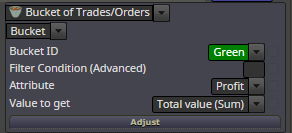
      Would really appreciate some input on the correct settings for Bucket of Closed Trades.

      EA places multiple trades and I want to get a combined total when all the trades have closed.

      My approach is to get the open time of the first trade and create a bucket of all trades for this pair, with the correct group numbers that have closed since the open time of the first trade.

      Open time is in a variable
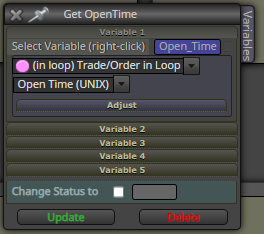
      0_1596459772236_79c3a25f-5b3c-404d-8ed4-878ecde186d4-image.png

      I have tried multiple ways but to no avail. Where do I place this variable in the Bucket settings please ?
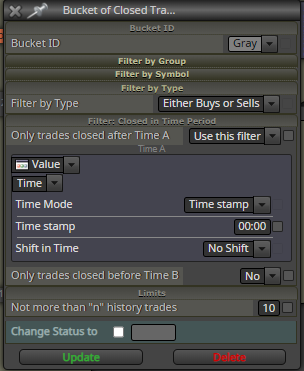
      0_1596459823100_ce9b0611-cfce-4267-9b76-0cceccfa72b1-image.png

      Many thanks

      posted in Questions & Answers
      M
      Mantadiver
    • RE: Find out which blocks use a variable

      @l-andorrà said in Find out which blocks use a variable:

      AFAIK

      Thank you l'andorra for the confirmation.

      posted in Questions & Answers
      M
      Mantadiver
    • What is included in Bucket of trades profit ?

      I have created a bucket of trades to get the Total Value of profit.

      Does anyone know if the returned value included commission & swap ?

      0_1596414462438_95ac6d1b-cf70-488f-acbd-58bff2f15a33-image.png

      posted in Questions & Answers
      M
      Mantadiver
    • Re-Initialize after settings change

      Hi,

      This has been mentioned before in:- https://fxdreema.com/forum/topic/4812/some-of-my-fxd-ea-s-won-t-reinitiale-after-changing-settings-or-timeframes/2

      I am surprised more people are not requesting this.

      When the EA is running & it is opened to change a setting, it does not then reinitialize. I don't understand why this is the default state & it is cumbersome to keep having to enter the code, rem out the code suggested by Miro & recompile.

      I am having to insert blocks that checks settings every tick for changes but this is slowing the EA down.

      Is there a way to write a custom block that can automatically change this behaviour ?

      posted in Questions & Answers
      M
      Mantadiver
    • Find out which blocks use a variable

      If you try to delete a variable that is still in use, fxdrema provides a list of the block numbers where it is used.

      Is there an alternative way to get this list ?

      At the moment I have to press delete to see the list, even though that's not the action I want.

      Thanks.

      posted in Questions & Answers
      M
      Mantadiver
    • RE: Draw Edit field - unable to turn off border colour

      Great, many thanks.

      posted in Bug Reports
      M
      Mantadiver
    • RE: Draw Edit field - unable to turn off border colour

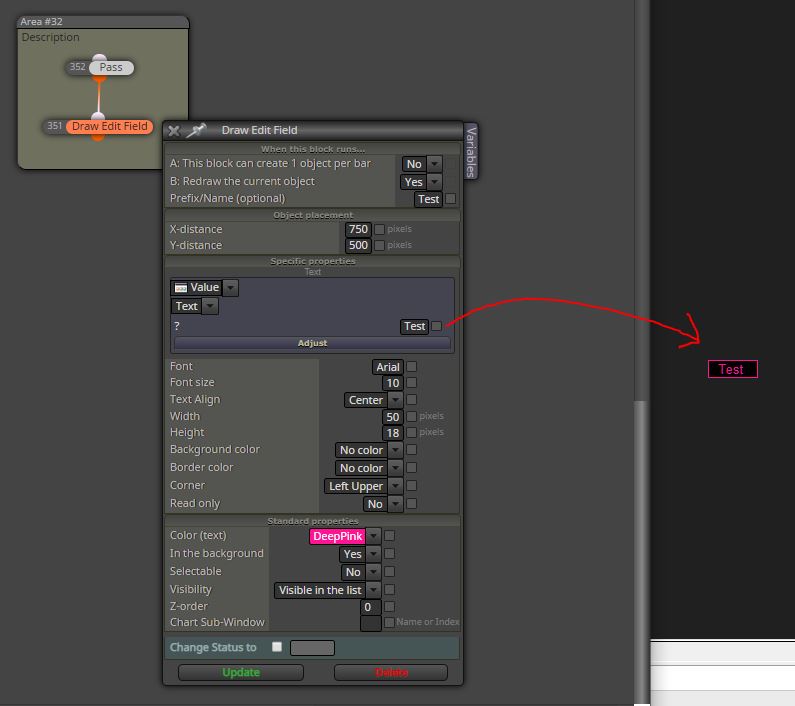
      0_1590411776989_TextBorder.JPG

      Here is a simple test to send the word "Test" to screen with "Border Color" set to "No Color".

      It creates a border in the same color as the font. Is this expected behaviour ?

      Obviously the simple way around it is to simply color the border the same as the background color.

      Many thanks.

      posted in Bug Reports
      M
      Mantadiver
    • Draw Edit field - unable to turn off border colour

      When using a "Draw Edit Field" and Border Colour is set to "No Color", a border still draws in the same colour as the text.

      Please can you tell me how to turn off the border ?

      posted in Bug Reports
      M
      Mantadiver
    • Import Custom indicator - defaults change . . .

      When importing custom indicators I regularly experience the default parameters changing . .

      In particular:

      1. Boolean changes from False to True.
      2. Negative settings changed to positive.

      Just something to be aware of as I spent hours trying to track down an error in the buffer values only to realise the defaults had been changed.

      posted in Bug Reports
      M
      Mantadiver
    • RE: Some of my fxd EA's won't reinitiale after changing settings or timeframes

      Has anyone found a way to automatically exclude this code by using blocks or custome code ? Woiuld be really useful as it consumes a lot of time having to rem it out with each new version.

      Many thanks.

      posted in General Discussions
      M
      Mantadiver
    • RE: [Custom Block Release] Send a message or screenshot to Telegram Blocks

      I managed to get messages working but struggled with screenshots until I changes the screenshot _chat_id parameter to datatype long (rather than int in the screenshot).

      Then it started working.

      Many thanks for sharing your knowledge in this exciting area.

      posted in Tutorials by Users
      M
      Mantadiver
    • Is there an event that informs when Input window closes ?

      Step 1: EA added to chart
      Step 2: User opens input window via F7 or right mouse click, "Expert Advisers", "Properties".
      Step 3: User may make some changes.
      Step 4: User presses "OK" to close the window and apply the changes.

      Question: Is there an event or some way for the EA to know that the input window has been closed ?

      I've searched but not found any clues yet.

      Many thanks.

      posted in Questions & Answers
      M
      Mantadiver
    • Custom indicator import

      Just wanted to mention this in case it helps anyone else or turns out to be some sort of bug.

      Custom indicator import usually works flawlessly but one indicator I have with 17,000 lines of code did nothing when selected. No variables, no buffers, nothing. Initially I thought it was due to either the size of code, number of variables or large number of buffers but after a long process of deleting segments of code & trying to import I finally narrowed it down to a tiny segment of text in a comment.

      The offending characters were:- 1 – 14;

      Remove them and it imports perfectly.

      Not a clue why, but glad to have found a solution.

      posted in Bug Reports
      M
      Mantadiver
    • RE: Moving Blocks & Areas

      OK, many thanks for the clarification.

      posted in Questions & Answers
      M
      Mantadiver
    • Moving Blocks & Areas

      I can move multiple blocks by highlighting and dragging but I can't get the corresponding areas to move as well.

      Is there a way to select large numbers of blocks & areas and move them or is that a limitation ?

      Many thanks

      posted in Questions & Answers
      M
      Mantadiver
    • Custom Indicator Import - Boolean defaults

      Hi,

      I've noticed that when importing custom indicators the boolean settings seem to default to True even if they are set to false in the original code.

      Only reason I mention it is that I kept getting alerts from the ea not realising they got turned on in the indicator on import.

      Thanks

      posted in Bug Reports
      M
      Mantadiver
    • RE: How to add values of double variable to string variable

      Please disregard my last post.

      For the avoidance of doubt adding ""+ at the beginning & + "" at the end works a treat.

      Many thanks

      posted in Questions & Answers
      M
      Mantadiver
    • Typo ?

      Very minor.

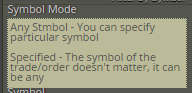
      On block "For any trade", the help text for Symbol Mode maybe mixed up. The text for "Any Symbol" seems to relate to "Specified" & vice versa.

      0_1536709520052_106699fd-7f6c-4742-a2dc-acb16bbd433a-image.png

      posted in Bug Reports
      M
      Mantadiver
    • 1
    • 2
    • 3
    • 4
    • 5
    • 6
    • 4 / 6