fxDreema

    • Register
    • Login
    • Search
    • Back to the main page
    • Categories
    • Recent
    • Tags
    • Popular
    • Search

    Some of my fxd EA's won't reinitiale after changing settings or timeframes

    General Discussions
    5
    8
    2472
    Loading More Posts
    • Oldest to Newest
    • Newest to Oldest
    • Most Votes
    Reply
    • Reply as topic
    Log in to reply
    This topic has been deleted. Only users with topic management privileges can see it.
    • S
      safv6 last edited by safv6

      Hi Radoslav and fellow fxDreema users,

      My fxDreema EA's won't reinitialize / refresh when I change timeframes or settings while the EA is running.
      I tried to create a simple EA with only 2 blocks just now, to share here as an example, but to my surprise that simple EA does reinitialize just fine. My more complex EA's won't though.
      Does anyone have any idea what I did wrong?

      Best regards,

      Saf

      1 Reply Last reply Reply Quote 0
      • M
        miro1360 last edited by miro1360

        when changing settings for running EAs from fxDreema, remove EA from chart and place it again ...

        or as alternative .. it is caused by this part of code:
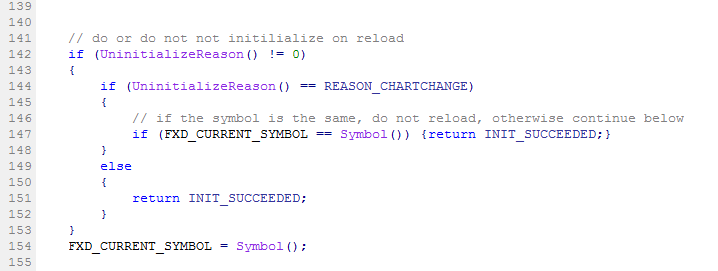
        0_1498486562711_upload-9536f1ad-3416-481e-8f3c-1c152ebecf3e

        if you need full reinitialization with all settings and without removing EA from chart, this part of code give into quotes as this example and click compile button (in MetaEditor) :
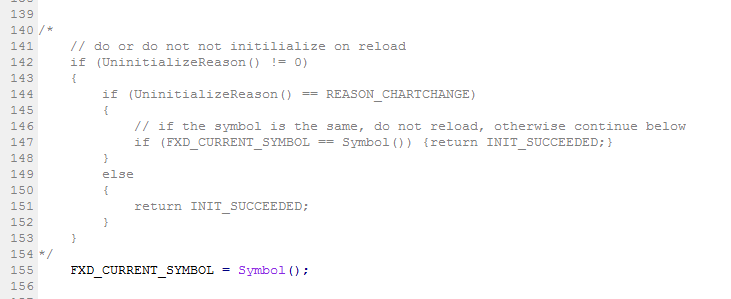
        0_1498486660464_upload-dee10a23-ffbd-4c0c-8d10-812ea841e338

        Between trading and gambling is a very small gap, be careful.

        1 Reply Last reply Reply Quote 0
        • S
          safv6 last edited by

          Hi miro, that did the trick! I can't help but wonder though, why you wouldn't want to have the EA reinitialize when you change settings, because if you don't, the changes you make will not be applied, right? I don't really see the logic in that, but hey, this works for me, so thank you for the great support. I appreciate it!

          Peace!!!!

          1 Reply Last reply Reply Quote 0
          • M
            miro1360 last edited by

            I also dont use this "feature" and dont know why it is ... I can understand it in this form:
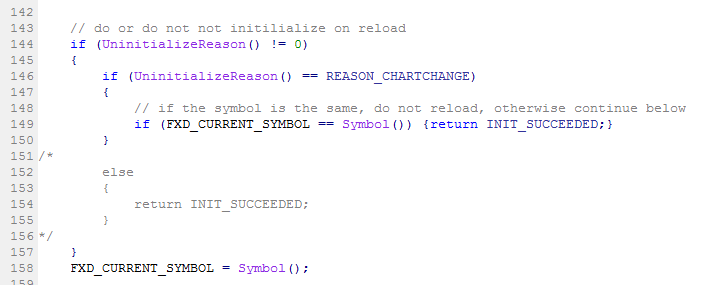
            0_1498570856101_upload-7e3883af-c0a5-40de-9f72-8161d32318ce

            because result is, when you change between timeframes, all settings are not changed and it can be ok - something what is usefull ... but in form when it is skipped settings changed in EA settings - I dont see it usefull - maybe somebody need it 😄

            Between trading and gambling is a very small gap, be careful.

            S 1 Reply Last reply Reply Quote 0
            • S
              safv6 @miro1360 last edited by

              @miro1360 Right, perhaps. I'm not sure though, but I kind of think that most users would prefer this functionality to be disabled by default, or to be adjustable in the Project Options menu or something, but hey, I'm not complaining! Your solution solved my issue!
              Thanks again for all the help Miro!

              1 Reply Last reply Reply Quote 0
              • M
                Mantadiver last edited by

                Has anyone found a way to automatically exclude this code by using blocks or custome code ? Woiuld be really useful as it consumes a lot of time having to rem it out with each new version.

                Many thanks.

                1 Reply Last reply Reply Quote 1
                • B
                  Breeeeen last edited by

                  @fxDreema as what Mantadiver was asking, is there a way we can automatically exclude this code so we don't have to jump into meta editor each time? Essentially what we want is for the EA to reinitialise when changes to any settings have been made.

                  Breeeeen

                  1 Reply Last reply Reply Quote 0
                  • roar
                    roar last edited by

                    https://fxdreema.com/forum/topic/16310/when-to-stop-oninit

                    Admin has already answered on this issue, there is no problem in their view

                    Need small help? Tag me in your post
                    Need big help? https://www.fiverr.com/big_algo/automate-your-winning-strategy-in-mql4-or-mql5

                    1 Reply Last reply Reply Quote 0
                    • 1 / 1
                    • First post
                      Last post

                    Online Users

                    A
                    N
                    S
                    E
                    A
                    M
                    T
                    M
                    A
                    E
                    K

                    26
                    Online

                    146.7k
                    Users

                    22.4k
                    Topics

                    122.6k
                    Posts

                    Powered by NodeBB Forums | Contributors