@spuzy i am sorry how ?
you can give me example for 3 points different save it in the same condition ?
thank you
M
Posts made by Moon
-
RE: can I Add Save Any Number In Memory EA ?posted in Questions & Answers
-
RE: can I Add Save Any Number In Memory EA ?posted in Questions & Answers
@fxdreema look
by example roar
1 / if candle past 1 cross simple move past 1 up = memoryA
2 / if next candle past 1 cross simple move past 1 up again = memoryB
now are memoryA different memoryB ?? Answer ,,,,,, Nooooooo
will be the same because condition happen the same until if happen in position differenti want if 1 happen save data
if 2 happen save new data happen and data 1 also saved ( different position )you understand me
-
RE: can I Add Save Any Number In Memory EA ?posted in Questions & Answers
@roar
if i want save multi points price how i can do that ?
your projects about save one memory and create order if candle cross this memory
i dont want that ...i want if candle cross simple move up now - save this point in memory A
and next this if candle again cross simple move up again - save this point in memory B
and next if happen candle again cross simple move up again - save this point in memory Cand all this memory A and B And C available if i want use this points saved it in my EA .
thank you
-
can I Add Save Any Number In Memory EA ?posted in Questions & Answers
hello
if i say if candle cross simple move to up save price this point this candle in memory Under name A
and if candles will be next cross simple move to up again save price this point this candle again in memory under name Bthis mean price A available if i want use it and too price B available if i want use it.
Can i do that By FXdreema ? And how .... Please Show Example
thank you
-
RE: How I do That in MACD With FXDreema ??posted in Questions & Answers
@moon when i use x> or x< dont work and create more and many orders in first place happen this cross not create one order in every time happen this cross ? with mt5
-
How i Can Edit This Option On This Indicator ?posted in Questions & Answers
Hello
i Found This Indicator Created By Serhii Ivanenko
And this its code((( //+------------------------------------------------------------------+ //| RenkoLineBreak.mq5 | //| Copyright 2013, Rone. | //| rone.sergey@gmail.com | //+------------------------------------------------------------------+ #property copyright "Copyright 2013, Rone." #property link "rone.sergey@gmail.com" #property version "1.00" #property description "It is a hybrid of Renko and Three Line Break indicators. Built on the " #property description "close prices of current Time Frame, the box size must be equal or larger than the specified." //--- indicator settings #property indicator_chart_window #property indicator_buffers 3 #property indicator_plots 3 //--- plot Upper #property indicator_label1 "Upper" #property indicator_type1 DRAW_LINE #property indicator_color1 clrRoyalBlue #property indicator_style1 STYLE_SOLID #property indicator_width1 2 //--- plot Lower #property indicator_label2 "Lower" #property indicator_type2 DRAW_LINE #property indicator_color2 clrCrimson #property indicator_style2 STYLE_SOLID #property indicator_width2 2 //--- plot Boxes #property indicator_label3 "Boxes" #property indicator_type3 DRAW_NONE #property indicator_color3 clrNONE #property indicator_style3 STYLE_SOLID #property indicator_width3 1 //--- input parameters input int InpMinBoxSize = 300; // Min Box Size //--- indicator buffers double UpperBuffer[]; double LowerBuffer[]; double BoxesBuffer[]; //--- double box_size; //+------------------------------------------------------------------+ //| Custom indicator initialization function | //+------------------------------------------------------------------+ int OnInit() { //--- if ( InpMinBoxSize < 0 ) { box_size = 300; printf("Incorrected input value InpMinBoxSize = %d. Indicator will use value %d", InpMinBoxSize, (int)box_size); } else { box_size = InpMinBoxSize; } //--- indicator buffers mapping SetIndexBuffer(0,UpperBuffer,INDICATOR_DATA); SetIndexBuffer(1,LowerBuffer,INDICATOR_DATA); SetIndexBuffer(2,BoxesBuffer,INDICATOR_DATA); //--- for ( int plot = 0; plot < 3; plot++ ) { PlotIndexSetInteger(plot, PLOT_DRAW_BEGIN, 1); PlotIndexSetInteger(plot, PLOT_SHIFT, 0); PlotIndexSetDouble(plot, PLOT_EMPTY_VALUE, 0.0); } //--- IndicatorSetInteger(INDICATOR_DIGITS, _Digits); IndicatorSetString(INDICATOR_SHORTNAME, "Renko Line Break (" +DoubleToString(box_size, 0)+")"); box_size *= _Point; //--- return(0); } //+------------------------------------------------------------------+ //| Custom indicator iteration function | //+------------------------------------------------------------------+ int OnCalculate(const int rates_total, const int prev_calculated, const int begin, const double &price[]) { //--- int start_bar; bool Down; static bool _Down; //--- if ( prev_calculated > rates_total || prev_calculated <= 0 ) { for ( start_bar = 0; MathAbs(price[1]-price[start_bar]) < box_size; start_bar++ ) {} if ( price[start_bar] > price[1] ) { UpperBuffer[start_bar] = price[start_bar]; LowerBuffer[start_bar] = price[1]; BoxesBuffer[start_bar] = 1.0; _up = true; } else { UpperBuffer[start_bar] = price[1]; LowerBuffer[start_bar] = price[start_bar]; BoxesBuffer[start_bar] = -1.0; _up = false; } start_bar += 1; for ( int plot = 0; plot < 3; plot++ ) { PlotIndexSetInteger(0, PLOT_DRAW_BEGIN, start_bar); } } else { start_bar = prev_calculated - 1; } //--- up = _up; //--- for ( int bar = start_bar; bar < rates_total; bar++ ) { double prev_up = UpperBuffer[bar-1]; double prev_dn = LowerBuffer[bar-1]; double prev_boxes = BoxesBuffer[bar-1]; if ( price[bar] >= prev_up + box_size ) { UpperBuffer[bar] = price[bar]; LowerBuffer[bar] = prev_up; if ( up ) { BoxesBuffer[bar] = prev_boxes + 1; } else { up = true; BoxesBuffer[bar] = 1.0; } } else if ( price[bar] <= prev_dn - box_size ) { UpperBuffer[bar] = prev_dn; LowerBuffer[bar] = price[bar]; if ( up ) { up = false; BoxesBuffer[bar] = -1; } else { BoxesBuffer[bar] = prev_boxes - 1; } } else { UpperBuffer[bar] = prev_up; LowerBuffer[bar] = prev_dn; BoxesBuffer[bar] = prev_boxes; } if ( bar < rates_total - 1 ) { _up = up; } } //--- return value of prev_calculated for next call return(rates_total); } //+------------------------------------------------------------------+ ))))when i use it i found this option in setting
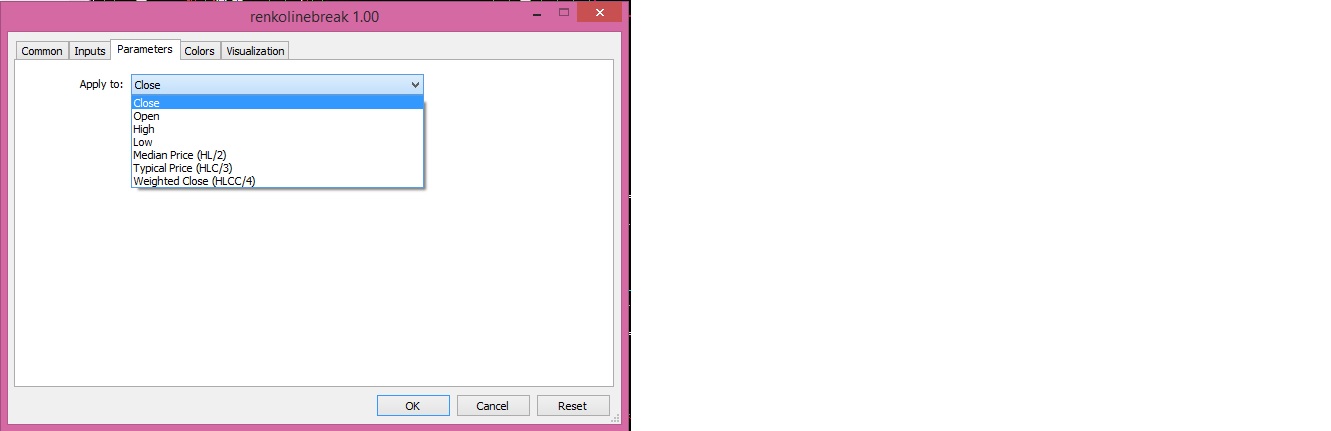
when i search in this code i cant found where this option if i want change it direct by code not by change setting
So , how i can found it in this option to can change it direct like i want open or else not close
how i do that ?
thank you0_1551130325231_renkolinebreak.mq5
-
RE: HOW CONVERT FROM mq5 TO mq4 BY FXDREEMA?posted in Questions & Answers
@josecortesllobat this convert from mq4 to mq5
i want mq5 to mq4 -
HOW CONVERT FROM mq5 TO mq4 BY FXDREEMA?posted in Questions & Answers
HELLO
HOW CONVERT FROM mq5 TO mq4 BY FXDREEMA?
THANK YOU -
RE: how i do that in fxdreema in equity ?posted in Questions & Answers
@roar thanks this mean you projects work with my ask?
thanks -
RE: how i do that in fxdreema in equity ?posted in Questions & Answers
@roar
sorry i add new information look it
Note : the 100 Dollar i say it not must happen direct ( i mean if add 10 $ and next add 30 $ and next add 70 $ then happen 100 $ i want then close all orders
how i can do that with above
thank you -
how i do that in fxdreema in equity ?posted in Questions & Answers
hello
my balance 100 $
i want if my profits above 100 $ close all orders
you tell me use condition account equity - balance
you are right but if i use strategy hedge my equity all time will under 0 $
So , its cant do what i say !!
i want if add to my last amount equity ( the first work will be Deposit ) 100 $ then close all orders ,
Ok if all orders close this mean become my equity 200 $
Work again if my currently equity add on it 100 $ close all orders
this mean become 300 And again >>>>>>
how i can do that ?
Note : the 100 Dollar i say it not must happen direct ( i mean if add 10 $ and next add 30 $ and next add 70 $ then happen 100 $ i want then close all ordersthank you
-
RE: what option can use it if i want create order on chart1 create in the same time on chart2?posted in Questions & Answers
@roar thanks if i do that must open chart for usdjpy or not ?
-
how i use option bucket position in Modify Variables ?posted in Questions & Answers
how i use option bucket position in Modify Variables ?

I want save total all buys or sell
but in here not show me what i want show me total buys or sells
and found filter condition what i write it until can have total for buys or sells
thank you -
RE: Having trouble creating a MT5 EA even after converting it from MT4.posted in Questions & Answers
@fxdreema i create before ea by fxdreema in mq4 and when i use option convert here from mq4 to mq5 its convert it, when i take this convert for test it show me more more more from error
but when i use mq4 its right not any error
i write subject here about my this problem and some body tell me create this ea from new on file mq5 in fxdreema because there problem in convert -
what option can use it if i want create order on chart1 create in the same time on chart2?posted in Questions & Answers
Hello
what option can use it if i want create order on chart1 create in the same time on chart2?
Mean My EA create order buy in symbol eurusd
i want in the same time create the same order buy and the same lot on symbol usdjpy
how i do that ?
thank you

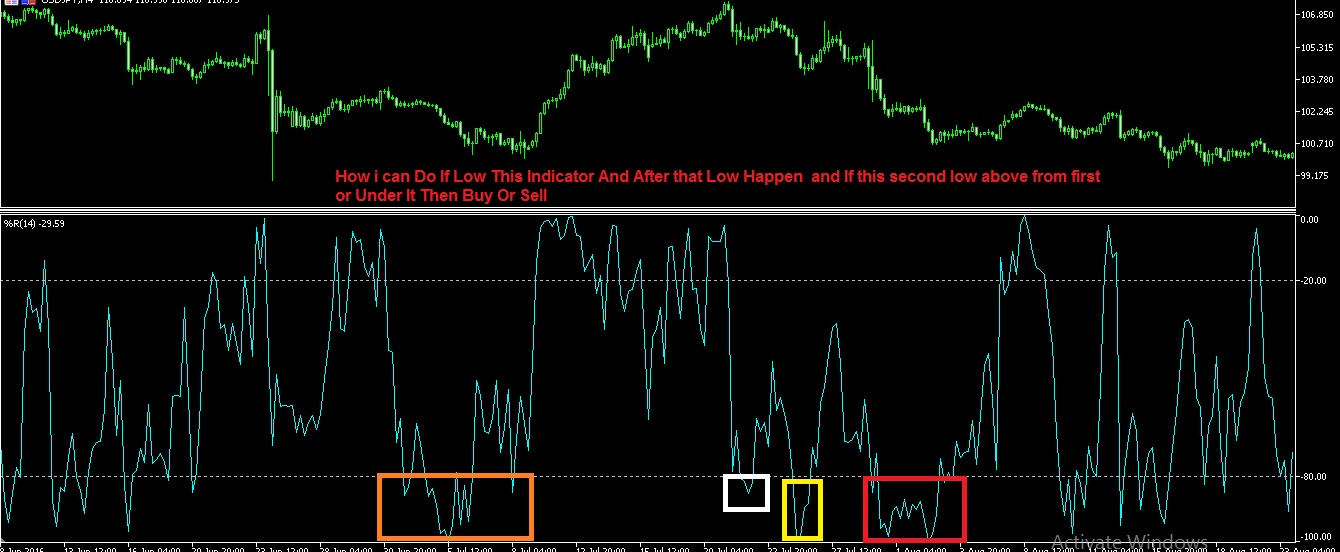 how
how