Excellent Miro...
I got the concept... my problem was with the initial code. 
Thanks a lot again.
Excellent Miro...
I got the concept... my problem was with the initial code.
Thanks a lot again.
just click on the project's name on the upper left side of your screen... edit the name and click "Done"
there are many examples and tutorials here: https://fxdreema.com/examples and here: https://fxdreema.com/tutorial
try to start there and post specific doubts here, then you'll get lots of help.
Use Buy/Sell pending orders with custom price (you'll find candle high/low within the block settings) in "OnTick"
... then, in the "onTrade" tab you add a block "Position created" that after passing will delete pending orders (use "Delete Pending order" block)
with that logic the sell order will be deleted when a buy position is opened (or vice-versa).
that project will work if you put the block in the "OnTIck" tab
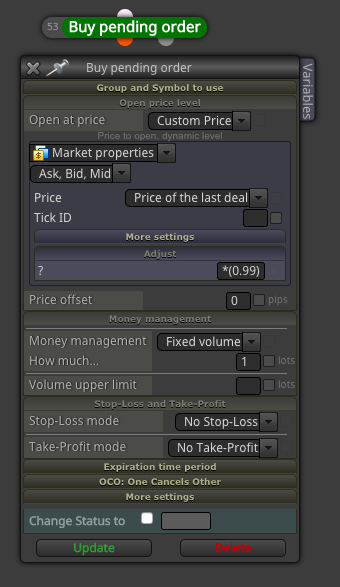
If you already have a percentage you will use forever (let's say 1%), then you can just use 0.99 (1% below market) or 1.01 (1% above market) in the Adjust field. However, if you want to optimize it or plan to change it in the future, it will be much more convenient if you have a constant you can change without the need of changing the source code.
Your choice !
Cheers.
See image below.. in the example, a buy limit order will be place 1% below the market (see the "Adjust" field, where it says *(0.99), that means current market price minus 1%).. then you can create a constant with the value you want and choose how far, in %, the order will be from current market price.
Hello,
I would like to implement the function PositionCloseBy on a custom block (Custom MQL code). This function closes a position with an opposite position. For example: if there is one buy and one sell position open, the function will be able to close the buy with the sell position (or vice-versa), without the need of executing two new orders to exit both positions. Here is the MQL information: https://www.mql5.com/en/docs/standardlibrary/tradeclasses/ctrade/ctradepositioncloseby
I know this is done automatically in MT5 "netting" accounts, but I need to use it on a regular "hedging" account.
I have tried very hard to make it work, but couldn't. I was hoping I could get some help.
@miro1360 , would you be so kind to have a try? I have seen you do the impossible with fxdreema blocks
You could perhaps use this simple project, that will open 2 buys + 1 sell position: https://fxdreema.com/builder/shared/dfo4SBX2e
My goal is to be able to leave only one buy position open (the newest).
Thanks a lot
After you export the EA (source code (.mq4/.mq5), or .ex4/.ex5 file) it is 100% yours, will work "forever" and have nothing else to do with your subscription.
However, you won't be able to edit the EA in fxDreema after the subscription expires, so if you need to change anything you'll have to do it manually in the source code.
Make a condition (Parabolic SAR > candle high) that will change a variable (+1) when it passes, then make another condition that passes (and executes the trade) when the variable hits 3. If the "Parabolic SAR" condition doesn't pass, the variable is reset to zero.
You can do it by using other blocks. try to connect the pink block "for each pending order" > "check age" (choose the expiry time in this block) > delete pending orders.
Hi @fxDreema,
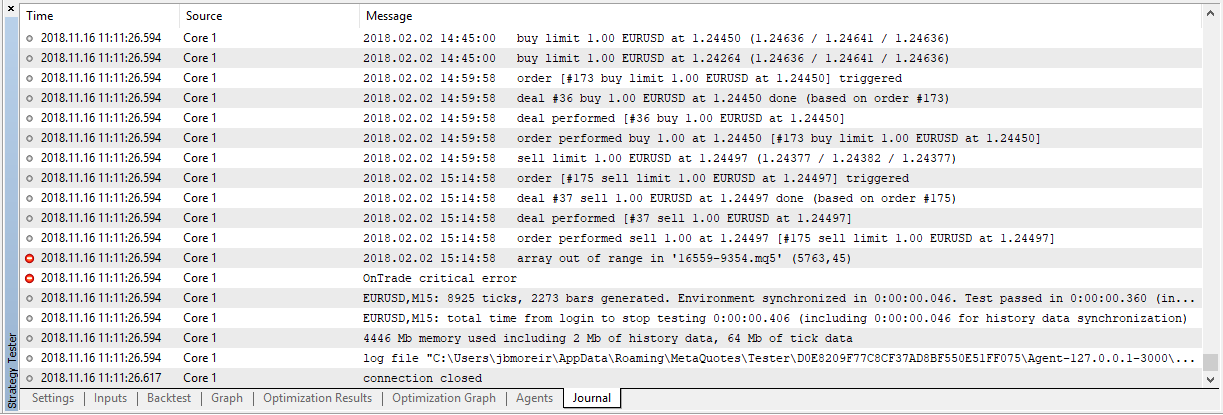
I'm using this EA https://fxdreema.com/builder/shared/dgyi9EqR , but I'm getting the error below every time it runs ("array out of range in... "). The EA or backtest are terminated after the error. It happens in all brokers and all pairs, but only when I'm entering and exiting positions with limit orders in MT5 (netting account). Could you please check that out?
Thanks
There is a blue block called "Check profit (period of time)". Negative profit means losses, so if you define how much loss you tolerate, you can use that block as a filter... If losses are greater than X USD in a day/week/month/year, close all positions and block opening new ones.
Sh*t ... I don't have a demo login in that specific broker. I only have live account there.
I guess it wouldn't make sense to change a "core code" in fxDreema to fit this specific requirement, so I wonder if you'd be able to just give us one example on how to force RETURN type of filling for all orders (opening and closing positions). Would you be so kind? This would definitely solve the problem, as this is the only issue, which has been confirmed by the broker itself (only RETURN fillings are accepted)
I made a simple EA you might use for the example: https://fxdreema.com/builder/shared/wUtAGYoUd . It's simple but includes a typical structure many people would use in that broker (includes a time exit at 5pm, when the exchange starts to call large margins for overnight positions).
If you are able to do that, you may just re-direct any future request about that to this thread, where people would find the solution. Perhaps you can post the mq5 file for this example here, or just a screenshot of the changed codes, that you would be of great help to us.
Cheers
Overfitting is the process of adjusting a model (e.g. a trading strategy) to work so perfectly in test data (e.g. the past) that it only "fits" that piece of data and absolutely nothing else. This is, in my view, the most common mistake in trading system development. So what happens in most cases is the trader has an excellent backtest, but the performance collapses immediately after starting on live trading.
Common question is: "how can we know the future then?".... obviously you can't, but what you can do is to break the past in multiple segments, develop and optimize a system in older segments, then pick the systems variations you judged "best" in that old segment and test it in a new, forward segment.... in that manner you can better estimate (never guarantee) whether your model has predictive power into new data, since this is the only thing a trader is looking for (a pattern in the past that is repeated in the future).
So, back to your other question: In sample is the "past", and out of sample is the "future", in relative terms. ..... 2012 is the future of 2011... 2013 is the future of 2012,.. 2014 is the future of 2013.... you got the idea.
So you have 2010 as in sample, optimise your strategy there and run the best option in 2011 (out of sample). Register the 2011 results alone... then 2011 becomes the past. So now it's in sample and you can optimise with 2011 data. So you do that and run the best option alone in 2012.... then repeat until you reach yesterday's trading session. If the combined performance of OOS segments is good, you have a system that has a good chance of adapting to next year's market, and continue to do so, until it doesn't (so you turn it off)... Again, nothing is guaranteed in trading, we're just talking about statistics and probability, on a context that is always changing. So you have to understand the risks and be aware that the chance of success is tiny tiny.
Validate a trading system across multiple independent segments of data that were not available during optimization.
Optimize 2010-2011 (past, in sample)
Test 2011-2012 ("future", out os sample OOS #1)
Optimize again 2011-2012 (that became past, in sample)
Test 2012-2013 (out of sample #2).
... repeat until all data is used, then calculate the combined performance of OOS segments. This is called walk forward analysis and simulates how well a strategy deals with changing markets. If not done carefully, you contaminate OOS segments by using them for optimisation before walk forward analysis. I see many people don't understand the concept and end up curve fitting the walk forward analysis as well.... so, it's important to do the homework (google Robert Pardo)
In my view:
rule number #1: avoid overfitting
rule number #2: backtesting results from "in sample" data means absolutely nothing. Out-of-sample is the only thing that matters.
rule number #3: never underestimate rules #1 and #2.