Have you already input data into the block? Perhaps the data is incorrect rather than the block itself...(?)
Regards*

Have you already input data into the block? Perhaps the data is incorrect rather than the block itself...(?)
Regards*
You could try only 1 symbol at a time. The EA will only place trades on the chart it's on....
Also you have JPYUSD in the field rather than USDJPY....
Also you have no Block ID in the Turn Off block....
Regards*
You could try something like For Each Pending Order>Condition or Indicator>Slide Order.....
Regards*

There is a work around for this by using the Unrealised Profit/Loss > Close Trades blocks* So long as you don't want to use Trailing Stops....
Regards*
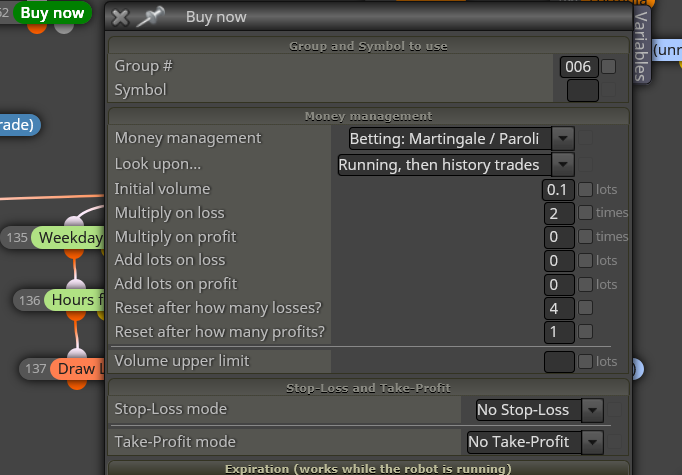
Do you have your Buy/Sell blocks set on the Martingale settings?
Regards*
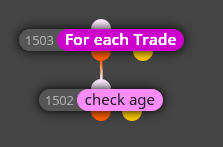
You could try For Each Trade>Check Age....
It has option for seconds...
Regards*
@ambrogio - Conditions are price movement a certain distance in one direction. The Buys work fine. Only the Sells throw up that message and have that problem....
But anyway, I've turned off Virtual Stops for now*
Regards*
Hi Guys - Thanks for your thoughts*
@l-andorrà - Yeh I know. I just have to put aside the theory that brokers hunt stops.. That's the whole point of using Virtual Stops right?
Also I already have over 300 blocks in this EA. I think that's enough yeh....lol
@ambrogio - Yes trailing stops. The real problem is that it only throws that message sometimes here and there, and when it does, the EA won't place the trade. Therefore, it's just not reliable enough as you can't have your EA missing trades etc...
Also, the stop doesn't start trailing immediately therefore the trade should still get placed...yet it doesn't....
Eh, I'll just have to do without it and hope the above theory is incorrect*
Regards*
Hello Dreemas*
I've had a long standing love/hate relationship with the Virtual Stops feature provided by FXDreema. Always seems to be a problem.
If I enable Virtual Stops I get the Error 4202. If I disable it I have no problems at all.
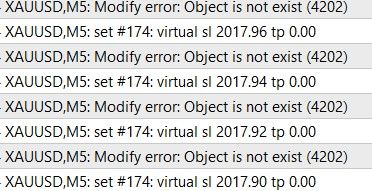
I relate to the reasoning and would dearly love to use Virtual Stops but I guess it's time to give up on the idea*
Regards*
Obimbs - Can you try this:
Disconnect Blocks 2 and 3
Remove the 1 in the Not More Than field
You would also have to make the pips_gap a variable so the sequence away from the parent trade is 20/40/60...etc....
This would also mean you probably wouldn't need the Once per Position block....
No it happens for me too....sigh*
I think it also has something to do with the amount of parameters an EA has....
If you run an EA that just Buys/Sells on 1 MA cross for exmple, it'll run fast.....etc*
I believe it's a one time pass every time the cross happens...Can still wreck you in a sideways, small volume market as it crosses back and forth...*
Under the Symbol field, you could try the other options like Control Points or Open Prices Only....
However: Some EA's don't even open trades on those options and results can be very different....
Backtesting isn't great for results anyway though. It's more a way to see if your EA is working....
But the tester should run faster on those other options....Worth a shot*
Perhaps in the On Trade tab using Trade Closed>Check Profit etc...?
I'm sorry no, I don't really understand....
Perhaps post a shared link to your project.....*
Could you not close all trades and start again before the maximum is reached...?
Hopefully l'andorra's method might work....*
You could use Buy/Sell Pending Orders in Grid set at 20 pips apart....*
Have a look at the money management options in the Buy/Sell blocks... They already have % of Bal/Eqt there....*
Keep in mind these figures will change between say EURUSD and XAUUSD etc....*
Can you post a shared link to your project so we can take a look.....*
I don't understand? You should be allowed to close trades whenever you want....?