
Posts made by Morpheus_0
-
RE: Distance In Time*posted in Questions & Answers
I've decided to leave it as White when Pressed because this means you can see at a glance from across the room whether or not it is pressed.
Thanks Again*
-
RE: EA not executing Tradeposted in Questions & Answers
@l-andorrà - I think because he has it set to Once Per 2 Trades...(?)
-
RE: max 2 trade per day, how to do this?posted in Questions & Answers
Well the easy way to do it would be to set up two tress and use the Once Per Day block on each tree....even just to test it....
But I would say your answer is somewhere in the Time Filter blocks....*
-
RE: EA not executing Tradeposted in Questions & Answers
In the Once per Trades block, try switching Any Symbol to Specified....
That was a mistake by FXD when he built the thing....or maybe he did it just to drive people insane....lol
-
RE: My EA not running at all, throwing up global initialization failed, global initializtion critical errorposted in Questions & Answers
Open the No Position/Orders Blocks and make it Buys for Buys and Sells for Sells....
Right now you have it "Either Buys or Sells".......*
-
RE: Distance In Time*posted in Questions & Answers
I guess I can have a mess around with it but I don't want 2 buttons on the chart....
It's strange and a pity the thing has to turn white when you press it.....*
-
RE: My EA not running at all, throwing up global initialization failed, global initializtion critical errorposted in Questions & Answers
@Obimbs said:
I added the delay block to prevent overlapping of orders
The two blocks above them should prevent that anyway....
Did it work....?
Also it won't open Buys AND Sells together unless you separate those in the No Position Blocks.....
-
RE: i need helpposted in Questions & Answers
On Tick tab: No Trade>Time Filter>Once Per Bar>Buy Order>Turn OFF Buy/Sell Blocks....
If Trade>Trailing Stop....
On Trade tab: Trade Closed: Closed By>Turn ON relevant Buy/Sell blocks....
This might get you started at least*
-
RE: My EA not running at all, throwing up global initialization failed, global initializtion critical errorposted in Questions & Answers
Heh...Well I wouldn't go 'expecting' things my friend. No one here 'works' for FXD. We all just give freely of our time when possible*
However, I have good news and not so good news....
The good news is it looks like you've set everything up properly.
The not so good news is I can't see why you'd be getting the globalization errors...But I also deal more with MT4, not MT5.....
And so: Are you getting those error messages when using the MT5 Compiler...?
Have you tried it without the Delay blocks...? What are those even for...?
Regards*
-
RE: Distance In Time*posted in Questions & Answers
So essentially you'd have to have 2 buttons and be drawing and deleting them under the On Tick tab right....?
Don't buttons need to be sitting under the On Innit tab...?
-
RE: Distance In Time*posted in Questions & Answers
@jstap @l-andorrà - Update: So yes the problem was I was trying to use = instead of <= or => which as you know, can't be done when dealing with Time Values as the time can skip, especially around candle openings....So that's that solved....
So how about this little problem: When dealing with a Button, why does it have to change to white when pressed?
I want it to stay black.....
https://fxdreema.com/shared/AwqWyT7eb
-
RE: Distance In Time*posted in Questions & Answers
Yes my friend...However as usual you were right....
When dealing with Time values you have to use <= or =>, not =.....
So I will update soon......
-
RE: Distance In Time*posted in Questions & Answers
So I'm using: For Each Object> Value Time Candle Time Shift Forward 5 minutes = Object Picked In Loop Time 1 > Action....
What's weird is sometimes it works and sometimes it doesn't....
SO frustrating.... :-((
-
RE: My EA not running at all, throwing up global initialization failed, global initializtion critical errorposted in Questions & Answers
@Obimbs Can you please create a shared link like this so myself or one of the guys can take a look..>>

PS: I suggest having larger gaps between orders and a good stop loss strategy because of the huge moves that come quite often. I've tried your strategy in the past...just saying... :-))
-
RE: Distance In Time*posted in Questions & Answers
Yes the line has a time stamp being a vertical line...
I've tried Candle Time with no luck.....*
-
Distance In Time*posted in Questions & Answers
Hi all. Once again I am stuck!
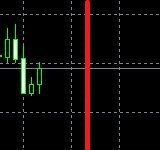
I want to turn on my News Filter 5 mins before the line on the chart, and turn it off again 5 mins after the line....
How do I do this...??
-
RE: Trailing Pending Ordersposted in Questions & Answers
Set the Buy/Sell Pending orders at 20 pips offset from the Ask/Bid price.
Then use the Trail Pending Orders block and set that to the same parameters....*
-
RE: Paymentposted in Questions & Answers
Yes....but I would say you might need more than a month to get it right.....:)