Hi @LALI ,
Check the link below. I think "Custom Sequence" will work for you.
Hi @LALI ,
Check the link below. I think "Custom Sequence" will work for you.
hi @kissasian ,
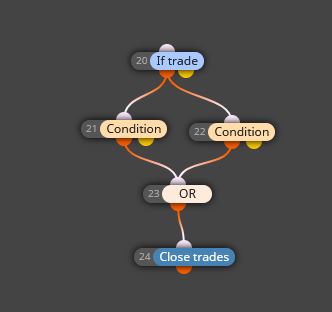
You can simply use such setup below.
You sure need to configure blocks regarding to your conditions.
Regards.
@laudable222 There are several ways to check if buffers provide a value.
You can try to use below blocks and run your EA in visual mode to print buffer values;
-Comment
-Trace
-Draw text
@vonmunchy You can attach draw shape or draw text blocks to close trade blocks or conditions. By this way you can see which condition/close trade block closes your trade.
@laudable222 You can use attached indicator to check buffer values.
0_1616839288208_Buffers explorer 2.ex4
PS: You can remove '0_1616839288208_' part from the indicator name. It's automatically renamed when uploaded to forum.
@simenandreas You can use 'No trade' or 'Trades count' blocks to limit the number of initiated trades.
You can check link below for some details:
@gorilla, I'm trying to figure out from your setup but not sure about the idea. What is the details of your strategy?
.
@max-c I see. Buffer Explorer indicator is a practical tool for me but there are several ways to check if buffers provides a value.
You can try to use below blocks and run your ea in visual mode as you know;
-Comment
-Trace
-Draw text
@Gorilla hi there,
Just to be sure, what's the block name that you use in the project?
@max-c you can use attached indicator to check if buffers provide any value.
@itadila yes I know  I thought maybe you can implement another solution if needed.
Take care 
@itadila hi,
If you need to apply virtual stops, there are a few ways that can be implemented.
You can use 'Check profit (unrealized)' (profit value must be minus) or 'For each trade' & 'pips away from open price' blocks connected to 'Close trades' block.
You can also create a boolean condition to enable/disable the function.
Hope it gives an idea.
Regards.
notify: @l-andorrà
@khacdiepvnc As I have mentioned before, one option to use groups for your strategy.
I have created Setup 3 as an example.
https://fxdreema.com/shared/UX8qiV66
In this setup, No trade and connected blocks are in group. I have configured 1, 2, 3 as group numbers. It's a basic setup and is to give you an idea.
Be careful with the groups, it can be hard to manage in complex setups.
@khacdiepvnc you may find a simple example below:
https://fxdreema.com/shared/ppxR1P45e
In setup 1, only one trade will be initiated if one of the three condition occurs for buy and sell.
In setup 2, only one trade will be initiated if one of the three condition occurs for buy or sell.
You can search introduction, HowTo or forum areas for details and various solutions.
@fxmich78 you killed me bro!
Please apply the setup as I advised.
I found the difference. You used 'For each trade' instead of 'For each closed trade' block.
Things should start working properly.
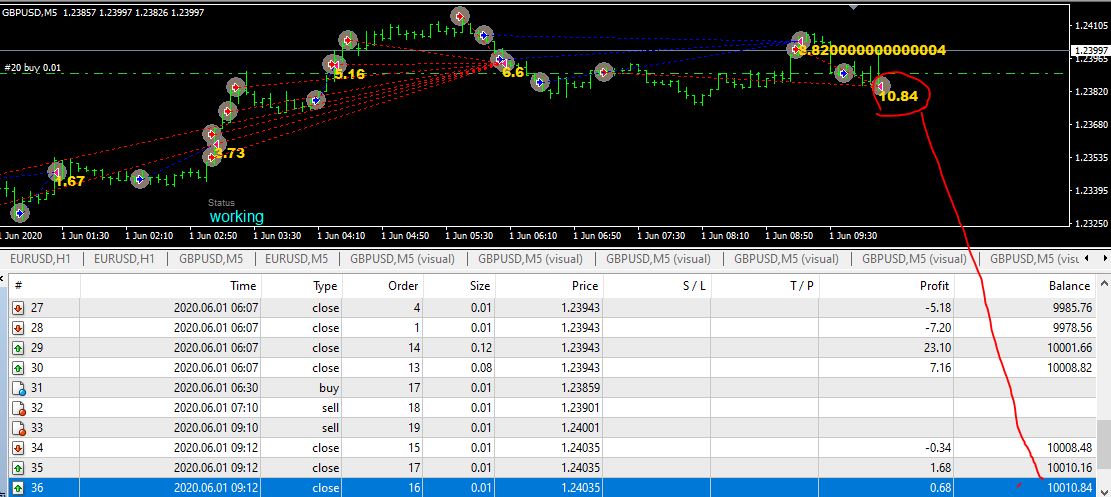
@fxmich78 ok I found it.
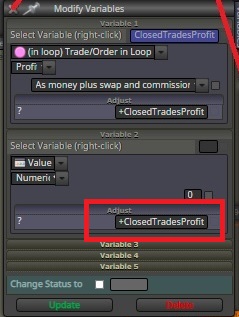
In your draw text block, you have to use 'ClosedTradesProfit' variable instead of 'ClosedTradesCount'.
Please update it and try again.
By the way, you can remove this:
Sure @decopain . Indicator is not important, concept of not trading in this situation of yours important for you. But most important point, at least for me, is the right way to implement a strategy with the correct setup of blocks.
Please do not get me wrong but, I think setup (https://fxdreema.com/shared/9IAzRIYuc) is not proper.
I just wanted to check the indicator's buffers and try to advice a good setup.
I hope you find a good solution for your project.
Regards.
@decopain is it possible to share the indicator that you are trying to use?