Hello @er-arpit09,
Check the below link if it's what you are looking for?
https://www.mql5.com/en/market/product/38228
Before trying to find a coder on fiverr.com, you can try to search such published indicators on various resources.
Regards.
Hello @er-arpit09,
Check the below link if it's what you are looking for?
https://www.mql5.com/en/market/product/38228
Before trying to find a coder on fiverr.com, you can try to search such published indicators on various resources.
Regards.
@bl4ckp3n9u1n-0 thanks for sharing the results of your EAs. Good to see some encouraging results 
Regards.
@bl4ckp3n9u1n-0 I hope you get good results 
Take care.
Regards.
You are welcome @bl4ckp3n9u1n-0 ,
Since there are missing buffers, you need to add buffer 5 manually. Go to "My Indicators" find your indicator and add buffer to "Output Buffers" field.
If your last buffer is 4 you can write 'Buffer 5' and click update button.
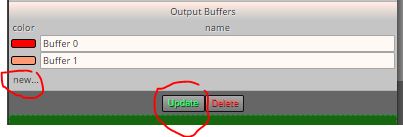
Tip: If you see Buffer 3 as last identifiled buffer, and need to add Buffer 5, you need to add Buffer 4 eighther. No missing buffers allowed because name is not important, rows are counted. First row starts with 0.
By the way, if you can mention my nickname in your post, I will be notified. I can miss your reply without mention.
Regards.
Hi @bl4ckp3n9u1n-0 ,
Buffer 5 provides numeric value 1 for up trend (arrow UP) and numeric value -1 for down trend (arrow DOWN).
You can set your conditions regarding to this information.
Regards.
Hi @pipsacoin ,
You are trying to use same buffer with same candleID which will provide same info/signal every time. I mean you will never get a different value with Buffer0 (CandleID 0-emtpy) > Buffer0 (CandleID 0-empty).
In the code, line 23 declares that buffer 4 is set to provide info about trend.
I use an indicator named buffers-explorers (which Iattached a version of it) to see what data is provided via buffers. Buffer 4 of ozymandias indicator provides numeric value 1 when trend is down (middle line color is tomato) and provides numeric value 0 when trend is up (middle line color is DeepSkyBlue).
So you may set a simple condition for a scenario up trend turns down as below;
Buffer 4 = 0 (candleID 1 for previous candle time) --> trend is UP for previous candle
Buffer 4 = 1 (candleID 0-or leave emtpy- for current candle time) --> trend is DOWN for current candle
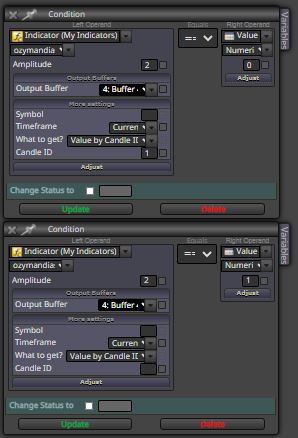
In my experience, using 4 conditions with 4 candleIDs (at least 3 with 2 for previous and 1 for current time) provides better results in such setups.
For example:
Buffer 4 (cID 3) = 0
Buffer 4 (cID 2) = 0
Buffer 4 (cID 1) = 1
Buffer 4 (cID 0) = 1
I didn't try it but you should get it work this way, or you'll find right way to work.
Buffers explorer 2.mq4
Buffers explorer 2.ex4
Regards.
Notify: @l-andorrà
@len-1 You're welcome. I would like to see your results with that. If you have any issues, please provide details with screenshots.
Hi @saeed-2 ,
I do not know what issue you have but if it's repaint, you may use attached non repainting version of super trend indicator by Mladen Rakic.
SuperTrend-nrp-mtf-mladen.mq4
SuperTrend-nrp-mtf-mladen.ex4
Regards.
Notification: @l-andorrà , @len-1
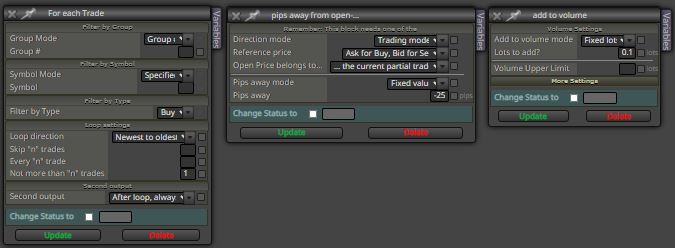
In my opinion, this is the easiest way. Here I share a screen shot, which the usage order is left to right with the following setup. You should use group number if you need. It should work.
I use this and similar setups in my EAs which works perfectly.
Regards.
Hi @Supersako ,
Meta Trader data windows do not provide all information provided via buffers. In my experience, it's better to use an indicator named buffers-explorer. You may explore which buffer provides what data with this indicator. I first found it on this forum and use it every time.
I hope it helps.
Regards.
Hi @khalids222 ,
Best way I know is to use the block named "pips away from open-price" after "For each trade" block to add to volume (create additional trades related to parent trade).
If you do the setup right (please read the provided information in blocks) it should work perfectly.
Regards.
@l-andorrà That's what I do. I just thought you provided a better way
Thank you for your reply @l-andorrà
Regards.
I wonder if there is a simple way to reset variable value to default (to the value when EA first starts to run)?
Thank you.
@dragonfly617 I think you may try to use the block named "Check profit (average)" which has profit mode option to check pips & money.
Just a kind warning:
I used pips as profit mode, but this block just simply divide gained pips to number of orders. It does not take lot size into calculation. Which may lead you get unexpected results.
I hope this helps.
Regards.
Hi @l-andorrà ,
I have an update here:
I had some issues with this setup. I got undesirable results in some cases with this loop. I removed the loop block and just used condition & modify variable blocks to run a loop which provided accurate results.

Initial value for 'incLoop' variable is set to 0 which is increased by one in custom mql code block until it is equal to LoopNumber (which is 10 in my case) and loop restarted.
I don't know if it you could use previous setup but if you are still working on your project you may try this loop instead.
Regards.
It's not working for me, sorry. Thank you for your kind help
@l-andorrà It's like time based SL, can close trades with loss.
Hi @trader-philipps , thank you for your warning. I am trying to find an optimum way to minimize loss for my self.
Hello @l-andorrà ,
For example, let's say I created a strategy that buys when candle low touches lower line of the band and exit trade when price reaches the middle line of the band. But when price goes below the lower line without reaching middle line trade turns to a bad trade. We never know if it goes up or deeper. Using a stop sure is an option but many times stops below my profit or ended profit potential trades.
So, I am wondering a way to exit bad trades without loss or big loses. Sure it's not an easy or certain solution. The idea was to mark that kind of trades created by EA and manage them in a different way.
Regards.