fxDreema

    • Register
    • Login
    • Search
    • Back to the main page
    • Categories
    • Recent
    • Tags
    • Popular
    • Search
    1. Home
    2. rafaelgrecco
    R
    • Profile
    • Following 0
    • Followers 1
    • Topics 28
    • Posts 111
    • Best 7
    • Controversial 0
    • Groups 0

    rafaelgrecco

    @rafaelgrecco

    9
    Reputation
    1879
    Profile views
    111
    Posts
    1
    Followers
    0
    Following
    Joined Last Online

    rafaelgrecco Unfollow Follow

    Best posts made by rafaelgrecco

    • RE: Calculating Simple Moving Average of a Indicator

      Ok, I figured it out.

      Each "Modify Variables" can modify up to 5 variables at once, so 3 blocks can handle 14 periods for example.

      The "Formula" block only has simple operations, but we can add more operations on "Adjust the result" field. So we can sum all variables (as many as we want) using a single block.

      It is a lot of stuff to keep track, but it works using only a few blocks. I should have tested a little more before posting.

      Anyway, I hope this information can help someone if they are looking to do something similar.

      posted in Questions & Answers
      R
      rafaelgrecco
    • RE: object on chart has no parameter

      Hi,

      I confirm this bug. I am also waiting for a fix!

      Best Regards.

      posted in Bug Reports
      R
      rafaelgrecco
    • Calculating Simple Moving Average of a Indicator

      Hi! I am trying to calculate the SMA (simple moving average) of a Indicator.

      Simple Moving Average is the sum of the closing prices divided by the period number.

      Example SMA for 5 periods: (1.0399 + 1.0394 + 1.0387+ 1.09375 + 1.09382) / 5 = 1.0387

      This is calculated automaticaly by the indicator.

      I want to have a Simple Moving Avarage for a Indicator, for example Momentum. The calculus would be same same, but using Momentum data instead of price, so I can compare them.

      Example SMA for 5 periods of Momentum Indicator: (100.2094 + 99.9420 + 99.0634 + 99.2944 + 99.4350) / 5 = 99.8884 - This would be the SMA that I wanted.

      This way I can compare the SMA of the Indicator with the Indicator data itself.

      What I currently have is:

      Have 5 Variables (M1 to M5), each with a Candle ID (0, 1, 2, 3, 4) of the Momentum Indicator. Then use Formulas blocks to sum all variables and put on secondary variables so I can sum all of them:

      M1 + M2 = T1
      M3 + T1 = T2
      M4 + T2 = T3
      M5 + T3 = T4 (here I have all candles summed up)

      Now divide T4 by 5 = SMA. This is the Simple Moving Average of the Indicator.

      Now imagine I want a SMA of 9, 14 or 21 periods... it would be too much to do this way. Is there a better and simpler way to achieve this?

      Thanks.
      posted in Questions & Answers
      R
      rafaelgrecco
    • RE: How to close all open orders at 5:00 PM, for example?

      @cjdduarte

      Using a Hours filter block, like this:

      https://fxdreema.com/shared/p69qvTG2

      If you mean all orders, including manually open, change the filter on the Close trades blocks to all orders (by default, it will only close orders opened by itself).

      posted in Questions & Answers
      R
      rafaelgrecco
    • RE: How to Select "Least profitable trade"?

      Hi @roar

      Thank you very much for your help! Using your example I was able to make something that works on my strategy!

      What I was missing was:

      • Reseting the variable "smallestprofit" on every new loop
      • Using the second output of "Each Trade" to wait for all trades to be checked

      Best regards!

      posted in Questions & Answers
      R
      rafaelgrecco
    • RE: Once per bar and No position together?

      The block is called "No trade" on MQL4 projects and "No Position" on MQL5 projects, but they are the same thing.

      Make sure you are using the correct block (there is one block for position, one for pending order and one for both).

      It should work like you said: Once Per Bar -> No Position. At least it works on MQL4 projects.

      posted in Questions & Answers
      R
      rafaelgrecco
    • RE: Working with Terminal Variables (Global Variables on MT4)

      Thank you very much!

      I didn't know there was a tutorial for it...

      posted in Questions & Answers
      R
      rafaelgrecco

    Latest posts made by rafaelgrecco

    • RE: "For Each Closed Position" block is not working.

      @ambrogio is it couting the closed trades?

      posted in Bug Reports
      R
      rafaelgrecco
    • RE: "For Each Closed Position" block is not working.

      @l-andorrà Thank you for the reply.

      But the project I shared as example is new, I made it just as I posted here... it means even new blocks are not working.

      Have you tried the example? It's pretty simple. Just add it to your MT5 and wait for you other EAs or manual trades do complete. The counter should add 1 each time a trade is closed, but it is not working (at least not on my terminal...)

      posted in Bug Reports
      R
      rafaelgrecco
    • "For Each Closed Position" block is not working.

      The block described in the title (For Each Closed Position) is not working anymore.

      Projects I made around a month ago (begnning of February) that used this block were working correctly.

      When I import those same projects and compile them again, those blocks stops working.

      I made a very simple project as example: https://fxdreema.com/shared/j4rfm1PBc

      In this simple project, everytime a trade (any symbol any magic number) is closed the counter should be implemented by 1, but it is not.

      Can you have a look please?

      posted in Bug Reports
      R
      rafaelgrecco
    • RE: For Each Closed Trade - Block Filters

      @l-andorrà Thanks for the info!

      posted in Questions & Answers
      R
      rafaelgrecco
    • RE: For Each Closed Trade - Block Filters

      @l-andorrà thanks for replying.

      I don't know if I made myself clear on my original post.

      Imagine you are running the EA "X". You configure 10 on that field (just as you posted) to loop the last 10 trades.

      Now imagine you also run EA "Y" on the same account. Let's suppose the last 9 closed trades were from the EA "Y", the 10th trade is from EA "X".

      How will the block work on this scenario?

      1. Will it just find a single trade to loop? Because of the last 10 trades, only one of them was from EA "X"

      2. Will it look for the last 10 trades from EA "X" - this means it will keep looking through the trades history until it finds 10 closed trades from EA "X"

      Thanks!

      posted in Questions & Answers
      R
      rafaelgrecco
    • For Each Closed Trade - Block Filters

      Hi,

      When using the block For Each Closed Trade, we should set a maximum number os trades so the EA does not loop through all trades in history.

      If we set for example the last 100 hundred trades, does it mean it will look at the last 100 trades on this exact EA (using this EA's Magic Number) or it will look at the last 100 trades overall (any Magic Number)?

      Does this apply to any filter? Using the same example above, if I ask the block to filter only "Buy" trades, will it look for the last "100 buy trades" or it will look for the last "100 trades" and maybe only 50 of those trades are buy - so It will loop through 50 buy trades?

      Thanks!

      posted in Questions & Answers
      R
      rafaelgrecco
    • RE: How can info be included on the 'comment' column when closing a trade?

      @l-andorrà It cannot be changed on MT4, but can be changed on MT5.

      I believe we don't have a block for that function, so you would have create a Custom MQL Code block like this:

      m_request.comment = PositionGetString(POSITION_COMMENT);

      I'm not sure if you could just use a Close Position block and then use the Custom MQL Code block to change the comment or if you have to create the entire close function, something like:

      m_request.action =TRADE_ACTION_DEAL;
      m_request.position =ticket;
      m_request.symbol =symbol;
      m_request.volume =PositionGetDouble(POSITION_VOLUME);
      m_request.magic =m_magic;
      m_request.deviation=(deviation==ULONG_MAX) ? m_deviation : deviation;
      m_request.comment = PositionGetString(POSITION_COMMENT);

      posted in Questions & Answers
      R
      rafaelgrecco
    • RE: Check Age filter

      Thank you!

      posted in Questions & Answers
      R
      rafaelgrecco
    • RE: How can info be included on the 'comment' column when closing a trade?

      I think it's only possible to include a comment when opening a trade. It cannot be changed afterwards.

      posted in Questions & Answers
      R
      rafaelgrecco
    • Check Age filter

      Hi,

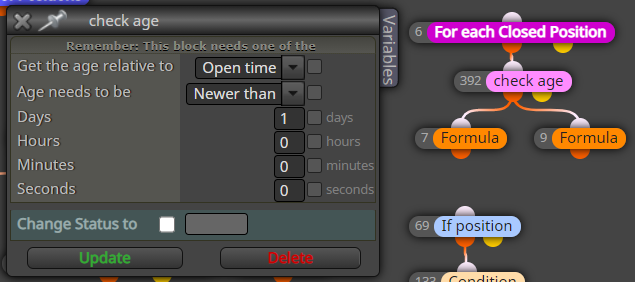
      I'm wondering if when using the days parameter on the Check Age block, it considers 24 hours or the date?

      For example, If I set "Newer than 1 Day", like the image below:

      0_1615401726194_checkage.png

      Will it consider any trade within the last 24 hours or it will only consider trades that opened after 00:00? (for example, if it is 5 am it will only consider trades that were opened on the last 5 hours, that same day).

      What I need to do is filter the trades that happens on the same day - between 00:00 and 23:59.

      Thanks!

      posted in Questions & Answers
      R
      rafaelgrecco