@ambrogio is it couting the closed trades?
R
Posts made by rafaelgrecco
-
RE: "For Each Closed Position" block is not working.posted in Bug Reports
-
RE: "For Each Closed Position" block is not working.posted in Bug Reports
@l-andorrà Thank you for the reply.
But the project I shared as example is new, I made it just as I posted here... it means even new blocks are not working.
Have you tried the example? It's pretty simple. Just add it to your MT5 and wait for you other EAs or manual trades do complete. The counter should add 1 each time a trade is closed, but it is not working (at least not on my terminal...)
-
"For Each Closed Position" block is not working.posted in Bug Reports
The block described in the title (For Each Closed Position) is not working anymore.
Projects I made around a month ago (begnning of February) that used this block were working correctly.
When I import those same projects and compile them again, those blocks stops working.
I made a very simple project as example: https://fxdreema.com/shared/j4rfm1PBc
In this simple project, everytime a trade (any symbol any magic number) is closed the counter should be implemented by 1, but it is not.
Can you have a look please?
-
RE: For Each Closed Trade - Block Filtersposted in Questions & Answers
@l-andorrà Thanks for the info!
-
RE: For Each Closed Trade - Block Filtersposted in Questions & Answers
@l-andorrà thanks for replying.
I don't know if I made myself clear on my original post.
Imagine you are running the EA "X". You configure 10 on that field (just as you posted) to loop the last 10 trades.
Now imagine you also run EA "Y" on the same account. Let's suppose the last 9 closed trades were from the EA "Y", the 10th trade is from EA "X".
How will the block work on this scenario?
-
Will it just find a single trade to loop? Because of the last 10 trades, only one of them was from EA "X"
-
Will it look for the last 10 trades from EA "X" - this means it will keep looking through the trades history until it finds 10 closed trades from EA "X"
Thanks!
-
-
For Each Closed Trade - Block Filtersposted in Questions & Answers
Hi,
When using the block For Each Closed Trade, we should set a maximum number os trades so the EA does not loop through all trades in history.
If we set for example the last 100 hundred trades, does it mean it will look at the last 100 trades on this exact EA (using this EA's Magic Number) or it will look at the last 100 trades overall (any Magic Number)?
Does this apply to any filter? Using the same example above, if I ask the block to filter only "Buy" trades, will it look for the last "100 buy trades" or it will look for the last "100 trades" and maybe only 50 of those trades are buy - so It will loop through 50 buy trades?
Thanks!
-
RE: How can info be included on the 'comment' column when closing a trade?posted in Questions & Answers
@l-andorrà It cannot be changed on MT4, but can be changed on MT5.
I believe we don't have a block for that function, so you would have create a Custom MQL Code block like this:
m_request.comment = PositionGetString(POSITION_COMMENT);
I'm not sure if you could just use a Close Position block and then use the Custom MQL Code block to change the comment or if you have to create the entire close function, something like:
m_request.action =TRADE_ACTION_DEAL;
m_request.position =ticket;
m_request.symbol =symbol;
m_request.volume =PositionGetDouble(POSITION_VOLUME);
m_request.magic =m_magic;
m_request.deviation=(deviation==ULONG_MAX) ? m_deviation : deviation;
m_request.comment = PositionGetString(POSITION_COMMENT); -
RE: How can info be included on the 'comment' column when closing a trade?posted in Questions & Answers
I think it's only possible to include a comment when opening a trade. It cannot be changed afterwards.
-
Check Age filterposted in Questions & Answers
Hi,
I'm wondering if when using the days parameter on the Check Age block, it considers 24 hours or the date?
For example, If I set "Newer than 1 Day", like the image below:
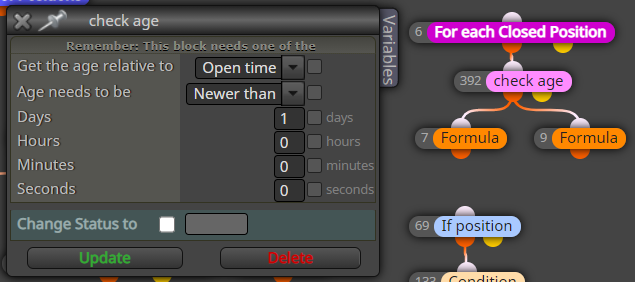
Will it consider any trade within the last 24 hours or it will only consider trades that opened after 00:00? (for example, if it is 5 am it will only consider trades that were opened on the last 5 hours, that same day).
What I need to do is filter the trades that happens on the same day - between 00:00 and 23:59.
Thanks!
-
RE: Trades opening on inferior time framesposted in Questions & Answers
@ovidiuzav as l'andorrà said, you need to separate the "close trades"blocks. You can do it like this:
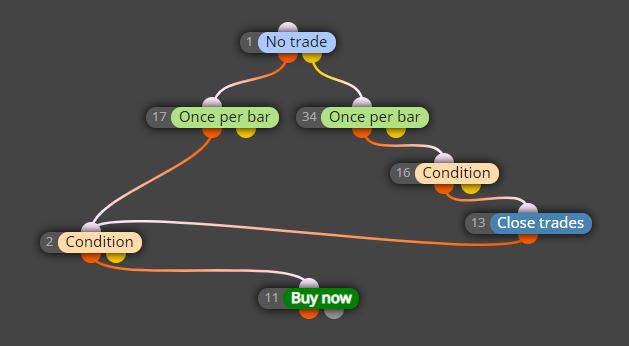
Notice that the orange exit of "No Trade" works when there is NO trade, so it is looking to buy. The yellow exit of the same blocks works when THERE IS a trade, so it is looking for the closing strategy.
-
RE: Trades opening on inferior time framesposted in Questions & Answers
The indicator values will oscilate whitin the hour candle. It could cross and "uncross" during that hour.
If you want to check the cross once the candle is closed, you can add the Time Filter block "Once per bar" and change the condition block to check Candle ID 1 (previous candle) instead of 0 (current Candle).
-
RE: Basic Question: How to control One EUR/USD Buy Or Sell at a timeposted in Questions & Answers
NoTrade->Condtion->OnceADay->CloseTrades->BuyNow
That should work! You only need to set Block NoTrade to filter only Buy trades.
That way it will only open a new Buy trade on the current pair (EURUSD for example) if there isn't one opened yet. -
RE: Possible bug using "For Each Closed Position" on MQL5 block.posted in Bug Reports
I managed to find a different solution. I'll just keep this topic here, eventually the admin/programmer will read this and have a look at this bug.
Thanks for your time.
-
RE: Possible bug using "For Each Closed Position" on MQL5 block.posted in Bug Reports
Thank you for you replay.
I've made some additional testing.Those blocks actually work correctly when used on "Every Tick". The problem seems to be related to detecting Stop Loss and Take Profit (which I was trying to use).
-
Possible bug using "For Each Closed Position" on MQL5 block.posted in Bug Reports
Hi,
I want to print the Profit of the last closed trade. This is how it should be done:
https://fxdreema.com/shared/WCAWB3F2e
This works perfectly on MQL4, but it's not working on MQL5.
This project is printing the oldest trade Profit, like if the Loop direction is reversed (instead of selecting the newest trade, it is selecting the oldest one).
If I change it to print the Oldest trade (invert the Loop direction), it does nothing (does not print anything). Again, just to make it clear, this exact same project works perfectly using MQL4 blocks.
Is this a bug?
Thanks -
RE: EA for Renko barsposted in Questions & Answers
For MT4 I recommend this renko sold on this site:
https://ovo.cz/products/offline-charts-for-mt4/renko-bars/
For MT5 I recommend this renko sold on MQL5 market:
https://www.mql5.com/pt/market/product/29005
I personally use both products I mentioned above.To make a simple EA like mentioned on the first post, you have to simply use a condition box to compare how the last candle was closed:
If Close of Candle ID 1 is > Open of Candle ID 1 = it was a up candle -> open buy position
If Close of Candle ID 1 is < Open of Candle ID 1 = it was a down candle -> open sell positionWhile it is simple to make such EA, it does not mean it will be profitable...
-
RE: How to cancel order if it takes too long to openposted in Questions & Answers
@trader-philipps Yeah, I've talked to other people that also uses my current Broker (or any Broker in Brazil) and it seems it is a common problem.
Unfortunately there's nothing I can do, like changing brokers... all I wanted was a way to cancel the trade if it took too long to be executed, but I don't think that's possible

-
RE: How to cancel order if it takes too long to openposted in Questions & Answers
Hey, just to be clear I am using a VPS with a ping of 3 ms to the broker.
My VPS is actually on the same data center that the broker uses. Connection is not an issue.
Today all trades are getting executed in 30-40 ms.
My problem is that eventually the broker messes something up and trades takes several seconds (sometimes up to 40 or 50 seconds) to execute the trade, and I wanted a way to prevent the trade from being executed when that happens.
-
RE: How to cancel order if it takes too long to openposted in Questions & Answers
@trader-philipps thanks for the tips.
I don't think "expiration" field will help. The lowest value possible is 1 minute. I would have to use something like 10 or 15 seconds (which is already a looong time for a trade to be executed).
The asset I am trading is the most liquid asset in Brazil. I'll contact my broker's support to see their explanation.