And hook them all together...in the end comes the draw line box. On the right side is the same for the lows.
S
Posts made by SirLuk
-
RE: Need a guide on thisposted in Questions & Answers
-
RE: Need a guide on thisposted in Questions & Answers
@tec-nacks
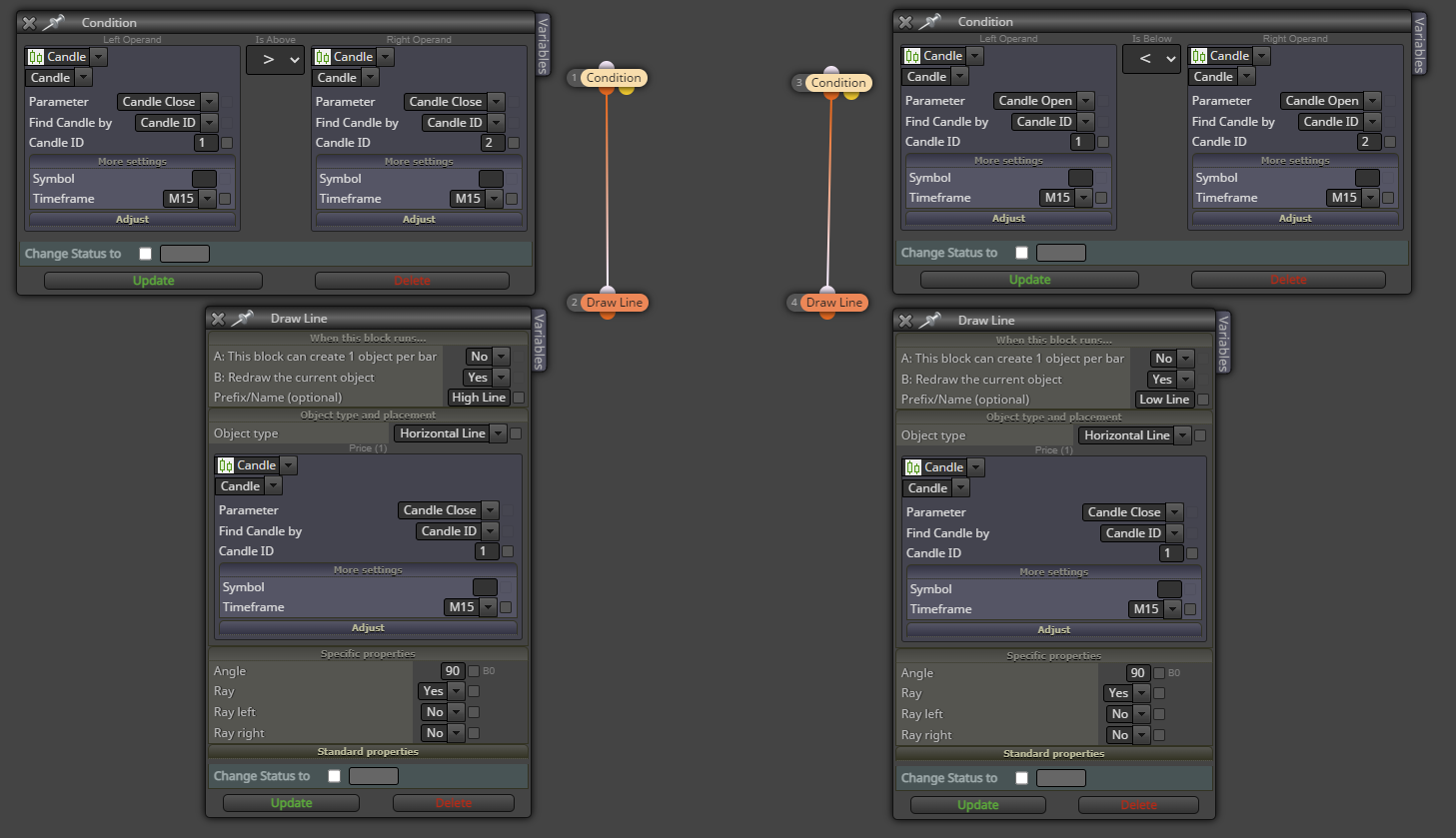 You just have to make 9 of these condition blocks, one for each ID.
 -
RE: Need a guide on thisposted in Questions & Answers
@tec-nacks What's the timeframe? Let's say 10 candles. You make 10 condition boxes...Draw line at candle close ID1 if higher than close of ID2, then 3 then 4 and so on until ID10. That means the line will always be at the highest close of the last 10 candles. You do the same for the lows.
-
Will my idea work?posted in Questions & Answers
So I want an EA that sells/buys if a hammer candle crosses through horizontal lines that I place manually at areas of resistance. An EA can't recognize horizontal lines that I create manually on my Mt4, or can it? So I created a button that I can press and it then creates a new line...so I can create as many as I want. I didn't give the lines a name, is that a problem? Will this work?
Here is a link to my project: https://fxdreema.com/shared/syQNQoDJc
Greatful for any inputs. -
Giving sell/buy signal by phoneposted in Questions & Answers
Hi. I won't to create an EA that lets me enter a trade with a fix money based stop loss using an EA thats running on my desktop, for when I'm out and about.
I want to open a trade with the stop being above the candle ID 1 for sell and below the candle ID 1 for buys with a fixed money risk stop. That's the easy part. Now how do I get to activate this via phone? The only solution I came up with is entering sell limit/stop somewhere by phone which triggers the sell/buy at the current price with the right stops and lot size. I thought something like this: https://fxdreema.com/shared/cmTz7pKjb Problem is, it's not working. Anyone see the mistake or has a better solution?
-
Giving sell/buy signal by phoneposted in Questions & Answers
Hi. I won't to create an EA that lets me enter a trade with a fix money based stop loss using an EA thats running on my desktop, for when I'm out and about.
I want to open a trade with the stop being above the candle ID 1 for sell and below the candle ID 1 for buys with a fixed money risk stop. That's the easy part. Now how do I get to activate this via phone? The only solution I came up with is entering sell limit/stop somewhere by phone which triggers the sell/buy at the current price with the right stops and lot size. I thought something like this: https://fxdreema.com/shared/cmTz7pKjb Problem is, it's not working. Anyone see the mistake or has a better solution?
-
RE: A mistake in my SL moving EAposted in Questions & Answers
@jstap did you look at the project? https://fxdreema.com/shared/nIhcYABLd
Only the two areas I created. (The turn on boxes after the sell or stop start the process). The upper one is for moving stops in a buy trade, the lower one for a sell trade. Why is it not working?
-
RE: A mistake in my SL moving EAposted in Questions & Answers
Maybe @jstap sees the mistake? I tested it with GbpJpy from 01.01.2023 till today. It works fine with the first trade...then from the second one on it doesn't work. Would that suggest a probleme with the counters?
-
RE: A mistake in my SL moving EAposted in Questions & Answers
Lets just look at the "Stopp Loss mover long setups" part of my EA: https://fxdreema.com/shared/nIhcYABLd
The string starting with block 52 looks for a close of candle 1 below the 15EMA but in profit, meaning above the buy line. This closes the string and starts the string starting with block 62. This looks for a new candle high while making sure, price always stays above the buy line...and then activates the modify stops. The barcounter_long variable counts the bars since that break below the 15EMA and so SL should be below the lows since then.
I just don't see where I made the mistake...
-
RE: A mistake in my SL moving EAposted in Questions & Answers
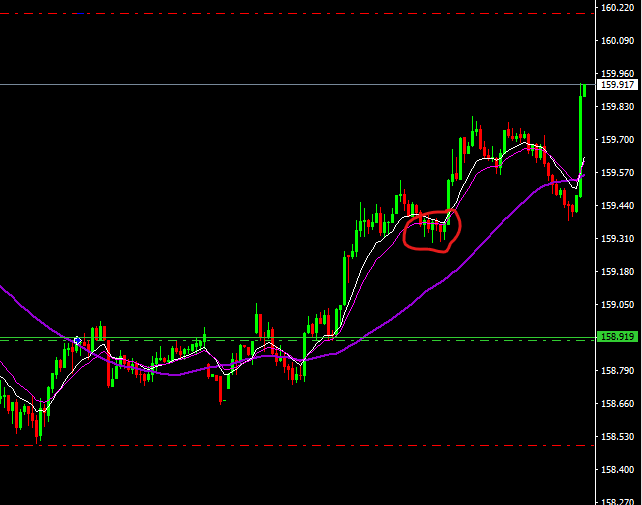 Like here, I don't understand why my stop is not moved below the pullback in the red circle, when price later makes a new high!
 -
RE: A mistake in my SL moving EAposted in Questions & Answers
Also to note: On the pullback like in the second picture, price has to always stay beneath the green line. I don't want to move stops if price hit my entry level again.
-
A mistake in my SL moving EAposted in Questions & Answers
Hi,
This is my project: https://fxdreema.com/shared/RM20FS7S
It opens trades and creates a green Line right above/below entry price. Once in profit and price closes above the 15MA (in a short setup) and then makes a new low, the SL should move to the last swing high that was above the 15MA.
In my backtest on GbpJpy, you can see that it worked here. That's the way it should be:
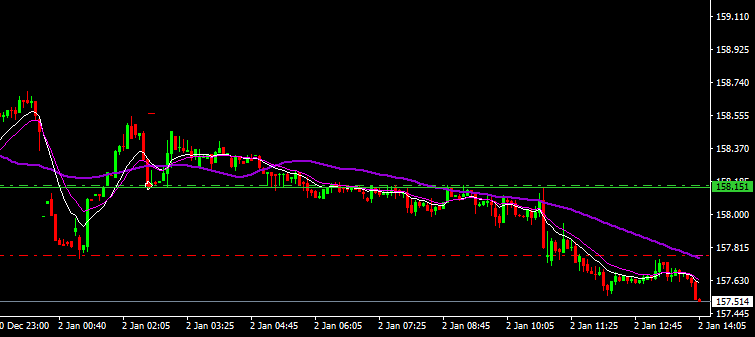
Now, somehow when the trade goes longer, the EA seems to not work properly. I can not find out why the EA doesn't move the stop in this case:

Can anybody see the mistake in the part of the EA that moves the stops? Really greatful for the support!
-
Property rights of EA and source codeposted in Questions & Answers
Hi, I ran in to an issue when I tried to pre approve an EA I created with Fxdreema at one of the online prop firms. They said since Fxdreema is a 3rd party, my EA will not be allowed. This seems very odd to me...doesn't the EA I create with Fxdreema belong to me? That would be like saying the scientific research paper I write on my Mac book belongs to Apple... Is there a clause in the Terms that explicitly states that the EA belongs to me?
They say to also send the source code, if the EA is mine. Where can I find that? I'm absolutely not a coder.
Thanks for any clarifications!
-
RE: Trailing stopposted in Questions & Answers
But it doesn't have to be with money...the way I want it is, when price is in profit the same distance as stop loss...so 100% of stop loss, move SL to breakeven. If price then moves that same distance again...so 200% of original stop loss, move stop to 100% of original stop and so on...
-
Trailing stopposted in Questions & Answers
Guys, I've tried it over and over, but I just can't figure out how to get this trailing stop working. Could someone post a pic of the trading stop block and the exact setting I have to chose? Would be great.
So this is the situation. When I open a trade, it automatically has a stop loss of 200$. Profit target varies between 400$ and 800$. Once I am 200$ in profit, I want the stop moved to the entry point. If it goes to 400$, stops move to +200$ profit etc.
So the adjusted stop is always 200$ (the original stop)...But the stop only moves, when either the 200, 400 or 600$ level is reached. So for example if I'm up 300$, the stop doesn't move to 100$ profit. It stays at 0 until price reaches 400$.No idea why I can't get it done...
-
RE: Can't see if there is a mistake in my EAposted in Questions & Answers
No, in a buy setup, the trade should open as soon as a hammer candle formed and closed…so the hammer has to be ID 1. The lower wick of the hammer also has to go through the bottom line, but close above.
I don’t know, the Ea is running on a VPN and sometimes I come and see and the lines are incorrect, even though mostly it works. Just thought maybe someone sees a mistake I made in drawing the lines or with the following setup it needs. Thanks for looking through it!
-
Can't see if there is a mistake in my EAposted in Questions & Answers
Hi guys. So I created this EA that looks for double tops/bottoms on the 5m. https://fxdreema.com/shared/yIZV5h3xe. It draws a green line at the 60 bar highs (candle body close) and a red line at the 60 bar lows (candle body close). This seems to work fine in my forward testing, allthough sometimes I get wrong lines during the early Asian sessions.
Next I have to have a pullback beneath the 15 EMA and a retest of the line all within 60 bars. You can see them by the areas left and right from the large area in the middle that creates the lines.
To get a signal, I need a hammer candle for long and an inverted candle for short setups, that cross the line but don't close beneath/above the lines. Here is a pick of a setup that would have to trigger a long (the third pinbar through the line:
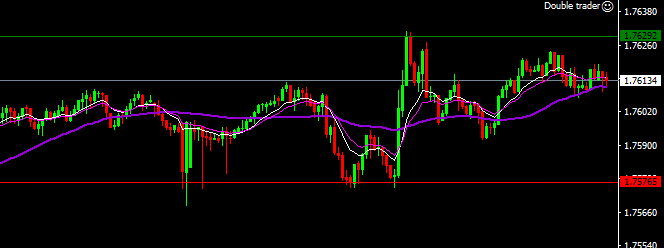
Could experienced programmers go through my EA and see if I made an error somewhere, whenever you have time? I would really appreciate it.
-
RE: Draw line at highest candle body closeposted in Questions & Answers
@jstap I think I found the problem...I realized I have to build in a modify variables block before the draw line block to reset the variable to 2. Otherwise it just goes higher and higher.
-
RE: Draw line at highest candle body closeposted in Questions & Answers
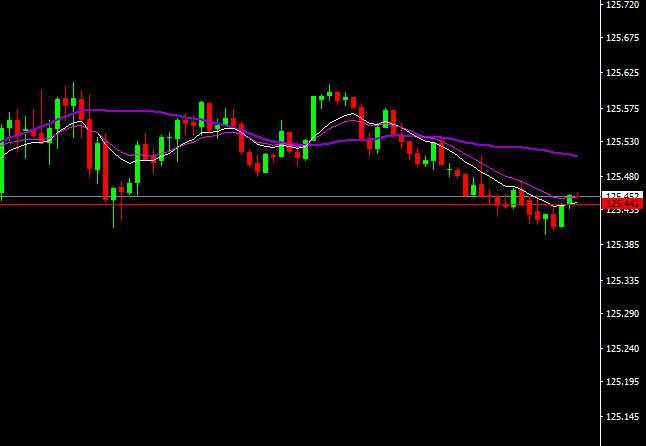
@jstap and it doesn't as you can see in this pic here...the line at close of ID 2 is wrong, it should be at close of ID 3 and stay there. But it also didn't move to ID 1 close. I don't understand...