You have to be a bit more specific. So you start with a buy...then sell and then buy again. Do you open more and more trades until you reach certain points as profit? Or is it just these 3 trades (buy, sell, buy again)?
S
Posts made by SirLuk
-
RE: Buy and Sell evert candle !posted in Questions & Answers
-
RE: Need help for price from last candleposted in Questions & Answers
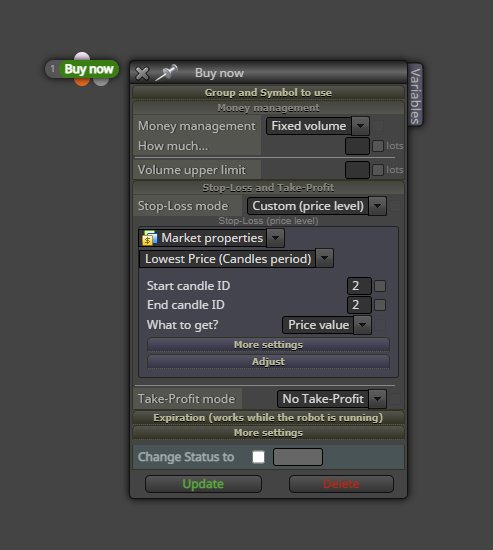
This might be too simple, but why not just use a stop loss based on the low of the last candles and just enter ID 2 as measurement? Like this:
-
Colour of button when pressed.posted in Questions & Answers
This might only concern @FXDREEMA, but maybe someone else can help. I find it really hard to see if a button is pressed or not. Is there no way to somehow light the button up when it's pressed or something like that? Maybe do something with the border?
Thanks.
-
RE: Please help with my Price Alert Projectposted in Questions & Answers
@plentygrazes if it's only the bodies you take into calculation, this should work for the bullish tree: https://fxdreema.com/shared/kPyOiL3Ic.
-
RE: Please help with my Price Alert Projectposted in Questions & Answers
@plentygrazes for bullish/bearish engulfing, are you just looking at the bodies of the candle or also the wicks? Can you tell me exactly the requirements for the setup?
-
RE: Please help with my Price Alert Projectposted in Questions & Answers
You'll have to do the fine tuning of the blocks, but it should then look something like this: https://fxdreema.com/shared/tvhZfJQ9c.
-
Simple and fast position size calculatorposted in Questions & Answers
Hi everyone. Here I created a simple and fast position size calculator for anyone who is interested. You'll simply have a horizontal line which you pull to where you want your stop loss. The EA creates a buy and a sell button on the left hand side...you'll use these to enter the trades. When starting the EA, you can either select a fixed money amount to risk or a percentage of your balance.
I trade the 5m chart and have to be quick in getting into trades. None the less, risk management is important. This EA is focused on fast execution without all the calculating of position size.
You can find the project here: https://fxdreema.com/shared/S4irmwcMc.
-
RE: Can't find the mistake!posted in Questions & Answers
Holy crap...that's so weird!
 Since I changed the stop loss mode to custom price level, I totally didn't think about the possibility that I still had a variable in the "fixed pips" mode!
Thanks @ambrogio for helping me out.
-
Can't find the mistake!posted in Questions & Answers
Could someone please tell me where I made the mistake?
This works fine: https://fxdreema.com/shared/wxZ7dFgid
In this one, which is basically the same, I get an error "SL_distance - struct member undefined": https://fxdreema.com/shared/XS3Gkwbpd
You can ignore the "on tick" part. This works, I also deleted that whole part and still the EA shows the error.
Why am I getting an error?
-
RE: Movable horizontal line to define position sizeposted in Questions & Answers
Thanks @jstap. The solution for what I wanted is actually much easier than I thought. Draw a horizontal line and then use object on the chart as a stop loss mode. I had to create seperate Buy and Sell buttons, since I want to open trades manually with this EA. But I'm really happy with it. I just pull the line to my intended stop and click buy or sell. Position size all automatic.
-
Movable horizontal line to define position sizeposted in Questions & Answers
Does anyone know how to go about this?
I want a horizontal line on my charts which I can move around according to where I want my stop loss. On tick, the EA always calculates the distance from the line to the live price. If I then click buy or sell (on created buttons), the position size will automatically be correct to give me a fixed stop loss in money, the size which I define before hand in a constant.
So let's say the constant says 100$. I pull the line to where I want the SL and then click buy. The position size is then automatically calculated and applied to my trade.
-
RE: Buttons on MT4 screen to fine tune EAposted in Questions & Answers
No that's exactly what I built now. All three buttons visible...I can then select if the EA can go long or short. Further I can close all trades via the third button.
-
RE: Buttons on MT4 screen to fine tune EAposted in Questions & Answers
Problem solved thanks to the great video made by @l-andorrà here on youtube: https://www.youtube.com/watch?v=zkidOSSlNrY
-
Buttons on MT4 screen to fine tune EAposted in Questions & Answers
So I know this is complicated...but what I would really like is three buttons on my MT4 screen. A "buy", "sell" and a "close all". The buy button would turn off the sell block in the EA (so only buys would be possible), the sell button turns off the buy block while the close all button closes everything on all charts.
Has anybody done something similar before? Any help is appreciated.
-
RE: No Trade block that monitors multiple open chartsposted in Questions & Answers
Use the No Trade block and in "Symbol mode" choose any symbol. That should do the trick.
-
RE: Purchase planposted in Questions & Answers
Well, first of all you can create more than 10 blocks...which you'll most likely need. More important, and someone can correct me if I'm wrong, I don't think you can create an EA that buys and sells without the paid plan. The free version just allows signals in my experience.
-
RE: Close after certain amount of money profitposted in Questions & Answers
Thank you for your input. Any idea how that would look like? Maybe you could show me how? If I have the account history set to today, won't that always show correctly no matter if I close Mt4 or not?
-
RE: Close after certain amount of money profitposted in Questions & Answers
Thanks for the help everybody!