I think it's interesting.
I need candles, not open positions.

I think it's interesting.
I need candles, not open positions.
Hello fxDreema and simonnnagk129
I have another idea. Partial closure if over or close 2 candles above position opening.
How to do it this way?
@tcanuto said in Bug in blocks:
As I said, the problem for me was in the lines of codes quoted above. But I changed manually in the mql5 code and it was ok.
Now you need to review the blocks containing the above codes. Once you review and correct what you need, let me know and I'll be generating a new project to test...
Complementing what I had said earlier: These changes I made in the code were based on the best results of my EA, but I'm not sure if it's the correct way to use it here in fxDreema.
In this case you should evaluate if the blocks need correction or not.
As I said, the problem for me was in the lines of codes quoted above. But I changed manually in the mql5 code and it was ok.
Now you need to review the blocks containing the above codes. Once you review and correct what you need, let me know and I'll be generating a new project to test...
I discovered the problem that is occurring.
This is in CurrentSymbol. Replaces all
Static string Symbol = " ":
//per
Static string SYMBOL; SYMBOL = CurrentSymbol ();

//and also
Static string Market = " ";
//per
Static string Market; Market = CurrentSymbol ();

//and also (Left and Right operands of the conditions)
(String) " ",
//per
(String) CurrentSymbol (),

//And finally I added the code
String CurrentSymbol (string symbol = "")
{
    Static string memory = " ";
    If (symbol! = "") {Memory = symbol;} else
    If (memory == "") {memory = Symbol ();}
    Return (memory);
}
Solved my problem!
Note: I compared and copied from my previous project.
Once you're doing something, could you contact me so I can generate mql5 and ex5 from my projects?
Well with that I will do new tests, and if the result hits with the current version that is correct, I give you feedback.
@fxDreema said in Bug in blocks:
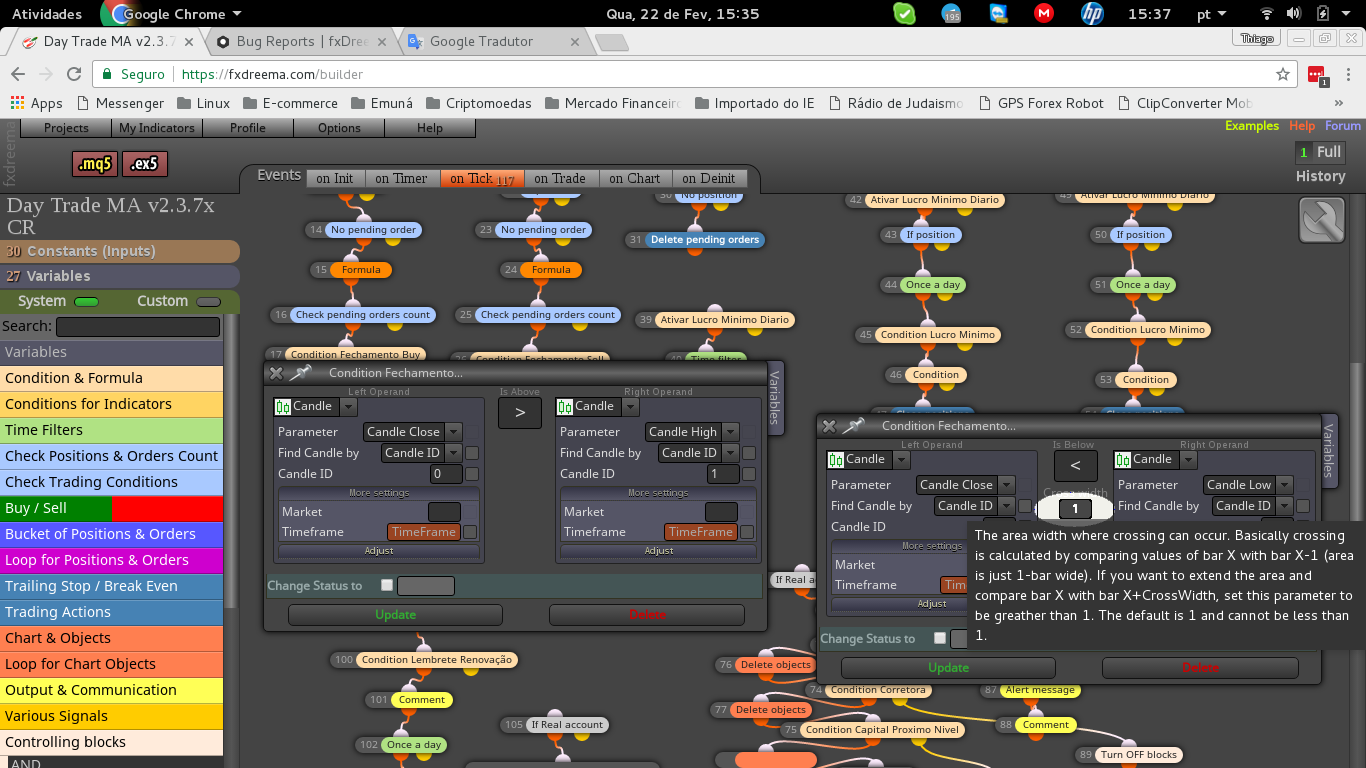
This cross width thing is probably cosmetic defect, not something fatal. That input field is always there, even if it's not visible.
Thankfully it's only an aesthetic problem.
I'm more afraid of that parameters change. The thing is that fxDreema become complex years ago and since then I'm only trying to make it simpler for me, to minimize potential problems when I decide to update something. But after all my efforts, bugs are still possible. Give me more details about this parameters change problem - what exactly happens and how can I cause the problem, so I can see it and fix it?
By the way, I discovered this problem minutes ago: https://fxdreema.com/forum/topic/4449/february-2017
Yes ... I'm suspicious of this. Once I happened to change the constant inside the block.
Already in these last days I had a problem in the block Close Positions, which I had left in the Filter by type as Buy and Sell, but it took almost a week to find out that the problem was him, since I had changed in the project for Buy only. So the results did not beat.
Now I've reviewed all the blocks, but they still have different results for the same parameter.
I think I have a problem with the second link project.
Maybe when you import a project, you should also change the blocks parameters yourself.
Look what's happening:
I also have 2 similar versions, but using the same parameter. But the results are different.
I also discovered that the parameters in a block was changed alone, I do not know if it was because I imported a project already saved on my PC, I do not know why.
shared/YNDwt25jc
shared/ZEX1LxCnd - Add Weekday filter block
@fxDreema Well ... this would be an alternative. I believe it is possible, but I do not know how to do it.
Perhaps the most accurate solution is this: http://fxdreema.com/forum/topic/4433/change-the-indicator-color-in-the-visual-strategy-tester/3
Explaining better: what I meant is to change the color of the indicator in the Strategy Tester, since it is possible to change the properties and colors of the chart objects.
To change the color I still do not know, but to hide the indicator, there is the possibility, which is described in IndicatorRelease () function in the Tester - https://www.mql5.com/en/articles/239
Hello fxDreema. All right?
Again I ask you something that some fellow users have also asked for, which is a way to hide the indicator in the Visual Strategy Tester.
One of the ways I believe it's possible is to have the option of changing the indicator color to none, for example. For it will be invisible.
Hello fxDreema. All right?
Is it possible to change to the color none? Or change the type to DRAW_NONE?
@fxDreema So, cite a correct way to use it
@fxDreema Oba! I'll be taking the test as soon as possible!
At first I thought I'd try it this way:

What do you think?
Interesting. Maybe I can help on the Portuguese part of the forum, but unfortunately I still can not help with the translation. Anyone who speaks Portuguese and English, and is interested in helping, can be our intermediary even with fxDreema, and with that we can help wherever possible.
Hello. I'm sure with the help of if you have people interested in it, it would be welcome. As for example translating the site and forum in another language, for example. I also do not speak English, and I translate by translators. It would also be interesting to create a questionnaire to know which languages of the users, and then translate to these languages, according to the demand.
Yes. They expire and have daily adjustments in prices, because the market has opening and closing times daily.
How do I do this here on fxDreema?
@tcanuto said in Do not open position on the last day of the month.:
Hello fxDreema.
Another way that I believe to be possible is:
I would like to filter the expiration day of the future dollar contract, for example, and in mql5 it is identified as SYMBOL_EXPIRATION_TIME
Description: Date of the symbol trade end (usually used for futures)
Type: datetime
https://www.mql5.com/en/docs/constants/environment_state/marketinfoconstantsHow to use it?
I believe you will need the Custom MQL5 code block
Look at this ... maybe it's something interesting to include in Time Filters blocks, for example.
Hello fxDreema.
Another way that I believe to be possible is:
I would like to filter the expiration day of the future dollar contract, for example, and in mql5 it is identified as SYMBOL_EXPIRATION_TIME
Description: Date of the symbol trade end (usually used for futures)
Type: datetime
https://www.mql5.com/en/docs/constants/environment_state/marketinfoconstants
How to use it?
I believe you will need the Custom MQL5 code block