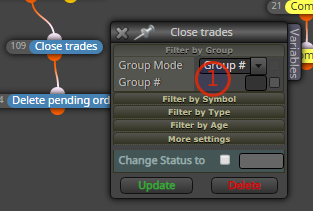
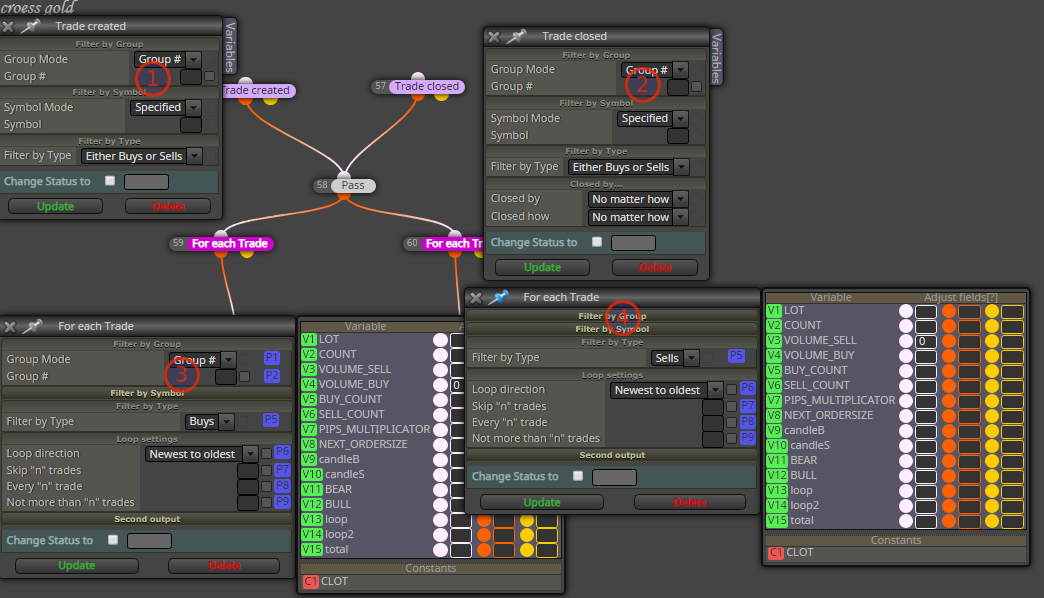
@amrfawzy Check when exporting the right path. Does it compile?
T
Posts made by trader.philipps
-
RE: technical errorposted in Questions & Answers
-
RE: Can you help. three candles closed above. a candle is closed below. The candle will open. buyy. expertposted in Questions & Answers
@ambrogio Well, maybe for start. I think you need a set of instruments and their corellation (positive / negative). Than check each for direchtion and find the condition where exactly 1 is in opposite direction where all others are in the same direction.
In @ambrogio 's example the case are fixed. -
RE: a certain number of trades at the same timeposted in Questions & Answers
@weius You may specify 1 block (Sell or BUy or pending) per trade or you may create a loop.
-
RE: How can I close all positions at the same time on a certain profit, and include pending orders that have openedposted in Questions & Answers
@khalids222 On close trades blocks there are no groups defined. Is the issue that no trades are closed?^
The blocks on the on trade tab don't have any groups defined either!
-
RE: How can I close all positions at the same time on a certain profit, and include pending orders that have openedposted in Questions & Answers
@khalids222 Share your project, I guess the reason is inconsistent use of groups.
-
RE: TP hit.. move stop loss to break evenposted in Questions & Answers
@indaplace2be Work with groups! Group 1 with the trades that close on TP and group2 the ones without. If a condition is valid for both groups specify 1,2 in the groups field of the corresponding block.
@l-andorrà 's approach will work, if you put group 1 on the trade closed block and on the ones after group 2. But be aware you have to specifiy the groups on every block that offers the group # field !Go ahead and try and share your project here if you still have any issues.
-
RE: How can I close all positions at the same time on a certain profit, and include pending orders that have openedposted in Questions & Answers
@khalids222 If you work with groups, you have to specifiy the related groups per each action! In your screenshot check profit unrealized doesn't take into account any trades that belong to a group!
-
RE: Moving Average cross logic neededposted in Questions & Answers
@vince-3 said in Moving Average cross logic needed:
HI @ambrogio , ok, the bot does not work consistantly. Meaning sometimes the bot reverses positions and sometimes it does not. As you can tell by the time i've been watching this for the past many hours. The only thing i can think of is:
1 - I am using mt5 and fxdeema works best with mt4 OR
2 - I am trading futures, not forex, and fxdeema works best with forex.
If you or anyone has any thoughts i'd appreciate the feedback. Thanks.Hard to tell, but most times is in the EAs logic rather than EA code. If you might share your project, we can have a closer look. The way @ambrogio suggests in his example means the cross may have happened in candle ID 2 or ID1. If it happened on candle ID2, the the MA didn't cross back on candle ID1.
-
RE: GMT Timestamp to Server / Chart Time *** SOLVED ***posted in Questions & Answers
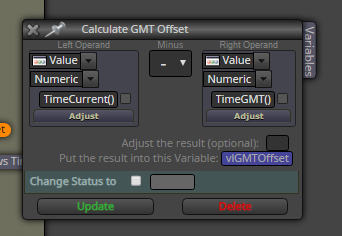
@trader-philipps Found it by myself. Like that:
-
GMT Timestamp to Server / Chart Time *** SOLVED ***posted in Questions & Answers
I'm currently working on the next Version of the Tutorial EA. At this time I'm integrating the icefx Newsinfo indicator (off-topic: "that bloody bitch!!!"). I'm quiet done at the moment, but want to draw a rectangle on the chart when there is a news time ahead. That works also quiet well so far, but all the nes times are in GMT. When I simply calculate my news before and news after thresholds, I have 2 time values to draw the rectangle.

However, the chart is in server time (not local time) and the my timestamps are all in gmt time.
Is there a smart way to convert my gmt timestamps into servertime? The case that during that period a change between summer and winter time may happen I neglect at this point.Btw. that's how the new version looks right now.

-
RE: Can you help. three candles closed above. a candle is closed below. The candle will open. buyy. expertposted in Questions & Answers
@roar Yepp, you need to consider the correlation if any
-
RE: Please help how to Turn Off Turn On buy sell block and close all trade in Friday 23:58-23:59 GMT to prevent the huge gap which is very important.posted in Questions & Answers
@zarbitz Take a look at my Tutorial EA I published recently. Actual Project Link: https://fxdreema.com/shared/Udh0CS5Ud
There I do similar things. For close on Friday, I have defined a constant in order to switch that feature ON/OFF).
On the On Init tab I have a condition that sets a flag to true or false depending on the configured parameter (instead of flag you could also use Turn ON /OFF blocks.

Assuming the CoF flag is set to true, I have on the on Tick tab the following separate path.

The last block connects to the central close Trades block.
For Turning ON/OFF trade entries take a look at this tree on the on Tick path ..

So Monday to Thursday I have different trading hours. On Fridays, if close on Fridays is true, I will disable the entry tree at the same time as the close should happen (in order to avoid that after closes new trades are opened again).
-
RE: all my stops set to 48.01posted in Bug Reports
@simonsavva You can group your trades by numbers in order to gave seperate condition per group. Afaik each group will have a technically a different magic number and hence you can trade more than 1 strategy on a chart/symbol at the same time with the same EA.
-
RE: Avoid too much slippage for Stop Pending ordersposted in Questions & Answers
@asto94 That depends on your broker / account type. See explanation for the slipage field in the pending orders Buy/Sell block.

-
RE: partial closing of dealsposted in Questions & Answers
@trader-philipps The EA gives a zero divide in MT4 tester when switching to another market, trying to calculate some pip value. It's a limitation of the tester! Try to stick with 1 symbol or port your project to MT5!
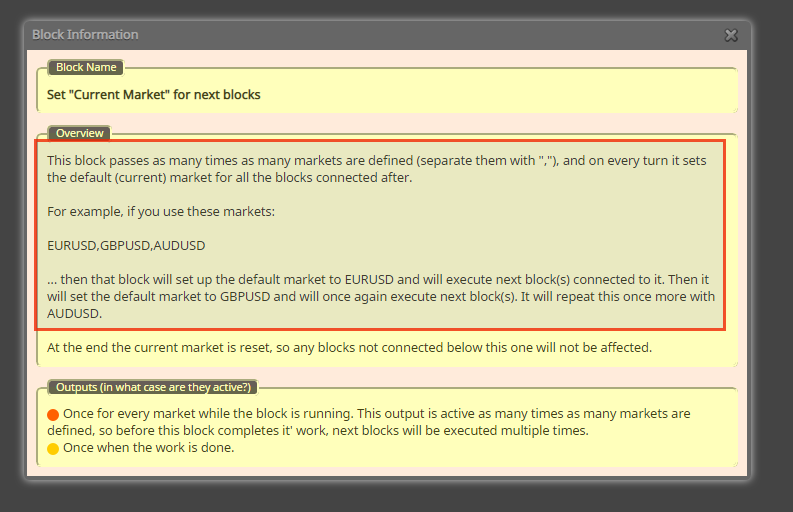
By the way, read the block information that will save you a lot of time. For instance ..
-
RE: partial closing of dealsposted in Questions & Answers
@kop If I seek help, I try to describe the issue precisely and give a person that wants to help me all information to do so. By your description and the screenshot, I can't see how one should solve that issue. Just by taking a look at the screenshot they look well connected. So what's the real issue?
-
RE: Parametersposted in Questions & Answers
@marcos-0 You have to use constants instead of just clicking the make available for testing check boxes .. take a look in the screenshot
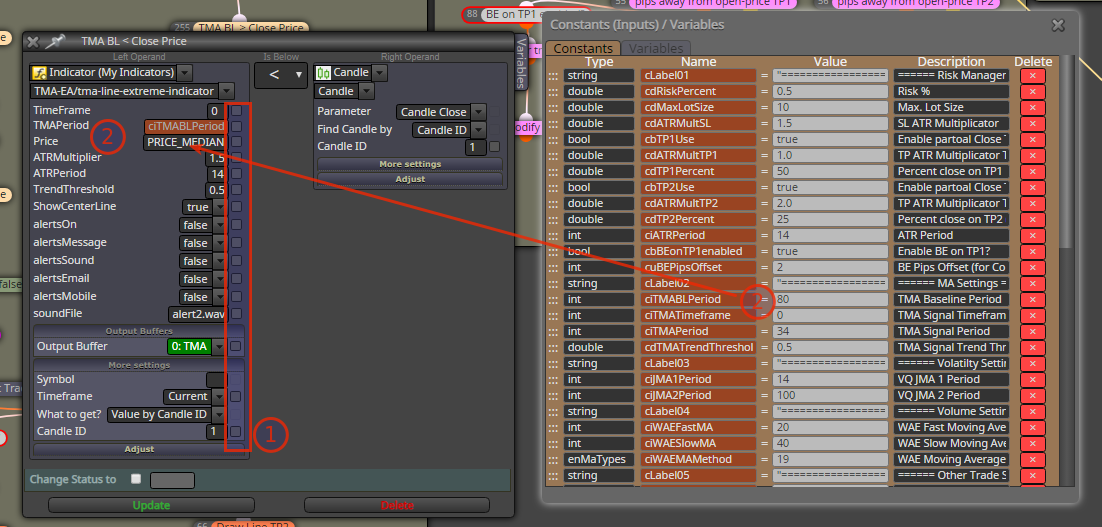
Don't use (1), but use the parts marked with (2). You can use the previously defined constant in any input field by right-klicking that field and choosing the corresponding constant.