@traderscornerph Can you share your project link please? Will be quicker to achieve
T
Posts made by trader.philipps
-
RE: please need helpposted in Questions & Answers
-
RE: Once per day bar placement ? On top or before the buy or sell ?posted in Questions & Answers
@l-andorrà The aim should be to run blocks only if it is necessary for the strategy. This will be resource protecting and also should speed up back testing.
However, there is no rule that disallows you to not do this, but it wouldn't be the best approach. -
RE: Tutorial Expert Advisor with some recent issues solvedposted in Tutorials by Users
@fabien-s said in Turtorial Expert Advisor with some recent issues solved:
nice work!! for news filter i always use this free tool: https://darkmoonfx.com/newsinfo/
Yes, I know this indicator. Most users just use the EA disable function what I think is very risky if there are trades open. But I took a look at the manual and saw chapter "News data query from Expert Advisors (EA)". So I will focus on implementation of this as my ffcal tests ended in out of memory errors.
I'm already working on V1.01 of the EA. Currently I just implemented a notification feature of terminal lost connection to broker.
So there will be an update later after some testing. -
RE: Tutorial Expert Advisor with some recent issues solvedposted in Tutorials by Users
@fabien-s said in Turtorial Expert Advisor with some recent issues solved:
your tutorial is very useful for alll thew nononsensforex traders out there!
Yes indeed! The trading style from my perspective is one of the most reliable ones. Just ATR level if trading other timeframes than D1 may need adjustment on multipliers.
-
RE: Store Trade Targets such as TP1, TP2, etc. *** SOLVED ***posted in Questions & Answers
@roar I finally decided to change the color to dimgrey once the tp was taken as you can see in the tutorial EA. That works best so far.
-
RE: load ea on 1 pair , but allow it to trade any pairposted in Questions & Answers
@kop You can switch current market with this block
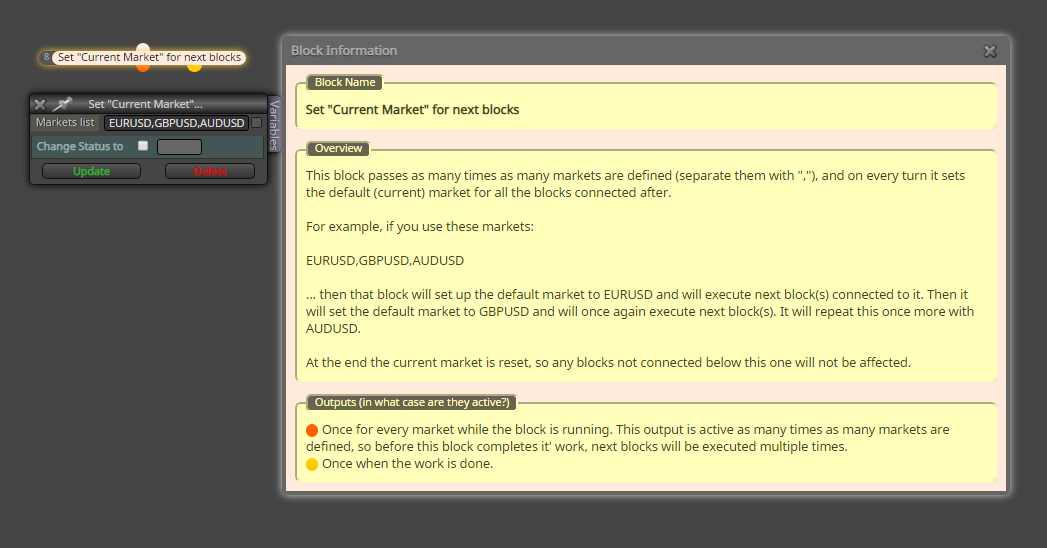
But it's a bit more advanced as back-testing in MT4 is only possible on 1 instrument. If you are using MT5, back-testing during development is easier as it supports for multiple instruments for back-testing.
-
RE: HOW I CAN MODIFY SOME OPTION WHEN SLIPPAGE CHANGE ?posted in Questions & Answers
@moon said in HOW I CAN MODIFY SOME OPTION WHEN SLIPPAGE CHANGE ?:
@trader-philipps can you give me your idea project if i use pending buy or sell ?
Well, that is a bit more tricky as the creation of the order and the opening of the trade are not followed after each other. Hence you need to store the price you placed in your pending order somewhere. I you have just 1 trade at a time you might keep this price stored in a variable. If you dela with more than 1 pending order you need to have a link between the stored price (how and wherever) and the the order itself.
The only direct way I see wpuld be storing your order price in the comment. That's not very smart, but you have a direct relation to the order. -
RE: Fib EAposted in Questions & Answers
@scottpapetti Okay, so you want to draw the levels by yourself? Anyway, it seems that you can read the values from a fibo object on a chart an eg. store it in a variable .. take a closer look at this ..
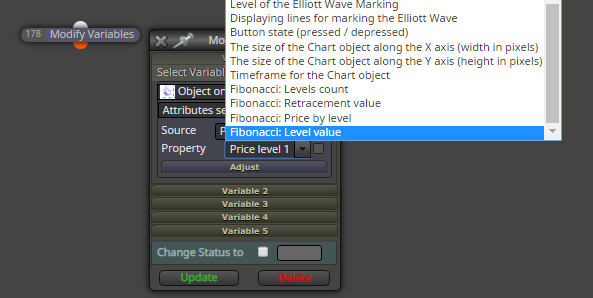
But to behonest I never worked with this and maybe someone else may get you up on track the better way than me.
-
Tutorial Expert Advisor with some recent issues solvedposted in Tutorials by Users
Here is the Tutorial EA that I recently created and which covers some of the issues that were asked for in the forum. I tried to keep it as simple and structured as possible.
Disclaimer: This EA is created only for eductaional purposes. It's functions are rarely tested and may contain errors. Using this EA on a real account is strongly not recommanded as the strategy settings are not optimized at all!
Key Features:
- Risk Control based on Balance (SL)
- SL ATR multiplied based
- ATR based trailing
- TPs ATR multiplied based (TP1 / TP2)
- TP1/TP2 visualized by horizontal lines - values will be picked up on terminal restart
- Close on Opposite signal
- Close on max. age
- Limiting trading time
- Protect from tripple swap
ToDos:
- News filter
Custom Indicators used:
- tma-line-extreme-indicator
- vq-stridsman_on_jurik2_mtfalerts_nmc
- waddahattarexplosion_averages_nmc_alerts_2_1
Any Credits go to the authors!
Installation: Unfortunately I cannot upload a zip file, so you must do a little work manually.
Create a Folder "TMA-EA" in your indicators folder (IMPORTANT!!!) and copy the following indicators into it.
5_1580504153979_waddahattarexplosion_averages_nmc_alerts_2_1.mq4
4_1580504153978_waddahattarexplosion_averages_nmc_alerts_2_1.ex4
3_1580504153978_vq-stridsman_on_jurik2_mtfalerts_nmc.mq4
2_1580504153977_vq-stridsman_on_jurik2_mtfalerts_nmc.ex4
1_1580504153975_tma-line-extreme-indicator.mq4
0_1580504153969_tma-line-extreme-indicator.ex4Please rename the files according to the names mentioned above as the forum adds strings as prefix to the uploads. But do not remove the file extensions!
It should look like this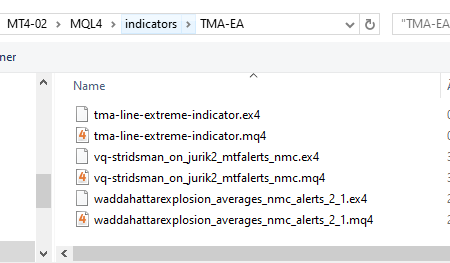
Copy (and rename) the files in the expert folder to the experts folder of your MT4 terminal.
1_1580504633596_Tutorial-EA_V1.0.mq4
0_1580504633595_Tutorial-EA_V1.0.ex4Currently I do forward tests on M30 timeframe in order to things happen more often. The screen when EA is attached to the chart should looklike this:
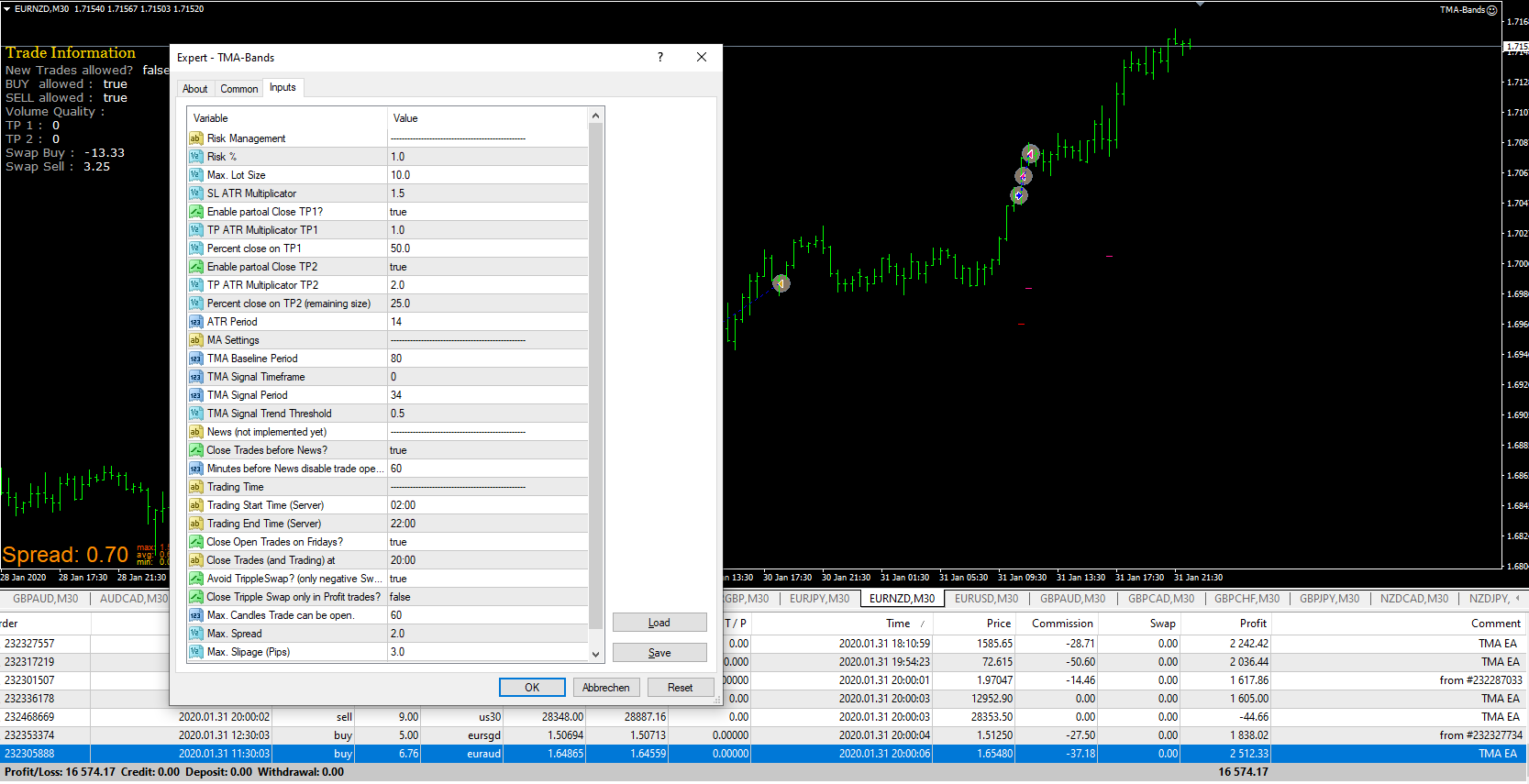
You can import the file Tutorial-EA_V1.0.mq4 into a fxdreema project, The result would look like this.

-
RE: Fib EAposted in Questions & Answers
@scottpapetti You can find highest and lowest price for a certain number of candles if that help. Other approaches maybe more @l-andorrà 's knowledge.
-
RE: Fib EAposted in Questions & Answers
@scottpapetti Do you have a project link to share? How should we know where you're stuck?
-
RE: HOW I CAN MODIFY SOME OPTION WHEN SLIPPAGE CHANGE ?posted in Questions & Answers
@moon Something like this ..

-
RE: how do i arrange my final ea input for simple identification like in the picture below ?posted in Questions & Answers
@mbiganyi-dagwi You have to define constants rather than just checking the Use as input parameter checkbox.
That might look like this ..
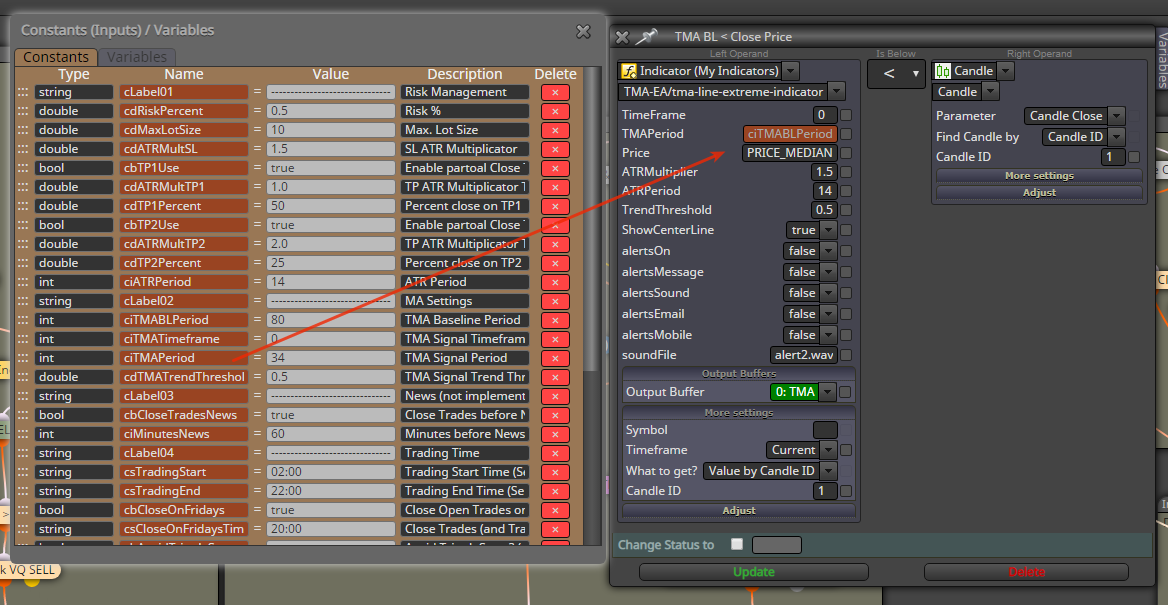
Than you can by right clicking on an input fielt define the constant as input paramter in the blocks. That works on most blocks, but you have to know the data types and set them the right way.
-
RE: HOW I CAN MODIFY SOME OPTION WHEN SLIPPAGE CHANGE ?posted in Questions & Answers
@moon Are you working with pending orders or with Buy/Sell now blocks? If you have a pending order, you might set the order price by yourself and store it in a variable. Once the order is opened, you mihjt take the open price and calculate the slipage (positive or negative).
With the Buy/Sell now block you might store the actual market price (bid/ask depending on direction) in a variable and after the Buy/Sell now block calculate the difference.
-
RE: Store Trade Targets such as TP1, TP2, etc. *** SOLVED ***posted in Questions & Answers
@trader-philipps @roar I am facing the issue on TP2 that is executed several times the blocks look like thats
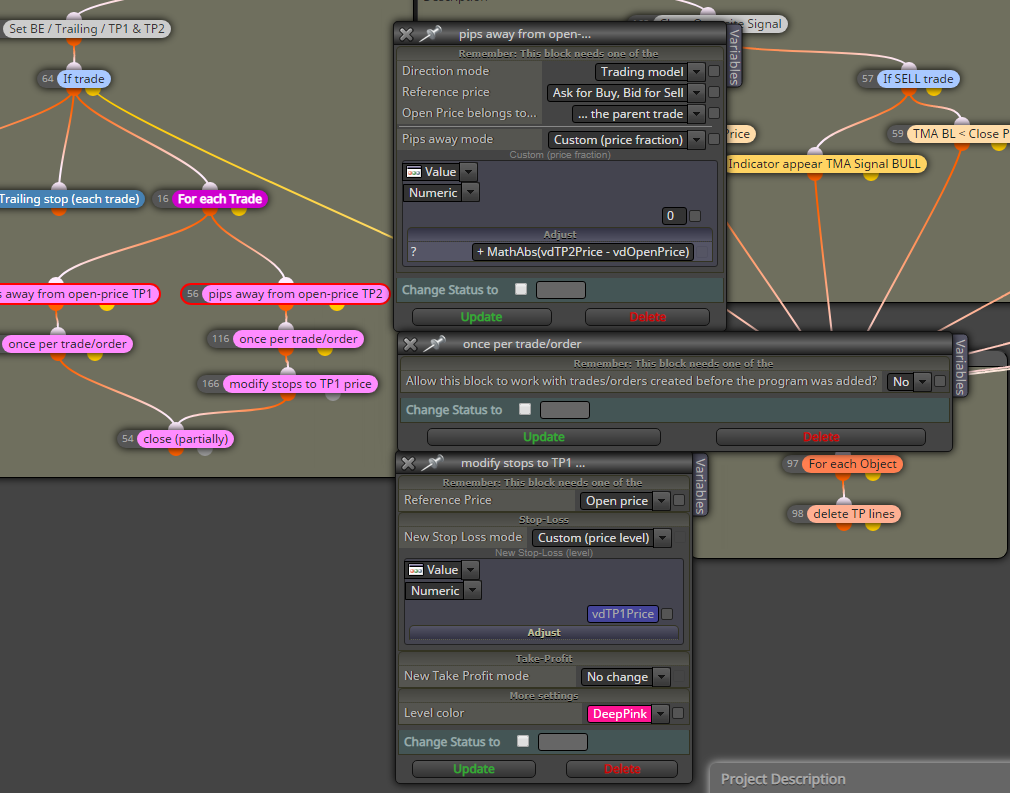
The flow is:
- Initial Trade
- On TP1 partial close (new trade generated = child)
- On TP2 partial close of child trade (from TP1) results in a child-child trade
from here it seems to be executed at least once more. Need to find a test scenario.
Do you have an idea to solve that issue? Of course I could set any variables if passed the partial close block or the once per trade / order block, but that information would get lost.
Maybe I should change something on the TP lines (change color to grey or something like that)? But than I would need to check this before executing the loop, right? -
RE: Store Trade Targets such as TP1, TP2, etc. *** SOLVED ***posted in Questions & Answers
@roar Used the horizontal line approach for now. I will post my work in the tutorial section after some testing (including forward on demo).
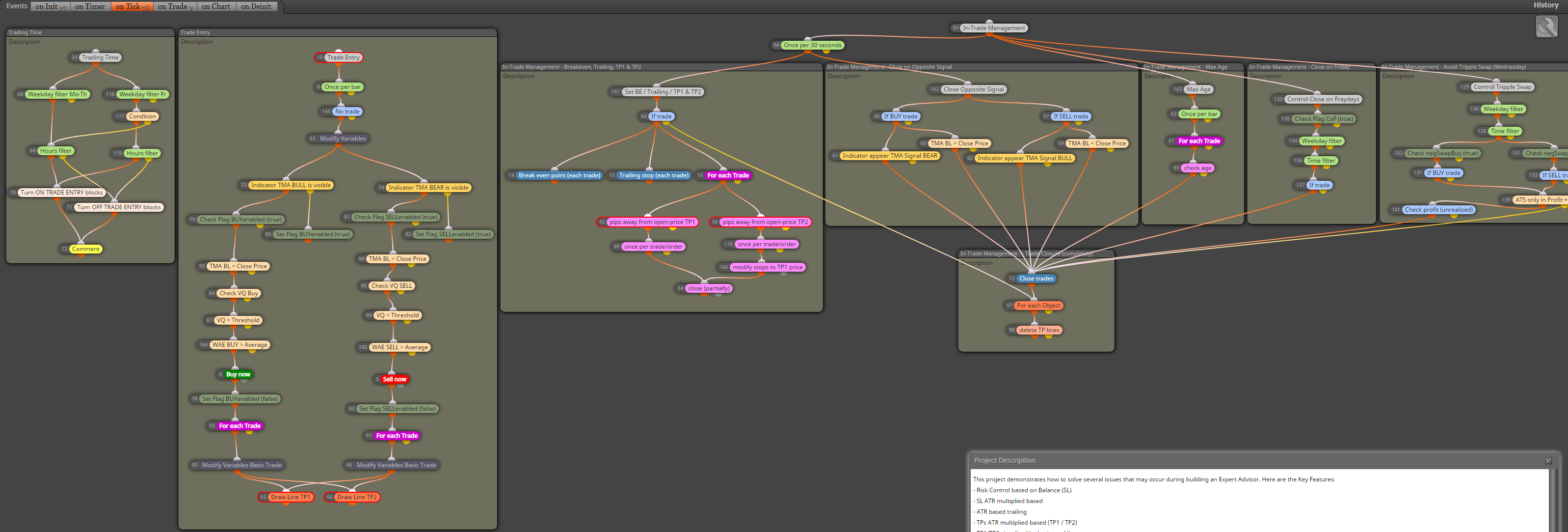
Here are the main features ..
This project demonstrates how to solve several issues that may occur during building an Expert Advisor. Here are the Key Features:
- Risk Control based on Balance (SL)
- SL ATR multiplied based
- ATR based trailing
- TPs ATR multiplied based (TP1 / TP2)
- TP1/TP2 visualized by horizontal lines - values will be picked up on terminal restart
- Close on Opposite signal
- Close on max. age
- Limiting trading time
- Protect from tripple swap
ToDos:
- Volume filter
- News filter
That's how it looks like right now.
-
RE: Candle ID for ATR indicatorposted in Questions & Answers
@tanjiayi1 Here in short ...
- right
- also right, but as you are at the very begining of the candle, the result is wrong. If you have a period of let's say 14 it can make a slight difference especially on a daily chart. If you use period 200 or something like that, it won't matter that much. But by principle you should work with closed candles - meaning candle ID1.
- Well, I think I answered that in 2 already, but from calculation perspective assuming your ATR period is 14, using candle ID0 means calculation of 13 full candles and 1 with almost no move when you EA opens the trade or checks the condition.
-
RE: Slow Strategy Testposted in Questions & Answers
@shaziz1958 This can have several issues. If it's not one of your maybe used custom indicators, most times it's the case if blocks are unnecessarily executed at each tick. May you share your project please, so we can have a look?
Is it all the time slow or eg. just if a trade is opened? Do you loop very often through open trades or objects on the chart?
-
RE: please need helpposted in Questions & Answers
@traderscornerph So, if I get you right, your 2 MAs are the filters (price must be below both for sell) and stochastic gives the sell signal, when it's value is above 80, right? Or do you mean when it crosses from above 80 down?
This is the exampke with the crossing below 80 ...

-
RE: EA should not open trades at certain timesposted in Questions & Answers
@dragonfly617 There ar 2 option from your screenshot.
Option 1) Put a Pass block in front of both No trade blocks and connect them with it. Pass - > No trade (each). Put the block ID of the Pass block in the Turn Off / Turn On blocks.
Option 2) Put the block id numbers of both No Trade blocks in the Turn Off / Turn On blocks. Do this as a comma seperated list! In your case from screenshot 1,5