@trader-philipps Okay, found the error. I need to filter for prefeix not name contains.
T
Posts made by trader.philipps
-
RE: Store Trade Targets such as TP1, TP2, etc. *** SOLVED ***posted in Questions & Answers
-
RE: Store Trade Targets such as TP1, TP2, etc. *** SOLVED ***posted in Questions & Answers
@roar How do I pick up the Horizontal lines correctly?
Example for deletion ....
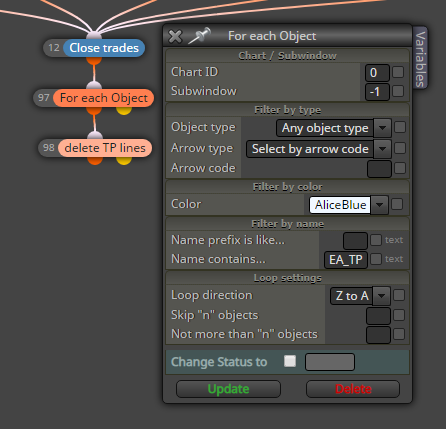
Doesn't work. The lines are all with the color AliceBlue!
-
RE: how to add max number of open trade option ?posted in Questions & Answers
@mbiganyi-dagwi Still hard to give an exact answer as we can't see how No Trade and Check trades count are configured. May you shar the project link here?
-
RE: Store Trade Targets such as TP1, TP2, etc. *** SOLVED ***posted in Questions & Answers
@roar Unfortunately I cannot set the prefix of the horizontal line with a variable. Even if I put code there, it is interpreted as a string.
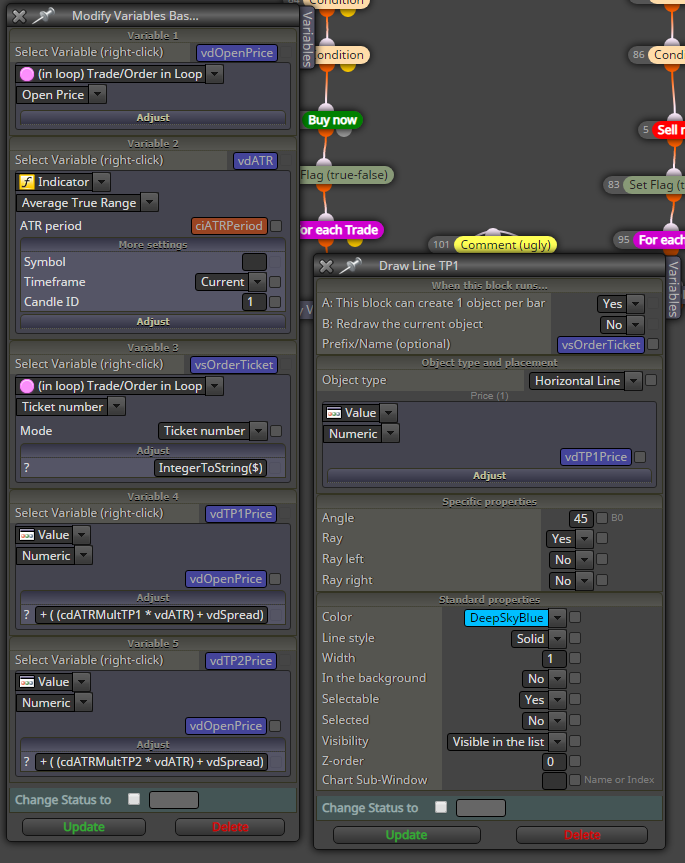
This doesn't work.
So I have to set a static lable such as TP1 or TP2 and have just 1 order per time / chart.
Do you have any other idea?
Another issue I might face with your approach is that the ticket number changes when partially closing a trade. But there might be a way to work around that.
-
RE: EA should not open trades at certain timesposted in Questions & Answers
@dragonfly617 Like this
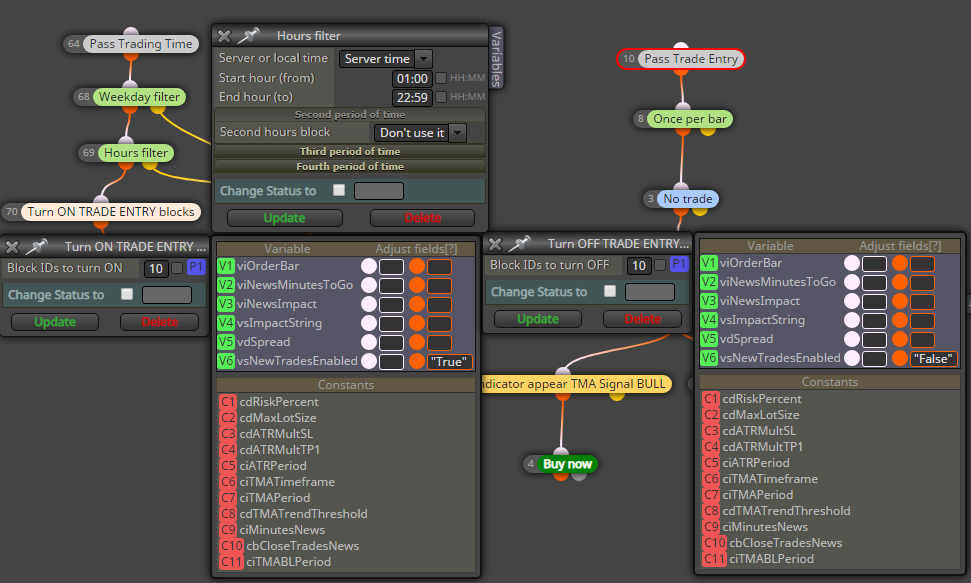
I also set my variable vsNewTradesEnabled to "False" or "True" in order to dosplay this information in a comment block. But that is optional.
Furthermore I addes a Weekday block which is also optional for the requested functionality. -
RE: EA should not open trades at certain timesposted in Questions & Answers
@dragonfly617 Define what you mean by "not to work". I assume you mean it SHOULD NOT open new trades, but SHOULD care about open trades. Is that correct?
-
RE: Manual Trailing stop lossposted in Questions & Answers
@l-andorrà said in Manual Trailing stop loss:
Did you consider the possibility of running the same EA on different charts with one single trade each? That would dramatically ease the structure of the EA.
Manual opened trades will have magic number 0 unless you have some trade manager that can set a magic number. So it wouldn't matter if there are 2 or 10 EURUSD trades, the EA on each chart would pick them all up.
-
RE: Store Trade Targets such as TP1, TP2, etc. *** SOLVED ***posted in Questions & Answers
@roar Interesting approach. Usually I try to avoid visual stuff. How would you identify those lines? By prefix?
-
RE: how to add max number of open trade option ?posted in Questions & Answers
@mbiganyi-dagwi That depends what you are doing behind the blocks. If you use No Trade, the blocks connected on the orange dot will only be executed if there is "NO TRADE". If those blocks are checking your entry conditions, you wouldn't be able to let them be executed until all open trades are closed.
-
Store Trade Targets such as TP1, TP2, etc. *** SOLVED ***posted in Questions & Answers
At current I'm always recalculating my profit target again and again, what is a bit inefficient. Also I recognized that pips away from block sometimes doesn't work correctly and hence some trades run through my TP1 for instance withaut any partial closure. So I am thinking ao a different way to achieve this.
At current I have some solutions in my mind.
- Store my profit targets in the order comment and read it from there. Not nice as I expose my levels to the broker, but could work.
- On new trade I'd store the order ticket number in a global variable where the order ticket is the interger value and my profit targets are the string value. I could then read this and split the string into the right numbers.
Is there a better approach to persist the targets without the need to re-calculate them? Simple variable or array will be lost when EA gets re-initialized or terminal restarted.
Any ideas are welcome!
-
RE: How/what blocks can i use the blocks to structure this problem?posted in Questions & Answers
@fxgjg Sounds like you are more opening and deleting pending orders than trade them. However, is the number of pending orders fix or variable? You might count through the open orders and close that much that you no need anymore. But I need to understand what's the intention first - especially static vs variable rules.
-
RE: struct member undefinedposted in Questions & Answers
@BlueMoon Or share your project that we can compile it for you. As @roar said there is a variable you use that is not defined or recognized as a variable. If the compiler complains about BuySell2222 variable, check the variable declaration in fxdreema if it's written the same way.
-
RE: How to check if a block is On or Offposted in Questions & Answers
@l-andorrà Yeah with flags you have check function but I currently prefer switching On/Off a block.
-
RE: Binary options trade disabledposted in Questions & Answers
@jakedabass Looks okay. But the issue you're facing has a different reason I think. Are there any other hints in the logs?
-
RE: How the EA follows these objects on the chart????posted in Questions & Answers
@gt-0 Check the buffers of the indicator in data window <CTRL>-D in terminal.
-
How to check if a block is On or Offposted in Questions & Answers
Simple issue, but I can't find the solution (yet). How can I check if a specific block is swiched On or Off? For instance if I have several places were a specific block gets switched Off or On and I want to write the state of the block in a comment to display on screen.
Example: Block ID 10 is the Trade Entry path.I know that I can track by writing a variable, but is there a specific function to check if a block is ON or Off?
-
RE: Binary options trade disabledposted in Questions & Answers
@jakedabass Ok, than maybe it's your terminal. Check the following:
- Verify options -> Expert Advisors -> Allow live trading
- Verify expert properties -> common -> Allow live trading and Long & Short positions
-
RE: Manual Trailing stop lossposted in Questions & Answers
@salahuddinonline I think 1 For each trade block is enough. However, that might not be the solution of the issue.
-
RE: Close all Pending Order before weekendposted in Questions & Answers
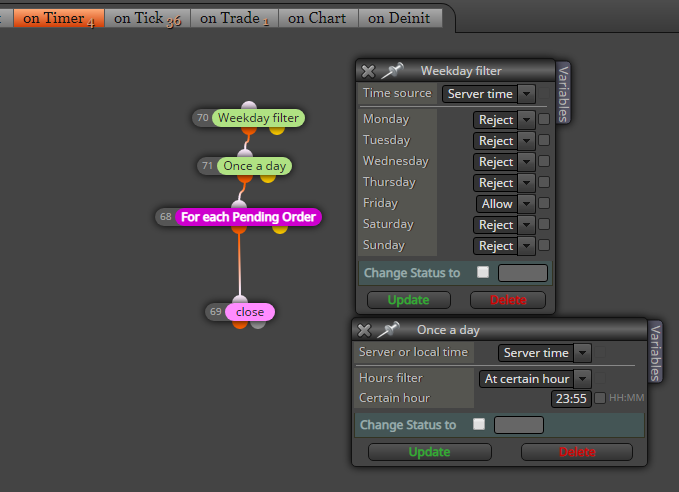
@asto94 Something like this
-
RE: close pending orders when take profitposted in Questions & Answers
@niko Is that TP closing the entire order and all pending orders should be deleted?
In that case go to the on Trade tab. Do something like this
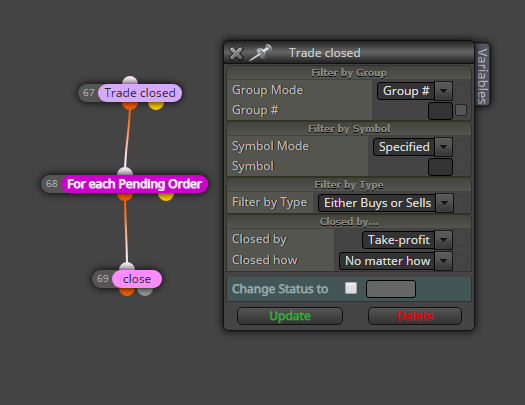
Adjust the Trade closed block to your needs!