fxDreema

    • Register
    • Login
    • Search
    • Back to the main page
    • Categories
    • Recent
    • Tags
    • Popular
    • Search
    1. Home
    2. trader.philipps
    3. Posts
    T
    • Profile
    • Following 3
    • Followers 38
    • Topics 20
    • Posts 1001
    • Best 91
    • Controversial 2
    • Groups 0

    Posts made by trader.philipps

    • RE: Close operation when it opens in the opposite direction

      @chocoloco-0 Well, basically each EA in MT4 uses a specific number in order to identify it's own trades. This is called magic number. Assuming that you can have influence on the magic number of the external EA there might be a chance to build what you try to accomplish.
      However, if you have no clue how the external EA manages it's trades, I'd strongly recommend to refrain from your idea!
      In worst case both EA produce ping pong conditions where 1 EA for instance opens a trade and the other closes it immediately or adjustment of SL are done by both causing thousands of order modifications.

      If you know the conditions of the external EA maybe have a try to rebuild it with fxdreema. If you don!t want to do that effort contact the creator of the external EA and ask him to fix the issues you're facing with it.

      posted in Questions & Answers
      T
      trader.philipps
    • RE: renko

      @clidee I haven't tried yet as back testing is a bit complicated and I never spend enough time to make it work. But there are manuals available on the web. You don't need the indicator for that.
      If you plan to use any indicators with the EA make sure that they work with renko offline charts.
      Moving Average based indicators should work such as macd. However, you should test that before!

      posted in Questions & Answers
      T
      trader.philipps
    • RE: What oscillators combination ?

      @seb-0 I think there is no right answer on your question as it is not concrete enough. It may always be a wise approach to have a confirmation of your signals but there may be other factors that have more effect on profitability such as trading time, volatility, volume, news (political and economical) and instrument you trade as well.
      From my perspective volatility is one of the most important factors in trading. If price doesn't move, there is no profit. If it moves too much you might get stopped out or your lot size is too big and this means danger to your account.

      posted in Questions & Answers
      T
      trader.philipps
    • RE: Manual Trailing stop loss

      @salahuddinonline Do you have a project to start from? And one important question, iare the trades opened manually or by EA?

      posted in Questions & Answers
      T
      trader.philipps
    • RE: Add more than two variables

      @jaychyke isn't it the ATR what you are trying to calculate? Something like ATR 15?

      posted in Questions & Answers
      T
      trader.philipps
    • RE: Entry after receiving an alert from custom indicator.

      @ezzyxo I haven't used that indicator yet, but was investigating it. If You work on candle 0 it might have an issue with once per bar block. As volume adds from 0 until end of bar, in the begging when once per bar is executed, there's probably no reliable value existing with it. If you work with candle id 1 it should be fine.

      posted in Questions & Answers
      T
      trader.philipps
    • RE: Manual Trailing stop loss

      @salahuddinonline Try the on Trade tab, there you will find the Order SL modified block. Here you would do the abstractions you did before and enable the trailing with the distance.
      However, I not quite sure how to divide between manual SL adjustments and those done by trailing.
      Probably you might disable the Order SL modified block assuming there will be only 1trade at a time the EA manages.

      posted in Questions & Answers
      T
      trader.philipps
    • RE: wait after closing trade

      @trader-philipps Ups, after 144 should also go the turn off block for your entry conditions. Sorry I forgot that on my screenshot.

      posted in Questions & Answers
      T
      trader.philipps
    • RE: wait after closing trade

      @turelforex What about this approach? Untested but from my mind could be an approach.

      I assume you have your entries conditions somewhere after 1 block ..

      On the on trade tabe do the following:

      0_1579754377259_7e79d352-ea44-4c51-8433-4445c180045b-image.png

      On the on Timer tab do this ...

      0_1579754520241_801b4bc0-6af1-4349-bee3-0b70b43d75f3-image.png 0_1579754417016_a4a02427-a8b4-4aa7-980a-b72515c8c4f8-image.png

      Not sure if on Timer tab is necessary.

      Let me know if that works!

      posted in Questions & Answers
      T
      trader.philipps
    • RE: Testing Historical Trades with a new Strategy

      @dynamout What I'm asking myself is that timing as also a clue to profitable trades. If your new strategy is compared to the same entries, so you just want to back-test the "new strategy" only for exits?

      About how many trades are we talking here? In total and per pair/symbol?

      posted in Questions & Answers
      T
      trader.philipps
    • RE: Mobile ?

      @ralph No problem, I believe you. But when I'm on mobile im usually not at home and I wouldn't have a wireless keyboard anyway. I think it would be an easy way for the @fxdreema to implement another entry in the dialog box to open the block configuration mode.
      I mainly use the forum on mobile and in that case I cannot completely see the shared projects. That's my primary issue with it.

      posted in Questions & Answers
      T
      trader.philipps
    • RE: How can I protect profits from returning to loss?

      @khalids222 Easiest thing is to set Breakeven. Ther's a block for that. You also might consider the opposite signal as en exit signal for your trades. For instance if your entry is price closes above EMA 20, than you exit would be if price closes below EMA 20.
      There are tons of ways to do so. There is no best way. If your strategy reaches more often your target goal than it looses, You might take that risk into account.
      Another way is some kind of scale out. You might close some parts of your position once a smaler target is reached. That will give you a profit even if your target will be missed. However, it will have influence your risk reward ratio if closing every 10 USD for instance a part of the trade.

      posted in Questions & Answers
      T
      trader.philipps
    • RE: Mobile ?

      @ralph can you simulate a double click with it such a PC mouse would do? I thought that the zoom in / out function that is done in browser on mobile on double tab event is mobile specific.

      posted in Questions & Answers
      T
      trader.philipps
    • RE: Unreliable onTrade filter events on MT5

      @nilsen Did you check the logs in mt5? Also check minimum stop level of the instrument. I'm on mobile at the moment and can't open the blocks in your project. So it's just a guess.

      posted in Bug Reports
      T
      trader.philipps
    • RE: Entry after receiving an alert from custom indicator.

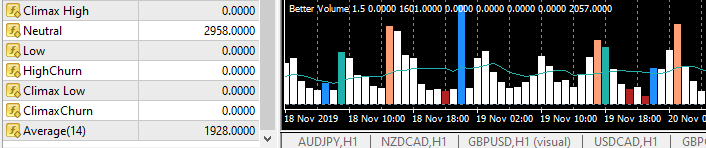
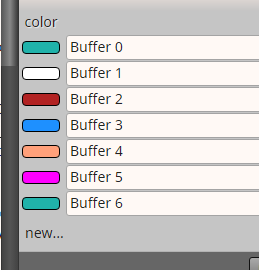
      @ezzyxo Each color has a specific buffer. You might identify which buffer belongs to which color when hovering over the different candles.
      0_1579697457646_22402a9f-64a5-4339-9b46-ec0dd1b8617a-image.png

      Finally build a condition block where your color of interest is checked if value is > than Average value.

      You can ease up your live, if you'd have the mq4 version of the indicator as the import identifies the buffers and corresponding colors already.

      0_1579697578948_afd61272-27e4-47db-8bbd-7f8974705f3a-image.png

      posted in Questions & Answers
      T
      trader.philipps
    • RE: Entry after receiving an alert from custom indicator.

      @ezzyxo is it possible to share the indicator in order to have a look?
      Usually you'd watch if there are buffers available eg. in data window <CTRL>-D and if in case of an alert any of the buffers shown there do change.

      posted in Questions & Answers
      T
      trader.philipps
    • RE: Changing daily variable from a constant

      @tcanuto Well, I don't get the issue to be honest. You can use constants as variables or put their value in a variable.
      If you have to change those values manually anyway you'd press F7 and change those values.
      If you want more comfort you may use an input field on the chart and store the value in a variable.

      posted in Questions & Answers
      T
      trader.philipps
    • RE: Problem in importing custom indicator - Enumerations

      @gabrielebrignoli I guess the show_all may cause an issue, but that's just a guess. Do you need the show_all option for the indicator to work?

      posted in Questions & Answers
      T
      trader.philipps
    • RE: Help on Trailing stop block appreciated (SOLVED)

      @l-andorrĂ  Well, I did something similar just with ATR instead of % of open price. But maybe you can see what I do there.

      0_1579620874654_8657e5b6-c377-478d-8b39-d80ede8a08e4-image.png

      Of course I have to get to know the bar the trade was opened (custom MQL block), that you don't need as you can get the open price just by the curent order in the loop.

      Then you do your variables calculations for trailing stop, step and start. I use Pips since I had issues with price fractions.

      Finally you place the variables in the according fields in the Trailig Stop block.

      I think your approach should work the same way. Since my ATR value of 1 bar before order was opened is a static value for that trade, your percent from open price is also static.

      posted in Questions & Answers
      T
      trader.philipps
    • RE: My Blocks wont connect

      @fxgjg What browser are you using? I use Chrome and Firefox latest versions without any issues.
      Please also note that connections can only be linked from orange/yellow dots to white dots!

      posted in Questions & Answers
      T
      trader.philipps
    • 1
    • 2
    • 13
    • 14
    • 15
    • 16
    • 17
    • 50
    • 51
    • 15 / 51