@khalids222 You mean the single MACD example?
T
Posts made by trader.philipps
-
RE: How to take one of several buys orders?posted in Questions & Answers
-
RE: How to take one of several buys orders?posted in Questions & Answers
@trader-philipps However, in an MACD example I would missing some trades. Look at this Sell example on EURUSD D1:
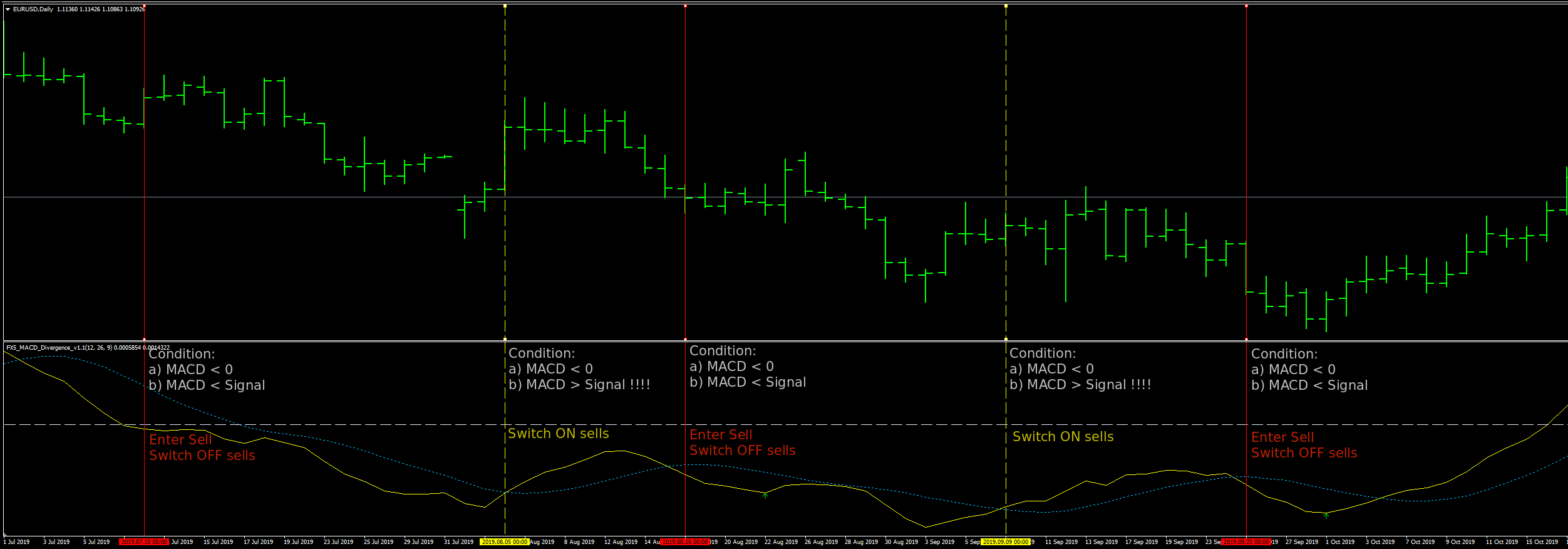
As you can see, MACD < 0 is not the best way to switch on Sell path again. You might miss some good re-entries. So in that case MACD > Signal while MACD still <0 would be the trigger for enabling the Sell Path again.
-
RE: How to take one of several buys orders?posted in Questions & Answers
@khalids222 I needed to change the block names BUY and SELL back to numbers as the Switch OFF didn't work. No idea why it works with switch ON but not switch FF - maybe a bug.
Further I simply copied your Sell entry blocks to the Buy control and the Buy entry blocks to the Sell control side,Check this out 0_1579284526893_TEST3.mq4
Now it takes 1 entry per direction, which may not be your intention, but maybe a point to start from.
-
RE: How to take one of several buys orders?posted in Questions & Answers
@khalids222 Okay, you didn't set the Switch ON condition right!
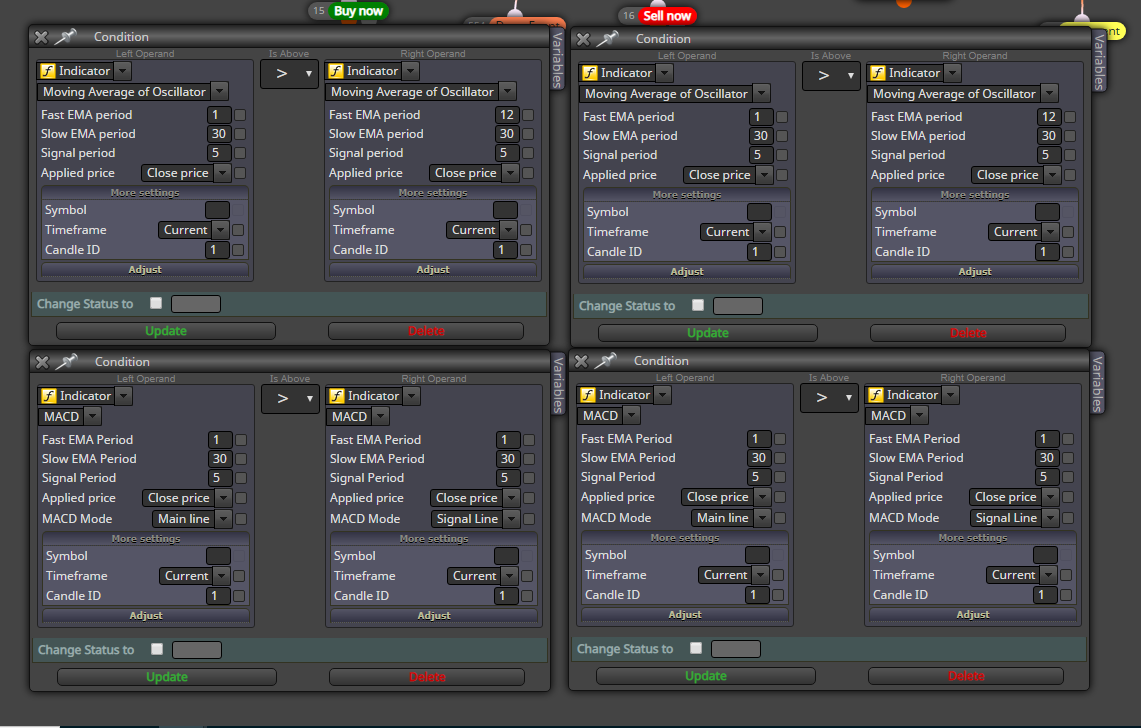
Left side is your switch ON condition and right side is your entry condition. Like this you no need the Switch ON/OFF blocks.
The idea is that you switch on the corresponding block only if the entry condition is not met anymore.
Simple example with Moving average (easier to demonstrate):
- Price x> MA --> Switch on Buy blocks
- Buy order gets triggerd -> Buy path gets switched OFF
- Price <x MA (below MA) -> Buy blocks switch ON
Does that make sense?
In your example I guessed that your Sell entry condition (or at least the most stricted one of them) is the trigger to switch ON the Buy blocks again.
-
RE: How to organize the EAsposted in Questions & Answers
@trader-philipps said in How to organize the EAs:
@tom-5 I haven't tried but I think it would work like this:
- Export V1.0.mq4 to a folder
- Copy V1.0.mq4 to V1.1.mq4 in that folder
- Create a new project MyNewEA
- Import V1.1.mq4 to that project
- Start making your changes
Like this you may also create projects with Al the trade management stuff etc. I believe.
It should read that you can create project / EA templates.
-
RE: How to take one of several buys orders?posted in Questions & Answers
@khalids222 Could you reshare your version of the project please if you made any changes to mine?
-
RE: How to organize the EAsposted in Questions & Answers
@tom-5 I haven't tried but I think it would work like this:
- Export V1.0.mq4 to a folder
- Copy V1.0.mq4 to V1.1.mq4 in that folder
- Create a new project MyNewEA
- Import V1.1.mq4 to that project
- Start making your changes
Like this you may also create projects with Al the trade management stuff etc. I believe.
-
RE: Testing Historical Trades with a new Strategyposted in Questions & Answers
@roar I was thinking of this as well on the timer tab. We would need a multi dimensional array (or 2 with the same length) that covers the trade time and the direction Buy/Sell (if that matters). Convert a Unix timestamp to MT4 date and a second one that adjusts it for a couple of seconds.
@DynamOut will there be just 1 trade at a given time? -
RE: Help needed in modifying values in a sequenceposted in Questions & Answers
@rafaels919 Sorry, I mixed up the projects. I meant @roar 's approach.
I pimped the code a bit to make it more obvious what @roar or I with my answer meant.
In roar's project he sets the constants like that

Those are 6 values. Roar splits that sequence string into 6 parts (seperator is the comma) and creates an array seq[i]. In the given case the array index has a size of 6. As arrays are 0 based, this means it starts counting by 0 (not by 1). You can read the integer value of each array position in the index like
seq[0], seq[1], ...,seq[5]I print this out in the log and here is the result ..
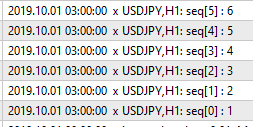
Knowing this, you can at each time go wherever you want in the index of the array by selecting the right index value.
So if you count your losses by a variable, you can use the array like roar did in the BUY block.baseLot * seq[loses]
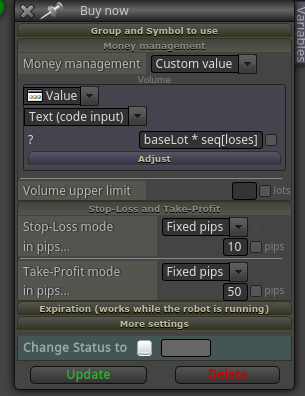
loses is the integer of your losses counter. So if you are at losses 3, it will do like baselot * seq[2]
Unfortunately there is a glitch in roar's code as the array is 0 based. So if the first value is not 1, it will not match corectly (or in other word works different to fxdreema). But that's not that important.Did you get what I mean?
Again in short refering to roar's version.
Sequence is: 1, 3, 5, 7
Startlot is 0.01Will result in ..
seq[0]: 1
seq[1]: 3
seq[2]: 5
seq[3]: 7Where the numbers in brackets represent the value of you losses counter.
Is that clear?
-
RE: Help needed in modifying values in a sequenceposted in Questions & Answers
@rafaels919 I'm on mobie right now and can't open blocks. But I think to remember that there was an array of the multiplicators. Each array has an index. So you can address each value by the index.
So if you assume to be at trade 3 and want to step back you'd access the value of the array for current index position -1Does that make sense?
-
RE: Help needed in modifying values in a sequenceposted in Questions & Answers
@rafaels919 @miro1360 created a manual martingale system that you may have a look at. Like that you might set or reset the next lot size by yoursel.
-
RE: simple top/bottom in a series of candlesposted in Questions & Answers
@akulus Yes, that is true for a given number of candles to look back. If that's not clear, you might watch for Higher High Lower Low indicatro for instance (don't recall the name HHLH or something like that). Or you get some insides on fractals.
Others like zig zag indicators are lagging until the high or low is confirmed. -
RE: renkoposted in Questions & Answers
@marcin-3 There are different solutions but none with fxdreema afaik. Some EA produce renko offline charts. I personally use a commercial produkt that uses an indicator to produce the offline chart. Don't want to advertise but if you are interested it's from here https://ovo.cz
However, back-testing is a bit complicated and not all indicators work well with renko offline charts.
-
RE: Testing Historical Trades with a new Strategyposted in Questions & Answers
@l-andorrà I have tried some approaches to open an order at a specific time (Unix Timestamp), but didn't find a solution, yet. If that is done, it looks almost like a no brainer.
-
RE: break even point after negative valueposted in Questions & Answers
@clacky Do you mean your trade was in profit (eg 12 Pips) and falls back to 9 Pips profit. In that case you want to set BE?
If that is the case, why don't you just set BE if you reach 10 Pips?
-
RE: Help on Trailing stop block appreciated (SOLVED)posted in Questions & Answers
@l-andorrà You lost me as you haven't shared your project ;-))
However, as far as I understood calculate the first 11 % in pips and than multiply it?!? If you need to multiply a pricefragment to Pips you may try this function MathPow(10,_Digits-1) as an multiplicator.
-
RE: System not exiting Tradesposted in Bug Reports
@l-andorrà @albunting Haven't used it yet in fxdreema, but maybe make a screenshot on conditionmay help to identify if it complies to the chart after BT?!?
-
RE: How to take one of several buys orders?posted in Questions & Answers
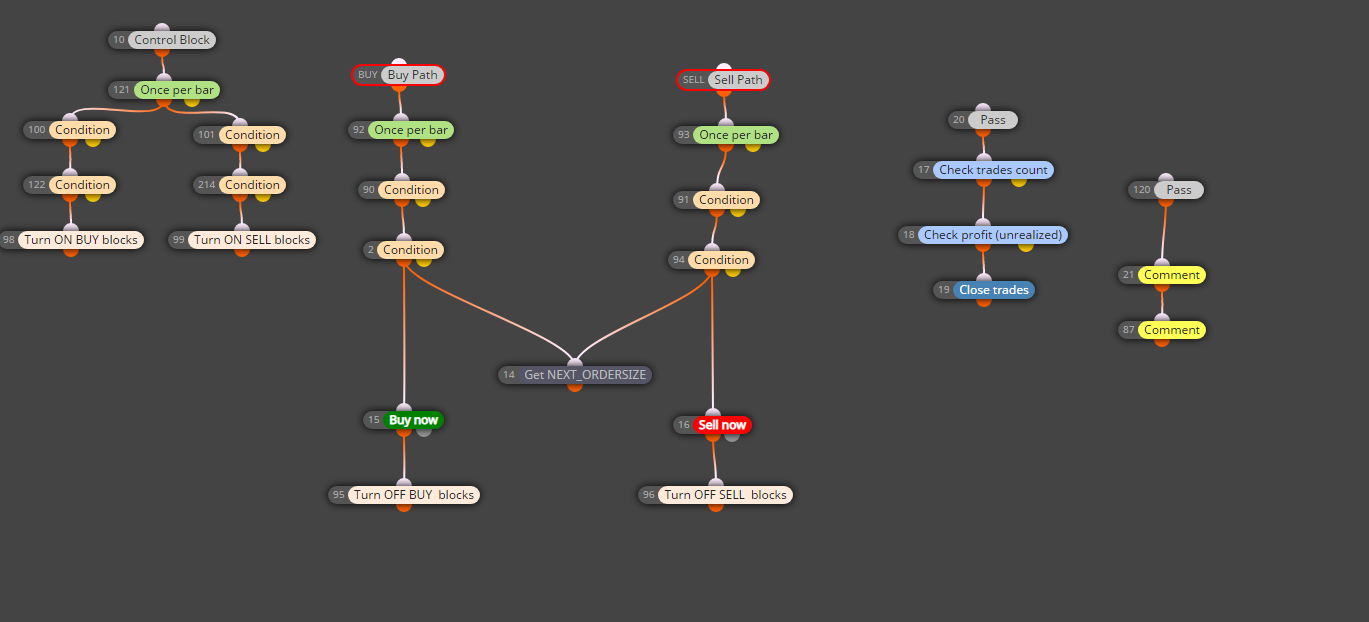
@khalids222 Not sure if I met the conditions right as they were a bit messy on the shared projects. So check this for principle and adjust to your need. Btw. MACD 1,30,5 flips around the signal line a hell so there will be lots of trades in any way.
-
RE: How to take one of several buys orders?posted in Questions & Answers
@khalids222 If you just want 1 buy at a time, use No trade block and linit it to Bues only. Do the same for Sells.
If you want to allow multiple trades in the same direction but not on the same "signal condition" switch off the eg Buy block (or better path) and switch it on somewhere else again if your entry condition is over.
Here an example of what I mean with sitch off / on:
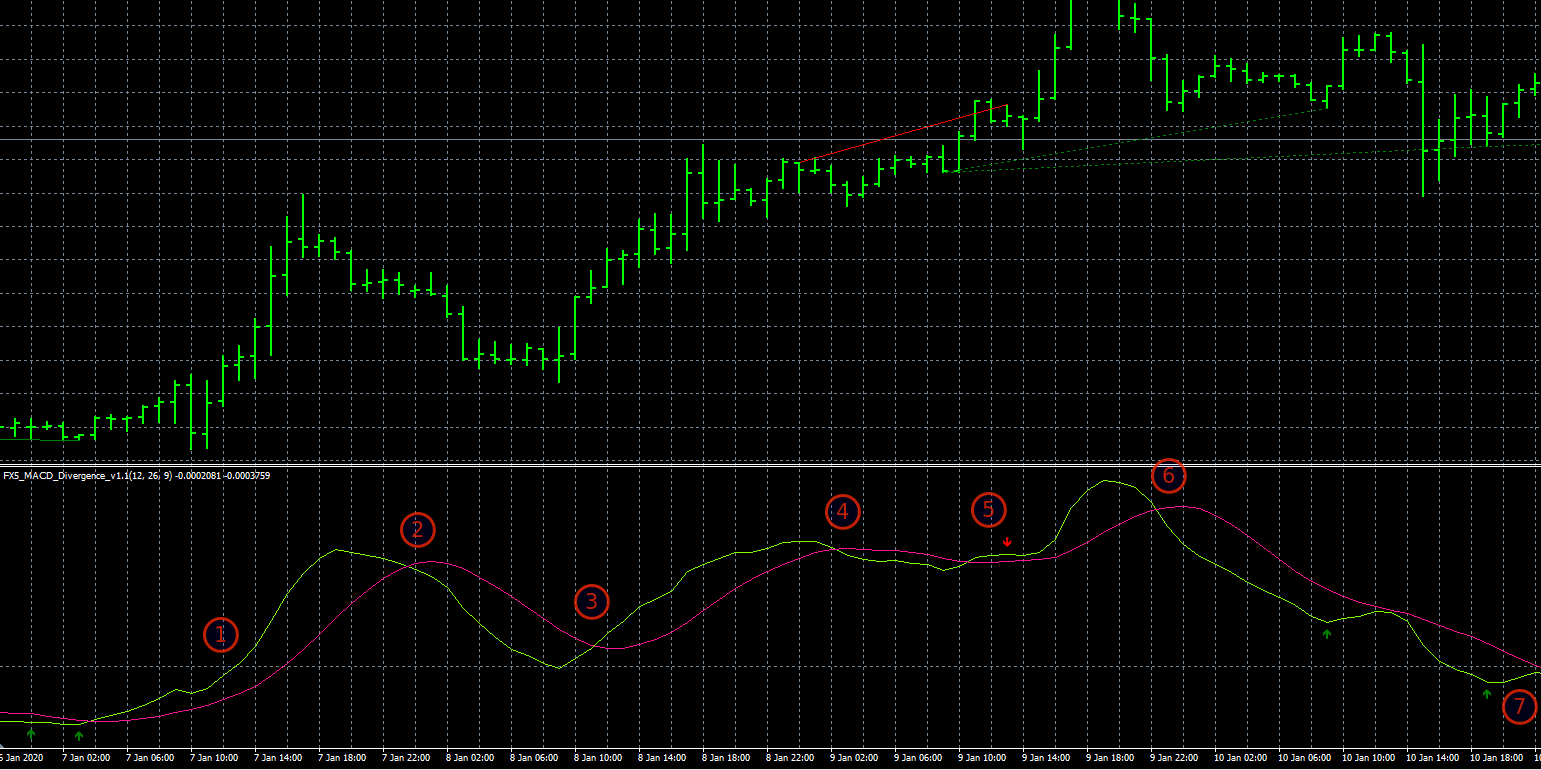
- MACD crosses 0 line up. -> Open Buy -> Switch OFF Buy path
- MACD crosses signal line down -> switch ON Buy path
- MACD crosses signal line up -> open Buy -> switch OFF Buy path
- MACD crosses signal line down -> switch ON Buy path
- MACD crosses signal line up -> open Buy -> switch OFF Buy path
- MACD crosses signal line down -> switch ON Buy path
- MACD crosses 0 down - you may again switch ON/OFF Buy as it fits to your strategy.
Does that make sense?
-
RE: Close price - EMAposted in Questions & Answers
@rhang You mean you want to check if the variable BuyLastEMA is bigger than 3? Use a condition block like that.
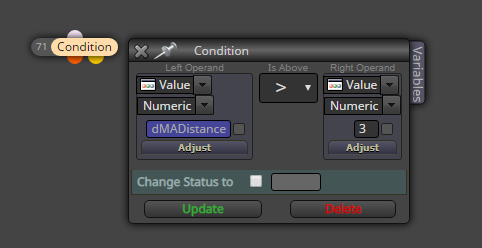
In order to get the variable in the input field, right-klick on it an choose your BuyLastEMA variable.