T
Posts made by trader.philipps
-
RE: How to add a stop of ea trading after an amount of lot's are done?posted in Questions & Answers
@pavansantani Doy you mean per chart (EA instance) or all charts in case you run it on more than 1 chart?
-
RE: How to open a project for making an Indicator?posted in Questions & Answers
@alwakas987 fxdreema is not designed to create indicators.
-
RE: Help on Trailing stop block appreciated (SOLVED)posted in Questions & Answers
@l-andorrà So your trailing step is wrong?
-
RE: Help on Trailing stop block appreciated (SOLVED)posted in Questions & Answers
@l-andorrà Let me know if it works.
-
RE: Open a position when indicator gives alertposted in Questions & Answers
@rusen I am absolutely no expert in managing chart objects! What I found by quickly scanning the options I'd start with this condition block (don't know if that is doing the right thing) in your object loop.

There is als a Time doption where you can choose from 3 times. Maybe that could work as well.
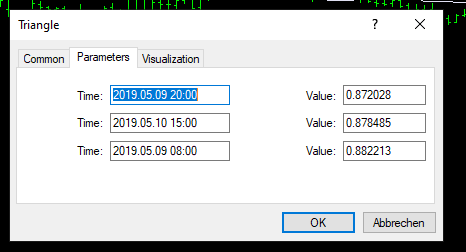
For a triangle object there are 3 times. So maybe one of those might do the trick.
-
RE: Help on Trailing stop block appreciated (SOLVED)posted in Questions & Answers
@l-andorrà Don't know if I get the issue right, but I'd start like that

-
RE: Open a position when indicator gives alertposted in Questions & Answers
@rusen Well, that seems to be a comercial indicator and my account is not in the list to use it. In general it will be hard to get reliable results with an harmonic indicator as it tends to repaint if price moves.
However, in this case you might check the objects it creates on the chart. Find them by pressing CTRL-B. But much more I can't help here.
-
RE: Open a position when indicator gives alertposted in Questions & Answers
@rusen If you may upload your indicator I might have a look how to catch the alert event.
-
RE: Expire order in n bars *** SOLVED ***posted in Questions & Answers
@roar It depends on specifying yes or no here..

But to be honest I don't know what the broker does with it as the expiration is send with the ordersend of the order.
-
RE: Expire order in n bars *** SOLVED ***posted in Questions & Answers
@trader-philipps Okay, I shouldn't answer my questions by myself, but writing the issue down gave me the hint. For everyone who is interested, I solved the issue with the period() function that gives back an integer value in minutes for the current chart timeframe. In fxdreema it looks like that now.
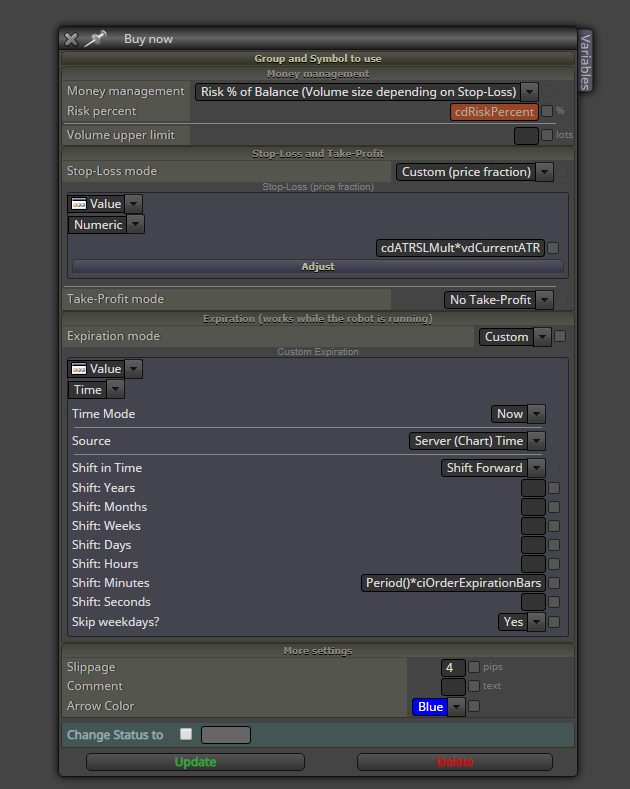
ciOrderExpirationBars is an integer constant were the user can set the number of bars in the EA's parameters.
-
RE: Open a position when indicator gives alertposted in Questions & Answers
@rusen Check data window in terminal on a chart were the indicator is placed on. To switch on/off data window use CTRL-D keys.
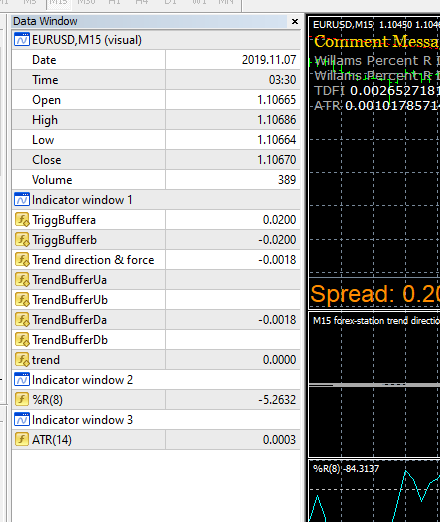
It should look like this.
Now try to find your indicator. If it draws for example an arrow on the chart, then hover over that arrow and see which buffer value changes (usually one gets a number that hadn't one before or after).
-
Expire order in n bars *** SOLVED ***posted in Questions & Answers
Hi, I currently try to find an easy way to expire an order (best on the BUY or SELL block defined) after n bars (eg. after 50 bars) regardless of if it is in profit or loss.
Has someone a quick solution? By custom MQL code I might calculate the current chart timeframe to minutes and multiply by my bar expiry value.For example for an M15 chart I might calculate 5015 minutes. For an H1 chart it would be 5060 minutes and so on.
Is there an easier way I don't see right now?
-
RE: How can I do this Formula ?posted in Questions & Answers
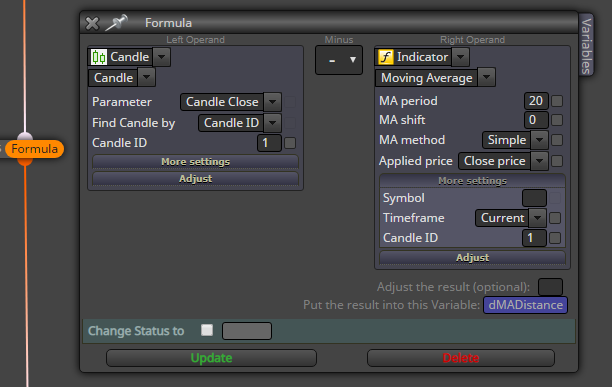
@delibalta Maybe not the best approach but it might give you an idea.

-
RE: Shrink stop / minimum TP issueposted in Bug Reports
@robertk If that block doesn't work for you, why don't you use the modify stops block instead?
-
RE: how to get only BUY PENDING ORDER above MA and vice versaposted in Questions & Answers
@trader-philipps ... and finally I found it :)) So if you work on other thand daily chart specify everywhere in the conditions block daily! That will make that logic work even on lower tf.
But the reason that you sell buy and sell pending orders is different!

Switch of OCO option (one cancels other) as this places long and sell order and automatically deletes the other one if a pending order gets triggerd.
-
RE: how to get only BUY PENDING ORDER above MA and vice versaposted in Questions & Answers
@charlie66 Are you using the EA on a daily chart? If not change the once per bar to once per day block!
Also change the No trade block for a Notrade / order block!
-
RE: How can I do this Formula ?posted in Questions & Answers
@delibalta I think there is no easy answer. Will there be only 2 trades or could there be more? How to identify which of those you need to substract?
Usually you a mql developer would create an array of all open orders and then use the array index to find the orders.
With fxdreema that would require custom mql code. I f you want to do so with fxdreema blocks only, you need to specify how those trades could be identified. -
RE: cant find MY INDICATORSposted in Questions & Answers
@twezo So you don't know where to find the data folder of your MT4/MT5 instance? In the terminal go to File -> Open Data Folder
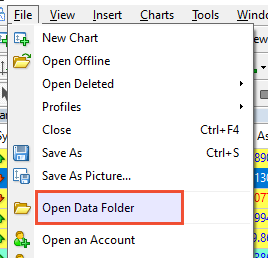
When the file browser opens choose MQL folder and then indicators. Mark the path, copy it and use it in fxdreema upload indicator dialog.
-
RE: How do I group parallel conditions. This or that or the other ?posted in Questions & Answers
@jzfusion Could you share yoir project? Entry and exit of trades have nothing to do with each other unless you specify the opposite signal for instance of an entry condition as an exit condition.
Show us your project and the concrete issue you're facing and we can help.