@tanjiayi1 Well, that't not what I would recommend to do, but if your EAs check if there is a trade open, yes, that's a way to do it.
T
Posts made by trader.philipps
-
RE: No trade on multiple EAsposted in Questions & Answers
-
RE: How can I do 3 or 4 strategies within the same robot.posted in Questions & Answers
Turn of the 2 blocks 1 and 2 first (right mouse click ON / Off) it must look like in the screenshot
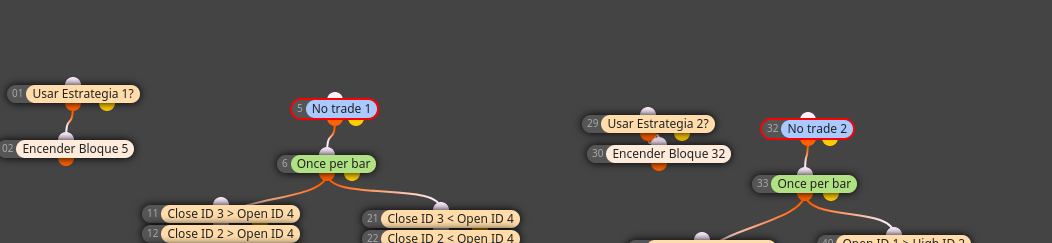
-
RE: Backtesting stops abruptly and I don't know why (but I guess why)posted in Questions & Answers
@l-andorrà Are you using a custom indicator in your project? Can you backtest it in your terminal?
-
RE: No trade on multiple EAsposted in Questions & Answers
@tanjiayi1 If they have same magic number the other instances will recognize the trades on the symbol they are attached at. If you use the same EA, try to set magic number by yourself with the logic base number + timeframe in minutes.
Exapmle:
Base: 10000
M1: 10001
M5: 10005
... and so on.However, you need to implement the logic by yourself.
-
RE: THis happened today is a big GAPposted in Questions & Answers
@khalids222 Well, gaos are the risk you take in forex trading. There is no way to protect your account against this besides manually close all positions, disable auto trading and go to a pub.
-
RE: No More MetaTrader 4? I had no choice but to download MetaTrader 5.posted in Questions & Answers
@dan-2 It only shows up if MT4 terminal can compile it. If you have some errors eg. in custom code, it will not show up after first installation to expert folder.
-
RE: EA does not tick/Fill stop loss and Take profitposted in General Discussions
@llqwertyll If it's not an faulty logic in your EA, there might be a minimum stop level on the asset defined by your broker. Check the specifications. However, in that case you should see some error messages in the log files.
-
RE: Reverse trade after a reverse tradeposted in Questions & Answers
@callanjohn27 said in Reverse trade after a reverse trade:
trade closed
Actually trade closed is the right block to use. Do your divide between buys and sells? If you do, please share your project!
-
RE: How can I place the SL on top of the candle wick ID 1 + the spreadposted in Questions & Answers
@luisjunior1224 Again, do you mean above/below the high/low of th3 candle or the body. Your question ist not that precise!
-
RE: PZ Day Trading Indicatorposted in Questions & Answers
@tom-5 I think the discussion went off-topic! Can we stick back to the issue?
-
RE: can someone help me to see why he doesn't do operations in the backtest =?posted in Questions & Answers
@l-andorrà Esoecially there are x> / x< conditions chained.
-
RE: How can I place the SL on top of the candle wick ID 1 + the spreadposted in Questions & Answers
@luisjunior1224 What exactly you mean by "on top of candle wick"?
 (source: https://www.babypips.com/learn/forex/what-is-a-japanese-candlestick)
Are you talking about a bear or a bull canlde? -
RE: Backtesting stops abruptly and I don't know why (but I guess why)posted in Questions & Answers
@l-andorrà Doy our really have disk space issues? If so you might delete sone log files (or let Windows compress them) and maybe delete some of the historic data. As those are stored per broker you might have some unused in your MT4 instance.
-
RE: EA to work only for testingposted in Questions & Answers
@ambrogio Also take if Testing and use turn off and turn on or the terminate block to close EA or diable it's functions.
-
RE: Need Help. Forgot the EA Strategy.posted in Questions & Answers
@biztet You mean, you dan't have the project anymore and want to do changes on the EA? In that case you can create an empty project and just import the MQ4 file. Otherwise I have to do the same and have a look

-
RE: candle wick calculationposted in Questions & Answers
@mcarl42 On x> / x< you might change the parameter for width, but I'm nit sure that this would be exactly what you are looking for. If you specify width of 5. the cross could have happened within the last 5 candles and it has not crossed down yet again. Maybe that help a bit!?!
-
RE: I can't compile anything! I keep getting an "Application Not Found" error. How do I fix this? Please help!posted in Questions & Answers
@dan-2 Easiest way is to re-install. Or if you're a bit experienced, you might use a portable version in order to create a new instance. Check this video for portable installation (please note that your data folder will not be in the appdata section of your Windows installation anymore!
https://www.youtube.com/watch?v=ySaDWRSnu9E -
RE: Backtesting stops abruptly and I don't know why (but I guess why)posted in Questions & Answers
@l-andorrà Did you check the journal / expert tab? Are you on MT4 or MT5?