@kriordan Not so hard to find  https://fxdreema.com/howto#Constants-and Variables
T
Posts made by trader.philipps
-
RE: I can't compile anything! I keep getting an "Application Not Found" error. How do I fix this? Please help!posted in Questions & Answers
@dan-2 Right click in MT4 on your EA if it's already in the list. Choose modify.
Then hit compile button.
That will compile your EA after update.
Once the file is open in Editor and gets updated by MQ4 button click in fxdreema, it will reload automatically in Editor and you just need to press compile. -
RE: What is the mistake?posted in Questions & Answers
@luisjunior1224 ^Well, in my tester it opens orders.
 .
.Howerver, in the shared project check block 4 .. that one is in difference to the screenshot always true.
-
RE: Cannot load indicatorposted in Bug Reports
@tcanuto Okay, I don't have the indicator named "HiLo Escadinha.ex5" so I'm still getting errors. But if I change the settings for constant named "HiLo_Deslocar" to a positive value, at least the Moving Average error appears to be gone.
-
RE: What is the mistake?posted in Questions & Answers
@luisjunior1224 The order of the blocks don‘t seem to prevent from opening an order. Hence there must be some misconfiguration inside the blocks, but you didn't share.
In general as you seem to require a lot of support from the community, please always share you project as it will make the answer loops much shorter! -
RE: I can't compile anything! I keep getting an "Application Not Found" error. How do I fix this? Please help!posted in Questions & Answers
@dan-2 How do you try to compile? I exported the MQ4 file from your link and compiled it in MetaTrader Editor without any problems.
-
RE: I keep getting this error when I try to compile any EA. Any tech savvy people who can help? Please!posted in Questions & Answers
@dan-2 can you share your project here so I can have a look?
-
RE: candle wick calculationposted in Questions & Answers
@mcarl42 Interesting approach to use fibonacci retracement on candle sticks. Please update your solution here. Sounds interesting.
-
RE: I can't compile anything! I keep getting an "Application Not Found" error. How do I fix this? Please help!posted in Questions & Answers
@dan-2 Could you share your project and if necessary custom indicators, please?
-
RE: I keep getting this error when I try to compile any EA. Any tech savvy people who can help? Please!posted in Questions & Answers
@dan-2 Try without blank spaces in the Project Name!
-
RE: Cannot load indicatorposted in Bug Reports
@roar & @tcanuto Usually you are facing that error, when a parameter is set in a block that doesn't fit to the expected one (eg. variable type or in MA maybe period = 0). Will be a bit hard to find on huge projects.
-
RE: which is the most optimal to place the block: once per bar?posted in Questions & Answers
@luisjunior1224 From programmatically view the aim is to let conditions check be done only if it's required as they consume CPU power and maybe other resources.
Hence placing the filter in the logic of how to reduce the cycles you put in the reight order in the screenshot.
- Hours filter filters out 1 to 23 hours a day depending on what you speciefied in it. Perfect! That will reduce the cycles to the allowed times.
- No trade - Filters only for times that there is no trade happening
- Once per bar. Absolutely right place here.
Hence 1 in your screenshot is the right place from my opinion. However, there might be times where your business logic will require more cycle runs than you'd like from the programmatically view. But in the given exampke everything appears to be right.
-
RE: Closing Tradesposted in Questions & Answers
@kriordan Once per bar works fine. There must be something else in your project. Could you share it?
-
RE: Input Parametersposted in Questions & Answers
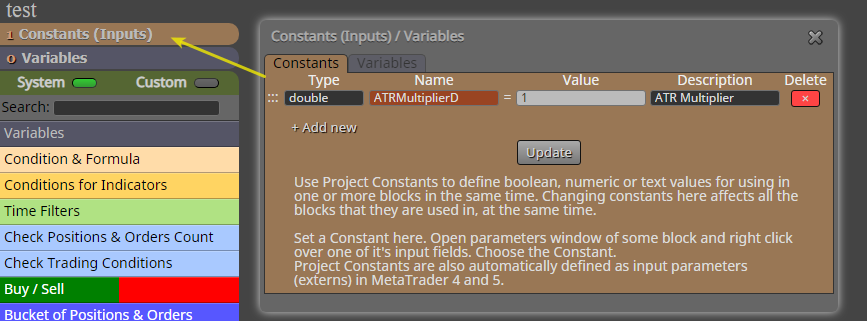
@kriordan Create a constant variable of type doube. You might set the default value to 1. Write in the Adjust field "* <constant_name>" where <constant_name> is the name of the constant you created before.
Example:
Constant name: ATRMultiplierD
Adjust field: * ATRMultiplierD -
RE: How can I put filters in another timeframe??????posted in Questions & Answers
@luisjunior1224 You can specify the desired timeframe on all relevant blocks. Klick on "More settings" and you will see it.
-
RE: How can I do 3 or 4 strategies within the same robot.posted in Questions & Answers
@luisjunior1224 It does not help if you repeat your aim a lot of times. You might specify your strategy in order to get started. If you're not able to specify your strategies, my answer you can read above as that's the way to do it
-
RE: How can I do 3 or 4 strategies within the same robot.posted in Questions & Answers
@luisjunior1224 Okay, so maybe start with describing your strategies and than we will figure out the differenrent trade states (open signal, in trade, close) accross them.
-
RE: An EA that is made by storing variables cannot be done without variables?posted in Questions & Answers
@luisjunior1224 You can check for variable values or didn't I get the question right?!? Maybe you'd provide more information or a shared project.
-
RE: How can I do 3 or 4 strategies within the same robot.posted in Questions & Answers
@luisjunior1224 Well, that really depends on how different your strategies are. If you build it like 4 different EA for instance, with separate entry and exit paths, you might use boolean constant variables in combination with turn on / turn off blocks for instance. This you are able to switch on a specific strategy (or more) in the EA settings.
If you want to "reuse" some parts of the EA throughout all the strategies you should separate the different phases of the trades.
- Entry condition(s) (including maybe trading hours, max spread, etc)
- In-trade management (such as set to BE, trailing, news)
- Exit condition(s)
If your strategies only differ on entry conditions only for instance, you'd use turn off/turn on blocks and the boolean constant only for the different entry conditions.
Here is a rough example how that may look!
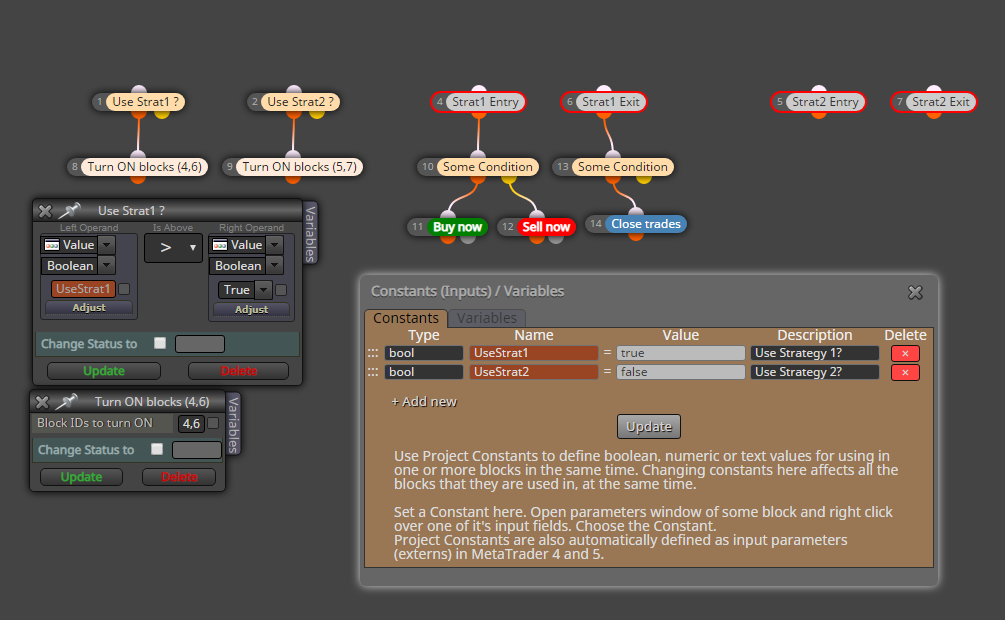
I simplified it a bit for the screenshot. I'd run the paths of block 1 and 2 afteranother on init tab rather than on the on tick tab, but like that I could place all in one screenshot.
Pleas also note that all blocks 4 to 7 are switched off by default and the conditions from block 1 and 2 would switch them on depending on EA parameter settings.